In this guide
A shop owner hears that AI can answer customers, read invoices, forecast stock and reply to reviews, then searches online and finds forty products that all promise the same thing. The hard part is not finding AI tools for small business. It is knowing which repeated task to hand over first, what the tool needs from you, and where a person must still say yes. This guide sorts the twelve AI app demos Zenocta has built into four themes, explains what each one really contains, and gives you a short framework for choosing where to start.
Read this first: every AI part here is simulated
The demos use made-up sample companies, nothing you do is saved, and everything resets when you refresh. No language model is called. What looks like AI is scripted: keyword rules, word lists, templates, scoring tables and arithmetic running in your browser. The demos show a workflow and an interface, never the accuracy a real system would reach on your own data.
What jobs can AI tools do in a small business?
Most useful AI features are narrow. They take one repeated input, such as a customer question, a supplier bill or a sales history, and produce a first draft, a flag or a number that a person then checks. The jobs that come up again and again in small businesses are these:
- Answering the same customer questions on the website, WhatsApp or the phone, including outside opening hours.
- Reading documents: pulling fields out of invoices, comparing two versions of a contract, answering questions with a source.
- Drafting first versions of replies and posts for a person to approve.
- Moving routine work along: follow-ups, reminders, reports and approvals that depend on someone remembering.
- Turning past sales into a likely range for next month, so stock orders stop being guesses.
- Answering questions about your own numbers without waiting for whoever knows the spreadsheet.
- Keeping teams on schedule: releases, content, training batches and project time.
AI tools do judgement badly: whether to refund an upset customer, whether a clause is acceptable, whether a sales spike is real. Good designs leave those decisions with a person and make the handover easy.
What does simulated mean, and why does it still help?
A simulated demo is a rehearsal, not a result. You can click through the screens, see which reasons a tool shows and notice where a person has to step in, before anyone connects your data. That helps with scoping, but it proves nothing about accuracy, speed or cost. For a fuller method, read our guide on how to judge any AI demo or vendor. For a faster taste, ten quick simulated AI demos each fit on one screen.
How do you decide where to start?
Three questions narrow twelve options down to one or two, and none of them is about technology.
1. Which repeated task costs you the most?
Look for work that happens daily or weekly, follows fairly clear rules and costs money or goodwill when it is missed: unanswered enquiries, bills waiting to be keyed in, reviews with no reply, stock that runs out. A task you do twice a year is rarely worth automating first.
2. What data do you actually have?
A forecasting tool needs sales history, a document assistant needs readable documents, and a chatbot needs written answers to the questions people ask. If that material is scattered or out of date, tidying it is the real first project.
3. Where is the human approval point?
For anything involving money, people or a public statement, decide who approves and when before you build. A reply that admits fault, a refund, a payment run and a published post all deserve a named checker. If you cannot name one, start with a task where a wrong answer is cheap to catch.
| Approach | Works best when | Watch out for |
|---|---|---|
| Keep doing it by hand | The task is rare or still changing every month | Missed work when someone is on leave |
| Rules inside a spreadsheet or tools you have | The logic is simple and the volume is small | Fragile formulas, no history of who changed what |
| A ready-made AI tool | Your task is common and the tool already fits your data | Paying for features you do not use, limits you cannot change |
| A custom build around your workflow | Your rules, approvals or documents are specific to you | Starting too big: agree a small first release |
Which AI apps help you talk to customers?
Three demos sit on the customer side: chat, the phone and public reviews. All three handle volume you cannot answer instantly, and all work only if a person can step in.
ChatOcta: website and WhatsApp chat with an inbox
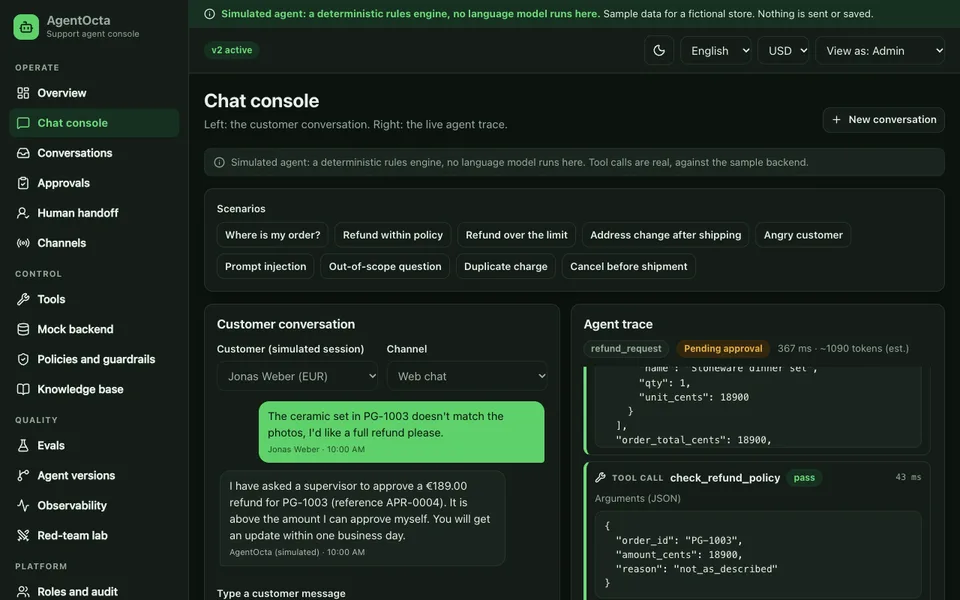
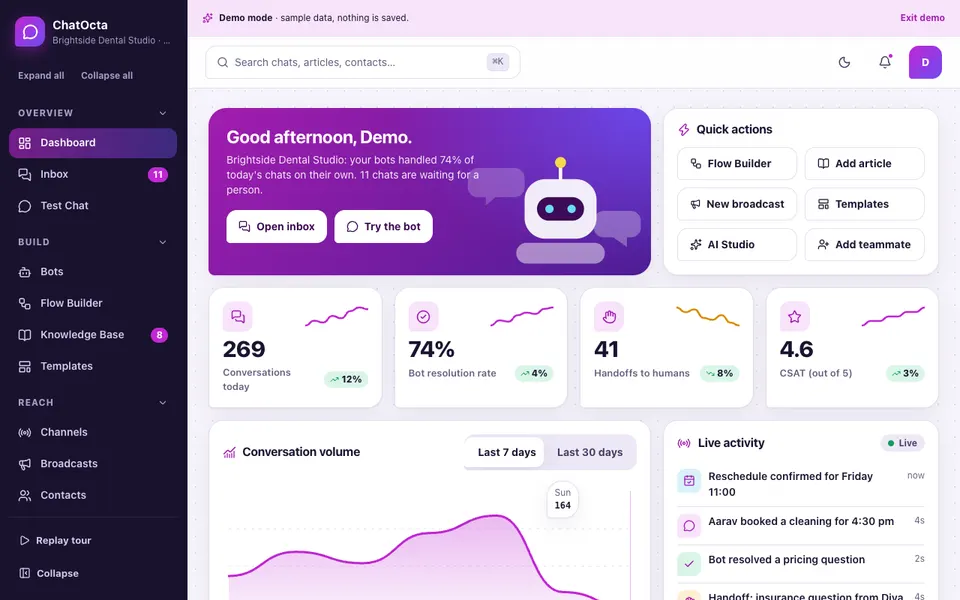
Built around a fictional dental practice, ChatOcta is for clinics, salons and restaurants. The Test Chat answers from 33 sample knowledge articles, shows which article it used and offers a small booking flow. Anything it cannot answer lands in a coverage gaps list, and a chat can be handed to the Inbox, which has filters, assignment, status and a drag-and-drop board. It solves the 9:40 pm question nobody answers until tomorrow. Read the chatbot and human handover guide or open the ChatOcta demo.
VoiceOcta: a phone assistant for clinics, garages and service desks
VoiceOcta is a scripted, text-only phone assistant for a fictional garage called Sample Auto Care. There is no microphone, speech or audio: voice is drawn as waveforms. You can watch eight scripted live calls and take over, try a booking as a caller in the call simulator, design a call flow on a canvas, test where a call would be routed, and read rule-based quality scores. It solves the call that rings while everyone is busy, with a summary passed to the person who takes over. The phone assistant guide and the VoiceOcta demo go deeper.
ReplyOcta: reviews across many branches
ReplyOcta follows a fictional 12-branch dental group with 247 sample reviews. A single inbox replaces checking many listings, and the reply composer drafts from templates in a chosen tone, with a policy checker and an approval queue with timers and roles. A topics view compares branches, and the review request builder deliberately offers no review gating. It solves inconsistent replies from branch to branch. Read about review management at scale or try the ReplyOcta demo.
Which AI apps read documents for you?
Document AI saves the most time when the document is long, repetitive or boring, and when a wrong reading is easy to catch if the tool shows its source.
DocOcta: ask, compare and flag
DocOcta is a workspace for ops, HR and legal teams, with 29 sample documents for a fictional logistics company. Ask returns numbered citations and an honest "not found". Compare shows a word-level difference between three sample version pairs, with a change list. Risk review lists pattern-based flags on a board, and the demo states that these are not legal advice. It solves the question of what changed between versions. The document review guide explains it, and the DocOcta demo lets you try it.
ScanOcta: invoices with exceptions only
ScanOcta is for accounts-payable teams, using a made-up company with 30 vendors and six invoice layouts. The Review screen draws boxes over each field with confidence chips and live checks. An exceptions board offers a suggested fix per case, and a three-way match has a tolerance slider. Entries export as CSV, JSON or voucher XML. Uploading does not read your file: a sample invoice is processed instead, and the page says so. It solves retyping, by moving reviewers to the suspicious bills. See the invoice extraction guide or open ScanOcta.
Which AI apps help you run the business?
These three work on routines and numbers rather than conversations: what should happen automatically, how much stock to order, and what your data says.
FlowOcta: no-code automation with approvals
FlowOcta is a no-code builder for small retail and service businesses, with 30 sample flows and 26 templates. You drag steps onto a canvas, connect them, branch, add an Approval pause, and test run with a deliberate failure and a Retry. A schedule page turns a cron line into plain words with the next five run times. It solves reminders and reports that depend on someone remembering. Read the workflow automation guide and try the FlowOcta demo.
ForecastOcta: demand forecasts with honest bands
ForecastOcta suits retail and distribution teams, with 60 sample products, 12 stores and three years of sample history. The explorer offers four methods with 80% and 95% bands and a backtest table with WAPE and bias. Scenarios test a promotion or supplier delay, and inventory planning covers safety stock, reorder point and a purchase plan that fits a budget. It solves ordering by feeling. The forecasting guide explains what a band means, and the ForecastOcta demo is on sample data only.
InsightOcta: ask your data in plain English
InsightOcta works on about 20,000 sample order lines over 24 months. A question returns a chart, a table, a sentence and a "How I answered this" panel showing how it was read. Unusual phrasings get a polite refusal with suggestions. Dashboards, stories, alerts, a 15-metric catalogue and data quality checks sit around it. It solves waiting for whoever knows the spreadsheet. Read how natural language analytics works or open InsightOcta.
Which AI apps support teams and delivery?
The last four are for teams that make or ship something: software, content, training and client projects.
ShipOcta: releases, flags and incidents
ShipOcta is for small software teams and release managers. Eight scripted pipelines have approval gates, rollback and a streaming log. Feature flags include a kill switch, incidents have a postmortem builder, and a status page previews what customers see. Nothing builds or deploys for real. It solves not knowing what is running in production. See the release management guide or the ShipOcta demo.
ContentOcta: calendar, drafts and approvals
ContentOcta plans posts for a fictional bakery. The calendar warns about same-channel clashes, the composer previews each channel with readability and brand-voice checks, and approvals run through Writer, Editor and Owner roles. Nothing is ever posted. It solves drafts that travel as screenshots. Read about the content calendar and approval workflow or try ContentOcta.
TrainOcta: courses, quizzes and certificates
TrainOcta is for training institutes and academies. A course builder checks prerequisites, quizzes support five question types with partial credit and item analysis, the gradebook has editable weights, and attendance flags clashes. Certificates carry a verifiable code. It solves combining marks, attendance and certificates by hand. Read the learning management guide or open TrainOcta.
ProjectOcta: time, capacity and invoices
ProjectOcta serves software agencies and IT service teams. It has a timeline with a critical path, weekly timesheets, a capacity heatmap that warns of over-allocation, and invoices built from approved time. A Client role sees only the portal. It solves busy weeks that still lose money. Read about project profitability or open ProjectOcta. Check the current rules before relying on any tax setup.
How do the twelve compare?
The table lists what each demo shows for four capabilities. A blank cell means the demo's guide does not mention it, not that it is absent.
| Demo | Human handover or approval | Roles and permissions | Rules and maths behind it | Export or download |
|---|---|---|---|---|
| ChatOcta | Handover to the shared inbox | Team permissions, handoff rules | Retrieval from sample articles | |
| VoiceOcta | Take over a live call | Team roles | Rule-based dialogue with slot filling | Call log CSV |
| ReplyOcta | Approval queue with timers | Owner, Manager, Agent, Viewer | Template drafts, policy checker | CSV downloads |
| DocOcta | Risk flag review board | Owner, editor, viewer | Word-level diff, keyword scoring | Activity log export |
| ScanOcta | Approver queue, exceptions board | Field checks, three-way match | CSV, JSON, voucher XML | |
| FlowOcta | Approval pause in a flow | Team roles | Canvas logic, cron parser | Run log export |
| ForecastOcta | Team roles | Four forecast methods, backtests | Purchase order drafts | |
| InsightOcta | Roles | Parsed query over sample data | CSV of answers | |
| ShipOcta | Approval gate on production | Team and roles | Flag evaluator, version bump | Markdown changelog |
| ContentOcta | Approvals with review timers | Writer, Editor, Owner | Readability, clash rules | SVG graphics |
| TrainOcta | Team and roles | Grading, attendance, clash maths | Gradebook CSV | |
| ProjectOcta | Timesheet submit and approve | Roles incl. Client | Scheduling, capacity, money | CSV exports |
Which one should you open first?
Use your situation as the filter.
- Customers wait too long for answers: start with ChatOcta, or VoiceOcta if your enquiries come by phone.
- Reviews are piling up across locations: start with ReplyOcta.
- Paper and PDFs slow the office: DocOcta for contracts and policies, ScanOcta for supplier bills.
- The same routine is forgotten every week: start with FlowOcta.
- Stock decisions are guesses: ForecastOcta, with InsightOcta if you also need quick answers from your numbers.
- You ship software, content, training or client work: ShipOcta, ContentOcta, TrainOcta or ProjectOcta respectively.
If you build or sell software yourself, see our roundup for SaaS founders and AI-first teams. For wider context, the posts on AI in small and medium businesses and AI trends to watch in 2026 are useful companions.
How can you try the demos in 15 minutes?
- Pick three demos from three themes, including the one closest to your most repeated task. Open each from the all AI demos page.
- On each login screen, choose Try Demo Account. No sign-up is needed.
- Spend about three minutes per demo on its main flow: ask the chat a question, compare two document versions, test run a flow, or open a forecast.
- Find the reasons. Look for the source, rule or number the tool shows next to every answer. A tool that cannot show them is hard to trust.
- Find the handover or approval point, and ask who would decide in your business.
- Push it: ask something it should not know, or phrase a question oddly. Notice whether it refuses politely or bluffs.
- Write down three gaps: what your business would need that the demo does not show. That list becomes the start of a scope.
What mistakes do buyers make with AI tools, and what should you ask a builder?
Teams start with the hardest task instead of the repetitive one. They judge by a fluent demo answer instead of by the misses. They skip the approval point, so one wrong reply reaches a customer. And they forget the data: scattered or outdated material gives confident wrong answers. Before agreeing to anything, ask a builder these questions.
- What data does it need from us, and who cleans it?
- How will we test it on our own examples before customers see it, and who checks the misses?
- Where does a person approve, and what is recorded when they do?
- What happens when it does not know: does it say so and hand over?
- What does each use cost, and what are the limits?
- Where does our data go, who can see it, and how do we export or delete it?
- Who is accountable when it is wrong?
How do you get an AI tool built around your own workflow?
A demo shows the shape. A custom build starts from your questions, your documents and your approval rules, and begins with one small release rather than twelve modules. Bring ten real examples of the input, the answer you would want for each and the name of the person who checks the result. Zenocta replies with a scoped, fixed-price proposal. The Zenocta apps show production work already live on Google Play, and when you are ready, tell us the job.
Try it live
Open the real thing: demos run in a new tab with sample data, apps link to their own page.
 Live demoChatOcta live demoAsk the sample bot questions, move chats across the inbox board and run the flow builder for a fictional dental practice.
 Live demoDocOcta live demoCompare three sample version pairs, ask cited questions and review risk flags for a fictional company.
 Live demoFlowOcta live demoDraw and test flows on a real canvas, pause for approvals and read run logs for a fictional retailer.
- ABrowse allAll AI demosTwelve AI apps and ten quick demos, all with sample data and simulated AI.
- ZBrowse allZenocta appsProduction apps live on Google Play.
- TBrowse allTalk about a custom buildBring ten real examples and get a scoped, fixed-price proposal.
Frequently asked questions
01Which AI tool should a small business try first?
Start with the repeated task that costs you most and has a clear checker, such as unanswered customer questions, supplier bills waiting to be keyed in or reviews with no reply. Avoid tasks involving money or people until you have a named approver.
02Are these AI apps real products I can buy?
No. They are interactive demos with made-up sample companies. Nothing is saved, data resets on refresh, and the AI parts are simulated with rules, word lists and arithmetic, not a language model. They show what Zenocta could build for you.
03Do I need clean data before using AI?
You need material the tool can read. Forecasting needs sales history, document tools need readable files, and a chatbot needs written answers to common questions. Tidying that material is often the real first project and helps whatever you build next.
04Can AI replace my staff for customer chat or phone calls?
A good design handles routine questions and passes everything else to a person with the full thread or a summary. Write the handover rules first: a request for a person, repeated failed answers, a complaint or anything time sensitive should reach a named human.
05How does Zenocta price a custom AI build?
Every build starts with a scoped, fixed-price proposal. Bring ten real examples of the input, the answer you want for each and the person who checks the result, and we agree a small first release before extending it.