In this guide
The phone rings while the mechanic is under a car, the receptionist is with a customer and the owner is on the other line. The caller waits, gives up and rings the next garage. An AI phone assistant for small businesses is meant to catch exactly those calls: answer, deal with the simple ones, book appointments, and pass the rest to a person with the context already written down. This guide explains how that works, where it can go wrong, what to ask before you commit, and what a simulated demo contains, so you can judge the idea without a real call being made.
How do phone calls get handled today, and where does it break?
For clinics, garages, showrooms and service desks, the phone is still the main way customers ask, book and complain. The usual setup is one number, one or two people and a notebook. It fails in familiar ways.
- Peak-hour pile-ups. Calls bunch up in the morning and after lunch, and the second caller hears a ring tone or an engaged signal.
- The same five questions. Opening hours, location, price ranges, whether a slot is free, and whether a car or report is ready eat most of the time.
- Messages on scraps of paper. A callback request written on a bill gets lost, and nobody knows which one was urgent.
- No picture of quality. Nobody listens back to calls, so tone and missed sales are invisible.
- After-hours silence. Customers who call at 8 pm get nothing, even though they are ready to book.
An assistant helps most with the repetitive part. It does not replace the person who calms an angry customer or quotes a complicated repair.
What does a phone assistant actually do?
Think of it as a front-desk process with five jobs.
- Answer. Pick up every call, greet the caller and find out what they want.
- Understand the request. Work out the intent, such as booking a service, asking a price range, checking hours or reporting a problem.
- Collect the details. A booking needs a name, a number, a vehicle or service and a date and time. This is called slot filling: the assistant keeps asking until every required slot is filled and valid.
- Act or hand over. Book the slot, answer from your approved answers, or transfer to a person with a short summary.
- Log and score. Record a transcript, a summary and an outcome so a manager can review it later.
How does the assistant know what to say?
Safe assistants answer from material you approved, not from imagination. The simplest design is a knowledge list of common questions and answers, and a retrieval step that finds the best match for what the caller said. One classic method, TF-IDF, scores how well the caller's words match each stored answer, giving more weight to rare, telling words and less to common ones like "the". If nothing matches well enough, the right behaviour is to say so and hand over, not to guess.
A useful side effect is coverage gaps. Every question that found no good answer shows you what to add to the knowledge list next. That list is your quality lever, far more than any clever wording.
When should the assistant hand over to a person?
This is the design decision that decides whether callers are helped or trapped. Good rules for a handover include:
- The caller asks for a person. Always honour it, without arguing.
- The assistant has failed to understand twice in a row.
- The caller sounds upset, or the transcript contains clearly negative words.
- The topic is outside what you approved, such as a complaint, a dispute or anything safety-related.
- Your staff are in hours and free, and the call matters more than a booking.
The hand-off should carry context: who the caller is, what they asked, what was already collected. Nothing annoys a customer more than repeating their story. Some systems also let a manager listen in or whisper guidance to the person on the call, which is useful for training.
Tip
Write the "never do" list before you write the "can do" list. For a garage it might be: never quote a final price for a repair that needs inspection, never promise a completion time, never discuss another customer's vehicle. Guardrails are easier to agree on paper than to retrofit.
What does containment mean, and how do you measure it?
Containment is the share of calls the assistant fully resolved without a person. It is a useful number and an easy one to abuse, because a caller who hangs up in frustration may be counted as contained. Pair it with outcome measures such as bookings made, callbacks completed and a quality score on a sample of calls.
Here is a made-up example to show the arithmetic. Say 100 calls arrive in a day. The assistant resolves 55 (bookings and simple questions), hands over 30 to staff, and 15 end in a voicemail that needs a callback. Containment is 55 divided by 100, so 55%. If every call needed a person at about 3 minutes each, that is 300 minutes, or 5 hours. With the assistant, staff handle 30 handed-over calls at 3 minutes (90 minutes) and 15 callbacks at 2 minutes (30 minutes), which is 120 minutes, or 2 hours. These numbers are invented, so measure your own, and remember the saving only counts if callers were genuinely helped.
How do you route calls by hours, holidays and overflow?
Routing is plain rules, and getting them right matters as much as the assistant. A call to the main line during business hours might ring the service desk first, overflow to the assistant after 20 seconds, and go to voicemail after hours. On a holiday, a different greeting and different destination apply. Good software lets you ask "where would a call go right now, and why" so a mistake in the rules shows up before a customer finds it.
What about recording, consent and personal data?
Calls contain names, phone numbers and sometimes card or identity details. Two practical points apply to any phone system, with or without AI. First, whether and how you may record a call, and what you must tell callers, depends on where you and the caller are, so check the current rules for your area before enabling anything. Second, sensitive details should be masked in transcripts. Simple pattern matching can find and hide things that look like card numbers, and a checksum test can reduce false alarms. Also decide how long recordings and transcripts are kept, and who can read them.
How do the approaches compare?
| Approach | Good at | Where it falls short |
|---|---|---|
| Staff answer, notebook for messages | Human warmth, no setup | Missed calls at peak and after hours, lost messages, no quality data |
| Basic voicemail and a missed-call list | Cheap, captures something after hours | Callers dislike it, callbacks are manual, no triage |
| Phone assistant with routing, handover and logs | Answers every call, books slots, passes context, scores calls | Needs approved answers, clear handover rules and regular review of transcripts |
What should you ask any vendor?
- Can the caller reach a person at any time, and does the handover include a summary?
- Are answers drawn only from material I approved, and what happens when none matches?
- Can I read every transcript and see why a call was routed where it was?
- How are card numbers and other sensitive details masked, and how long is data kept?
- What are the recording and consent settings, and who is responsible for checking the current rules for my area?
- How is quality scored, and can I see the scoring rules?
- What does the assistant do with an accent, background noise or a bad line?
What mistakes do small businesses make?
- Launching on every call type at once instead of starting with hours, directions and booking.
- Making it hard to reach a human.
- Letting the assistant quote prices or promise times it cannot back up.
- Never reading transcripts, so the same failure repeats.
- Counting a hang-up as a success.
- Forgetting after-hours and holiday routing.
What the VoiceOcta demo shows
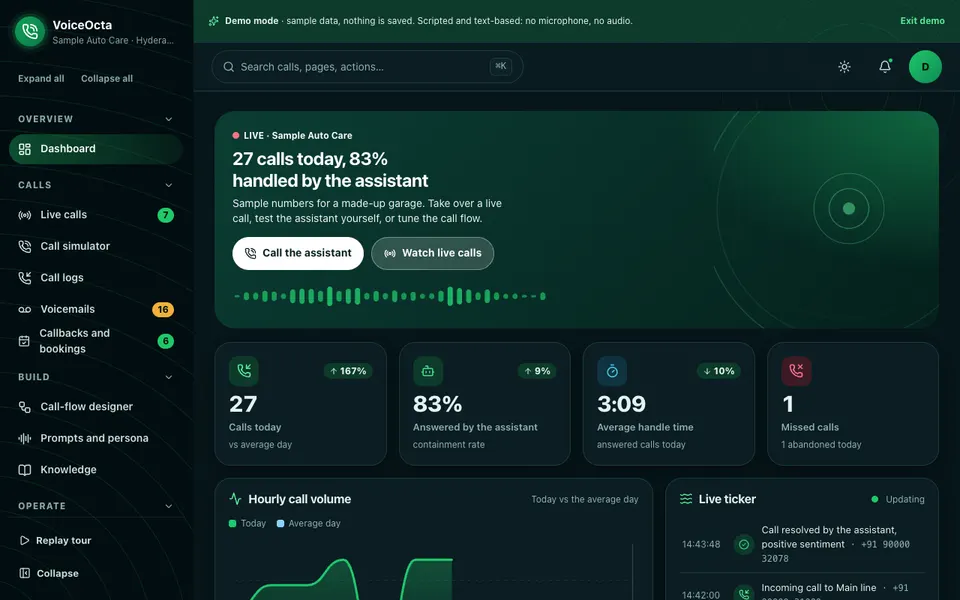
VoiceOcta is an interactive demo of an AI call-centre and phone-assistant platform for a fictional garage called Sample Auto Care. It is entirely scripted and text-based: there is no microphone, no speech, no audio and no real calls. Voice is drawn as animated waveforms, transcripts are text and the audio player is a pretend player. Phone numbers are samples, nothing is saved, data resets on refresh, and the "AI" is keyword rules, word lists and regular expressions running in your browser with no language model.
- Live calls. Eight scripted calls where you can take over, whisper to the agent or end the call.
- Call simulator. A rule-based dialogue engine with slot filling and date and time checks, so you can try booking a service as a caller.
- Call logs and voicemails. Filters, bulk tags, a detail drawer and CSV export, plus 25 voicemails with keyword priority rules.
- Callbacks and bookings. A list and a calendar view of what was booked or promised.
- Call-flow designer. A node canvas with undo and redo, validation, a test call and four templates.
- Prompts, persona and knowledge. A live preview with a guardrail checker, and 30 FAQs with TF-IDF retrieval and coverage gaps.
- Queues, agents, numbers and routing. Drag and drop assignment, a wallboard, six numbers with hours, holidays and overflow, and a "where would a call go" tester with reasons.
- Analytics and QA scoring. Heat maps, intents, containment, handle time and abandon rates, with rule-based scorecards.
- Compliance and privacy. A consent checker, pattern-based PII redaction and retention settings, shown as demo features, not legal advice.
- AI Studio. Five simulated tools, plus team roles, integrations and an audit log.
How to try it
Open the VoiceOcta live demo, choose Try Demo Account on the login screen and take the guided tour. Then press "Call the assistant" on the dashboard, book a service in the simulator, and open Live calls to take over one of the scripted conversations. Try the routing tester with a holiday date. Find more simulated tools on the AI demos page.
Getting something like this built
A real phone assistant needs a telephony provider, speech handling, your approved answers, your booking calendar and clear rules for recording and consent in your area. Zenocta can scope that around your calls and your hours. Talk to us about a custom build and you will receive a scoped, fixed-price proposal. If you run a workshop, our garage management software guide and the online booking page guide cover the systems a phone assistant would connect to, and the Zenocta apps page shows what we already ship.
Try it live
Open the real thing: demos run in a new tab with sample data, apps link to their own page.
 Live demoVoiceOcta live demoTry a scripted, text-only phone assistant for a sample garage: live calls, a booking simulator, call-flow designer, routing tester and QA scoring.
- ABrowse allAll AI demosBrowse every AI demo, each with a sample company, nothing saved and simulated AI.
- ZBrowse allZenocta appsProduction apps live on Google Play.
- TBrowse allTalk about a custom buildDescribe your calls and opening hours and get a scoped, fixed-price proposal.
Frequently asked questions
01What can an AI phone assistant handle for a small business?
It can answer common questions from approved answers, collect booking details such as name, service and time, record a message and route urgent or unclear calls to a person. Complex quotes, complaints and anything sensitive are best left to staff.
02What is slot filling in a call assistant?
Slot filling means the assistant keeps asking until every required detail for a task is collected and valid, such as a name, phone number, service and a date and time that exists. It then confirms the details back before booking.
03What does containment rate mean for phone calls?
It is the share of calls the assistant fully resolved without handing over to a person. Read it alongside bookings made, callbacks completed and sampled quality scores, because a frustrated caller who hangs up can look like a success.
04Do I need permission to record calls?
Rules on recording and telling callers vary by place and by who is calling whom, so check the current rules for your area before you enable recording or transcripts. This guide and the demo are not legal advice.
05Does the VoiceOcta demo make real phone calls?
No. It is scripted and text-based, with no microphone, speech, audio or phone network. Voice is shown as animated waveforms and transcripts, the data is sample data that resets on refresh, and the AI parts are simulated rules.