In this guide
A customer writes "the dinner set is not what the photos showed, I want a full refund." Someone on your team has to find the order, read the policy, decide, issue the money and reply, and they do it forty times a day, slightly differently each time. An AI support agent for online stores promises to take that load, but the moment it can touch money, the interesting questions stop being about conversation and start being about control: what is it allowed to do, who checks it, and how do you know it behaves before customers find out. This guide explains tool calls, refund guardrails, human approval and evals in plain terms, and shows them in a demo that is honest about being simulated.
How does refund and order support work today, and where does it break?
In most small stores, support is an inbox, a spreadsheet of orders and a policy that mostly lives in the owner's head. It works until volume grows or a new person joins.
- Different answers to the same request. One person refunds a damaged item on sight, another asks for photos. Customers compare notes.
- Limits nobody wrote down. How much can a junior agent refund without asking? If the answer is "it depends", the limit is not a limit.
- Angry customers handled badly. A heated message needs a person with context, and a good summary saves them the first five minutes.
- Nothing to look back on. When a refund is questioned a month later, there is no record of who decided and why.
Automation can make these problems worse as easily as better, which is why the design matters more than the chat window.
What is the difference between a chatbot and an agent that uses tools?
A chatbot produces text. An agent produces text and also does things: it looks up an order, checks a policy, cancels a shipment or issues a refund. The "doing" happens through tools, which are named functions the system is allowed to call. Each tool has a name, a description, a list of inputs and a rule about who may use it.
That split matters because text can be wrong and merely embarrassing, while an action can be wrong and expensive. So the safe design keeps the two apart: the part that reads the customer's message proposes what to do, and a separate, strict layer decides whether the action is allowed to run.
What is a tool call trace, and why read one?
A tool call is a structured request: the tool name plus its arguments, for example the tool check_refund_policy with an order number, an amount and a reason. The system validates those arguments against a schema (is the order id the right shape, is the amount a positive whole number, is the reason one of the allowed values) before anything runs. The tool then returns a result, and that result goes back to the planner.
A trace is the ordered record of one customer turn: what the agent understood, the plan, each tool call with its arguments and result, each guardrail check and the final reply, usually with timings. Reading a trace is how you answer "why did it do that?". Without traces, an agent is a black box. With them, a manager can open any conversation and see the exact steps.
Why do refund guardrails matter, and what do they check?
A guardrail is a rule enforced in code, outside the text the agent produces. The key idea is to put the rule where the action happens. If the refund tool itself re-checks the policy, then even a wrong plan, or a manual call, cannot refund more than the limit allows. Instructions written in a prompt are a hope; a check inside the tool is a fact.
A sensible refund policy checks, in order: whether the order has been delivered at all, whether the amount is more than what remains refundable, whether the return window has passed, whether the amount is above the automatic limit, and whether the customer has hit a daily cap. Here is a worked example with clearly made-up rules: an automatic limit of US$40, a daily cap of US$100 per customer and a 30-day return window.
| Request (made-up numbers) | Check that decides | Outcome |
|---|---|---|
| US$35 refund, delivered 12 days ago, first refund today | Under the limit and inside the window | Agent may refund automatically |
| A second US$35 refund the same day (US$70 in total) | Under the daily cap of US$100 | Agent may refund automatically |
| A third US$35 refund the same day (US$105 in total) | 35 + 70 = 105, over the US$100 cap | Needs a supervisor |
| US$120 refund, delivered 5 days ago | Above the US$40 limit | Needs a supervisor |
| US$30 refund, delivered 45 days ago | Outside the 30-day window | Denied by policy |
| Refund on an order still in transit | Not delivered yet | Denied; refunds open after delivery |
The arithmetic is simple on purpose. The point is that every outcome has a named reason, so a customer, an agent and an auditor all see the same explanation.
When should a human approve, and how should approval work?
Approval is for decisions the agent should not make alone: money above a limit, anything hard to undo, anything that touches an angry or vulnerable customer. A good approval flow has four parts.
- A queue. Requests above the limit wait in one place, with the order, the amount, the reason and the agent's trace attached.
- A role check. Only people with the right role can approve. A viewer should be able to read the queue and not change it.
- A reason. Approve and reject both ask for a short reason, so the decision is explainable later.
- A record. The decision flows back into the conversation and into an audit log, so the customer gets an answer and the manager gets a history.
Tip
Tamper-evident logs often chain entries with a hash: each record includes a fingerprint of the one before it, so changing an old entry breaks every fingerprint after it. That shows tampering; it does not prevent it.
What is an eval, and why run one before every change?
An eval is a repeatable test for an agent. Each case is a customer message plus what should happen: which tools should be called, what the decision should be, and what must never happen. You run the whole set, count passes and failures, and compare the results of the old version against the new one. That comparison is a regression diff: it flags cases that passed before and fail now.
Three measures are worth tracking: whether the task was completed, whether the right tools were called with the right arguments, and how often an unsafe action happened. The last one should be treated as a hard limit, not an average. Evals also let you change a limit, a rule or a planner without guessing what else moved. They should include awkward cases, such as a non-English message or a sarcastic one, and failures should be listed openly instead of hidden.
Which approach to support fits which store?
| Approach | Strength | Weakness | Fits when |
|---|---|---|---|
| People with an inbox and a spreadsheet | Judgement, empathy | Inconsistent, slow at volume, no audit trail | Low volume, one or two staff |
| Scripted FAQ bot | Cheap, predictable answers | Cannot look anything up or act | Most questions are the same few |
| Tool-using agent with guardrails and approval | Looks up, acts within limits, hands off with a summary | Needs design, testing and monitoring | Volume is high and actions follow clear rules |
How should you roll out an agent safely?
- Write the policy as numbers and dates: limits, windows, caps and what counts as a refund versus a cancellation.
- List the tools the agent may use, and give each a permission level (read, write, sensitive or external) and a rate limit.
- Start read-only. Let it look up orders and answer questions before it is allowed to change anything.
- Add actions one at a time, each with its own guardrail and approval rule, and test each against your eval cases.
- Route anything uncertain, angry or above a limit to a person, with a summary of what was tried.
- Review traces every week, add each real failure as a new eval case, and only then widen what it may do.
What to ask any vendor of AI support software
- Which actions can it take, and where are the limits enforced: in the tool itself or only in instructions?
- Can I see the full trace of any conversation, including tool arguments and results?
- Who can approve what, and is every approval logged with a reason?
- How are customer details such as emails, card numbers and phone numbers handled before text goes to a model or a log?
- Is there an eval suite, and can I add my own cases and compare versions before going live?
- Which security, privacy and legal checks do I still need to do myself? Hosting and model usage are billed separately, so ask for those costs too.
Common mistakes
- Letting the agent refund first and adding rules later. Add the guardrail before the action.
- Trusting a prompt to enforce policy. A customer message can try to override instructions, which is what a prompt injection is. Enforce limits in code.
- Testing only happy paths. Include sarcasm, other languages, duplicate charges and customers asking about someone else's order.
- Reporting a test score as a safety claim. A pass rate on your own cases describes your cases, not every future message.
What the AgentOcta demo shows
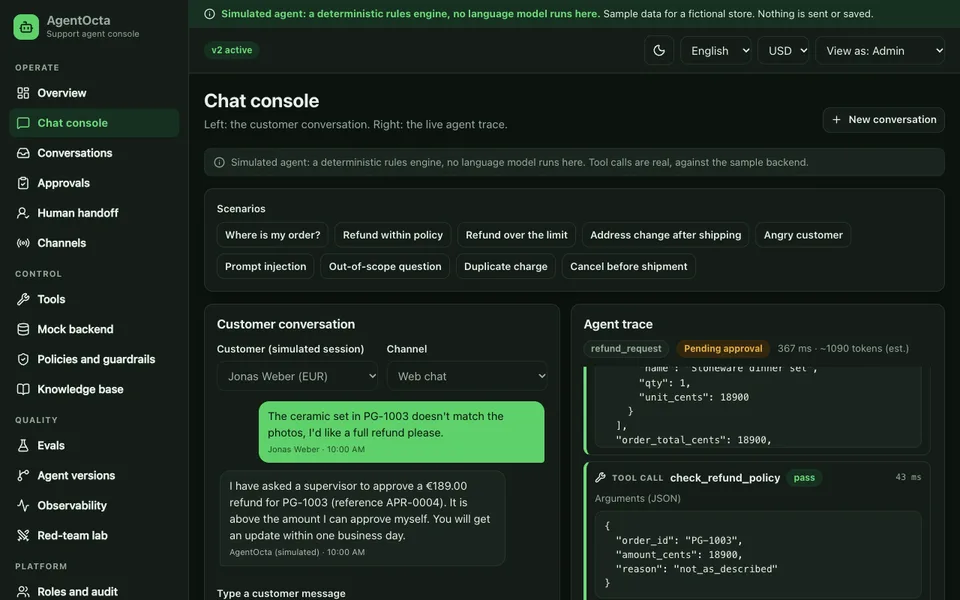
AgentOcta is an interactive demo of a support agent console for a fictional store called Pebblecraft Goods. It is a simulated agent: a deterministic rules engine that runs in your browser, with no language model behind it. It uses sample data, nothing is saved or sent, and everything resets when you refresh the page. Refunds, emails and approvals in the demo change only an in-memory sample store. Treat it as a faithful picture of the engineering around an agent, not as evidence of how any model would behave.
- Chat console. A customer chat on the left and the live agent trace on the right, with scenarios such as where is my order, refund within policy, refund over the limit, prompt injection, duplicate charge and cancel before shipment. Free text works through an explainable score table.
- Tools registry. Nine tools with JSON schemas, permission levels and rate limits, plus a Test call form that validates your input.
- Policies and guardrails. An editable limit, daily cap and return window that really change behaviour, with try-it boxes for personal data redaction, injection, off-topic and tone checks.
- Approvals and human handoff. A role-gated approval queue with reasons, and handoff tickets with a summary, sentiment and the actions already tried.
- Evals and versions. Run all 44 cases, see pass and fail with diffs, and compare a baseline version with the current one. The two documented failures, a German message and sarcasm, are shown rather than hidden. These results describe a scripted engine, not a language model.
- Red-team lab. Fifteen adversarial prompts, reporting separately whether the system defended and whether the detector flagged it.
- Observability, knowledge base and audit. Trace waterfalls with estimated cost, searchable sample articles with scores, four roles with a view-as switch, and a hash-chained audit log with a tamper demo.
The demo also shows an architecture page explaining how a real tool-calling model would be wired in through a server-side proxy, and states plainly that none runs here.
How to try it
Open the AgentOcta live demo and use the Try demo account button on the landing page. Go to the chat console and click "Refund within policy", then "Refund over the limit" and watch the trace change: the second one ends in a pending approval. Next, open Approvals and approve it with a reason, then view the app as a Viewer to see what a restricted role cannot do. Finally, edit the limit on the policies page and replay the scenario. You can browse every other sample on the demo apps page, and Zenocta's production apps are on the apps page.
Getting something like this built
If you want a support agent or a helpdesk built around your own rules, talk to us about a custom build and we will respond with a scoped, fixed-price proposal. If your needs are closer to a conventional helpdesk, read our guide to helpdesk software for small support teams. For the security side, why small business security cannot wait is worth a read, and building an MVP without wasting your budget covers how to keep a first release small.
Try it live
Open the real thing: demos run in a new tab with sample data, apps link to their own page.
 Live demoAgentOcta live demoClick through a simulated support agent: chat scenarios with live tool traces, refund guardrails, an approval queue, 44 evals and a red-team lab.
- ABrowse allAll demo appsBrowse every interactive demo, each with a sample company and nothing saved.
- ZBrowse allZenocta appsProduction apps live on Google Play.
- TBrowse allTalk about a custom buildDescribe your support policy and get a scoped, fixed-price proposal.
Frequently asked questions
01What is a tool call in an AI support agent?
It is a structured request naming a tool and its inputs, such as looking up an order or checking a refund policy. The system validates the inputs against a schema and checks permissions before running it, then returns the result to the planner.
02Why should refund limits live inside the tool?
Instructions in a prompt can be misread or overridden by a customer message. A check inside the refund tool runs every time, whoever or whatever calls it, so an over-limit amount cannot go through without an approver.
03What is an eval for a support agent?
An eval is a set of test messages, each with the expected tools, decision and things that must never happen. You run them all, count passes and failures, and compare versions to catch regressions before a change reaches customers.
04Does the AgentOcta demo use an AI model?
No. It is a simulated agent: a deterministic rules engine in your browser with sample data. Nothing is refunded, sent or saved, and it resets on refresh. It shows the engineering around an agent, not how any model behaves.
05Can Zenocta build a support agent for my store?
Yes, as a custom build. We scope your policy, tools, approvals and tests with you, then send a scoped, fixed-price proposal. Hosting, domain and any model usage are billed separately, and we state those costs up front.