In this guide
A vendor sends back "version 3, small edits only", and someone has to find out what actually changed before the business signs. Doing that by eye, across forty pages in two windows, is slow and easy to get wrong. Contract and document review software tackles the mechanical part: it shows what changed between versions, pulls out dates and obligations, and flags clauses that deserve a closer look from a qualified person.
Where does document review break down today?
Operations, HR and legal-adjacent teams usually review documents with a PDF viewer, an email thread and a spreadsheet of renewal dates. The failure points repeat.
- Silent edits. A counterparty changes "30 days" to "45 days" in a paragraph nobody highlights, and the tracked-changes copy was not the one sent.
- Buried dates. Renewal and notice dates sit in clause 14, and the person who read them has left.
- Inconsistent checking. One reviewer looks for auto-renewal, another does not, so the review depends on who was free.
- Version sprawl. "Final", "Final v2" and "Final signed" live in three folders.
Good software does not replace the lawyer, the HR head or the finance manager. It makes sure that the person who decides is looking at the right text, the right changes and a consistent list of things to check.
Important
Software that flags clauses is a reading aid, not legal advice. Whether a clause is acceptable depends on your situation, your jurisdiction and the current rules, which a qualified adviser must judge.
What does version comparison actually do?
A comparison tool takes two versions of the same document and shows the differences. There are two layers, and you want both.
The word-level diff
The two texts are lined up and every inserted, deleted or changed word is marked, usually in colour. This catches the sneaky edit that no one mentioned. It is exact, and it has no opinion about importance.
The plain-English change list
A raw diff of a long document can show hundreds of marks, most of them formatting. A change list groups them into statements a busy reader can scan: "Payment term changed", "Clause on confidentiality period shortened", "New paragraph added about assignment". The summary points you to the places that matter, and you still read the highlighted text itself.
Here is an invented illustration. Version 1 of a supply agreement says payment is due within 30 days of invoice and the agreement renews for 12 months unless either side gives 60 days' notice. Version 2 says 45 days and 24 months, with 30 days' notice. A diff marks three number changes. A change list says the payment term lengthened by 15 days, the renewal term doubled from 12 to 24 months, and the notice period halved from 60 to 30 days. Each of the three affects cash flow or exit options, which is exactly why they deserve a human decision.
How do cited answers over your documents work?
Asking questions across a library ("What is the notice period in the logistics agreement?") uses retrieval. The system splits documents into passages, scores them against the question, and quotes the best sentences with a numbered citation that opens the source paragraph. The principles of chunking, ranking and access control are covered in our guide to chatting with company documents, so here the focus is on what matters for contracts.
- Citations are the product. An answer without a paragraph you can click is a guess. Click, read, confirm.
- "Not found" must be a valid answer. If the words in your question barely appear in the library, the tool should say it could not find an answer, not stretch.
- Keyword limits are real. A keyword-based method may miss a question phrased with different words from the document. Test with the wording your team really uses.
How do clause flags work, and what can they not do?
Risk flagging usually means a rule list: patterns that match language commonly worth a second look. Typical patterns include automatic renewal, unlimited liability, termination for convenience, penalty or liquidated-damages wording, exclusivity, and indemnity. When a pattern matches, the clause is flagged and linked to the text.
Rules are transparent and predictable, which is valuable: you can see why something was flagged and add your own patterns. They also have honest limits.
- A pattern matches words, not meaning. A clause can be harmless and still be flagged, or be risky and phrased in a way no rule anticipated.
- Flags say "look here", never "this is safe" or "this is unlawful".
- The rule list is only as good as the person who wrote it, and should be reviewed with your adviser.
Treat every flag as a task: open, in review, resolved, with a name against it. That turns scanning into a process you can audit.
Which dates and obligations should be extracted?
Reading a contract is partly a data entry problem. Four extractions pay for themselves quickly:
- Start, end and renewal dates, with the notice window written next to them.
- Payment amounts and due dates.
- Named parties and defined terms, with every place they appear.
- Obligations that fall on you, such as reports to deliver or insurance to maintain.
Put extracted dates into one expiring-contracts view and review it monthly. Missing a notice window by a week is a common reason businesses end up renewed against their wishes. Always verify extracted values against the document before relying on them.
How do you roll out document review step by step?
- Pick one document family. Vendor agreements or HR policies, not everything at once.
- Gather the current and older versions. Comparison is most useful when old versions are kept and labelled.
- Agree your flag list with an adviser. Start with six to eight patterns, not fifty.
- Set folders and roles. Decide who may view, edit or only read each folder.
- Run one real review side by side. Do it the old way and the new way, and compare what each caught.
- Move the renewal calendar in. Let the software own the dates and send reminders.
- Review the audit trail. Check who opened, changed and approved what.
What to ask any document review vendor
- Does every answer show a citation I can open at the exact paragraph?
- What happens when the answer is not in the documents?
- Can I see why a clause was flagged and edit the rules?
- Does it keep older versions and compare any two?
- How are folder permissions enforced, and is there an audit log?
- Which file types are read properly, and which need conversion first?
- Where are documents stored, who can access them, and how are they deleted?
Which approach suits which team?
| Approach | Strength | Weakness |
|---|---|---|
| Shared drive and manual reading | No setup, familiar | Misses silent edits, dates stay in heads |
| Spreadsheet of contracts and dates | Cheap renewal tracking | Manual entry, no text search or comparison |
| Word processor change tracking | Shows edits made with tracking on | Fails when the other side sends a clean copy |
| Purpose-built review software | Compare, cite, flag, extract and audit in one place | Needs set-up, rules need ongoing review |
Common mistakes
- Trusting a summary over the text. Summaries compress; the clause itself is what binds you.
- Treating flags as verdicts. They prompt a human decision, nothing more.
- Uploading everything with open access. Employment and commercial files need role-based folders.
- Skipping the old versions. Without them you cannot see what drifted over three rounds of edits.
- Setting no confidence rule. Decide the point below which an answer must be double-checked by a person.
What the DocOcta demo shows
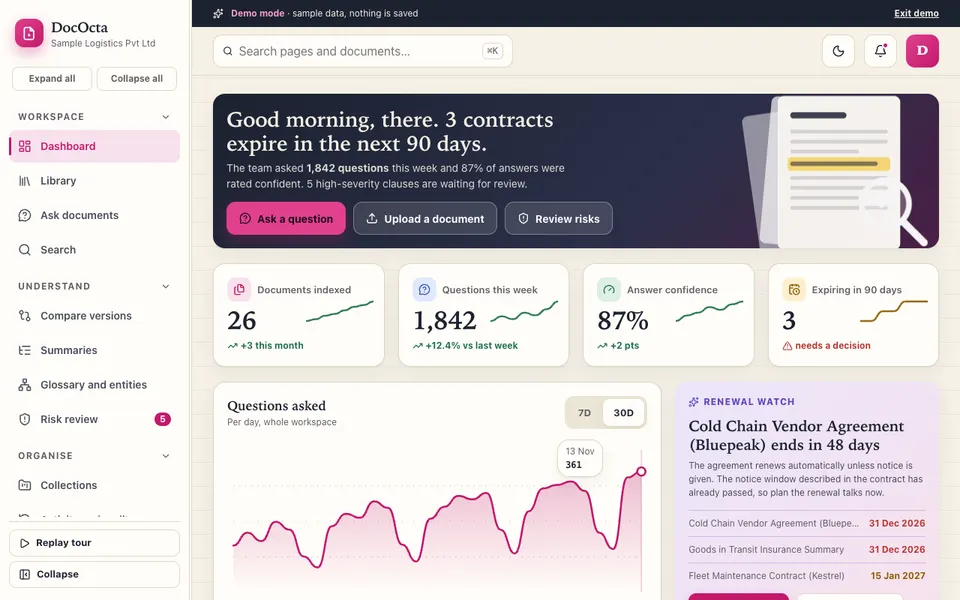
The DocOcta demo is an interactive document workspace for a fictional company, Sample Logistics Pvt Ltd. It uses sample data, nothing is saved, it resets when you refresh, and the AI is simulated: there is no language model, answers come from keyword scoring over the sample text, and the risk rules are patterns, not legal advice. What you can open:
- Library and viewer: 26 current documents plus 3 older versions, with an upload simulator, an outline, notes and bookmarks.
- Ask: questions across the library, a folder or one document, with numbered citations, a confidence meter, retrieved passages and an honest "not found".
- Compare versions: Leave Policy, Vendor Agreement and Mutual NDA pairs, or any two documents, with a side-by-side word diff and a change list.
- Summaries and Search: short, medium and long extractive summaries with key dates, numbers and obligations, plus full-text search.
- Risk review: pattern flags on a board (Open, In review, Resolved) or in a table, linked to the text.
- Glossary and entities, Collections, Access and roles, Activity and audit, Integrations: people, dates and amounts found by patterns, shared collections, an owner, editor and viewer matrix, a log with export, and connections labelled as not connected.
- AI Studio: a clause extractor, question generator, plain-English rewriter, table extractor and redaction preview, all marked simulated.
One caveat the demo states itself: uploads read only text files, while PDF and Word files get placeholder text, and keyword retrieval will miss paraphrased questions.
How do you try it?
Open the demo and choose Try Demo Account on the login screen. Start with Compare versions and pick the Vendor Agreement pair, then open Risk review and click a flag to jump to the text. Finish in Ask with one question the documents answer and one they do not. The full set of examples sits on the AI demos hub.
Getting a document review tool built for your team
A custom build starts from your own document types, folder structure and the checks your adviser wants applied. Related reading: how a case management tool organises hearings and billing, how a compliance calendar keeps deadlines visible, and how procurement matching reduces manual checks. You can browse our production apps, or describe your documents to us and we will return a scoped, fixed-price proposal.
Try it live
Open the real thing: demos run in a new tab with sample data, apps link to their own page.
 Live demoDocOcta live demoCompare three sample version pairs, ask cited questions, review risk flags and open the audit log for a fictional company.
- ABrowse allAll AI demosTwelve AI app demos and quick demos, all with sample data and simulated AI.
- ZBrowse allZenocta appsProduction apps live on Google Play.
- TBrowse allTalk about a custom buildDescribe your documents and review checks and get a scoped, fixed-price proposal.
Frequently asked questions
01Can software tell me if a contract is safe to sign?
No. Software can compare versions, extract dates and flag clauses that match risk patterns, which saves reading time. Whether a contract is acceptable depends on your circumstances and the current rules, so a qualified adviser must make that call.
02How does version comparison work?
The tool lines up two versions of a document and marks every inserted, deleted or changed word. A good one also groups those marks into a short change list, such as a payment term lengthening, so reviewers can find the edits that matter.
03What does a clause flag mean?
It means a pattern, such as automatic renewal, unlimited liability or exclusivity wording, appeared in the text. The flag links to the clause so a person can read it in context. It is a prompt to review, not a judgement about the clause.
04Why must answers carry citations?
A citation lets you open the exact paragraph and check the answer yourself. Without it you are trusting a summary. A trustworthy tool also says plainly when the documents do not contain the answer instead of guessing.
05Is the DocOcta demo a real contract tool?
It is an interactive demo with a fictional company and sample documents. Nothing is saved and it resets on refresh. The AI is simulated with keyword scoring and pattern rules, and its risk flags are not legal advice.