In this guide
A small training institute usually runs on four separate lists: a course outline in a document, quiz marks in a spreadsheet, attendance in a register and certificates typed from a template. Each list is manageable on its own. The trouble starts at the end of a batch, when someone has to combine them into a result and a certificate, and the numbers do not agree. This guide covers what learning management software for small training institutes needs to do, the rules worth getting right, and how a simulated demo for a fictional academy puts them together.
Where does a small institute's admin go wrong?
Teaching is the part trainers are good at. The admin around it is where time and trust leak away:
- Marks live in many files. Each trainer keeps their own sheet, and the final result is typed in by hand, so a slip changes someone's grade.
- Attendance is checked too late. The register shows a learner missed too many classes only after the batch is over.
- Timetable clashes surface on the day. A trainer is booked in two rooms, or a room is double-booked for two batches.
- Quizzes are all-or-nothing. A learner who got three of four right in a multi-answer question gets zero, which tells you nothing about what they know.
- Certificates cannot be checked. An employer receives a PDF and has no way to confirm it is genuine.
How should a course be structured?
A course is a list of modules, and a module is a list of lessons. A lesson can be reading, a video, a quiz or an assignment. Three habits make courses easier to run:
- Prerequisites. If Course B assumes Course A, say so, and let the system refuse enrolment that skips it.
- Duration totals. Each lesson has a time estimate, and the course adds them up, so a trainer can see that a "two-week" course contains thirty hours of content.
- Structure validation. The builder should warn about an empty module, a quiz with no questions or a lesson with no duration before the course is published.
Learning paths take this further. If several courses depend on each other, the dependencies form a graph. A sensible order that respects every dependency can be computed (it is called a topological order), and a path that loops back on itself, such as A needs B and B needs A, can be detected and refused. This is plain logic, and it saves a lot of confusion when a curriculum grows.
How do you build quizzes that tell you something?
Good quizzes mix question types: single choice, multi-select, true or false, fill in the blank and ordering. Partial credit is the feature that makes a difference. In a multi-select question with four correct answers, a learner who finds three should earn something, and a rule that penalises wrong picks stops people from ticking everything.
Reading the results: difficulty and discrimination
After a quiz has been taken, two simple measures help you improve it. Difficulty is the share of learners who answered correctly. If 20 of 25 got a question right, difficulty is 0.8, which means it was easy. Discrimination compares your strongest and weakest learners on that question. Suppose the top 10 learners by total score got it right 9 times and the bottom 10 got it right 3 times: the difference is (9 minus 3) divided by 10, or 0.6, which means the question separates strong from weak well. A question that everyone gets right, or one that strong learners get wrong more often than weak ones, deserves a second look. It may be ambiguous or mis-keyed.
A question bank helps too. Instead of hand-picking every paper, you set rules such as "five easy and three medium from module two", and the system selects a paper. Using a fixed seed means the same learner sees the same selection if the page reloads.
How should assignments and the gradebook work?
Subjective work needs a rubric: a few criteria, each with a weight, scored by the trainer. A weighted rubric keeps two trainers grading the same way. Feedback templates save time on repeated comments, and a stated late rule keeps penalties fair.
Worked example with made-up numbers. An assignment is marked out of 100 and the institute's rule is five marks off per late day. A learner scores 80 and submits two days late, so the final mark is 80 minus 10, which is 70.
The gradebook then combines components by weight. Say quizzes count for 30 percent, assignments for 30 percent and the final exam for 40 percent. A learner with 80 in quizzes, 70 in assignments and 60 in the exam gets 0.3 times 80 plus 0.3 times 70 plus 0.4 times 60, which is 24 plus 21 plus 24, or 69. A grading scale then turns 69 into a letter or a pass or fail. When weights, pass mark and scale are settings, not buried in formulas, a rule change does not require rebuilding a spreadsheet.
Tip
Write your grading rules on one page before choosing any software: weights, pass mark, late penalty, re-attempt policy. If you cannot state them in plain words, no tool can apply them consistently.
Why do attendance and timetables deserve the same care?
Attendance is a percentage: sessions attended divided by sessions held. A learner who attended 18 of 24 sessions is at 75 percent. If your institute asks for 75 percent, that learner is exactly on the line, and the useful moment to know is mid-batch, not at the end. A heatmap by learner and week makes patterns visible, and an alert at a threshold lets a trainer call someone while it still helps.
Timetables need clash detection on three things: the trainer, the room and the cohort. Two bookings clash when they share any of those and their times overlap. The helpful extra is a suggested free slot, so fixing a clash takes seconds. Enrolment into a batch should respect capacity, so the thirty-first learner is told the batch is full, not quietly added. For more on registers and fee-linked rules, see our guide to coaching institute management software and the shorter note on attendance management.
What makes a certificate trustworthy?
A certificate is only as good as the ability to check it. A common approach is to give each certificate a unique code and keep a register of issued codes. Adding a short check value to the code lets a verifier catch a mistyped character immediately, though it does not, by itself, prove the certificate is genuine: the lookup in your own register does that. A sample certificate should say it is a sample, and a real one should carry your institute's name, the course, the date and the code.
What about an AI study assistant?
Study assistants are popular, and the useful ones share a few traits. They answer from your own lesson text, show where each answer came from, and say so when the lessons do not cover a question, instead of improvising. That is the same retrieval-and-citation idea we explain in our guide to chatting with company documents. A study-plan generator is usually scheduling arithmetic: how many days until an exam, how many lessons are left, how to spread them. Be cautious about automated short-answer scoring: treat it as a first pass for a trainer to confirm, never as the final mark.
Spreadsheet, generic course platform or a purpose-built system?
| Need | Spreadsheet and register | Generic course site | Purpose-built for your institute |
|---|---|---|---|
| Weighted results | Fragile formulas | Fixed options | Your weights and scale as settings |
| Attendance alerts | Manual | Often missing | Threshold alerts by cohort |
| Clash detection | By eye | Usually none | Trainer, room and cohort |
| Verifiable certificates | Typed PDFs | Platform-specific | Code plus register |
| Fits your batches and fees | Yes, by hand | Partly | Built around your process |
A rollout plan for a small institute
- Write down your grading rules, attendance threshold and late policy on one page.
- Move one course first: its modules, lessons and a quiz of 15 to 20 questions.
- Import one batch of learners and run attendance in the system for two weeks.
- Compare the computed gradebook with your spreadsheet for one assessment and resolve every difference.
- Add timetable clash checks, then certificates, once the grades are trusted.
What to ask any vendor
- Can pass mark, weights, late rules and attendance limits be changed as settings?
- Does it show why a learner is flagged at risk, with the reasons?
- Can a learner see only their own data, and can a trainer see only their own batches?
- Can results and attendance be exported as CSV?
- How are certificates verified, and what happens to the register if we change systems?
- Where is learner data stored, and who can delete it?
Common mistakes to avoid: copying a university grading scale you do not use, rolling out every module in the first week and treating at-risk flags as final judgments about a person.
What the TrainOcta demo shows
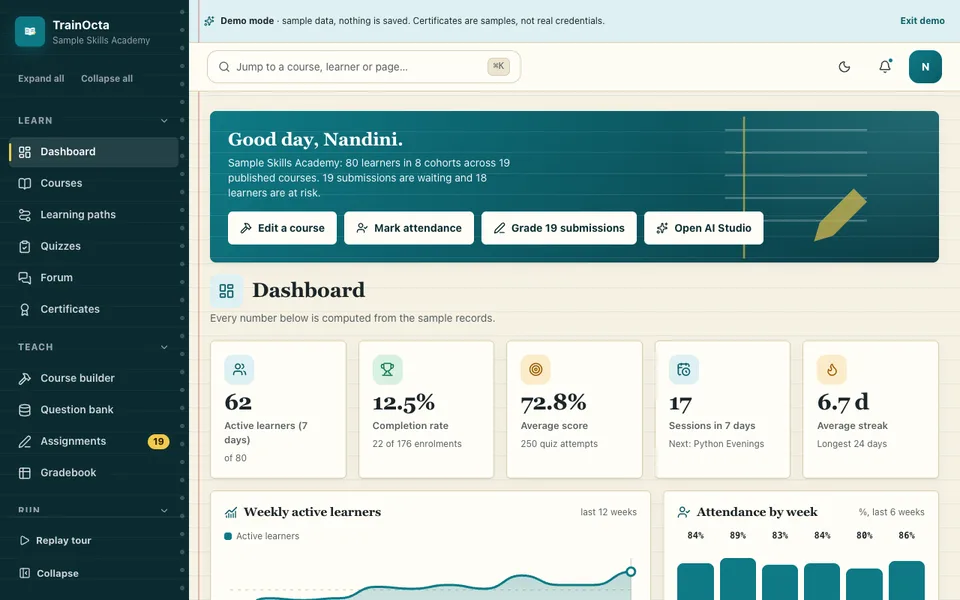
TrainOcta is an interactive demo for a fictional "Sample Skills Academy". The courses, learners and trainers are made up, nothing is saved, data resets on refresh, and there are no network calls. Certificates are samples and say so. Here is what you can open:
- Dashboard with active learners, completion rate, average score, upcoming sessions and streaks, computed from the sample data.
- Courses and course builder with filters, prerequisites, drag or button reordering, live structure validation and a preview as a learner.
- Lesson player with reading progress, notes, a placeholder video player, quiz and assignment lessons.
- Quizzes and question bank with five question types, partial credit, a countdown, review mode, rule-based paper building and item analysis from 250 sample attempts.
- Assignments with a weighted rubric grader, feedback templates and a late-penalty rule.
- Learners and cohorts with an at-risk rule that shows its reasons, a profile drawer and capacity-checked enrolment.
- Timetable and attendance with clash detection and suggested free slots, percentages, a heatmap and low-attendance alerts.
- Gradebook with editable weights and scores, weighted totals, letter grades and CSV, shown as cards on phones.
- Certificates and learning paths with a designer, an issued register, a code verifier, a prerequisite graph and cycle refusal.
- Forum, analytics, team and roles, audit log, integrations and settings. The integrations page says "Demo: nothing is connected".
Scoring, grading, the at-risk rule, clash detection, attendance maths and certificate codes are real logic. The AI Studio is simulated: the study assistant with citations, quiz generator, lesson summariser, study-plan generator and short-answer scorer use retrieval, sentence picking, text heuristics and scheduling arithmetic in your browser, always labelled "Simulated AI", and no language model is called. The assistant says when the lessons do not cover a question. You will find it among our AI demos.
How to try the TrainOcta demo
Open the demo, pick Admin, Trainer or Learner, and press Try Demo Account on the login screen. A guided tour starts and can be replayed from the sidebar or account menu. Try taking a quiz, then open its item analysis; change a weight in the gradebook and watch totals move; create a timetable clash on purpose; and switch to the Learner role from the account menu to see the course builder blocked.
Getting something like it built
A real system needs real accounts, a database, backups, learner privacy rules and, if you issue certificates, a register that stays online. We would begin with your batch structure, grading rules and the three reports you read most often. Zenocta is a Hyderabad team of 11 serving clients worldwide remotely, and we send a scoped, fixed-price proposal. To start the conversation, tell us how your batches run. You can also see our apps on Google Play, or read about tuition management software for tutors.
Try it live
Open the real thing: demos run in a new tab with sample data, apps link to their own page.
 Live demoTrainOcta live demoBuild a course, take a quiz with item analysis, edit gradebook weights, check attendance and design a sample certificate.
- ABrowse allAll AI demosTwelve AI app demos and ten quick demos, all with sample data and simulated AI.
- ZBrowse allZenocta appsProduction apps live on Google Play.
- TBrowse allTalk about a custom buildDescribe your batches and grading rules and get a scoped, fixed-price proposal.
Frequently asked questions
01What should a small training institute look for in learning management software?
Look for settings you control (weights, pass mark, late and attendance rules), clash detection for trainers, rooms and batches, quizzes with partial credit, a gradebook that exports, and certificates you can verify. Also check how learner data is protected and how easily you can leave.
02What is item analysis in a quiz?
Item analysis measures how each question performed. Difficulty is the share of learners who answered correctly. Discrimination compares how strong and weak learners did on that question. A question everyone misses, or one that strong learners miss more than weak ones, may be unclear or marked wrongly.
03How can a certificate be verified?
Give each certificate a unique code and keep a register of issued codes. A verifier looks the code up and confirms the name, course and date. A short check value inside the code catches typing mistakes, but only the register lookup shows that the certificate was really issued.
04Is the TrainOcta study assistant a real language model?
No. It is simulated. It finds relevant lesson passages and picks sentences using text matching, cites its sources and says when the lessons do not cover a question. Nothing is sent anywhere, nothing is saved and every AI output is labelled Simulated AI.
05Can Zenocta build a learning platform for our institute?
Yes. We start from your batches, grading rules and reports, then send a scoped, fixed-price proposal. A real build also needs accounts, backups and learner privacy decisions, which we discuss openly. Hosting and domain costs are billed separately and stated clearly.