In this guide
The first version of a SaaS product is rarely where founders get stuck. They get stuck on everything around it: sign-in, workspaces, roles, billing, failed payments, a support agent that is safe to switch on, a way to ship without breaking production. An enterprise buyer asks about every one of them before signing, and an AI feature adds new questions on top. This guide covers software for SaaS founders and AI-first product teams, maps five Zenocta demos to the jobs they do, and helps you decide what to build, assemble or defer.
What does a SaaS startup need beyond the app itself?
None of these jobs is your product, yet each one decides whether a customer can trust it. Think of them as the second product you have to ship:
- Sign-in, sign-up, password reset and an onboarding path that gets a new team to a first result.
- Workspaces, so each customer's data is separate, with roles that decide who may do what.
- Billing: plans, upgrades, coupons, usage charges, invoices and failed payments.
- Revenue tracking that separates new customers from expansion, downgrades and churn.
- Support, with an AI agent only when its limits and approvals are designed first.
- Answers drawn from your own documents, with sources and access rules.
- Releases you can promote, roll back and switch off with a flag, plus an incident process.
- An audit trail of who changed what, which security reviews and customers will ask for.
Where should founders and AI-first teams start?
You cannot build all of it at once, and you should not try. Three questions give you an order.
What can you not sell without?
If customers must sign up and pay, then accounts and billing come first. A support agent or document assistant can wait until you have customers asking the questions.
What breaks first when you grow?
Billing mistakes and permission leaks hurt as soon as there are paying teams. Releases hurt as soon as two people deploy in the same week. Fix the one you are already feeling.
What will a buyer ask about?
Security reviews usually ask about roles, audit trails, data separation and how AI features are limited. Those answers are easier to build in early than to retrofit.
| Approach | Works best when | Watch out for |
|---|---|---|
| Subscribe to separate hosted services for each job | You need to launch quickly and your needs are standard | Plan logic scattered across tools, costs that grow with usage |
| Build everything yourself | The job is your core differentiator | Months spent on invisible work before the first customer |
| Start from a commissioned foundation | You want ownership of the code and a head start on the basics | An unclear first scope, so agree what is simulated and what is real |
| Custom build around your plans and rules | Your pricing, approvals or data rules are unusual | Building every module before real usage shows what matters |
For a wider view on staging, see how to build an MVP without wasting your budget and technology mistakes that kill startups.
A note on how the demos work
Sample data, nothing saved, AI simulated
All five demos use invented companies. Nothing you do is saved, data resets on refresh, and no real payment, email or model is involved. Where a demo has AI-style features, they are scripted rules and arithmetic running in your browser. They show the engineering around a feature, not how a model would behave on your data. To learn how to judge claims like this, read simulated AI vs real AI.
Which demos cover the platform foundations?
These two sit under everything else: who can use the product, and how it earns money.
SaaSKit: workspaces, roles and billing
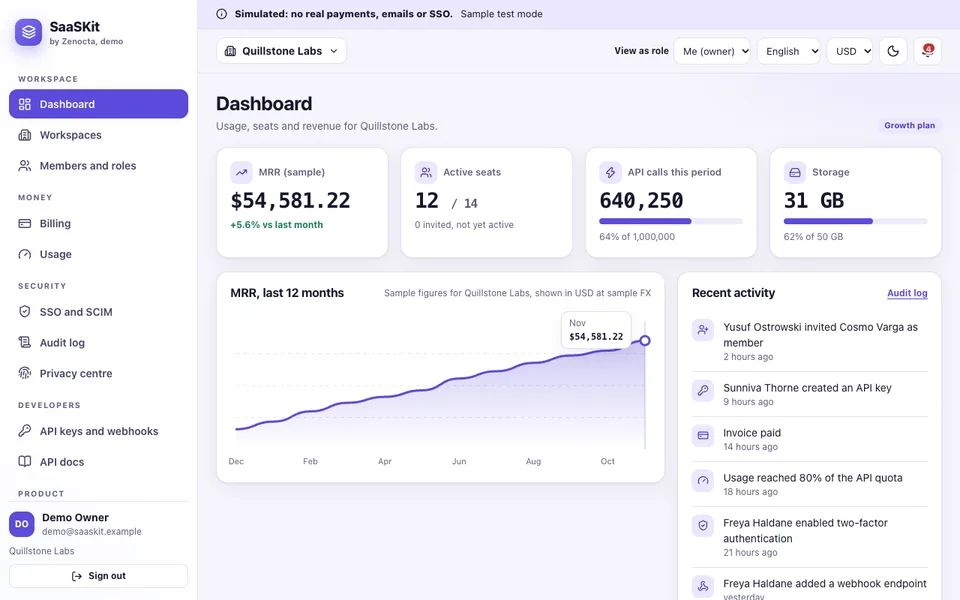
SaaSKit is set in a fictional workspace called Quillstone Labs. It covers sign-in, sign-up, magic link and password reset, then several workspaces with a role matrix enforced on every page and a View as switcher. Billing handles plan changes with proration, coupons, usage overage, dunning and invoices, with sales tax and VAT shown as illustrative. Developers get API keys stored as hashes and signed webhooks, and a hash-chained audit log records changes. It is candid about its edges: its two-step code is fixed, and tenant isolation in the browser shows the pattern but is not a security boundary. It solves the invisible first three months. Read the SaaS foundations guide or open the SaaSKit demo.
SubscribeOcta: subscription billing and retention
SubscribeOcta follows a fictional company called Taskloom. The dashboard shows MRR, ARR, net new MRR, logo churn, net revenue retention and ARPA, with a five-way MRR waterfall. Subscriptions move through trial, active, past due, paused and cancelled. A drag board handles dunning with a retry schedule and templates, a cohort heatmap toggles between logo and revenue retention, and a price-change simulator tests a new plan. Seven Revenue Studio assistants are scripted. It solves growth that hides churn. Read the billing and MRR guide or try SubscribeOcta.
Here is why the waterfall matters, using made-up figures. Say monthly recurring revenue starts at 100,000. New customers add 12,000, upgrades add 4,000 and a reactivation adds 1,000. Downgrades remove 1,500 and cancellations remove 6,500. The month ends at 109,000, a 9 percent rise that looks healthy. But 17,000 came in and 8,000 left, so almost half of what you won went out the back. A single total hides that, and a waterfall shows it.
Which demos cover AI inside the product?
If your product includes an AI feature, two questions matter more than the model: what is it allowed to do, and what is it allowed to see.
AgentOcta: a support agent with limits and approvals
AgentOcta is a simulated support agent console for a fictional store, Pebblecraft Goods. Its chat console shows the live agent trace beside the conversation. A registry lists nine tools with JSON schemas, permission levels and rate limits. Policies hold an editable refund limit, daily cap and return window that really change behaviour. Approvals sit in a role-gated queue, 44 eval cases run against two versions, and 15 red-team prompts test the defences. A rules engine drives it, with no language model, and the demo shows two documented failures rather than hiding them. It solves the question of how to limit what an agent can do. Read the AI support agent guide or open AgentOcta.
KnowOcta: answers from your own documents
KnowOcta uses 14 invented documents from a fictional retailer, Larkfield Outdoor Co. Chat shows a live retrieval trace and numbered citations that open the source. A retrieval lab lets you change chunk size and overlap and compare results. A View as switch changes who may see what: as a Guest, 88 chunks in 8 documents are visible and 70 are withheld, never scored. Evals use 47 questions, with 15 red-team inputs. Retrieval runs for real, but the answers are quoted sentences, not model text, and PDFs are not parsed. It solves access control for retrieval. See the document chat guide or the KnowOcta demo.
Which demo covers shipping safely?
ShipOcta: pipelines, flags and incidents
ShipOcta is a dashboard for a fictional Sample Software Studio. Eight scripted pipelines include a streaming log, an approval gate, re-run and rollback. Deployments promote with checks, releases build a changelog from conventional-commit messages with a suggested version bump, and a pull request gate explains why a merge is blocked. Feature flags include a kill switch, incidents have a postmortem builder, and a status page previews what customers see. Nothing builds or deploys for real. It solves not knowing what is running in production. Read the release management guide or open ShipOcta.
How do the five compare?
A blank cell means the demo's guide does not mention it, not that it is absent.
| Demo | Roles and permissions | Audit trail | Approval or gate | What is simulated |
|---|---|---|---|---|
| SaaSKit | Role matrix on every page | Hash-chained log | Payments, email, single sign-on, API layers | |
| SubscribeOcta | Four login roles | Seven Revenue Studio assistants | ||
| AgentOcta | Four roles, view-as switch | Hash-chained log | Role-gated approval queue | The agent itself: a rules engine |
| KnowOcta | Guest, Staff, Manager, Admin | SHA-256 chained log | Answer writing, connectors, cost estimates | |
| ShipOcta | Team and roles | Filterable log | Approval gate on pipelines | Pipeline runs and AI Studio |
The same pattern repeats: roles and an audit trail appear in most of them, and approvals appear wherever money or production is touched. If you also report on usage, a spreadsheet upload can become a dashboard, as in turning a CSV into a dashboard.
In what order should the pieces arrive?
For most B2B products the order is roughly this. First come accounts, workspaces and roles, because everything else hangs off who the customer is. Billing follows as soon as someone is ready to pay, with invoices and failed-payment handling, since an unpaid invoice is the cheapest churn to fix. Releases come next, because a kill switch and a rollback matter once real teams depend on you. Revenue views follow when you have enough customers for a trend to mean something. Support agents and document answers come last, once you have real questions to learn from and a tested set of cases to check them against. Your own constraints may reorder this: a product built around an AI feature may need retrieval and limits much earlier. The point is to choose the order deliberately, not by whichever tool you happened to find first.
How can you try them in 15 minutes?
- Open the all AI demos page for AgentOcta and KnowOcta, and the demo apps page for the rest. On each login screen, choose Try Demo Account.
- SaaSKit, 3 minutes: use View as to switch roles and notice what disappears. Then change a plan and read how the charge is worked out.
- SubscribeOcta, 3 minutes: open the MRR waterfall, then drag a failed invoice across the dunning board.
- AgentOcta, 3 minutes: run a refund within policy, then one over the limit, then open the approval queue.
- KnowOcta, 3 minutes: ask a question as Guest, switch to Admin and ask it again.
- ShipOcta, 3 minutes: flip a kill switch, then declare an incident and read the timeline.
- Write down three gaps: what your product would need that these demos do not show.
What mistakes should founders avoid, and what should you ask a builder?
The expensive mistakes are quiet ones. Teams hide a button and call it permissions, when the server still accepts the request. They put billing arithmetic in the interface instead of testable functions. They switch on an AI agent before deciding what each tool may do. They run no repeatable test set, so every change is a guess. They let retrieval see restricted documents and filter afterwards. And they deploy without a way to switch a feature off. When you brief a builder, ask:
- Are roles enforced on the server for every action, and can you show a test that fails when they are not?
- Is money handled in whole units by pure functions with tests?
- Where does each AI tool's limit live: inside the tool, or only in the prompt?
- How will we test AI features on our own examples, and who checks the misses?
- Is access filtered before retrieval, so restricted text is never scored or logged?
- Can we promote one tested build, roll back and switch a feature off?
- What is simulated in a first delivery, and what is real?
- Who owns the code, and what are the running costs of any third-party service?
How do you get something like this built for your product?
A demo shows the shape. A custom build starts from your plans, your roles and your data rules, and begins with one small release, such as accounts and billing, before anything else. Zenocta works from a scoped, fixed-price proposal, so you know the first release before you commit. Our roundup of twelve AI apps for small businesses covers the customer-facing side, and the Zenocta apps show production work live on Google Play. When you are ready, describe your product and plans.
Try it live
Open the real thing: demos run in a new tab with sample data, apps link to their own page.
 Live demoSaaSKit live demoSwitch roles, change a plan with proration, create an API key and read the hash-chained audit log, all simulated.
 Live demoAgentOcta live demoClick through a simulated support agent: chat scenarios with live tool traces, refund guardrails, an approval queue, 44 evals and a red-team lab.
 Live demoKnowOcta live demoChat with a live retrieval trace, switch between Guest and Admin roles and run the evals on a fictional retailer's 14 documents.
- ABrowse allAll AI demosTwelve AI apps and ten quick demos, all with sample data and simulated AI.
- ZBrowse allZenocta appsProduction apps live on Google Play.
- TBrowse allTalk about a custom buildDescribe your product and plans and get a scoped, fixed-price proposal.
Frequently asked questions
01What should a SaaS startup build first besides the product?
Build what you cannot sell without. Usually that is sign-in, workspaces with roles, and billing with invoices. Support agents, document assistants and release tooling can follow once real customers and real usage show which problem hurts most.
02Why do roles and audit trails matter so early?
Enterprise buyers and security reviews ask who can do what and who changed what. Roles must be enforced on the server, not just hidden in the interface, and an audit trail is far easier to build in early than to add later.
03How do you make an AI support agent safe to switch on?
Limit what each tool can do inside the tool itself, such as a refund cap, and require human approval above it. Keep a trace of every call, and run a repeatable test set before every change so regressions show up before customers see them.
04Why filter access before retrieval in a document assistant?
If restricted text is retrieved first and removed afterwards, it may still be scored, logged or paraphrased. Filtering by role before retrieval means a user without access never causes that text to be considered at all.
05Are these five demos real products?
No. They are interactive demos with invented companies and sample data. Nothing is saved, data resets on refresh, and payments, email, models and pipelines are simulated. They show what Zenocta could build, and a custom build begins with a scoped, fixed-price proposal.