In this guide
These are AI demos for small business owners who want to see before they spend. An owner hears that AI can answer customers, read invoices and score leads, but a brochure cannot show how any of that feels to use, and a sales call cannot show where it falls over. The quickest way to form a sensible opinion is to click through something small. On the Zenocta AI demos page there are ten quick demos built for exactly that: ten minutes, no sign-up, and every one of them honest about being scripted.
Why try ten small AI demos before you plan anything?
Most buying mistakes in AI come from vague expectations. People imagine a system that "understands the business", then discover that the useful versions are narrow: one job, one set of rules or documents, one person checking the output. A small demo teaches that scope faster than an article can, because you see the input, the output and the reasoning side by side.
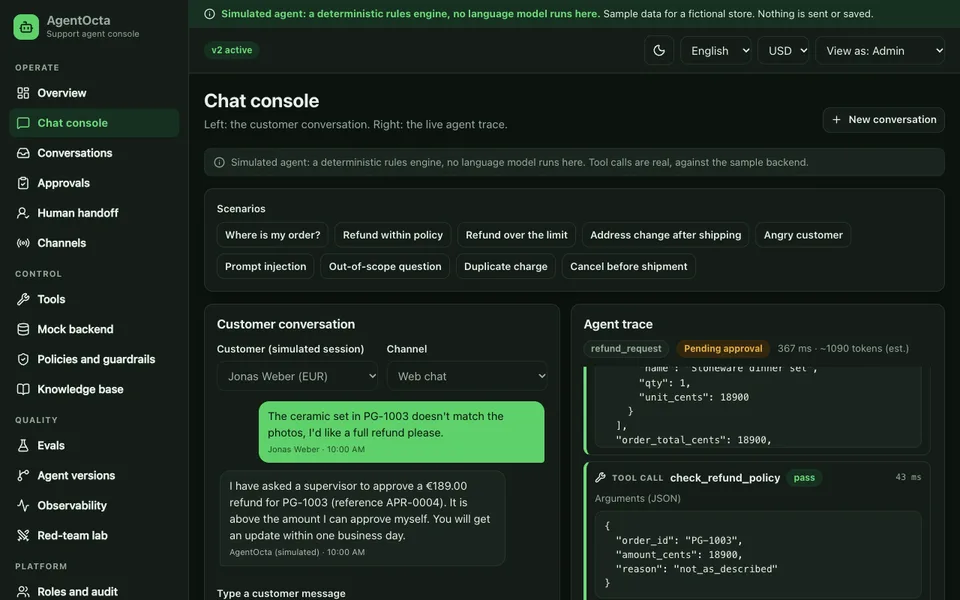
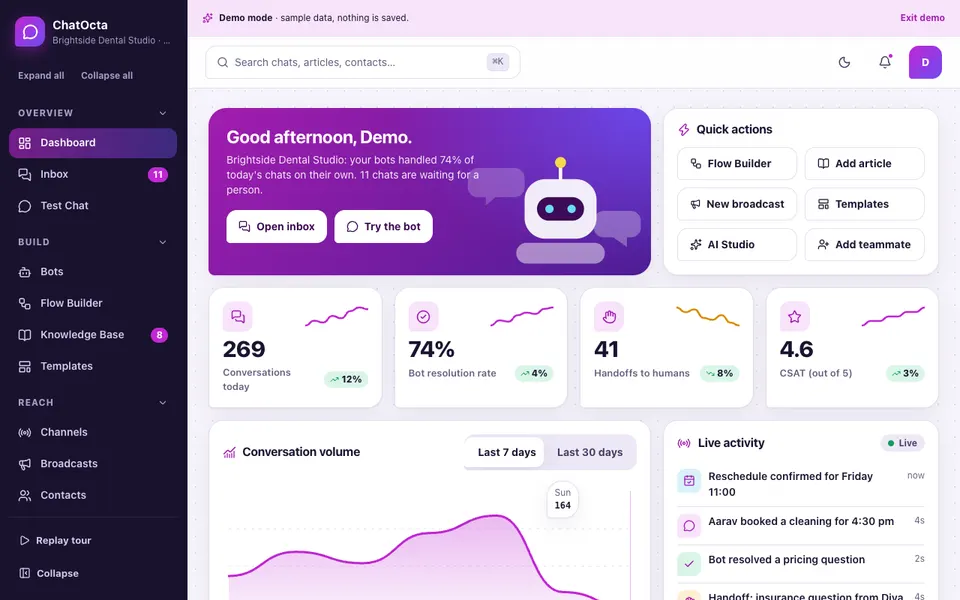
Above the quick demos, the same page also lists 12 fuller AI apps with sample companies, such as ChatOcta, the first of them. Those are worth opening later. This guide covers the ten quick demos, which each fit on one screen and each isolate one technique: a chatbot, an invoice reader, a lead scorer, an automation flow, a review reply writer, ticket triage, document question answering, a sentiment analyzer, a sales forecast and a resume screener.
What does "simulated" mean on this page?
Read this first: these demos are simulated
There is no AI model behind the ten quick demos. They are scripted in your browser: keyword rules, a short word list, simple arithmetic and pre-written text. All names, invoices, scores and numbers are made-up samples. Nothing you type is sent anywhere and nothing is saved. They show a workflow and an interface, not how accurate a real system would be on your data.
That sounds like a weakness, but it is the useful part. Because the logic is small, you can read the reasons: the lead scorer lists every point it awards, the sentiment analyzer colours the words that moved the result, the document tool highlights the paragraph it used. A real system hides that detail unless somebody builds it in on purpose. Seeing it here tells you what to demand from a real build.
The ten quick demos, one at a time
1. Business chatbot
You pick a sample business (a dental clinic, a café or a gym), then ask a question or tap a suggestion such as opening hours or booking. The bot answers from a few sample facts using keyword rules, and when nothing matches it says it is not sure and that a real bot would hand the question to a person. A price question gets the reply that a real bot would quote your own price list. What it teaches: a business chatbot is only as good as the facts you give it and the handover rule you set. What is simulated: the matching is plain keywords, and nothing is booked or reserved.
2. Invoice reader
Choose one of two sample invoices, press Read invoice, and the fields appear one by one: vendor, invoice number, date, subtotal, tax, total and the count of line items. It teaches the shape of the technique: messy text goes in, clean fields come out, and those fields can flow into accounts. The status line says plainly that the extraction was pre-written for these two samples. In a real build, extraction is the easy half. The hard half is checking, for example that the lines add up to the subtotal and the total, and sending doubtful ones to a person.
3. Lead scorer
You move a budget slider, pick how soon the customer needs it, choose where the enquiry came from and tick whether a phone number was shared. A score out of 100 appears with a band and a list of reasons. The rules are deliberately visible: with the starting settings the budget of ₹50,000 adds 9 points, needing it this month adds 18, a WhatsApp source adds 18 and the phone number adds 10, which is 55 in total and lands in the warm band. Same input, same score, every time. What it teaches: a score should always come with its reasons. What is simulated: the weights are invented, not learned from anyone's sales history.
4. Automation flow
Five steps light up in order: an enquiry arrives, an instant reply goes out, a CRM entry is created, a quote is drafted for a person to check and send, and an invoice is created when the quote is accepted. You can play the whole chain or step through it. It teaches that most business value in automation is in the joins between steps, and that a good flow keeps a person at the points where money or promises are involved. Nothing is sent when you press play.
5. Review reply writer
Pick one of three sample reviews (a happy one, a mixed one about a long wait, an angry one about a late and incomplete order) and a tone: warm, formal or short. A reply streams onto the screen word by word. What it teaches is how much a tone control changes the same facts, and why the label on the screen says a person should check and post the reply. What is simulated: the nine possible replies are pre-written, so there is no live generation.
6. Ticket triage
Type a support ticket or tap one of three samples. The tool picks a category (billing, technical, delivery, account or general), a priority, a team to route it to and a first reply to send. It works from keywords, so you can break it on purpose: write a ticket that describes a billing problem without using any of the usual words and watch it fall into general. That small failure is the lesson. Triage is a good first automation because a wrong guess costs a few minutes, provided someone reads the queue.
7. Document Q&A
The demo shows a fictional six-paragraph policy covering returns, refunds, delivery, warranty, support hours and cancellations. Ask a question and the tool highlights the paragraph it found and quotes the answer with a source number. Ask something the policy does not cover and it says it could not find the answer instead of guessing. That refusal is the most important behaviour to look for in any document assistant. What is simulated: matching is simple word overlap, not a language model. For the full version of the idea, read our guide to chatting with your company documents.
8. Sentiment analyzer
Type a message and the tool colours positive words green and negative words red, flips the meaning of the word after "not", and shows a mood label with a bar. Try "the food was not bad, thanks" and then try a sarcastic sentence of your own. It teaches both the use (spotting unhappy messages early) and the limit: a short word list cannot read tone, and a real tool needs testing on your own customers' wording before anyone trusts its labels.
9. Sales forecast
A chart shows twelve months of made-up sales in ₹ lakh and extends a straight trend line six months ahead. A slider adds extra monthly growth, from a small decline to a modest rise, and the forecast total recalculates. It teaches that a forecast is a trend plus assumptions, and that the assumption you choose moves the answer more than the arithmetic does. What is simulated: the data is invented and the method is a plain straight-line fit, with no seasonality and no outside signals.
10. Resume screener
Tick the skills a role needs from a short list, and four fictional candidates are ranked, each with the skills matched, the skills missing and a score out of 100. The score blends the share of skills matched with years of experience, and shows both so a person can see why someone ranked first. A note on the screen says a real screener must always be checked by a person. That is the right instinct: hiring affects people's lives, so keep a human decision in the loop and check the current rules that apply to you. If you are on the other side of the table, our guide to an ATS friendly resume explains what screening software tends to look for.
Which demo matches which business problem?
Start from the problem on your desk, not the technology. This table maps common problems to the demo that illustrates the closest technique, and what a real version would need that the demo does not have.
| Your problem | Try this demo | What to watch for | What a real version needs |
|---|---|---|---|
| The same five customer questions every day | Business chatbot | The fallback and handover reply | Your facts, a handover rule, a person who reads the misses |
| Typing supplier bills into accounts | Invoice reader | Fields appearing as a tidy list | Checks on totals and a review step for doubtful bills |
| Too many enquiries, unclear which to call first | Lead scorer | The reasons listed under the score | Weights tested against your own past sales |
| Work dropped between enquiry, quote and invoice | Automation flow | Where a person stays in the loop | Real integrations, retries and an error log |
| Reviews left unanswered | Review reply writer | The three tones on the same facts | A person approving every reply before it is posted |
| A support inbox with no order | Ticket triage | What it does when no keyword matches | Routing rules owned by the team lead and tested on past tickets |
| Staff asking where the policy says something | Document Q&A | Source numbers and the "not found" answer | Access control, fresh documents and a test set of questions |
| Spotting unhappy customers early | Sentiment analyzer | The coloured words and the negation flip | Testing on your customers' real wording and languages |
| Planning stock or cash for next quarter | Sales forecast | How the slider changes the total | Clean history, seasonality and a habit of checking forecasts against actuals |
| A pile of applications for one role | Resume screener | Matches and missing skills per person | A human decision, fairness checks and the current rules |
What is a good ten minute tour?
- Minute 1, chatbot. Ask the café bot about the menu, then ask something it cannot know and read the fallback.
- Minute 2, invoice reader. Read both sample invoices and compare the fields with the text on the left.
- Minute 3, lead scorer. Push the budget to the maximum, then change the source, and read how each reason changes.
- Minute 4, automation flow. Press play and note which step is drafted for a person rather than sent.
- Minute 5, review replies. Write the angry review's reply in all three tones and choose which you would post.
- Minute 6, ticket triage. Use a sample, then write a ticket of your own with no keywords and see where it lands.
- Minute 7, document Q&A. Ask a question the policy covers and one it does not.
- Minute 8, sentiment. Try "not bad", then a sarcastic line, and watch the label.
- Minute 9, forecast. Move the growth slider from one end to the other and compare the totals.
- Minute 10, resume screener. Tick every skill, then only one, and see how the ranking changes.
What do the demos hide that a real build must solve?
Every quick demo has the same blind spots, and they are the questions that decide whether a real project works.
- Accuracy. The demos use hand-picked inputs that work. Real inputs are messier, so ask how a builder will measure accuracy on your own examples.
- Edge cases. Where does it fail and what happens then? Look at the fallback behaviour before anything else.
- Data. Whose data is used, where is it stored and who can see it? Check the current data protection rules for your country and sector.
- Human approval. Which actions need a person, and is that built in rather than promised?
- Cost per use. A real model or service usually costs money for every run. Ask for an estimate at your volume.
- Maintenance. Policies, prices and products change. Who updates the facts, and how do you notice drift?
Which mistakes do owners make when they move from demo to project?
The first is starting with the most impressive demo rather than the most repetitive job. Ticket triage, review replies and invoice entry are boring and valuable, and a wrong answer is cheap to catch. The second is automating a step that nobody has written down, so the rules have to be invented during the build. The third is skipping the pilot: run any new tool beside the current process for a few weeks, compare results, and only then let it act on its own. The fourth is treating a score as a decision. A lead score decides who gets a call first, not who is worth respecting, and a resume score decides whose application a person reads first, never who is hired. For a sales example in practice, see how a WhatsApp CRM for sales teams keeps follow-ups visible.
Where do you go after the quick demos?
Two paths follow naturally. If one demo matched your problem, open the fuller demo apps on the demo apps page and the AI apps at the top of the AI demos page, which have sample companies, dashboards and more realistic workflows. If you want to see how a deeper agent is governed, read about an AI support agent with tool calls, guardrails and approval. Zenocta's production apps, which are real and live, are listed on the apps page.
How do you get a real version built around your own work?
Pick the single demo that matches your most repetitive job and bring three things to a conversation: ten real examples of the input, the answer you would want for each, and the name of the person who would check the output. With those, a builder can scope the work honestly. Zenocta's AI and automation service starts from that kind of brief and responds with a scoped, fixed-price proposal, stating up front that hosting, the domain and any model usage are billed separately. To start, tell us about the job.
Try it live
Open the real thing: demos run in a new tab with sample data, apps link to their own page.
- ABrowse allAI and automation demosOpen the ten quick demos and the 12 fuller AI apps, all simulated, nothing sent or saved.
- ZBrowse allZenocta appsProduction apps live on Google Play.
- ABrowse allAI automation servicesHow Zenocta scopes and builds AI and automation work.
- TBrowse allTalk about a custom buildBring ten real examples and get a scoped, fixed-price proposal.
Frequently asked questions
01Do the quick AI demos use a real AI model?
No. They are scripted in your browser with keyword rules, small word lists, simple arithmetic and pre-written text. All data is made up, nothing is sent anywhere and nothing is saved. They show workflows and interfaces, not the accuracy of any real model.
02Which AI demo should a small business try first?
Start with the one closest to your most repetitive job. Support questions point to the chatbot or ticket triage, supplier bills to the invoice reader, unanswered reviews to the reply writer. Pick a job where a wrong answer is cheap to catch.
03Can a lead scorer or resume screener make decisions for me?
It should not. A lead score helps decide who to call first, and a resume score helps decide whose application to read first. A person should make the final call, and for hiring you should check the current rules that apply to you.
04What does a real version need that the demos do not show?
Testing on your own examples, a clear fallback when it is unsure, human approval for sensitive actions, data handling you have checked against current rules, an estimate of cost per use, and someone who keeps the facts and rules up to date.
05How do I get a real version of one of these built?
Choose the one demo that matches your problem, gather ten real inputs with the answers you want, and name who will check the output. Zenocta then sends a scoped, fixed-price proposal. Hosting, domain and any model usage are billed separately.