In this guide
A customer messages your clinic at 9:40 pm asking whether you do same-week root canals, and nobody answers until the next afternoon. By then they have booked somewhere else. A business chatbot for website and WhatsApp is meant to catch that moment, answer the routine questions, and pass everything else to a person with the full conversation attached.
Where do customer messages go wrong today?
Most small businesses run enquiries through one phone number, a website contact form and the owner's patience. The pattern is familiar, and it breaks in the same places each time.
- The same ten questions. Opening hours, price ranges, parking, whether you take walk-ins. Staff retype the answers all day.
- After-hours silence. Messages arrive when nobody is watching, and a slow first reply is often the end of the conversation.
- No owner for a chat. Three staff see the same message on a shared phone and each assumes another one replied.
- Nothing is learned. Questions you could not answer vanish into the scroll instead of becoming a better FAQ.
A chatbot does not remove the need for people. It removes the repetitive part, and a shared inbox makes sure the rest is routed to someone by name.
What should a business chatbot actually do?
Strip away the marketing and a useful business bot does three jobs. Keep them separate in your head, because each needs different setup.
Answer from approved content
The bot looks up the answer in a knowledge base you wrote and reviewed: hours, services, preparation instructions, policies. It should say where the answer came from and admit when it has nothing. A bot that invents an answer about price or availability costs you more than a slow reply would.
Collect details for a task
Booking an appointment, asking for a callback, sending a quote request. These are structured: a fixed sequence of questions, with buttons or short replies, ending in a record someone can act on.
Hand over to a human
When the question is outside the content, the customer is upset, or the topic is sensitive, the bot stops, tells the customer a person will reply, and passes the whole thread across. The handover is the most important feature in the product, because it is what keeps the bot from becoming a wall.
How does a bot answer from your own articles?
The simplest honest design is retrieval. You write articles. When a customer asks a question, the system scores each article against the words in the question and returns the best match, quoting the article it used. One classic scoring method, TF-IDF, rewards words that appear in a matching article but are rare across all articles. The word "parking" is a strong signal; the word "the" is not.
This is different from a large language model that writes fresh sentences. Retrieval can only say what you wrote, which is a strength for a clinic or salon: the worst it can do is fail to find an answer. The weakness is vocabulary. If a customer asks about "tooth whitening" and your article says "bleaching", a pure keyword method may miss it. Fix that by adding the words customers actually use, which your unanswered-question list will show you.
Tip
Treat every question the bot could not answer as a to-do item. Ten minutes a week turning that list into new articles is the cheapest way to raise the answer rate.
Knowledge base or flow builder: which one do you need?
They solve different problems, and a good setup uses both.
| Need | Best tool | Example |
|---|---|---|
| Open-ended questions with many possible wordings | Knowledge base | "Is there parking?" "Do you treat children?" |
| A fixed sequence with a clear end | Flow builder | Book a slot, request a callback |
| Anything risky or emotional | Human handover | A complaint, a billing dispute |
Take an invented booking flow for a small clinic. Node 1 greets and offers three buttons. Node 2 asks which service. Node 3 asks for a preferred day. Node 4 asks for a name and phone number. Node 5 confirms that the front desk will confirm the slot. Five nodes, four connecting lines, one clear outcome. If a customer types something that does not fit, a fallback node sends them to a person. Because the flow is drawn, not coded, the owner can change a question in a minute.
When should the bot hand over to a human?
Decide the rules before launch, not after the first angry message. A sensible starting list:
- The customer asks for a person, in any wording.
- The bot could not answer twice in a row.
- The message mentions a complaint, refund, pain, urgency or anything health-related that needs a professional reply.
- The conversation is outside working hours and the customer needs something time-sensitive: say clearly when a person will reply.
- The customer is a returning contact with an open case that already has an owner.
When handover happens, the thread should land in the shared inbox with the earlier conversation intact, so the customer never repeats themselves. That small courtesy is what customers remember.
Why one shared inbox matters more than the bot
Bots get the attention, but the inbox decides whether your team can keep up. The basics are unglamorous and effective: every chat has a status (open, pending, resolved), an assignee, filters, and saved replies for the common situations. A board view helps a manager see at a glance what is stuck. Notes and a conversation summary let a colleague pick up a thread mid-way.
Channels should feed the same place. Whether the message arrives from your website chat, WhatsApp or another channel, it should appear as one conversation per customer. WhatsApp deserves a caution: it is a platform with its own rules about business accounts, message templates, opt-in and when you may message first. Those terms change, so check the current rules before you plan campaigns or automations around it, and treat the channel as one input among several.
How do you roll out a business chatbot step by step?
- List the top 20 questions. Pull them from your last month of messages, not from imagination.
- Write short articles. One question per article, plain wording, current facts only. Have the owner approve every line.
- Draw one flow. Start with booking or callback requests, the task that makes money.
- Set handover rules and working hours. Name who receives each type of chat.
- Test with staff for a week. Ask the questions customers ask, including misspelt and rude ones.
- Launch on the website first. It is the easiest channel to watch. Add messaging channels after you trust the answers.
- Review weekly. Read unanswered questions, handovers and customer ratings, then edit articles.
What to ask any chatbot vendor
- Can I see which article produced each answer?
- What does the bot do when it does not know? Show me the exact message.
- How does a human take over, and does the full thread move with them?
- Can I edit flows and articles myself, without a developer?
- Who owns the conversation data, and can I export it?
- What are the current rules and costs for each messaging channel, and who is responsible for staying within them?
- Can I set different answers and hours per branch?
Common mistakes with business chatbots
- Launching with ten articles. The bot fails constantly and customers learn to ignore it.
- Hiding the human. If there is no visible way to reach a person, frustration lands on your reviews.
- Promising what the bot cannot do. A greeting that says "ask me anything" invites questions the content cannot cover.
- Never reading the transcripts. The conversations are the best market research you will get for free.
- Automating sensitive topics. Health, money and complaints belong with a trained person.
A worked example with made-up numbers
Imagine an invented clinic that receives 200 conversations in a week. The bot answers 120 of them fully, so its resolution share is 120 divided by 200, which is 60%. The other 80 are handed over. If staff spend an average of 4 minutes on a routine conversation, and the bot absorbed those 120, that is 480 minutes, or 8 hours of typing handed back to the front desk. These numbers are invented to show the arithmetic, not a promise of results. Your own figures depend on how repetitive your questions are.
What the ChatOcta demo shows
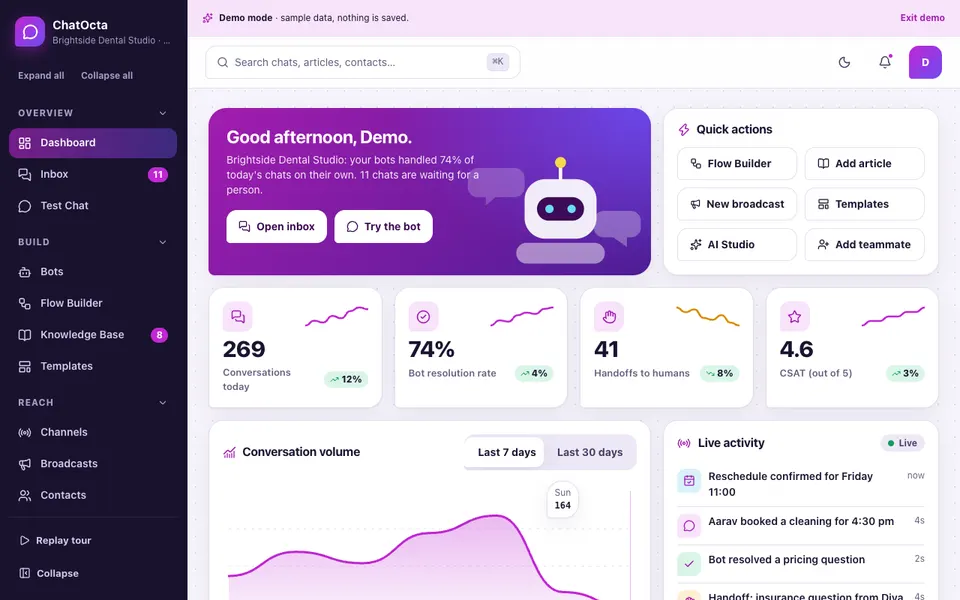
The ChatOcta demo is an interactive example of a chatbot builder with a shared inbox, built around a fictional dental practice. It uses sample data, nothing you type is saved, everything resets on refresh, and the AI parts are simulated with plain rules: no language model is called. The modules include:
- Test Chat: a bot that retrieves from the sample articles, shows which article it cited, offers quick replies and a small booking flow, and hands over to the Inbox. Unanswered questions land in a coverage gaps list.
- Inbox: filters, thread view, assignment, status, a suggested reply, saved replies, a summary, and a drag-and-drop board of Open, Pending and Resolved.
- Flow Builder: draggable nodes, lines you connect and disconnect, an inspector, and an animated test run.
- Knowledge Base and Templates: articles you can add, edit and unpublish, plus 14 flows you can load into the builder.
- Channels, Broadcasts and Contacts: a web widget preview and simulated messaging connections, a broadcast composer with simulated delivery figures, and contact segments and timelines.
- Analytics, Team and Settings: volume, intents, bot versus human, ratings, workload, permissions and handoff rules.
The connections, delivery statistics and embed code are decorative in the demo. They show the screens a real build would have, not a live integration.
How do you try it?
Open the demo, choose Try Demo Account on the login screen, and let the guided tour run. Then open Test Chat and ask something the articles cover, followed by something they do not, and watch the coverage gaps list fill. Move a chat across the Inbox board, and press Test run in the Flow Builder. If you want to see the rest of the set, the AI demos hub lists every one.
Getting a chatbot and inbox built for your business
If you want something like this for your own branches, the work starts with your real questions, services and handover rules rather than a template. For related reading, see how a WhatsApp-based CRM supports sales teams, how a helpdesk handles service levels and ratings, and how an AI support agent with approvals differs from a content-based bot. Our production apps show what we ship, and you can tell us about your channels and customers to get a scoped, fixed-price proposal.
Try it live
Open the real thing: demos run in a new tab with sample data, apps link to their own page.
 Live demoChatOcta live demoAsk the sample bot questions, move chats across the inbox board and run the flow builder for a fictional dental practice.
- ABrowse allAll AI demosTwelve AI app demos and quick demos, all with sample data and simulated AI.
- ZBrowse allZenocta appsProduction apps live on Google Play.
- TBrowse allTalk about a custom buildDescribe your channels and customers and get a scoped, fixed-price proposal.
Frequently asked questions
01Can a chatbot work on both my website and WhatsApp?
Yes, the usual design is one set of articles and flows feeding several channels into a single inbox. WhatsApp business messaging has its own account, template and opt-in rules that change over time, so check the current rules before you plan it.
02Does a business chatbot replace my staff?
No. It handles the repetitive questions and the first steps of simple tasks, then passes everything else to a person with the conversation attached. The aim is to give your team time back and to stop messages going unanswered after hours.
03How does the bot know what to answer?
In a retrieval design, it scores your written articles against the customer's words and replies from the best match, showing which article it used. If nothing matches well, it says so and offers a person instead of guessing.
04When should a chat move to a human agent?
Move it when the customer asks for a person, when the bot has failed to answer twice, when the topic is a complaint, refund or anything sensitive, or when the message is urgent. Agree these rules before launch and write them into the handoff settings.
05Is the ChatOcta demo a real chatbot?
It is an interactive demo with a fictional dental practice and sample data. Nothing is saved, it resets on refresh, and the AI features use plain keyword rules rather than a language model. Channel connections and delivery numbers are simulated.