In this guide
An accounts-payable clerk opens the shared mailbox on Monday to find 140 supplier bills, in six different layouts, some as photos taken on a phone. Retyping each one into the accounting system takes days and invites typos in amounts and tax numbers. Invoice data extraction for accounts payable reads the fields for you, checks them, and sends a person only the bills that look wrong. It is most useful when it is honest about what it is unsure of.
Where does manual invoice entry go wrong?
The hard part of accounts payable is rarely the typing itself. It is everything around it:
- Bills arrive everywhere. Email attachments, messaging photos, paper at the front desk, a supplier portal.
- Layouts differ. The total is bottom right on one supplier and mid-page on another, and the tax lines are labelled differently.
- Duplicates slip through. A supplier resends a bill with a slightly different number, and it gets paid twice.
- Approvals stall. A bill waits for a manager with no reminder, and the early-payment window passes.
- Month-end is a scramble. Nobody can say how much is owed, to whom, and how old it is.
Extraction software attacks the first two directly and makes the rest visible, which is where most of the value turns up.
How does invoice data extraction work?
Most pipelines follow five stages, and knowing them helps you ask better questions of any vendor.
- Capture. The bill is uploaded, emailed in or dropped from a phone.
- Read. Optical character recognition turns the image into text with positions on the page.
- Classify. The system decides whether it is an invoice, credit note, purchase order, receipt or delivery note.
- Extract. Fields such as supplier, invoice number, date, line items, tax and total are located.
- Validate. Checks run on the result: do the lines add up to the total, is the date sensible, is anything missing, does the tax number have a valid format?
Each extracted field should carry a confidence score. High-confidence fields pass, low-confidence ones are highlighted for a person. The extraction itself can be done with rules, with learned templates per supplier, or with trained models. Whatever the method, validation is what makes the output trustworthy, because it does not depend on the reader being right.
What does "review only the exceptions" mean?
The point of automation here is not zero human involvement. It is moving people from checking everything to checking what is suspicious. Two measures describe it.
The touchless rate is the share of documents that pass every check and go forward without a person touching them. Take an invented month with 500 bills. If 380 pass untouched, the touchless rate is 380 divided by 500, which is 76%. The other 120 become exceptions. If a person spends an average of 3 minutes on an exception, that is 360 minutes, 6 hours, instead of the 4 minutes per bill that full manual entry might take, which would be 2,000 minutes, a little over 33 hours. These figures are made up to show the arithmetic; yours depend on the mix of suppliers and the quality of scans.
Tip
Track the touchless rate by supplier. A handful of messy suppliers usually account for most exceptions, and fixing their templates or asking for a cleaner format is the fastest improvement.
Which exceptions should the system raise?
A clear exception list lets reviewers work quickly and lets managers see patterns. Useful categories include:
- Duplicate invoice: the same supplier, a near-identical number or the same amount and date. Similarity scoring between invoice numbers catches a resend with one character changed.
- Purchase order mismatch: the billed items, quantities or prices differ from the order.
- Invalid tax registration number: the supplier's tax ID fails a format or check-digit test. A failed format test is a prompt to ask the supplier, not proof of wrongdoing. Check the current rules for what you need on a valid invoice.
- Missing required field: no invoice number, date or total.
- Amount above approval limit: the total needs a senior approver.
- Unusual amount: far outside the supplier's normal range.
The unusual-amount check is simpler than it sounds. Compare the bill with that supplier's history using a robust measure such as the median and the median absolute deviation, which is not distorted by one earlier outlier. A bill many deviations away from the typical value is queued for a look.
What is three-way matching?
Three-way matching compares the purchase order (what you ordered), the goods receipt (what arrived) and the invoice (what you are billed for). A tolerance sets how much difference is acceptable before a person must look. Here is an invented example. You ordered 100 units at ₹250, a total of ₹25,000. The warehouse received 99, and the supplier invoiced 100. The quantity variance is 1 unit, which is 1% of the invoiced quantity, worth ₹250. With a 2% tolerance, that passes automatically. If only 96 had arrived, the variance is 4 units, 4%, worth ₹1,000, and it becomes an exception. Tolerance is a business choice: tighter for expensive items, looser for low-value consumables. Our guide to procurement and three-way matching goes deeper on the ordering side.
How do approvals and exports close the loop?
Once a bill is validated, rules route it. A common design sets amount bands by department: below a limit, a team lead approves; above it, finance. A queue shows each approver what is waiting, with options to approve, reject or delegate, and a timeline records who did what.
Approved data then needs to reach your accounting system as clean journal entries or vouchers, using the supplier's coded ledger account. Export in a standard format such as CSV or a voucher file is the minimum, direct integration is a later step, and the mapping rules, which supplier maps to which ledger code, should be editable by the finance team. Keep an audit trail of every edit, approval and export, because it is what an auditor will ask to see. For related compliance planning, see e-invoicing readiness for SMEs.
How should you measure whether it is working?
Pick four numbers and look at them monthly: the touchless rate, the time from receipt to approval, the number of open exceptions and the share of bills paid inside their terms. Add the reasons for exceptions, because a spike in one reason points at one cause. If invalid tax numbers jump, a supplier master needs cleaning. If order mismatches jump, the buying side is raising orders loosely. The tool shows you the symptom, and the fix is often a conversation with a supplier or a buyer, not more software.
Which approach fits which team?
| Approach | Works when | Breaks when |
|---|---|---|
| Manual entry from email and paper | Under a few dozen bills a month | Volume grows, duplicates and typos appear |
| Spreadsheet tracker plus manual entry | You need an aging view, little else | No field reading, checks or approvals |
| Purpose-built extraction with exception review | Hundreds of bills, many suppliers, an approval chain | Needs setup per supplier and ongoing rule upkeep |
Common mistakes when automating invoice processing
- Chasing 100% automation. A person reviewing real exceptions is a feature, not a failure.
- Trusting confidence scores without validation. A confident wrong reading still has to fail a totals check.
- Setting one tolerance for everything. Ten rupees matters on a small item and not on a large one.
- Ignoring the supplier master. Duplicate supplier records create duplicate payments.
- No audit trail. Edits without a record are a problem at audit time.
What to ask any extraction vendor
- Can I see every field highlighted on the original page, with its confidence?
- Which validation checks run, and can I add my own?
- How are duplicates detected, and across which fields?
- Can approval limits vary by department, and can approvers delegate?
- Which export formats are supported, and can ledger mapping be edited by finance?
- How are documents stored, who can see them, and what is logged?
What the ScanOcta demo shows
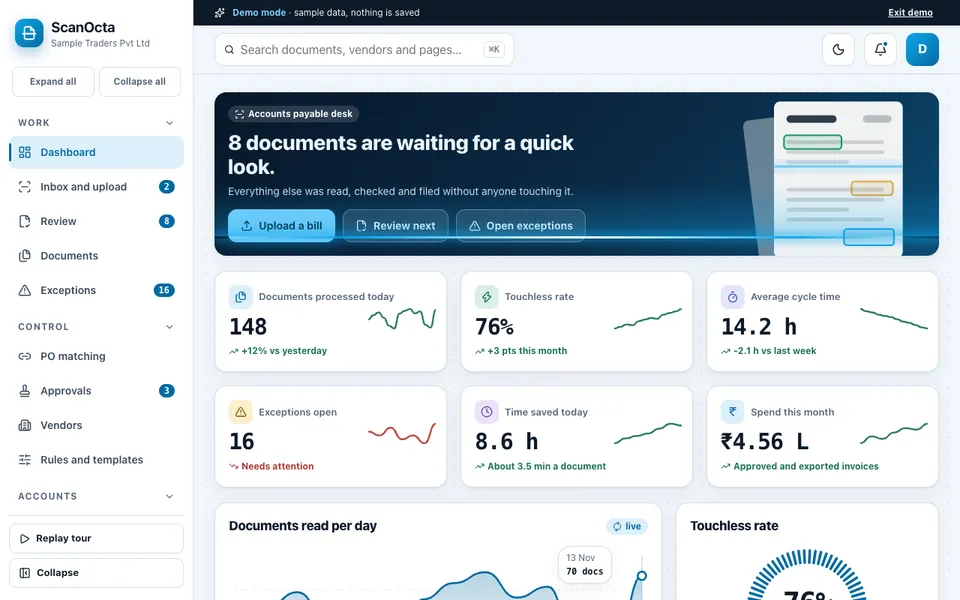
The ScanOcta demo is an interactive accounts-payable workspace for a made-up company, Sample Traders Pvt Ltd, with made-up suppliers. It uses sample data, nothing is saved, it resets on refresh, and the AI is simulated: reading a bill, classifying, anomaly detection and duplicate finding are rules and maths, not a model. Uploading a file does not read it; a sample invoice is processed instead, and the page says so.
- Review: a split view with a rendered invoice and coloured boxes over each field, confidence chips, editable fields and line items, live checks, and keyboard shortcuts.
- Inbox and upload: a five-stage pipeline of upload, OCR, classify, extract and validate, plus a simulated email inbox and photo drop.
- Documents and Vendors: filters, bulk approve, a CSV list export, and vendor profiles with payment terms and risk flags.
- Exceptions and PO matching: a drag-and-drop board with a suggested fix for each case, and a three-way match with a tolerance slider.
- Approvals, Rules and templates: editable amount rules, an approver queue, per-supplier field mapping and ledger code rules.
- Ledger and export, and GST and compliance: journal entries downloaded as CSV, JSON or voucher XML, and helper tools including a tax number format validator.
- Analytics, AI Studio, Integrations, Audit log: five analytics tabs, simulated extraction tools, connections labelled as not connected, and a filterable log.
How do you try it?
Open the demo and choose Try Demo Account on the login screen. Go to Review and click a coloured box to see the field it covers, then edit a value and watch the checks update. Open Exceptions and resolve a duplicate, then try PO matching and move the tolerance slider. The AI demos hub lists the other examples.
Getting invoice extraction built for your business
A custom build starts from your real suppliers, your approval chain and your accounting export format. If you are tidying the sales side too, our guide on making a GST invoice covers it, and compliance calendars for accountants helps with deadlines. See our production apps or tell us about your bill volumes and systems for a scoped, fixed-price proposal.
Try it live
Open the real thing: demos run in a new tab with sample data, apps link to their own page.
 Live demoScanOcta live demoReview a rendered invoice with field boxes, resolve exceptions on a board, try PO matching and export sample entries.
- ABrowse allAll AI demosTwelve AI app demos and quick demos, all with sample data and simulated AI.
- ZBrowse allZenocta appsProduction apps live on Google Play.
- TBrowse allTalk about a custom buildDescribe your bill volumes and systems and get a scoped, fixed-price proposal.
Frequently asked questions
01What is invoice data extraction?
It is software that reads a bill, finds fields such as supplier, number, date, line items, tax and total, checks them, and passes the result on for approval and accounting. The aim is to avoid retyping and to catch errors early.
02What is a touchless rate?
It is the share of documents that pass every check and move forward with no human touch. For example, if 380 of 500 bills pass cleanly, the rate is 76%. The rest become exceptions that a person reviews.
03How are duplicate invoices detected?
The system compares each new bill with earlier ones from the same supplier, looking at number similarity, amount and date. Scoring the similarity of invoice numbers catches a resent bill with one character changed, which exact matching would miss.
04What does three-way matching check?
It compares the purchase order, the goods receipt and the invoice, and flags differences beyond a tolerance you set. A small quantity variance passes automatically, while a larger one is raised for review before payment.
05Does the ScanOcta demo really read my files?
No. It is an interactive demo with a fictional company and sample data. Uploading a file processes a sample invoice instead, nothing is saved, and the AI parts are simulated with rules and maths rather than a model.