In this guide
One branch gets a thoughtful reply to a three-star review within a day. Another branch has forty reviews sitting unanswered, and a third has a manager pasting the same "Thank you for your feedback" under every comment, good or bad. Review management for multi-branch businesses is hard because the volume is spread across many locations, many people and several places where customers write, while the customer reading your replies sees one brand. This guide explains how to reply at scale without sounding robotic, how a drafting tool should and should not help, and what a simulated demo of such a tool contains.
How does review handling work today, and where does it break?
In most multi-branch businesses, reviews are checked when someone remembers. A manager opens a listing, reads a few comments, writes a reply from scratch or copies an old one, and moves on. Nobody owns the whole picture.
- Uneven response times. The branch with an organised manager replies in a day, the busy one never does. Customers can see the gap.
- Copy-paste voice. The same sentence under fifty reviews tells every reader that nobody is listening.
- Risky replies. A tired manager under pressure writes a defensive answer, or repeats a customer's personal details in public.
- No topic view. Ten branches may be getting the same complaint about waiting times, but each manager only sees their own handful of comments.
- No approval step. Either everyone can post anything, or head office becomes a bottleneck by email.
The fix is not replying faster at any cost. It is a process: bring reviews into one inbox, draft the first version quickly, let a person decide, and learn from the pattern across branches.
What does "replying at scale" really mean?
It means the work per review gets smaller while the quality bar stays where it is. Here is a made-up example to show the size of the saving. Suppose a group has 12 branches and each receives 20 new reviews a week. That is 240 reviews. If a person writes each reply from scratch in about 3 minutes, that is 720 minutes, or 12 hours a week. If a drafted reply that fits the review needs about 1 minute to read, adjust and approve, the same 240 replies take 240 minutes, or 4 hours. These numbers are invented for illustration, so measure your own, but the shape is typical: the saving comes from the first draft, and the quality comes from the person who approves it.
Tip
Time one real reply before you buy anything. Write it from scratch, note how long it took, then note how long it takes to edit a decent draft. Your own two numbers are a better business case than any vendor claim.
Why do drafted replies sound robotic, and how do you fix it?
A reply sounds robotic when it ignores what the customer actually said. "We value your feedback" fits every review equally, so it fits none. Four habits make drafts sound human.
Mention one specific detail
If a customer praised a named staff member or complained about a long wait, the reply should say so in plain words. A good draft picks up one concrete thing from the review and answers it.
Match the tone to the rating
A five-star review wants warm and short. A one-star review wants calm, direct and willing to take the conversation offline. A reply that is cheerful under an angry review reads as mockery.
Keep a written brand voice
Decide once how your business speaks: formal or friendly, first person singular or "we", whether replies are signed with a name. A short written voice guide lets drafts and humans match each other across branches.
Vary the wording
Offer more than one version of a draft and let the approver pick. Repetition is what readers notice, so even small variation across a hundred replies helps.
What should a human always decide?
Drafting is the safe part to speed up. Posting is the part that needs judgement. Keep people in charge of these:
- Anything that admits fault, offers money, or makes a promise about what will change.
- Low-rating reviews and any review that mentions safety, staff conduct or a complaint that may escalate.
- Replies that could reveal a customer's personal details. Public replies should stay general and invite the customer to contact you privately.
- Reviews you suspect are not genuine. Tools can raise a flag, but a flag is a hint, not proof, so a person should investigate before responding or reporting.
A simple rule works for many groups: five-star and four-star replies from a branch manager can go out on the manager's approval, while three stars and below go to a second person. The exact line is your call. The point is that the line exists and is written down. The same idea, an approval queue with roles and a record, is covered in our guide to AI support agents with guardrails and human approval.
What can topic spotting tell you that individual replies cannot?
Replying fixes one customer's experience. Reading across all reviews fixes the business. Topic spotting groups comments by theme, such as waiting time, staff attitude, cleanliness, price or parking, and shows how each theme is trending and where it is concentrated.
A heat map of branch by topic is especially useful for a group. If "waiting time" is mentioned often in only two of twelve branches, the problem is local scheduling. If it appears everywhere, the problem is policy or staffing across the group. You cannot see that difference by reading reviews one at a time.
Be honest about the method. Simple topic spotting counts keywords and scores words as positive or negative. It handles plain comments well and struggles with sarcasm, mixed feelings and unusual wording. Treat the chart as a prompt to read the underlying comments, not as a verdict.
How do you ask for more reviews without crossing a line?
A steady flow of fresh reviews is the best protection against one bad week. The honest way to get them is to ask every customer, at a sensible moment, with an easy link. A QR code on a counter poster, a short message after a visit, or a follow-up a day later all work.
One practice to avoid is review gating: asking customers privately whether they were happy and sending only the happy ones to the public page. It skews the picture your customers see, and people eventually notice. Check each platform's current rules before you design any campaign. A cleaner design sends everyone to the same public link and handles unhappy feedback through your normal complaints process.
How do the approaches compare?
| Approach | Good at | Where it falls short |
|---|---|---|
| Each branch replies on its own | Local knowledge, no head-office load | Uneven speed and tone, no group view, no approval trail |
| Spreadsheet of reviews and a shared template list | Cheap, familiar, a start on consistency | Copying reviews in by hand, no alerts, replies still typed one by one |
| Purpose-built review inbox with drafts and approval | One queue, drafted replies, roles, topic view, request campaigns | Needs setup, a written brand voice and clear approval rules |
How do you roll this out step by step?
- List your sources. Write down every place customers review you, branch by branch, and who currently checks each one.
- Write the voice guide. One page: tone, length, sign-off, words to avoid, what you never say publicly.
- Set reply rules by rating. Decide which replies a manager may post alone and which need a second approver, and set a target time to respond.
- Build five or six templates. For praise, a minor complaint, a serious complaint, a wrong-business review and a request to take it offline. Use them as starting points, not final text.
- Pilot with two branches. Measure time per reply and how often approvers rewrite drafts heavily.
- Review topics monthly. Pick one recurring complaint and fix it at the root, then watch whether the topic fades.
What should you ask any vendor about review tools?
- Does every reply pass through a person before it is posted, and can I enforce that by role?
- Can I see who approved what, and when, in an audit trail?
- How are drafts produced, and can they be tuned to our written voice?
- Does a policy check flag risky wording such as promises or personal details before posting?
- Can I export reports and reviews, and is my data mine if I leave?
- Does the review-request feature send everyone to the same public link?
- Which platforms are connected for real, and which are only planned?
What mistakes do multi-branch businesses make?
- Auto-posting replies with nobody reading them first.
- Answering every review with one template and calling it consistency.
- Measuring only the star average, not response rate and time to reply.
- Arguing with a reviewer in public instead of moving the conversation to a private channel.
- Ignoring good reviews. A short, specific thank-you for praise is cheap and readers notice it.
- Skipping the topic view, so the same issue returns every quarter.
What the ReplyOcta demo shows
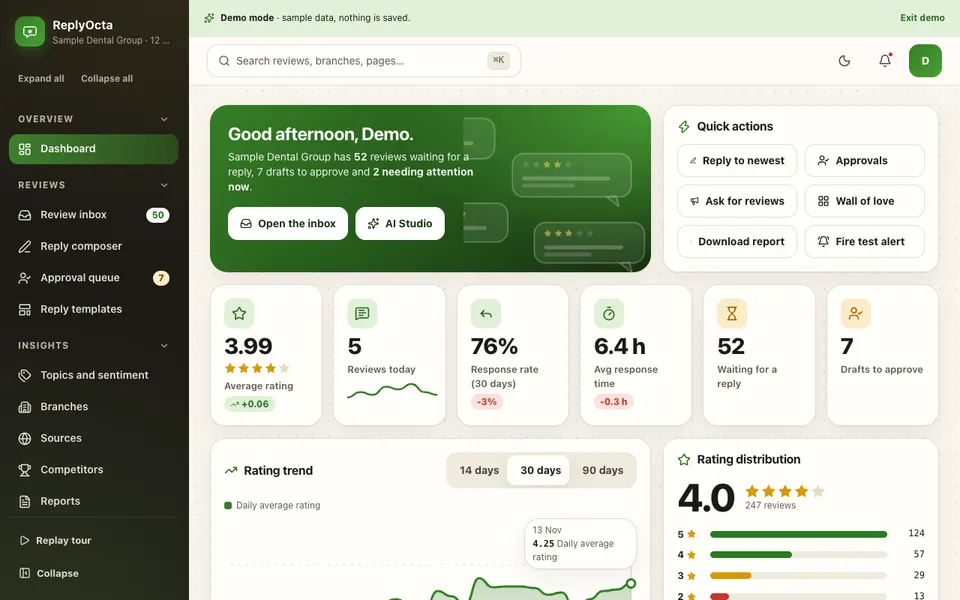
ReplyOcta is an interactive demo of a reviews and reputation manager for a fictional chain called Sample Dental Group with 12 branches. It runs in the browser on sample data: nothing is saved, it resets when you refresh, and every "AI" label is simulated with plain word lists and rules, with no language model behind it. Source names are generic text, so no real review platform is connected.
The modules, as the demo describes them:
- Dashboard. Average rating with trend, reviews today, response rate and time, sentiment split, rating distribution and top topics, with new sample reviews arriving live.
- Review inbox. Filters, search, sort, bulk actions, keyboard shortcuts and a detail drawer with the customer's history. This is the single queue that replaces checking many listings.
- Reply composer. Choose tone, length and brand voice, compare variants, run a policy checker, use templates, then send to approval or post. The drafts are rule and template based, with real variable filling, not generated by a model.
- Approval queue. A kanban board with drag and drop, role-based permissions and SLA timers, so replies wait for the right person.
- Topics and sentiment. Keyword and word-list matching, a word cloud, trends, emerging issues and the branch by topic heat map described above.
- Branches and competitors. A 12-branch leaderboard with drill-down pages, and a comparison against five invented competitors.
- Review requests. A campaign builder with a live phone preview, a funnel, rules and policy, and a QR poster drawn as SVG. It deliberately offers no review gating.
- Testimonial widgets and social proof. Build an embeddable wall of reviews and download a share card.
- Alerts, reports, team and audit log. Alert rules with a simulator, CSV downloads, role management and a log of 96 or more events.
One honest limit shown in the demo: the authenticity checker is a heuristic and cannot prove a review is fake. Good software says so.
How to try it
Open the ReplyOcta live demo, choose Try Demo Account on the login screen and follow the guided tour. Then open the Review inbox, pick a low-rated review, draft a reply in the composer and send it to the approval queue. Use the "View as" switch in the account menu to see how Owner, Manager, Agent and Viewer permissions change what you can do. You can browse the other AI demos on the AI demos page.
Getting something like this built
Every business has its own sources, branches, approval rules and brand voice. A real build would connect your actual review sources, store your approved replies securely and follow your rules about who can post. A good first step is to write down your reply rules and voice, then talk to Zenocta about a custom build and receive a scoped, fixed-price proposal. If you want a wider view of where automation helps smaller firms, read how AI is transforming SMEs, and see our production apps on Google Play for what we already ship.
Try it live
Open the real thing: demos run in a new tab with sample data, apps link to their own page.
 Live demoReplyOcta live demoClick through a sample 12-branch review inbox with a reply composer, approval queue, topic heat map and review request campaigns, all on sample data.
- ABrowse allAll AI demosBrowse every AI demo, each with a sample company, nothing saved and simulated AI.
- ZBrowse allZenocta appsProduction apps live on Google Play.
- TBrowse allTalk about a custom buildDescribe your branches and reply rules and get a scoped, fixed-price proposal.
Frequently asked questions
01Can a tool reply to customer reviews automatically?
It can draft replies automatically, but a person should approve what is posted, especially for low ratings, refunds or anything that makes a promise. Unreviewed auto-posting is how tone-deaf or risky replies reach the public.
02How do you stop replies from sounding robotic?
Mention one specific detail from the review, match the tone to the rating, keep a short written brand voice and offer a few variants so the wording differs. A person should then read and adjust the draft before it goes out.
03What is review gating and why avoid it?
Review gating means asking customers privately if they were happy and sending only the happy ones to the public page. It distorts the picture customers see, so a fairer design sends everyone to the same link. Check each platform's current rules.
04Can software tell whether a review is fake?
Not reliably. A tool can flag patterns that look unusual and prompt a closer look, but a flag is a hint, not proof. A person should investigate before replying differently or reporting the review to the platform.
05Is the ReplyOcta demo a real product?
No. It is an interactive demo for a fictional dental group with sample reviews. Nothing is saved, no review platform is connected, and the AI parts use plain rules and word lists, not a language model.