In this guide
A software agency can be busy every week and still lose money on projects. The hours go into the work, the invoice goes out at the agreed price, and nobody notices until the quarter ends that a fixed-fee project quietly consumed far more time than it was priced for. This guide explains project profitability for software agencies and IT service teams: how to plan, track time, balance capacity, invoice cleanly and see profit per project, with a simulated demo for a fictional studio.
Why do agencies lose money on projects they thought were fine?
The cause is rarely one big mistake. It is small gaps between four things that live in different places: the plan, the timesheets, the people's availability and the invoice.
- The estimate was a guess, and nobody compared it later. The next quote repeats the same optimism.
- Time is logged late or not at all. A Friday-afternoon memory of the week is not a record.
- The same person is promised to two projects. Both slip, and each project manager thinks the other is at fault.
- Invoices are built by hand from a mix of timesheets, milestones and expense bills, so billable work is missed.
- Profit is calculated once a year, when it is too late to change anything.
How does a plan with dependencies and a critical path work?
Tasks depend on each other: you cannot test what is not built. When you record those dependencies and the working days available, a scheduling pass can compute the earliest finish and show which tasks have slack. The longest chain of dependent tasks is the critical path. Anything on it delays the project if it slips.
Worked example with made-up durations. Task A takes 3 days. Tasks B (2 days) and C (4 days) both start after A. Task D (1 day) starts when both B and C are done. Path A, B, D totals 6 days. Path A, C, D totals 8 days. So the critical path is A, C, D, the project takes 8 days, and task B has 2 days of slack. If B slips by one day nothing changes, but if C slips by one day the project finishes a day late. That tells a project manager where to spend attention.
Two practical details matter. Calendars should skip weekends and a holiday list, so "5 days" means five working days. And the tool should refuse a dependency loop, such as A waiting for B while B waits for A, because no schedule can satisfy it.
What should time tracking record, and how do you read it?
Time tracking is only useful when it is quick and trusted. A weekly grid that checks a sensible limit, such as no more than 24 hours in a day, and flags overtime above a set threshold, catches typing errors early. A submit and approve step, with approved weeks locked, stops silent edits after an invoice has gone out.
Two numbers come out of it. Utilisation is billable hours divided by available hours. A developer with 40 available hours and 28 billable ones is at 70 percent. Neither extreme is the goal: a very high figure leaves no room for learning and leave, and a low one means you are paying for idle time. Pick a range that suits your business and watch the trend.
Tip
Ask the team to log time daily, in the same tool as their tasks. Logging from the task itself, with a short note, gives you a record that can be defended if a client questions an invoice.
How do you balance capacity before you promise dates?
Capacity is the hours a person has in a week. Allocation is the hours already promised to projects. Put them side by side and over-commitment is easy to see. If a designer has 40 hours, with 30 allocated to Project X and 18 to Project Y, that is 48 hours against 40, an over-allocation of 8 hours, or 120 percent. That conflict is cheaper to solve now than after both clients have been given dates.
A "who has capacity" view answers the question every project manager asks before accepting new work. It should show availability by person and week, include leave and holidays, and offer a card-style view on phones where a wide heatmap does not fit.
Estimates, quotes and the margin question
A quote should be built from a rate card: roles with hourly or daily rates, a count of hours per role, an optional discount and the resulting margin. Showing margin to the owner while hiding internal cost from the client is a permissions question as much as a maths one. When a quote is accepted, converting it into a project, with its budget carried over, removes a round of retyping.
Estimates improve when you compare them with actuals. A simple technique is estimating by analogy: look at similar past tasks and take the median of what they actually took. The median is steadier than the average, because one disastrous task does not drag it up. It is a starting point for a conversation, not a promise.
How should invoicing work for an agency?
Invoices come from three sources: approved time, agreed milestones and billable expenses. A good system draws all three into one invoice, so nothing billable is forgotten and nothing is billed twice.
- Sequential numbers. Invoice numbers should run in order within a financial year, without gaps or duplicates.
- Whole-paise arithmetic. Computers handle money badly with decimals: 0.1 plus 0.2 does not equal exactly 0.3. Storing amounts as whole paise avoids the drift.
- Tax splitting. If you charge GST, the tax is split into central and state parts for supplies within a state, or shown as a single integrated tax for supplies between states. The rates and rules change, so check the current rules or ask your accountant. A software demo can only show the mechanics.
- Rounding rules. When an amount does not divide into two equal halves in paise, the system must apply one stated rounding rule every time.
- Aging buckets and part payments. Show what is overdue by 30, 60 and 90 days and allow a payment against a part of an invoice.
Our guide on how to make a GST invoice covers the basic fields, and the note on subscription billing is useful if part of your income is retainers.
How do you see real profit per project and per client?
Profit is revenue minus cost. Cost is mostly people's time, valued at an internal cost rate, plus expenses. The comparison that matters is the planned margin against the actual one.
Worked example, with made-up figures. A fixed-fee project is sold for ₹4,00,000. The team logs 320 hours at an internal cost of ₹600 an hour, which is ₹1,92,000, and expenses of ₹18,000. Profit is 4,00,000 minus 1,92,000 minus 18,000, which is ₹1,90,000, a margin of 47.5 percent. Now suppose scope creep pushes the hours to 520. Cost becomes ₹3,12,000, profit falls to 4,00,000 minus 3,12,000 minus 18,000, which is ₹70,000, and the margin drops to 17.5 percent. Same client, same invoice, very different result. Seeing it while the project is running is what lets you have the scope conversation in time.
The same maths rolls up by client. A client who pays on time and rarely changes scope can be worth more than a bigger one who does neither.
Spreadsheet, several tools or one project system: how do they compare?
| Question | Spreadsheets | Separate tools for tasks, time and billing | One purpose-built system |
|---|---|---|---|
| Is the critical path visible? | No | Sometimes | Computed from dependencies |
| Is time linked to tasks and invoices? | Copied by hand | Exported and re-keyed | Approved time flows to the invoice |
| Who is over-allocated? | Hard to see | In one tool, not the others | Capacity heatmap |
| Profit per project | Rebuilt each quarter | Needs a data merge | Live from time, cost and revenue |
| Client sees only their own data | Separate files | Varies | Read-only portal |
A rollout plan that works for a small agency
- Write your roles, hourly rates and internal cost rates, and decide which of those a client may ever see.
- Start with time tracking on two live projects, and review the weekly grid together on Friday.
- Add capacity planning once two weeks of real hours exist.
- Generate the next invoice from approved time and compare it with the one you would have made by hand.
- Add a monthly profit review per project, and change one habit based on what it shows.
Common mistakes: logging time in a different place from tasks, treating utilisation as a score for individuals, quoting without comparing earlier estimates with actuals, and opening a client portal that leaks internal rates. For wider context, see our post on building an MVP without wasting your budget.
What the ProjectOcta demo shows
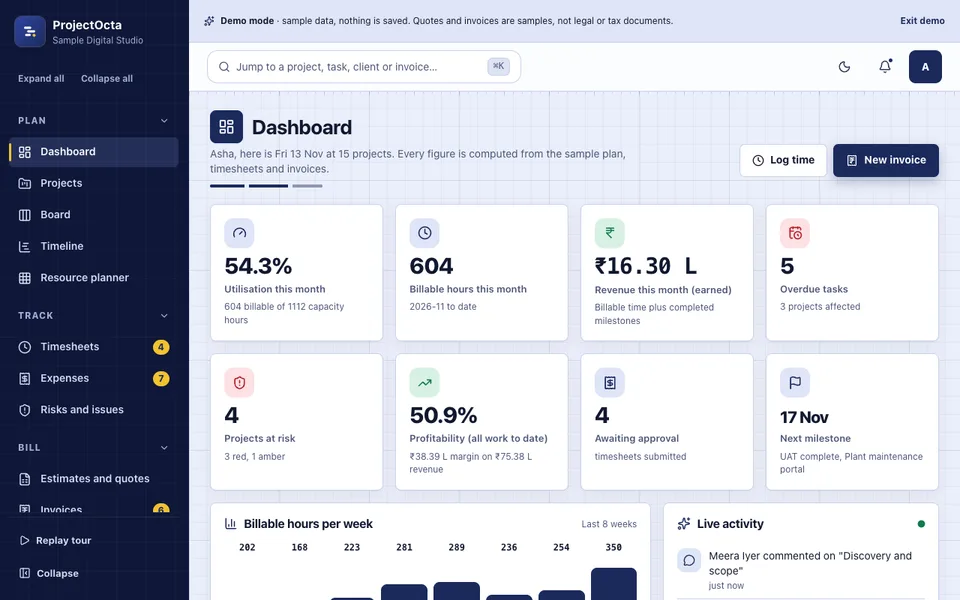
ProjectOcta is an interactive demo for a fictional "Sample Digital Studio" with made-up clients, projects and people. It uses sample data, nothing is saved, data resets on refresh, and there are no network calls. Quotes and invoices are samples, not legal or tax documents. It includes:
- Dashboard with utilisation, billable hours, revenue this month, overdue tasks, projects at risk and profitability.
- Projects and board with 15 projects, search, filters, a kanban per project with work-in-progress limits that warn, and drag or button moves.
- Timeline with dependencies, business-day scheduling, critical path, rescheduling that moves dependants, and cycle refusal. Dragging works with a mouse or pen, and touch screens use a list view or the Earlier, Later, Shorter and Longer buttons.
- Task detail and timesheets with subtasks, time logs, a weekly grid with a 24-hour daily limit, overtime, submit and approve, locked weeks and per-day cards on phones.
- Resource planner with a capacity heatmap, over-allocation warnings and a who-has-capacity helper.
- Estimates and quotes with rate cards, discount, margin and GST, a print preview, HTML and CSV download, and conversion to a project.
- Invoices and expenses generated from approved time, milestones and expenses, with sequential numbers, rounding, aging buckets and part payments.
- Clients, reports and risks with 12 clients, profitability, burn-down, burn-up, velocity, CSV exports and a 5 by 5 risk matrix.
- Client portal, team and roles, audit log, settings and integrations. Roles are enforced: a Client sees only the portal and never internal rates, costs or other clients. The integrations page says "Demo: nothing is connected".
The scheduling, capacity, timesheet, money and profit calculations are real code. The AI Studio is simulated: task breakdown from a brief, estimate by analogy, risk spotter, status report writer and meeting notes to tasks are templates, keyword rules, medians and arithmetic in your browser, each finding stating the numbers behind it. No language model is called. You can find it among the AI demos, and the GST settings are a demo feature, so check the current rules before relying on any invoice setup.
How to try the ProjectOcta demo
Open the demo, pick Owner, Project manager, Team member or Client, and press Try Demo Account on the login screen. A guided tour starts and can be replayed from the sidebar. Try pushing a task later on the timeline and watch its dependants move, then open the resource planner and look for an over-allocated person. Generate an invoice from approved time, then switch to the Client role and notice what disappears. Cmd or Ctrl and K opens the command palette.
Getting something like it built
A real system needs accounts, a database, backups, role rules and, for invoicing, a careful review of your tax setup with your accountant. We would start with your rate cards, project types and the one report you wish you had every Monday. Zenocta is a Hyderabad team of 11, whose most experienced members have 9+ years in the field, serving clients worldwide remotely, and we reply with a scoped, fixed-price proposal. To begin, tell us how projects are planned and billed today. You can also see our apps on Google Play, or read about project management software features for contractors to see how another industry handles milestones and budgets.
Try it live
Open the real thing: demos run in a new tab with sample data, apps link to their own page.
 Live demoProjectOcta live demoReschedule a Gantt with a critical path, log time, spot an over-allocated person, generate an invoice and switch to the Client role.
- ABrowse allAll AI demosTwelve AI app demos and ten quick demos, all with sample data and simulated AI.
- ZBrowse allZenocta appsProduction apps live on Google Play.
- TBrowse allTalk about a custom buildDescribe how you plan, track and bill projects and get a scoped, fixed-price proposal.
Frequently asked questions
01What is a critical path in project management?
The critical path is the longest chain of tasks that depend on each other, so it sets the earliest possible finish. A delay to any task on it delays the whole project. Tasks off the path have slack, meaning they can slip a little without moving the end date.
02How do I measure utilisation for a software team?
Divide billable hours by available hours for the same period. A person with 40 available hours and 28 billable hours is at 70 percent. Use it to spot trends and plan hiring, not to score individuals, and choose a target range that leaves time for leave and learning.
03Why store invoice amounts as whole paise?
Computers represent decimal fractions imprecisely, so adding many small amounts can drift by a paisa and make totals disagree. Storing money as whole paise and applying one stated rounding rule makes sums exact and repeatable. It is a small design choice that prevents arguments over an invoice.
04Does the ProjectOcta demo produce real invoices or tax documents?
No. Quotes and invoices in the demo are samples, not legal or tax documents, and the GST setting only shows how a split could work. Nothing is saved, data resets on refresh and the AI Studio is simulated. Check the current rules with your accountant for real invoicing.
05Can Zenocta build a project and billing system for our agency?
Yes. We begin with your rate cards, roles, project types and the reports you read, then send a scoped, fixed-price proposal. Tax and invoice formats should be reviewed with your accountant. Hosting and domain costs are billed separately and stated clearly.