In this guide
A five-person software team can ship something every day and still not know what is running in production. The last deploy was done from one developer's laptop, the version number lives in a chat message, the feature that was "turned off" is still on for half the users, and when something breaks at night nobody is sure who is meant to answer. This guide explains release management for small software teams in plain terms: what the moving parts are, which habits matter most, and what a single dashboard for all of it looks like, using an interactive demo you can open yourself.
Where does release work break in a small team?
Small teams rarely lack skill. They lack a shared picture. The work is spread across a code host, a build tool, a hosting dashboard, a chat channel and somebody's memory, and every handover between them is a place for a mistake. The same few failures show up again and again:
- Nobody knows what is live. Staging and production drift apart, and the answer to "which version is customers' version?" is a guess.
- Deploys depend on one person. If that person is on leave, releases stop, or someone improvises with the wrong credentials.
- Release notes are written at the last minute from memory, so they are short, late and sometimes wrong.
- A bad change cannot be undone quickly. The only way back is a new fix, written under pressure.
- Incidents live in chat. The timeline, the cause and the follow-up actions are scattered, so the same incident repeats.
None of this needs a large platform team to fix. It needs a small number of clear concepts, applied consistently.
Pipelines, deployments and releases: what is the difference?
These three words are used loosely, and mixing them up causes real confusion in handovers.
Pipeline
A pipeline is the automated route a change takes: build, test, package, and so on. Drawing it as a graph of stages shows which stages run in parallel and where it stopped when a run fails. Re-running only the failed stage saves time and keeps the log of the earlier attempt.
Deployment
A deployment is one version placed into one environment, such as test, staging or production. It has a state (queued, running, succeeded, failed), a person or rule that approved it, and a way back.
Release
A release is the named, versioned thing you tell people about: a number, a changelog and a date. A team can deploy ten times to staging for every one release. Keeping the words separate lets you say "we deployed build 214 to staging" and "we released 2.4.0" and be understood by everyone.
How do approval gates, promotion and rollback work?
The safest habit is to move a build forward through environments instead of rebuilding it for each one. That is called promotion: the same tested package goes from test to staging to production. Rebuilding for production means you are shipping something nobody tested.
Two controls make promotion safe without slowing a small team down:
- Pre-deployment checks. Tests passed, no open blocker, and the build is the one that was tested.
- An approval gate on production only. One named person approves, and the approval is recorded with a time.
Rollback is the other half. A rollback should be a button that redeploys the previous good version, not a project. Decide in advance which version is "last good" and make sure the database changes in a release are written so the previous version can still run, or the button will not help you.
Tip
Practise a rollback on staging once a month. A rollback you have never tried is a hope, not a procedure.
Why are feature flags worth learning early?
A feature flag is a switch in your code that decides whether a feature is on. It separates two things teams often bundle together: deploying code and releasing a feature. You can ship the code on Tuesday with the flag off, and turn the feature on for ten percent of users on Thursday.
Three ideas are worth knowing:
- Rollout percentage. The flag is on for a share of users. To keep each person's experience stable, the user's id is run through a hash function to give a number from 0 to 99, and the flag is on if that number is below the rollout. The same user always lands in the same bucket, so a feature does not flicker on and off between visits.
- Targeting rules. The flag can be on for your own team first, then for a customer segment, then for everyone.
- A kill switch. One toggle that turns a risky feature off immediately, with no deploy at all. For a small team, this is often the fastest incident response there is.
Flags also carry a cost: every flag is a branch in your code. Remove a flag once the feature is fully released, and give each one an owner and a review date.
What should you do when something breaks in production?
An incident is a period when your service is not working as promised. Teams that handle them well do the same small things each time:
- Declare it with a short title, a severity and one person in charge, so everyone knows it has an owner.
- Move it through clear statuses, for example investigating, identified, monitoring, resolved, and write each change on a timeline.
- Tell customers early on a status page, in plain words, with the time of the next update.
- Restore service first (roll back, flip a kill switch), and find the root cause second.
- Write a short postmortem that covers what happened, why, and which follow-up actions have owners and dates. The aim is learning, not blame.
A status page deserves a word of its own. It lists your components (for example web app, API, payments) with a current state and a record of past days. Customers who can see that you know about a problem send far fewer worried messages. Do not publish uptime figures you have not measured: show what your checks actually recorded.
Which four delivery measures should a small team watch?
Research on software delivery has settled on four measures, often called DORA metrics. They are useful for a small team because they are about outcomes, not effort.
| Measure | What it asks | Example with made-up numbers |
|---|---|---|
| Deployment frequency | How often do we ship to production? | 20 deployments in 4 weeks is 5 a week |
| Lead time for changes | How long from commit to running in production? | Changes take 2, 4 and 6 hours: the middle value is 4 hours |
| Change failure rate | What share of deployments cause a problem? | 3 of 20 needed a fix or rollback: 3 divided by 20 is 15% |
| Time to restore | How long to recover from an incident? | Incidents of 30, 90 and 60 minutes: 180 divided by 3 is 60 minutes on average |
These numbers are illustrative only. Your own will differ, and the point is the trend, not a target copied from someone else. Two cautions: never use them to rank individual developers, and do not chase a high deployment count by splitting changes into meaningless pieces. A healthy pattern is more frequent, smaller releases with a failure rate that holds steady or falls.
Spreadsheet, scripts or one dashboard: how do the options compare?
| Question | Chat and a spreadsheet | Scripts and several tools | One purpose-built dashboard |
|---|---|---|---|
| What is live right now? | Ask someone | Check each hosting panel | One environments view |
| Who approved a production deploy? | Scroll back in chat | Depends on the tool | Recorded on the run |
| Release notes | Written by hand, late | A script, if someone maintains it | Built from commit messages |
| Incident timeline | Reconstructed afterwards | Spread across tools | One timeline and postmortem |
| Cost of change | Low, but fragile | Grows with every tool added | A scoped build, then predictable |
A custom dashboard is not always the answer. If your team already has a build and hosting setup that works, a lightweight layer that reads from them may be enough. Be honest about which problems you actually have before you ask for a build.
What should you ask before choosing or building release tooling?
- Can we see, in one place, which version is running in each environment?
- Is production approval recorded with a name and time, and can it be required from a specific person or role?
- Can any deployment be rolled back in a few clicks, and have we tried it?
- How are secrets and environment variables stored and masked? Our post on small business cybersecurity covers why this matters.
- Are changelogs generated from commit messages, and what happens to commits that do not follow the convention?
- Is there an audit log we can export?
- Who is on call at 2 a.m., and does the tool know?
- What happens to our data and history if we leave?
Common mistakes when a small team formalises releases
- Copying a large company's process. Three approval layers for a team of five just teaches people to bypass the system. Start with one gate, on production.
- Measuring without acting. A dashboard nobody reviews is decoration. Pick one measure to discuss in a weekly fifteen-minute meeting.
- Leaving flags forever. Old flags are hidden complexity. Delete them when a feature is fully out.
- Skipping the postmortem when the fix was easy. Easy fixes often hide the same cause as the next hard one.
- No rehearsal for on-call. A rota nobody has tested leaves gaps at holidays and weekends. Our guide to technology mistakes that kill startups has more on process shortcuts that come back later.
What the ShipOcta demo shows
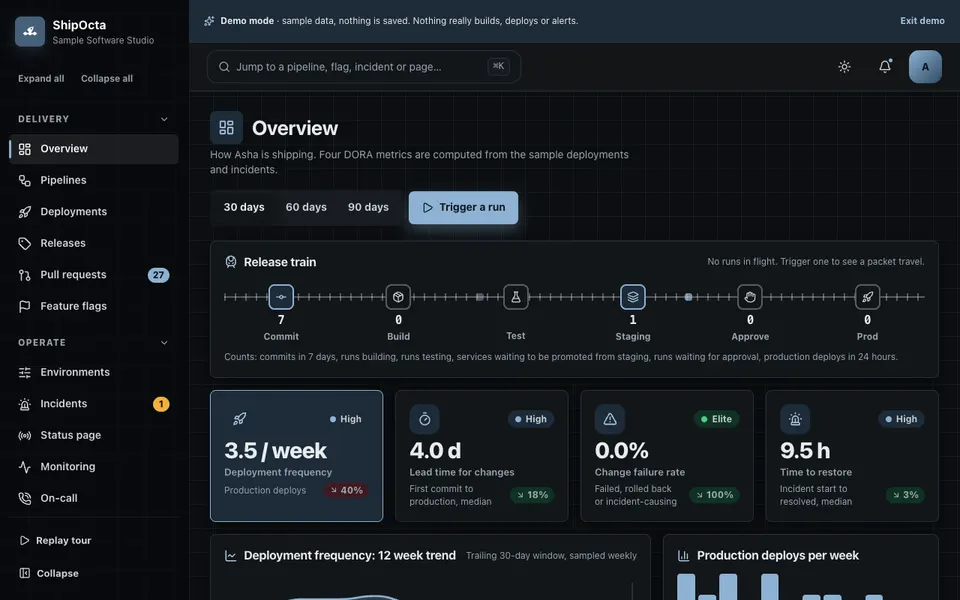
ShipOcta is an interactive demo for a fictional company called "Sample Software Studio". It uses sample data, nothing is saved, and data resets when you refresh. Nothing builds, deploys or alerts for real: pipeline runs are scripted simulations, there are no network calls, and the only thing stored in your browser is your light or dark theme. These are the real modules in the demo:
- Overview. Four delivery measures, a release train and trend charts, computed from the sample data.
- Pipelines and run detail. Eight pipelines as stage graphs or a list, with a streaming log, a timeline, an approval gate, re-run of a failed stage, cancel and rollback. Failures are scripted so you can see what a bad run looks like.
- Deployments. Promotion with checks and approval, rollback, a deploy calendar and a version diff.
- Releases. A changelog built from conventional-commit messages, a suggested version bump and a Markdown download.
- Pull requests. A merge gate that explains the reason a merge is blocked, with editable rules.
- Feature flags. Rollout, targeting rules, a kill switch and a deterministic evaluator with a test over 10,000 sample users.
- Environments and config. Masked variables and a compare view.
- Incidents. Declare, status flow, timeline, a postmortem builder and time to restore.
- Status page. Components, posting updates and a public preview with 90-day bars.
- Monitoring and on-call. Twelve checks, an alert simulator routed to the person on call, and a rotation builder with overrides.
- Tests and dependencies. A ranking of flaky and slow tests, and clearly sample advisories.
- Audit log, team and roles, integrations. Filters and CSV export; the integrations page says "Demo: nothing is connected".
The AI Studio holds a commit classifier, log summariser, root-cause hints, changelog writer and pull request risk scorer. All of it is keyword rules, regular expressions and arithmetic running in your browser. No language model is called, and the output should not be read as a real prediction of your own code. It is part of our AI demos, and the logic behind the flags, the on-call maths and the version bump is real code, not pictures.
How to try the ShipOcta demo
Open the demo and press Try Demo Account on the login screen. A guided tour starts, and you can replay it from the sidebar. Then try this short route: trigger a pipeline in Pipelines and open the run; promote a build in Deployments and watch the approval gate; flip the kill switch on a flag; declare an incident and fill in the postmortem builder; finally open the status page preview. Press Cmd or Ctrl and K for the command palette. On a phone, tables become cards and the pipeline graph has a list alternative.
Getting something like it built
A real version would connect to your actual code host, build runner and hosting, which means credentials, permissions and a server-side layer the demo deliberately does not have. We would start by writing down your real pipeline, your environments, who may approve what, and which of the four measures you want to watch. Zenocta is a Hyderabad team of 11, whose most experienced members have 9+ years in the field, serving clients worldwide remotely, and we respond with a scoped, fixed-price proposal. If you want to talk it through, tell us how your team ships today. You can also look at the production apps we have published, or read how we approach delivery in our software development process.
Try it live
Open the real thing: demos run in a new tab with sample data, apps link to their own page.
 Live demoShipOcta live demoTrigger scripted pipelines, promote and roll back deployments, flip a kill switch, declare an incident and preview a status page.
- ABrowse allAll AI demosTwelve AI app demos and ten quick demos, all with sample data and simulated AI.
- ZBrowse allZenocta appsProduction apps live on Google Play.
- TBrowse allTalk about a custom buildDescribe how your team ships and get a scoped, fixed-price proposal.
Frequently asked questions
01What is the difference between continuous integration and continuous delivery?
Continuous integration means every change is built and tested automatically when it is merged. Continuous delivery goes further: every passing build is kept in a state where it can be released, often with a human approval before production. The first checks the code, the second keeps releasing routine.
02Does a small team really need feature flags?
Not on day one, but they become valuable once you ship often. A flag lets you deploy unfinished work safely, release to a few users first and switch a feature off without a new deploy. Start with a few flags, give each an owner, and delete them after full rollout.
03What should a status page show?
List the parts of your service customers care about, such as the web app, the API and payments, with a current state and a short written update during an incident. Include the time of the next update. Only show history your own checks recorded, never an estimate presented as fact.
04Is the ShipOcta demo a real deployment tool?
No. It is an interactive demo with a fictional company. Pipeline runs, alerts and the AI Studio are scripted simulations in your browser, nothing is connected to a code host or server, nothing is saved and data resets on refresh. It exists so you can react to a realistic screen.
05How does Zenocta price a custom release dashboard?
We scope your pipeline, environments, roles and first release with you, then send a scoped, fixed-price proposal. Hosting and domain costs are billed separately and stated clearly. Because it would connect to your real tools, we also list what access and credentials the build needs.