In this guide
Most small businesses do not have a content problem, they have a coordination problem. Ideas sit in a notes app, drafts travel through chat as screenshots, the owner approves something by thumbs-up on a Tuesday, and on Friday nobody remembers whether it went out. This guide explains how a content calendar and approval workflow should work for a small business or a small agency, which checks are worth automating, and how a simulated demo shows all of it on a fictional bakery.
Where does content work fall apart today?
The usual setup is a spreadsheet for the calendar, a shared folder for images and a chat group for sign-off. It works until volume grows or a second person joins. Then the same failures appear:
- Two posts on the same channel at the same time, because nobody could see both on one page.
- Approval by memory. A client says "looks fine" in a voice note, and later says they never saw the final version.
- Ideas that vanish. A good thought from a staff member is never captured, so the calendar is built from whatever someone remembers on Monday morning.
- The same message pasted everywhere. A long professional-network post copied to a short-post channel gets cut off in the middle of a sentence.
- No record of what was tried. Without notes on which version ran, next quarter's plan starts from zero.
What does a content calendar actually need to do?
A calendar is more than a grid of dates. A useful one answers four questions at a glance: what is going out, on which channel, in what state, and who owns the next step.
- Several views. Month for planning, week for the working day, list for searching, and a simple agenda on a phone.
- Filters by channel and by status, so an editor can see "everything waiting for review".
- Clash warnings when two items land on the same channel in the same slot.
- Easy rescheduling. Dragging works with a mouse, but there should also be buttons and keyboard moves for people who cannot drag, and for phones.
- Campaigns that group related posts and show progress computed from the items inside them, not typed in by hand.
Why write once and adapt for each channel?
A single idea usually needs several shapes. The same offer might be a photo with a short caption, a longer professional update, a one-line short post, a broadcast message and a blog paragraph. Every channel has its own length limit, its own point where long text gets folded behind a "more" link, and its own habits around hashtags and links. Limits change over time, so check the current rules on each channel instead of memorising numbers.
A workable routine is to write the idea once, then adapt it:
- Write the core message in one or two plain sentences, with the single action you want the reader to take.
- Adapt the opening line for each channel, because the first line is what readers see before any fold.
- Check length, links and hashtags against that channel.
- Add the call to action in the form the channel handles best, such as a reply, a link or a visit.
- Schedule each version separately, so one failure does not hold up the rest.
Previews help here. Seeing roughly how the text will be cut before you publish catches the sentence that ends at "Visit us at our new sto".
What checks are worth running before a post goes out?
Some checks are simple rules a computer can apply without any intelligence at all. They are worth having because people skip them when they are busy.
Readability
The Flesch reading ease score is a long-standing formula based on average sentence length and average syllables per word. Higher scores mean easier text. For a made-up passage of 100 words in 8 sentences with 140 syllables, the average sentence is 12.5 words and the average word is 1.4 syllables, so the score is 206.835 minus 1.015 times 12.5 minus 84.6 times 1.4, which is about 75.7. That is in the easy range. The score is a prompt to look again, not a verdict: short is not always clear, and a technical audience can handle denser text.
Brand voice and banned words
A small brand guide can become a checklist: words you never use, a preferred way of greeting, signature lines, and approved hashtag sets. A lint check that flags a banned word is cheap and saves an awkward correction later.
Hashtags, emoji, links and calls to action
Count them. Too many hashtags, a post with no clear action, or a link that was forgotten are common slips. A check that says "no call to action found" is plain pattern matching, and still useful.
How should approvals work, and who signs off on what?
Approval is a small state machine. A post is a draft, then in review, then either approved or sent back with changes requested, then scheduled, then published. The rules that matter:
- Roles. A writer can draft and submit, an editor can review and send back, and an owner can approve and schedule. A writer should not be able to approve their own work.
- History. Every change of state is recorded with who and when. That record settles the "I never saw that version" argument.
- Review time targets. If an editor has two working days and an owner one, then a campaign that goes live on a fixed date must enter review at least three working days earlier, and a sensible team adds one day of buffer, so four.
- Client access for agencies. A client should be able to approve what concerns them without seeing your other clients' work or your internal notes.
Tip
Write down the approval rule for each content type once: routine posts need one editor, offers and prices need the owner, anything about health, money or legal matters needs a named expert. Then the software only has to enforce what you already decided.
What can analytics honestly tell you?
Reporting is where small teams are most tempted to read too much into too little. A calendar tool can group your own results by channel, content type and hashtag set, and show a trend in audience size. It cannot tell you why something worked. A post that did well on a festival week may simply have been a festival week.
Be careful with any suggestion of a "best time to post". A tool can compute which of your own past slots had the strongest numbers, which is a fair starting point for your own test. It does not mean the same slot will work for another business or that a platform will treat your post differently. Treat it as a hypothesis, change one thing at a time and keep notes.
Spreadsheet, shared drive or purpose-built workflow: how do they compare?
| Need | Spreadsheet and chat | Shared drive and email | Purpose-built workflow |
|---|---|---|---|
| See everything on one calendar | One tab, hard to filter | Not really | Month, week, list and filters |
| Catch a channel clash | By eye | By eye | Automatic warning |
| Prove who approved what | Scroll through chat | Search email | History on every item |
| Check length and voice | Manual | Manual | Rules per channel and brand |
| Capture ideas from the team | Messages that get buried | Documents nobody opens | An ideas board that opens a draft |
| Setup effort | An afternoon | Low | A scoped build, then steady |
Common mistakes with content calendars
- Planning every day of the year. A calendar that is too full is abandoned. Plan the next four weeks in detail and keep a looser outline beyond that.
- One approval step for everything. If the owner must see every routine post, they become the bottleneck and approvals are skipped.
- Treating automation as authority. A readability or voice check is a nudge. A human still decides.
- Ignoring the asset side. Posts wait for images. A simple way to produce quote, announcement and offer graphics inside the same tool removes a common delay.
- Never reviewing results. Put a monthly review in the calendar itself. Our guide to why every business needs a modern website is a reminder that social channels should lead somewhere you own.
What the ContentOcta demo shows
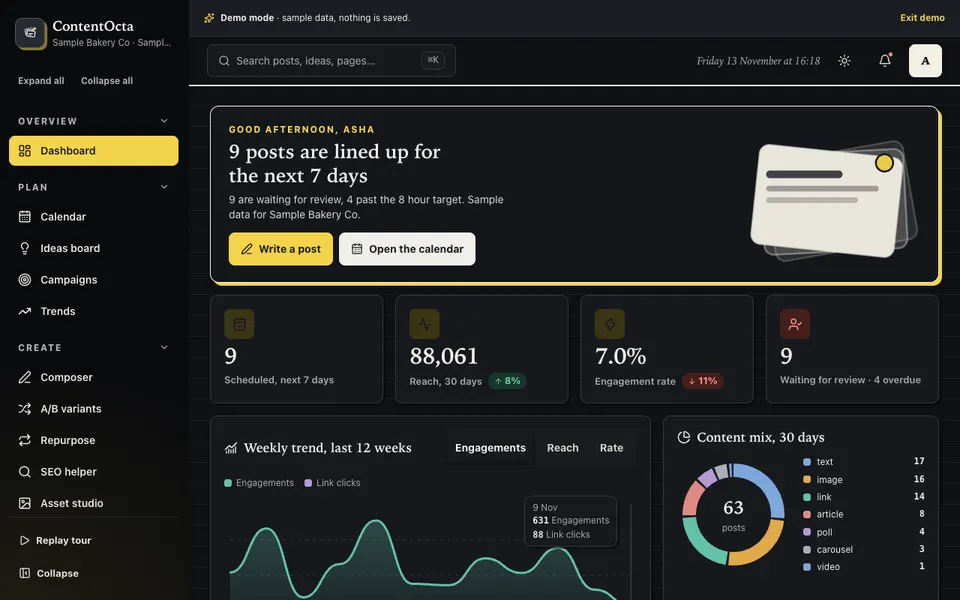
ContentOcta is an interactive demo for a fictional company, "Sample Bakery Co". It uses sample data, nothing is saved, data resets on refresh, and nothing is ever posted anywhere. The channels are generic (photo feed, professional network, short posts, messaging broadcast and blog), and no real platform is named or imitated. Here is what is in it:
- Dashboard with a summary of the sample plan.
- Calendar in month, week and list views, with drag or move buttons or Alt plus arrow keys, a same-channel clash warning, best-time suggestions computed from the sample history, filters and an agenda on phones.
- Composer with per-channel previews, limits and folds, readability, hashtag, emoji, link and call-to-action checks, a brand-voice lint, hashtag suggestions and a three-variant draft generator, then schedule or send for approval.
- A/B variants and an Ideas board as a kanban that opens the composer pre-filled.
- Brand kit with voice rules, banned words, hashtag sets and signatures.
- Asset studio that makes quote, announcement and offer graphics in six themes and five sizes, with a real SVG download.
- Approvals with Writer, Editor and Owner permissions, review timers and history.
- Campaigns, analytics, audience personas, trends, an SEO helper and repurposing, plus integrations (nothing is connected), team and roles, an audit log and settings.
The readability score, the hashtag and link detection, the per-channel trimming, the brand lint, the clash detection, the approval states and the SEO checklist scoring are real rules running on the sample data. The draft generator, AI Studio (five tools) and Repurpose are templates, word lists and rules, so they are simulated: no language model is called and nothing leaves your browser. The demo belongs to our AI demos, which is where to compare it with the other simulated tools.
How to try the ContentOcta demo
Open the demo, choose a role if you like and press Try Demo Account on the login screen. A guided tour starts and can be replayed from the sidebar. Then try a short route: drag a post to a slot that already has one on the same channel and read the warning; open the Composer and watch the previews change as you type; submit a draft for approval, switch role to Editor and send it back; and finish in the Asset studio by downloading a graphic. Cmd or Ctrl and K opens the command palette.
Getting a content workflow built for your business
A real version would connect to the accounts you actually publish on, which needs permissions, token storage and a server-side layer, and each channel's own rules on automation need checking. We would begin with your channels, who approves what and your brand rules, and keep the first release small. Zenocta is a Hyderabad team of 11 serving clients worldwide remotely, and we send a scoped, fixed-price proposal. If you want to explore it, tell us how your content gets approved today. You can also see the production apps on Google Play, or read how AI is changing SMEs in India for context on where simulated tools like these fit.
Try it live
Open the real thing: demos run in a new tab with sample data, apps link to their own page.
 Live demoContentOcta live demoPlan a calendar, write with per-channel previews, send a draft for approval and download a generated graphic, all with sample data.
- ABrowse allAll AI demosTwelve AI app demos and ten quick demos, all with sample data and simulated AI.
- ZBrowse allZenocta appsProduction apps live on Google Play.
- TBrowse allTalk about a custom buildDescribe your channels and approval rules and get a scoped, fixed-price proposal.
Frequently asked questions
01How far ahead should a small business plan its content?
Plan the next four weeks in detail and keep a looser outline for the following months. Detailed plans for a full year get abandoned. Leave room for timely posts, and make sure review time is built in, so approvals do not become last-minute rushes.
02Who should approve social posts in a small team?
Decide by risk. Routine posts can need one editor, while prices, offers and anything touching health, money or legal matters should need the owner or a named expert. Record each approval with a name and time, so there is no doubt about who signed off.
03Is a suggested best time to post reliable?
Treat it as a starting hypothesis. A tool can show which of your own past slots performed strongest, but that does not prove another slot would do worse or that the pattern will hold. Change one thing at a time, keep notes and review monthly.
04Does the ContentOcta demo post to real social accounts?
No. It is an interactive demo with a fictional bakery. Nothing is posted, nothing is connected, nothing is saved and data resets on refresh. Its draft generator and AI Studio are templates and rules in your browser, so they are simulated, and no language model is called.
05Can Zenocta build a content tool connected to our real channels?
Yes, as a scoped build. We would confirm each channel's current rules for automated publishing, design the roles and approvals with you and handle credentials safely on a server. You receive a scoped, fixed-price proposal, with hosting and domain billed separately.