In this guide
Every team has the same question asked again and again: how many days do we have to accept a return, what is the hotel limit in London, who may see the supplier terms? The answers exist, buried in handbooks, manuals and policy files, and the person who knows where they are is always busy. The idea behind a "chat with your company documents" tool is simple. The hard part is making it show its sources and keep restricted material out of the wrong hands.
Why does searching a shared drive fail for policy questions?
A shared drive is organised by whoever saved the file, not by the questions people ask. Searching it returns whole documents, not the paragraph that answers you, and several problems follow.
- Whole files, not answers. A 40-page policy matches your keyword on page 31, and you read until you find it.
- Old copies outrank new ones. An archived FAQ sits beside the current one and says something different.
- Access is all or nothing. A folder is open or closed, so sensitive text gets pasted into chats instead.
A document assistant tries to fix these by finding the right passages and pointing to the source. Whether it does so honestly depends on engineering choices that are easy to describe and often skipped.
How does a "chat with your documents" tool actually work?
Most systems of this kind, often called retrieval-augmented generation or RAG, follow the same sequence. Seeing the stages one by one makes it clear where quality is won or lost.
Ingest and chunk
Documents are read in and split into chunks, small pieces of a few sentences each. Chunks are the unit that gets searched and cited, so how you cut them matters more than most buyers expect.
Index, retrieve and rank
Each chunk is made searchable, with its words weighted by how rare and informative they are. The question is then scored against every chunk the user is allowed to see, and the best few go forward.
Compose the answer
An answer is written from those chunks, with a numbered citation for each source. This stage is where a system can either quote the documents or generate new wording.
Verify
The answer is checked against its sources: is each sentence supported, do the numbers match, do two sources disagree, and is there anything to answer at all?
How big should a chunk be?
Too large and a chunk contains several topics, so the best passage is diluted. Too small and a sentence loses its context, such as the exception that follows the rule. Many builders add overlap, repeating the last few words of one chunk at the start of the next, so a fact that straddles a boundary is not cut in half.
The arithmetic is easy to check. Take an invented 600-word policy, cut into 100-word chunks. With no overlap you get 6 chunks. With a 20-word overlap each new chunk starts 80 words after the last one, so the chunks start at words 0, 80, 160, 240, 320, 400, 480 and 560, which makes 8 chunks. Overlap protects the sentences near the boundaries.
How does retrieval rank the right passage first?
Two families of ranking are common. Keyword scoring (BM25 is the standard form) rewards chunks that contain the question's rare words many times and penalises very long chunks. Vector similarity compares the overall shape of the question to the shape of each chunk. Real systems often use both and fuse the two ranked lists.
One popular fusion method, reciprocal rank fusion, gives each chunk a score of 1 divided by (60 plus its rank) in every list, then adds them up. With invented ranks: chunk A is first by keywords and third by similarity, which scores 1/61 + 1/63, about 0.0323. Chunk B is second by keywords and first by similarity, which scores 1/62 + 1/61, about 0.0325. Chunk B wins narrowly because it did well in both lists, even though it won neither outright. A second step called maximal marginal relevance then avoids returning four near-identical chunks.
It also helps to rewrite a follow-up before searching: "And what about sale items?" means little alone, but with the previous question it becomes a precise search.
What makes an answer trustworthy: citations, grounding and saying no
A fluent answer is not a correct one. Four behaviours separate a useful assistant from a confident guesser.
- Numbered citations that open the exact source chunk, not just a file name.
- A grounding check per sentence, so unsupported statements are flagged, quotes are verified word for word and numbers that do not match the source are caught.
- A refusal rule. When nothing relevant is found, the right output is "this is not in the documents", and the unanswered question goes on a list of gaps to write up.
- Conflict handling. If two documents give different figures, show both and name them, instead of picking one quietly.
There are two ways to produce the final text. A generative system writes new sentences. An extractive system quotes sentences that already exist in your documents. Extractive answers read more stiffly, but every word can be traced. Either way, the sources and the checks matter more than the style.
How should access control work in a document assistant?
The key rule is simple: filter before you search, not after you answer. If restricted chunks are scored and then hidden, they have already influenced the ranking, may appear in a log and can leak through an answer's wording. If restricted chunks are never loaded for a user's role, they cannot leak.
In practice that means each document carries an access tier, each user has a role, and retrieval only considers chunks that the role is allowed to read. The same rule applies to actions: uploading, re-indexing and deleting documents should depend on role, and a forbidden page should refuse, not hide. An audit log of who asked and changed what completes the picture. Check the current data protection rules for any documents containing personal data.
How do you know it works? Evals, feedback and red-teaming
"It seemed fine in a demo" is not evidence. A small, honest test set is better than none.
- Evals. Write real questions with the document each should come from, run them after every change and compare two configurations side by side. A regression, where a question that used to pass now fails, shows up straight away.
- Red-teaming. Try hostile inputs: instructions hidden inside a document ("ignore the sources"), requests to dump restricted files, attempts to extract personal data. Document the ones your defences miss.
Be wary of any single accuracy number. A test set written alongside the documents shows that your tooling works, not how the system will perform on questions you have not imagined. For security habits around the surrounding systems, see our guide to small business cybersecurity.
Shared drive search, a wiki or a custom document assistant?
| Need | Shared drive search | FAQ page or wiki | Purpose-built document assistant |
|---|---|---|---|
| Find the passage, not the file | No | If someone wrote the question | Yes, via chunking and ranking |
| Show the source | File name only | The page itself | Numbered citations to the chunk |
| Different roles see different content | Folder permissions | Page permissions | Filter before retrieval, per role |
| Say "not in the documents" | Empty search results | Silence | Explicit refusal and a gap list |
| Measure quality over time | Not possible | Page views | Eval set and regression diff |
A rollout plan that does not start with the hardest documents
- Pick one audience and 10 to 20 documents. Public customer policies are a good start.
- Tag every document with an access tier before anything is indexed, and name an owner for each.
- Write 30 to 50 real questions from your inbox and chat history, each with the document that should answer it.
- Run the first version and read the traces. Look for chunks that are too small, stale sources ranking first and questions that should have been refused.
- Add the safety layer. Test hostile inputs and role switching before real users arrive.
- Review gaps weekly. Assign each gap to a document owner.
What should you ask any vendor or builder?
- Can I see the retrieved passages, scores and ranking behind any single answer?
- Does every answer carry citations that open the exact source text?
- Is access filtered before retrieval, and can I demonstrate that a restricted chunk never reaches a lower role?
- What happens when nothing relevant exists: refusal, or a confident guess?
- How do you test quality: what is the eval set, who wrote it and how are changes compared?
- What file types are really supported? Ask specifically about scanned files and PDFs.
- If a language model is involved, where do keys, rate limits and spend caps live, and who pays for usage?
- Who owns the data and where is it stored? Hosting and the domain are normally billed separately from the build.
What mistakes do teams make with document chat?
- Indexing everything at once. Old drafts and archived copies drown the current policy. Start small and mark stale material.
- Assuming it understands paraphrase. Keyword-based retrieval misses questions that share no words with the source, and you should test for that.
What the KnowOcta demo shows
KnowOcta is an interactive demo for a fictional retailer, Larkfield Outdoor Co., with 14 invented documents. It is built to be exact about what is real and what is not.
What is real and what is simulated
The retrieval runs for real in your browser: tokenising, chunking, keyword and similarity scoring, fusion, access filtering, grounding checks and the evals. The answers are not written by a language model. A rules-based composer quotes sentences from the documents. Latency, tokens and cost are estimates, connectors load canned sample documents, and the "vectors" are sparse word-weight vectors, not neural embeddings. Nothing is saved, data resets on refresh, and the people and the login are fictional. It is a demo, not a product with real users.
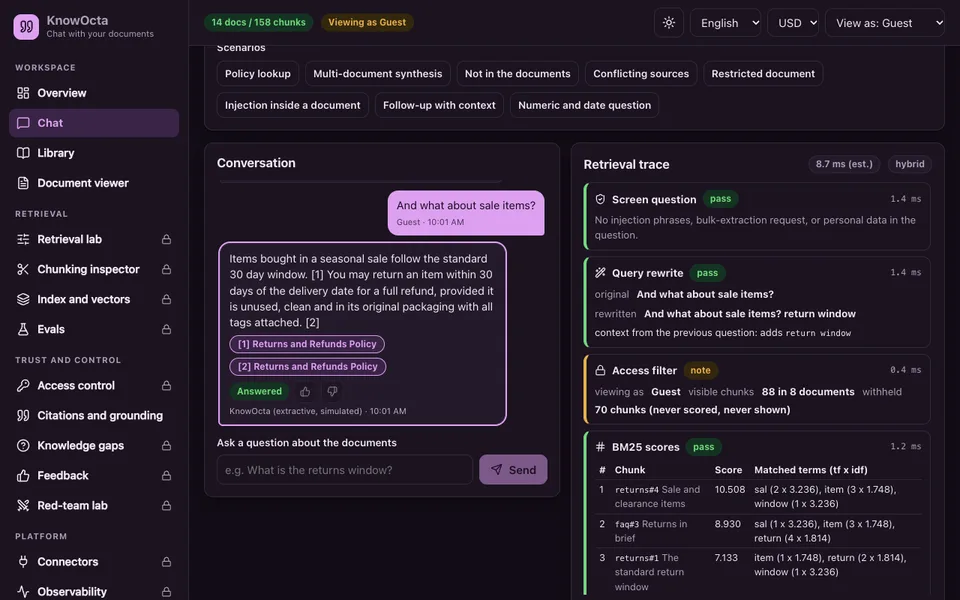
- Chat with a live retrieval trace. A conversation beside a trace showing question screening, query rewrite, the access filter, keyword scores, similarity scores, fusion and the composed answer with numbered citations that open the source chunk. Eight scenario buttons cover a policy lookup, a multi-document question, a question with no answer, conflicting sources, a restricted document, an instruction hidden in a document, a follow-up and a date question.
- Library and document viewer. Documents with owner, access tier and freshness. Paste text or upload a .txt, .md or .csv file and it is chunked and indexed for real. PDFs are not parsed.
- Retrieval lab and chunking inspector. Change chunk size, overlap, top-k and ranking settings, re-index and compare results for the same question.
- Access control. The "View as" switch changes what retrieval can see. For example, as a Guest the sample shows 88 chunks in 8 documents visible and 70 withheld, which are never scored or shown.
- Citations and grounding, gaps, feedback. Support per sentence, a list of unanswered questions, and thumbs that adjust a visible boost list. Connectors, observability and an audit log (chained with SHA-256 hashes) are simulated or estimated.
- Evals and red-team lab. A 47-question test set run against two configurations with a regression diff, and 15 adversarial inputs. One red-team input is a documented miss, because the guardrails are heuristics, not a complete defence.
Two honest limits: it matches English keywords, so a paraphrase with no shared words can miss, and its refusal rule can turn away an unusual phrasing of an answerable question. The demo is part of our AI demos, and you can browse every sample business on the demo apps page.
How to try the KnowOcta demo
Open the demo and press Try demo workspace on the landing page. Go to Chat, click "Conflicting sources" and read the trace, then click "Restricted document" and notice it says it cannot access. Use "View as" in the top bar to switch from Guest to Admin and ask the same question again. Finally, open Evals and run the two configurations to see how a regression diff looks.
Getting a document assistant built for your team
A real build starts with your documents, your roles and your questions. If it should use a language model to write answers, that needs a server-side layer for keys, rate limits, spend caps and abuse controls, and we would scope it with you openly. If extractive answers with citations are enough, a lighter build can work. Zenocta is a Hyderabad team of 11 serving clients worldwide remotely, and we return a scoped, fixed-price proposal. To start, tell us what your team keeps asking. You can also see our shipped apps on Google Play, and our posts on how AI is changing SMEs in India and why MSMEs invest in custom software add background.
Try it live
Open the real thing: demos run in a new tab with sample data, apps link to their own page.
 Live demoKnowOcta live demoChat with a live retrieval trace, switch between Guest and Admin roles, tune chunking and run the evals on a fictional retailer's 14 documents.
- ABrowse allAI demosTwelve AI app demos and ten quick demos, all with sample data and simulated AI.
- ABrowse allAll demo appsBrowse every interactive demo, each with a sample company and nothing saved.
- ZBrowse allZenocta appsProduction apps live on Google Play.
- TBrowse allTalk about a custom buildTell us what your team keeps asking and get a scoped, fixed-price proposal.
Frequently asked questions
01What does 'chat with your documents' mean?
It means asking questions in plain language and getting answers drawn from your own files, with references to where each answer came from. Behind it, the system splits documents into chunks, indexes them, retrieves the best matches for each question and composes an answer from those passages.
02How do I stop staff seeing documents they should not?
Tag every document with an access tier and give each user a role, then filter chunks by role before any search happens. If restricted text is never loaded for a role, it cannot appear in ranking, logs or answers. Test this by asking the same question under different roles.
03Does KnowOcta use a language model?
No. KnowOcta runs real retrieval in your browser, but its answers come from a rules-based composer that quotes sentences from the sample documents. Latency and cost figures are estimates. It shows the retrieval engineering, not generated text, and nothing is saved or sent anywhere.
04What should the system do when the answer is not in the documents?
It should say so and record the question as a gap, not guess. A good tool refuses when nothing relevant is found, shows both sources when documents conflict, and lets the team assign each unanswered question to someone who can write the missing document.
05Can Zenocta build a document assistant for my team?
Yes. We start from your documents, roles and the questions people ask, then return a scoped, fixed-price proposal. If a language model is involved, we scope the server-side layer for keys, rate limits and spend caps with you. Extractive answers with citations can be a lighter alternative.