In this guide
A jeweller worries about the daily gold rate and the metal sitting with a karigar. A kirana owner worries about the credit notebook and the carton that expires on the back shelf. A franchise founder worries about outlets he cannot visit. All of them are called "retail", yet no single package fits them. This guide is software for retail shops explained by job, not by label: which problems repeat across the sector, which are specific to your trade, and how six Zenocta demos map to them.
What jobs does software need to do in retail and commerce?
Strip away the trade names and a shop does a short list of jobs. The mistake most owners make is buying a billing tool when the money is actually leaking from one of the others.
- Selling and billing: a bill that is correct the first time, with the right rate, discount, tax line and payment mode.
- Stock: knowing what you hold, in what form (by piece, by unit number, by weight, by batch) and what is about to go bad or go old.
- Work in progress: anything made, repaired, baked or stitched after the order is taken, with a date somebody promised.
- Money outside the bill: credit given to customers, instalments, saving schemes, finance partners, royalty owed to you or by you.
- Suppliers and craftspeople: purchases, reorders, metal or fabric handed out, piece-rate payouts.
- People and access: who may change a price, see a cost or delete a record.
- Customer follow-up: reminders, ready-for-pickup messages, repeat business.
Every trade stresses these jobs differently. Jewellery stresses stock by piece and the daily rate. A mobile shop stresses unit-level stock and the repair bench. A bakery stresses time, because the oven is the scarce resource. Once you know which job hurts most, the software shortlist gets much shorter. For the common counter basics, our guides to billing and inventory software for retail shops and software for small retailers cover the ground that every trade shares.
How do you find the leak before you shop for software?
Do this on paper first. It takes one quiet afternoon and it stops you buying a feature you do not need.
- List where cash or stock is tied up: unpaid credit, stock that has not moved, jobs waiting at a workshop, metal or fabric with outside people, royalty not yet collected.
- Put a rupee figure next to each. A rough number is fine. The point is to rank them.
- Ask which one nobody can see on a normal day. That is usually the one to digitise first.
- Name the person who would update it. A record nobody owns goes stale within a month.
Here is an invented example for a general store with monthly sales of ₹6,00,000. The owner finds ₹45,000 of credit older than 30 days and ₹8,000 of packets that expired before they sold. Together that is ₹53,000 tied up or lost, and the credit is more than five times the expiry loss. Billing speed at the counter was never the problem. The first module worth paying for is the credit ledger with ageing, and expiry tracking comes second. A bakery or a jeweller would run the same exercise and reach a different answer: late cakes or untracked karigar metal. The method is the same, and the answer is yours.
Spreadsheet, ready-made app or custom build?
There are three honest routes, and each suits a different stage of a business. The table compares approaches, not products.
| Question | Notebook and spreadsheet | Ready-made billing app | Custom build |
|---|---|---|---|
| Fits a trade-specific job (karigar metal, oven clashes, royalty slabs) | Only if you design the sheet yourself | Usually not, or only partly | Built around the job |
| Cost to start | Almost nothing | Low | A scoped, fixed-price proposal |
| Speed of staff at the counter | Depends on the sheet | Good for plain sales | Designed for your counter |
| Handles several outlets | Awkward | Varies | Yes, if scoped in |
| Your own rules (making charge, credit limit, scorecard weights) | Manual formulas | Limited settings | Configured to your policy |
| Risk | Formulas overwritten, files drift | You adapt your shop to the tool | You must explain your workflow clearly |
A spreadsheet is a fair choice for a one-counter shop with simple sales. A ready-made app is fair when your trade is plain retail. A custom build starts to make sense when the money is lost in a step the generic tool does not model. Our note on why MSMEs invest in custom software explains where that line usually sits.
Six trades, six demos: where to start
Zenocta has built an interactive demo for each of the businesses below. Each opens on a fictional company, and each has its own deeper article. The summaries here tell you who it suits and what the demo actually lets you click through.
Jewellers: JewelOcta
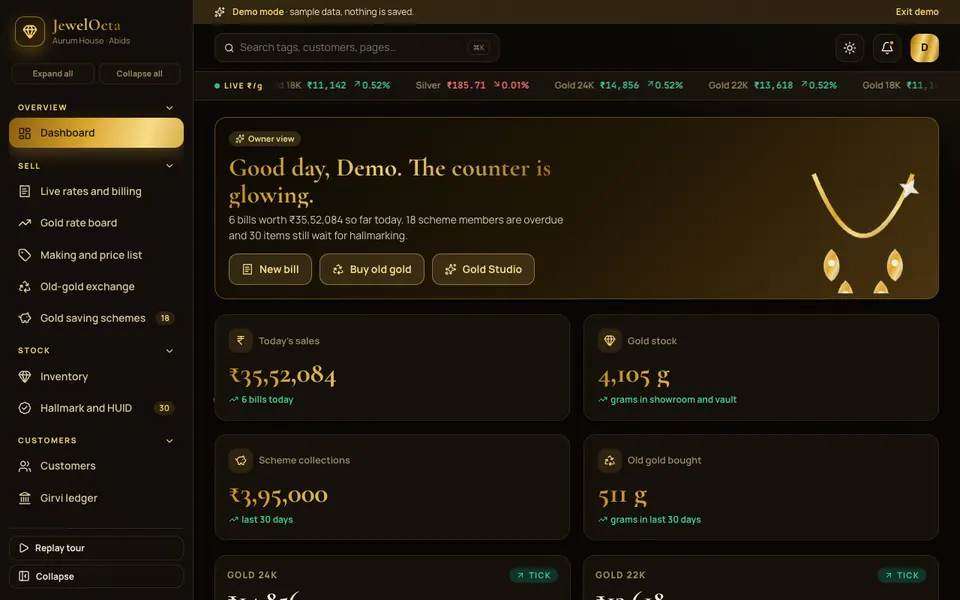
For jewellery shops where price moves daily and value sits in weight and purity. The demo has a live rate ticker with a rate lock, a bill builder that starts from a tag lookup and handles making charge, stone, wastage and old-gold deduction, tag-wise inventory with a scan audit, 11+1 saving schemes with a dues calendar, and a karigar kanban with issue and return entries. It solves best the problem of counting by total grams when you need to count by piece. Read the jewellery shop software guide or open the JewelOcta demo.
Boutiques and tailors: TailorOcta
For boutiques where one garment passes through a cutter, a karigar, a trial and an alteration. The demo has an order board with fabric swatches, a measurement profile with a body diagram, history and family profiles, a trials and delivery calendar, an alterations queue, karigar piece-rate payouts and fabric stock. It solves best the lost-notebook problem: measurements and due dates that live on slips of paper. See the boutique software guide or try the TailorOcta demo.
Kirana and general stores: KiranaOcta
For neighbourhood stores that sell on credit and carry hundreds of dated packets. The demo has barcode billing, an udhaar ledger per customer, an expiry heat map drawn as a shelf map, a reorder list grouped by distributor and WhatsApp orders entered as real orders. It solves best the quiet cash drain of old credit and short-dated stock. Read the kirana store software guide or open KiranaOcta.
Mobile and electronics shops: MobiOcta
For shops that sell phones and repair them in the same room. The demo has a POS with EMI and exchange, stock by IMEI, a seven-stage repair bench board with part-status chips and customer OTP delivery, spare parts, warranty and supplier returns, and four role views. It solves best the split between counter and bench, where repairs usually run on sticky notes. See the mobile shop software guide or try MobiOcta.
Bakeries and cake studios: BakeOcta
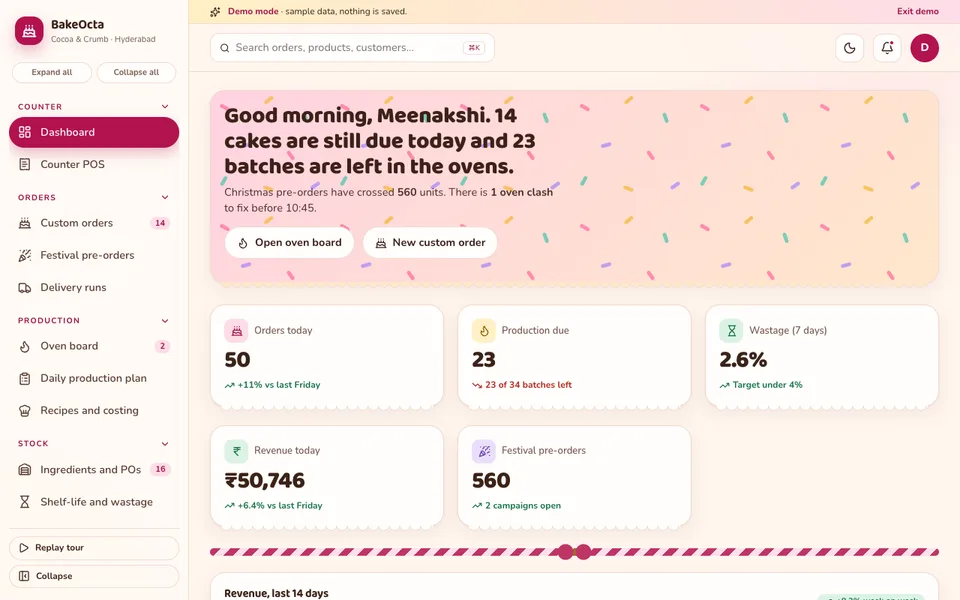
For bakeries that take custom cakes against fixed times. The demo has a custom cake builder with a live preview, an oven board that warns about clashes, late batches and capacity, a festival surge slider, a daily production plan, recipe costing and wastage tracking. It solves best the 6 a.m. surprise: seeing an overloaded oven while the customer is still on the phone. Read the bakery software guide or open BakeOcta.
Multi-outlet brands: FranchiseOcta
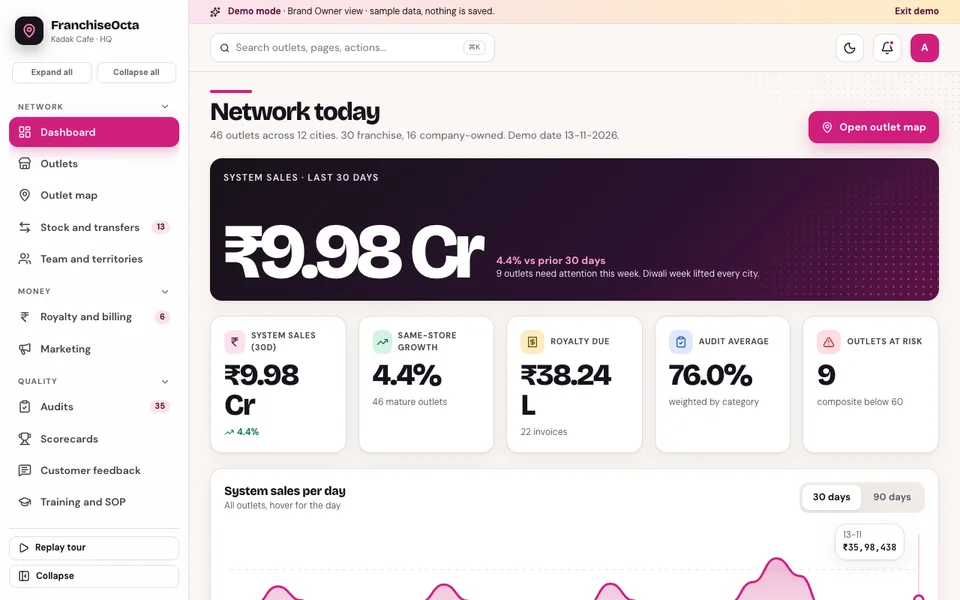
For brands that can no longer walk into every outlet. The demo has an outlet map with scorecard rings, royalty with marginal slabs and a marketing fund line, audits with corrective actions and re-audit, stock transfers between outlets, and an onboarding kanban for new franchisees. It solves best the visibility problem: one comparable view across a network. See the franchise management guide or try FranchiseOcta.
How do the six demos compare?
The table lists what each demo includes. A blank cell means the demo does not feature it, not that a custom build could not add it.
| Demo | Counter billing | Stock | Work or order tracking | Money beyond the bill |
|---|---|---|---|---|
| JewelOcta | Bill builder with rate lock and old-gold deduction | Tag-wise, scan audit | Karigar kanban | Saving schemes, girvi ledger |
| TailorOcta | Billing with GST | Fabric inventory | Order board, trials, alterations | Karigar piece-rate payouts |
| KiranaOcta | Barcode billing | Shelf map, expiry alerts | WhatsApp orders | Udhaar ledger |
| MobiOcta | POS with EMI and exchange | IMEI stock, spare parts | Repair bench board | EMI and finance settlement |
| BakeOcta | Counter POS | Ingredients and POs, shelf-life | Oven board, custom orders | Recipe costing |
| FranchiseOcta | Stock and transfers | Onboarding kanban, audits | Royalty slabs and ageing |
Each demo also contains a seven-tab "studio" of AI-style tools. Those are scripted illustrations of what assistants could do, not live models, so judge the demos on the workflow pages, not on the studios.
How do you try the demos in 15 minutes?
Treat it as a quick fit test. Pick the one or two demos closest to your trade and walk through a normal day.
- Open the demo from the links above. It runs in the browser on a phone, tablet or laptop.
- Press Try Demo Account on the login screen. A guided tour starts and can be replayed from the sidebar.
- Walk your own flow. Make a sale, move an order card, check a balance or open the map, whichever matches your busiest hour.
- Switch role or layout where the demo allows it, and look at what changes for a counter person.
- Write down the gaps. Note every step where your shop works differently. That list is your brief for a builder.
What the demos are
Every demo uses a fictional company and sample data. Nothing you do is saved, the data resets when you refresh, and anything that looks like AI is simulated. They show what a custom build could contain. They are not products with real shops behind them. Compare them on the demo apps page.
What mistakes do retailers make when buying software?
- Buying for the bill, not the leak. Find where money disappears first: credit, expiry, melt loss, idle ovens or late royalty.
- Importing history before the present. Start with open orders, active customers and new stock, then work backwards.
- Letting everyone see everything. Cost prices, rate editing and deletion should depend on role.
- Skipping the counter test. If a sale is slower than the old way during a rush, staff will quietly go back to paper.
- Forgetting the outside party. Karigars, distributors, finance partners and franchisees all need a clear record, not a memory.
- Ignoring the phone. Owners often check the shop from home or from the road, so the owner view should work on a phone, not only on the counter PC.
- Treating tax settings as fixed. Rules change, so ask who maintains them and check the current rules yourself.
What should you ask a builder before you commit?
- Which of my jobs from the list above does your system model directly, and which would be workarounds?
- Can my own rules (making charge, credit limit, slab rates, scorecard weights) be changed without a developer?
- How do roles work, and can I hide cost prices from the counter?
- What is real in your demo and what is simulated? Ask for a live walk-through.
- Can I export every record if I leave?
- Who owns the data and where does it live? Hosting and the domain are normally billed separately from the build, so ask for that cost in writing.
- How will you handle my rollout: which module first, and how long do the old and new methods run side by side?
Getting a version built around your own workflow
None of these six shops is yours. Your making rules, your distributors, your oven hours and your franchise agreement are specific, and a custom build can follow them. Zenocta starts from how your counter, workroom or network actually runs, then returns a scoped, fixed-price proposal for the modules you need. If you want to talk it through, tell us about your shop. You can also see what we ship in our production apps, and our guide to how MSMEs reduce costs through digital transformation is a good primer for the conversation.
Try it live
Open the real thing: demos run in a new tab with sample data, apps link to their own page.
 Live demoJewelOcta live demoRate ticker and rate lock, tag-wise stock, bill builder with old-gold deduction, saving schemes and a karigar kanban.
 Live demoKiranaOcta live demoBarcode billing, udhaar ledger, expiry shelf map, distributor reorder and WhatsApp orders.
 Live demoMobiOcta live demoPOS with EMI and exchange, IMEI stock and a seven-stage repair bench board.
- ABrowse allAll demo appsBrowse every interactive demo, each with a sample company and nothing saved.
- ZBrowse allZenocta appsProduction apps live on Google Play.
- TBrowse allTalk about a custom buildTell us how your shop or brand runs and get a scoped, fixed-price proposal.
Frequently asked questions
01Do I need different software for a jewellery shop and a general store?
Usually yes, because the hard parts differ. A jewellery shop needs stock by piece, a daily rate and karigar metal records. A general store needs credit ledgers, expiry tracking and distributor reorders. Plain billing overlaps, but the trade-specific jobs rarely do.
02When is a spreadsheet enough for a small shop?
A spreadsheet works for a single counter with simple sales, few staff and no outside parties such as karigars, finance partners or franchisees. Once you have credit customers, made-to-order jobs or several outlets, the cost of one missed follow-up usually exceeds the cost of a proper system.
03Can one system handle both a counter and a workshop or repair bench?
Yes, if it is designed that way. A mobile shop, for example, needs a sales counter and a repair board linked by customer and parts. Many ready-made billing tools cover only the counter, which is why shops with a bench often look at a custom build.
04Are the retail demos real products I can buy?
No. They are interactive demos with a fictional company and sample data. Nothing is saved, data resets on refresh and any AI-style tool is simulated. They show what a custom build could contain, and you can try each one in the browser.
05What does a custom build for a retail business involve?
We start from how your counter, workroom, kitchen or network really runs, agree the modules you need, and return a scoped, fixed-price proposal. Rollout is usually staged, starting with the module that hurts most, with old and new methods running side by side first.