In this guide
Most B2B SaaS founders spend the first three months building the same invisible things: sign-in, teams, roles, billing, invoices and an audit trail. None of it is your product, yet an enterprise buyer will ask about every piece before signing. This guide walks through the SaaS starter foundations that a multi-tenant product needs, shows the billing arithmetic that trips up first versions, and explains what a simulated foundation demo can show you before you commission anything.
What are SaaS foundations, and why do they cost so much time?
Foundations are the features every business product needs regardless of what it does. They look small on a roadmap and turn out large in practice, because each one touches the others.
- Accounts and sign-in: email and password, magic links, two-step verification, password reset.
- Workspaces: one customer company with its own people, data and settings, often several per user.
- Roles and permissions: who may invite, change billing, delete data or read the audit log.
- Billing: plans, trials, upgrades, proration, coupons, usage charges, tax and invoices, plus what happens when a card fails.
- Security features buyers ask for: single sign-on, an audit log, API keys, webhook signatures and a data-privacy page.
- Developer surface: API keys, webhooks and documentation, because customers will integrate.
Teams that postpone them usually retrofit them under pressure, which is when tenant data leaks and billing bugs appear.
What does multi-tenant actually mean?
Multi-tenant means many customers share one running application, but each customer's data stays separate. The simplest mental model: every record carries a tenant identifier, and every query must filter by it. The risk is the query somebody forgets to filter.
Three practical rules
- Put the tenant identifier on every record, and make the data layer, not each screen, apply it.
- Write tests that try to read tenant B's records while signed in as tenant A. They must fail.
- Treat a user as a member of one or more workspaces, with a role in each, rather than as belonging to one global account.
Tip
Test isolation from the outside, not just inside code you wrote. Many leaks come from a background job, an export or a webhook that nobody remembered to scope to a tenant.
How should roles and permissions be designed?
Start with a small set of roles and a matrix of actions. A typical B2B product has an owner, an administrator, a member and a billing contact or viewer. The matrix lists actions down the side (invite a person, change a plan, create an API key, read the audit log) and roles across the top, with a yes or no in each cell.
Enforce it in two places. The interface hides what a role cannot do, and the server refuses it anyway with a clear "not allowed" response. Hiding a button is a courtesy; refusing the request is the control. A "view as role" switch for your own team is a cheap way to catch screens that show too much.
Billing arithmetic that first versions get wrong
All of the examples below use made-up prices and a made-up tax rate purely to show the method.
Proration on an upgrade
A customer on a 30-day cycle pays 30 a month on a Starter plan and upgrades to a Growth plan at 90 a month on day 10, leaving 20 days.
| Step | Calculation | Amount |
|---|---|---|
| Credit for unused Starter days | 30 times 20 / 30 | -20.00 |
| Charge for remaining Growth days | 90 times 20 / 30 | 60.00 |
| Net due now | 60 minus 20 | 40.00 |
| Made-up 10% tax on the net | 40 times 10% | 4.00 |
| Total charged | 44.00 |
Usage overage
Suppose a plan includes 1,000,000 API calls, a customer used 1,150,000 and overage is priced at 0.50 per 1,000 calls. Overage is 150 thousand extra calls, so 150 times 0.50 equals 75.00. A good billing page shows the percentage of the allowance used before the bill arrives, so nobody is surprised.
Money in whole units
Store and calculate money in the smallest unit (cents or paise) as whole numbers, converting to decimals only for display. Decimal arithmetic on money causes the one-cent mismatches that make customers distrust an invoice.
Tax and reverse charge
Whether you charge tax, which kind and at what rate depends on where you and the customer are and what the customer is. For some business-to-business cross-border sales, tax moves to the buyer under a reverse-charge arrangement, which the invoice should state. These rules vary by country and change, so check the current rules with your accountant before you build or switch anything on.
Failed payments
Plan the dunning flow: retry on a schedule, email the customer, show a banner in the product, and decide at which point access is limited. A silent failure costs revenue, and an aggressive lockout costs goodwill.
How do you build SaaS foundations, step by step?
- Decide your tenant model. One user in many workspaces or one user per workspace? Changing this later is painful.
- Write the roles matrix. Four roles and about a dozen actions is enough to begin.
- Build sign-in properly. Include two-step verification and password reset from day one.
- Define plans and limits. Seats, usage allowances and features per plan, in one table the code reads.
- Implement billing math as pure functions. Proration, coupons, overage and tax as testable calculations, separate from the payment provider.
- Add the audit log early. Record who did what and when, and chain the entries so edits are detectable.
- Add API keys and webhooks. Hash keys at rest, show them once, and sign webhook payloads so receivers can verify them.
- Gate new features with flags. Release to a few workspaces first.
If you are still deciding what to build first, our guide on how to build an MVP without wasting your budget helps separate foundations you need now from those you can defer.
Build it yourself, use a template or commission a foundation?
| Approach | Strength | Watch out for |
|---|---|---|
| Build everything yourself | Full control, fits your model | Months before product work starts |
| Starter template or boilerplate | Fast start | Hidden assumptions about tenants and billing you inherit |
| Commissioned foundation | Built to your model and plans, tested | Needs a clear scope and roles matrix |
| Spreadsheet and manual invoices | Works for the first handful of customers | Breaks at the first proration or tax question |
What to ask any developer or vendor about SaaS foundations
- How is tenant isolation enforced, and can I see a test that proves it?
- Are roles enforced on the server for every action, or only hidden in the interface?
- Is billing arithmetic done in whole minor units, and are there tests for proration, coupons and overage?
- How are API keys stored, and can they be shown only once?
- Are webhook payloads signed, and how do receivers verify them?
- Is the audit log tamper-evident, and can administrators export it?
- Who handles tax rules, and how are they updated when rules change?
- What exactly is simulated or missing in the first delivery?
Common mistakes
- Building billing around the payment provider's objects. Keep your plan logic in your own code so you can change providers.
- One global role. A person can be an owner in one workspace and a viewer in another.
- Roles checked only in the front end. Anyone with a browser console can bypass them.
- Storing API keys in plain text. Store a hash, show the key once on creation.
- Skipping the status and changelog pages. Buyers look for them, and they cost little.
- Treating security features as certification. Having single sign-on or an audit log does not mean any certification has been earned. For wider hygiene, see small business cybersecurity.
What the SaaSKit demo shows
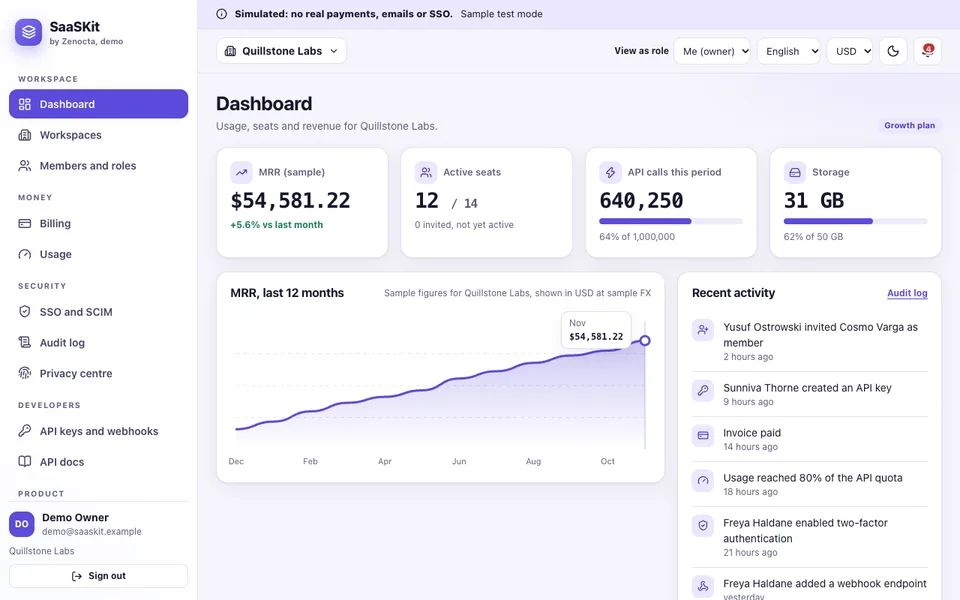
The SaaSKit demo is an interactive example of these foundations, set in a fictional workspace called Quillstone Labs. It runs in the browser on desktop, tablet and phone layouts. It is a simulated foundation: no real payments, emails or single sign-on, all companies and people are invented, nothing is saved and the page resets when you refresh. The billing, tax, hashing and permission logic run as real code in the browser, but the payment, email, directory and API layers are simulated, and the demo claims no certification.
- Landing, sign-in and onboarding: sign-in, sign-up, magic link, two-step screen, password reset, a status page, a changelog and an architecture page.
- Dashboard and usage: sample monthly recurring revenue, active seats, API calls and storage against plan limits.
- Workspaces, members and roles: several workspaces and a role matrix enforced on every page, with a View as role switcher and a not-allowed screen.
- Billing: plan changes with proration, coupons, usage overage, dunning and invoices, plus sales tax and VAT handling including reverse charge. Tax figures are illustrative.
- SSO and SCIM: single sign-on and provisioning screens, simulated, with a domain-ownership token.
- Developers: API keys stored as hashes, webhooks with signed payloads and an API documentation page.
- Audit log, notifications, flags, locale, privacy centre, admin and settings: a hash-chained log, a feature-flag page whose switches change other pages, English, German and Spanish for the shell, a privacy page, an admin area and settings.
The demo is candid about its edges. Two-step verification uses a fixed sample code rather than a real authenticator, tenant isolation is enforced in the browser to show the pattern and is not a security boundary, and only the interface shell is translated.
How do you try it?
- Open the demo and choose Try demo account on the landing page, which skips the second step.
- Go to Billing and change the plan. Read the proration lines and compare them with the table above.
- Open Members and use the View as role switcher. Visit Billing as a member and see the not-allowed screen.
- Open Developers, create an API key and note that it is shown only once.
- Check the Audit log, then see the rest of the series in all Zenocta demo apps.
Getting a SaaS foundation built for your product
A real foundation is built to your tenant model, your plans and your real payment, email and sign-in providers, and it is tested against your roles matrix. Zenocta scopes that as a fixed-price proposal, so you can see the full cost before product work begins. See what we ship in production on the Zenocta apps page, then tell us about the product you are launching.
Try it live
Open the real thing: demos run in a new tab with sample data, apps link to their own page.
 Live demoSaaSKit live demoSwitch roles, change a plan with proration, create an API key and read the hash-chained audit log, all simulated.
- ABrowse allAll demo appsSee every interactive industry demo built by Zenocta.
- ZBrowse allZenocta appsProduction apps live on Google Play.
- TBrowse allTalk about a custom buildDescribe your product and plans and get a scoped, fixed-price proposal.
Frequently asked questions
01What does multi-tenant mean in SaaS?
Many customers share one running application while each customer data stays separate. Every record carries a tenant identifier and the data layer filters by it, so one company can never read another company records.
02How is proration calculated on a plan upgrade?
Credit the unused part of the old plan and charge the remaining part of the new one. On a 30-day cycle, upgrading from 30 to 90 with 20 days left gives minus 20 plus 60, so 40 is due before any tax.
03Does the SaaSKit demo process real payments or single sign-on?
No. Payments, emails, single sign-on and the API are simulated, all companies and people are invented, nothing is saved and the page resets on refresh. The billing and permission logic does run as real code in the browser.
04Why should API keys be shown only once?
Storing only a hash means a database leak does not expose working keys. The full key is displayed once at creation, and if a customer loses it they revoke it and create another.
05Can Zenocta build SaaS foundations for my product?
Yes. Zenocta scopes custom builds as a fixed-price proposal after reviewing your tenant model, plans, roles and providers. A first delivery clearly states what is real and what is still simulated.