In this guide
Finance and compliance businesses run on dates, documents and money that has to reconcile. A CA firm, an insurance agency, a chambers, a small lender and a subscription company look different from outside, yet each one loses work in the same places: a deadline held in someone's head, a document chased on WhatsApp, a payment that was promised but never logged. This guide is about software for finance and compliance businesses of that kind, and how to decide what you actually need before you open a single demo.
Read this first
Everything here describes software for running a business. It is not tax, legal, lending or investment advice. Rates, due dates, thresholds, forms and regulator rules change, so in every case the instruction is the same: check the current rules with your adviser or the official source, and enter the verified dates and values into your system yourself.
What jobs does software need to do in finance and compliance?
Start from the jobs, not from the features list. In this sector the work falls into six groups, and most businesses care about two or three of them far more than the rest.
- Dated obligations. Filings, hearings, renewals, instalments, reminders and review dates, each with an owner and a status.
- Client or customer records. One record per person or company, with family or group links, documents and a history of contact.
- Documents and evidence. What was requested, what arrived, whether it was checked, and when it expires.
- Money records. Fees, premiums, commissions, EMIs, receipts, invoices, dues and ageing, tied to the same record as the work.
- Exceptions and escalations. Notices, claims, overdue accounts, failed payments, incidents: anything that needs a person to act this week.
- Reporting. The few numbers the owner reads every week, produced the same way every time.
Notice what is missing: the rules themselves. A good system holds the dates and values you have verified and counts down to them. It should not quietly decide what a law requires. That is a recurring theme in all eight demos below, and it is a useful test of any vendor.
Where does the work break today?
Almost every small finance or compliance operation starts in the same three places: a spreadsheet per person, a shared drive of scanned papers, and a chat group where the real status lives. It works until volume grows or someone is away.
The failure is rarely a date nobody knew. It is the missing document, the unassigned task, the reminder sent once, or the hours that were never logged. A calendar does not fix that on its own. What fixes it is a record that links the date to the person, the paperwork and the money, so one screen answers: what is due, who has it, what is missing, and what will it earn.
Spreadsheet, purpose-built app or custom build: how to decide
You do not need a custom system on day one, and you may never need one. The honest comparison looks like this.
| Approach | Works well when | Starts to hurt when | Watch out for |
|---|---|---|---|
| Spreadsheets and shared folders | One or two people, a few dozen clients, simple dates | Several people edit, or dates depend on documents arriving | No history of who changed what, and reminders that depend on memory |
| A ready-made app | Your process is close to the common one and you can adapt to it | You keep working around it, or key reports cannot be shaped | Paying for modules you never open, and exporting data when you leave |
| Custom build | Your service mix, review steps or reporting are unusual and drive revenue | The scope is vague or you try to build everything at once | Ownership of the data and code, and a clear first release |
A sensible path is to document the process on a spreadsheet first, run it for a month, and only then decide. If the same three problems appear every week, you have a requirement. Our note on why every MSME should invest in custom software covers when the investment pays, and the guide to building a first version without wasting budget shows how to keep a custom build small.
Practice firms: CA, insurance and legal work
These three businesses sell a person's time and judgment, and the software around them is a client-and-deadline engine.
CAOcta, for CA and tax firms
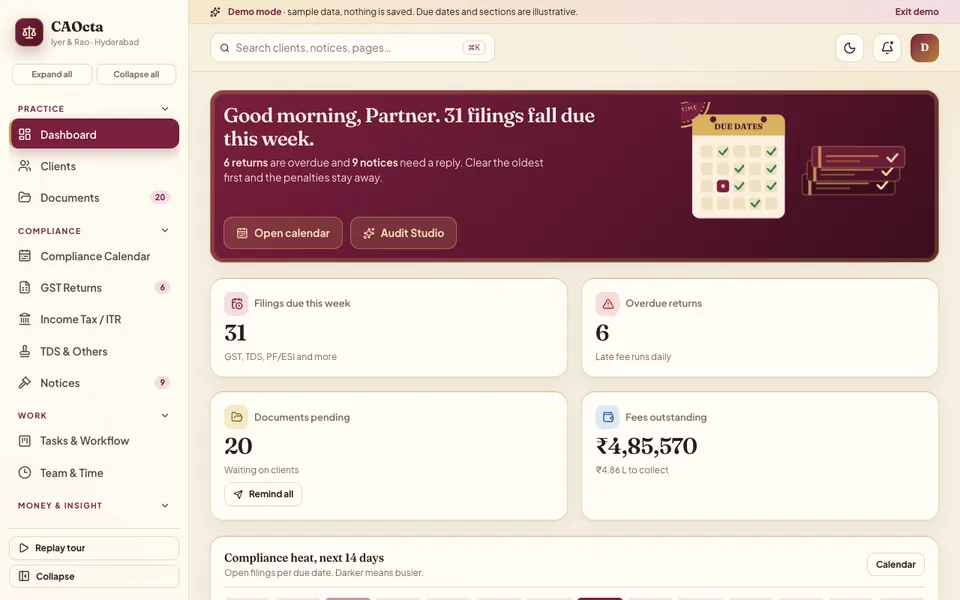
CAOcta centres on a compliance calendar, a GST return matrix of clients against filing periods, an income tax board that moves cards from documents received to e-verified, a notices queue with severity and reply date, document tracking, time logging and billing with ageing. It solves one thing best: showing which work is blocked by a missing document or an idle owner. The deep dive is in practice management software for CA firms, and you can open the CAOcta demo directly.
InsureOcta, for insurance agents and POSP teams
InsureOcta gives each client one record covering family, policies, documents, claims and notes, then adds a 60-day renewal wheel, a renewal ladder you drag cards across, a staged claims board with a document checklist, and commission views by insurer. Its strongest idea is the look-ahead: instead of a long list of policies, you see which days are busy and send a reminder from there. Read insurance agent CRM: renewal tracking and commissions, or open the InsureOcta demo.
LawOcta, for advocates and small law firms
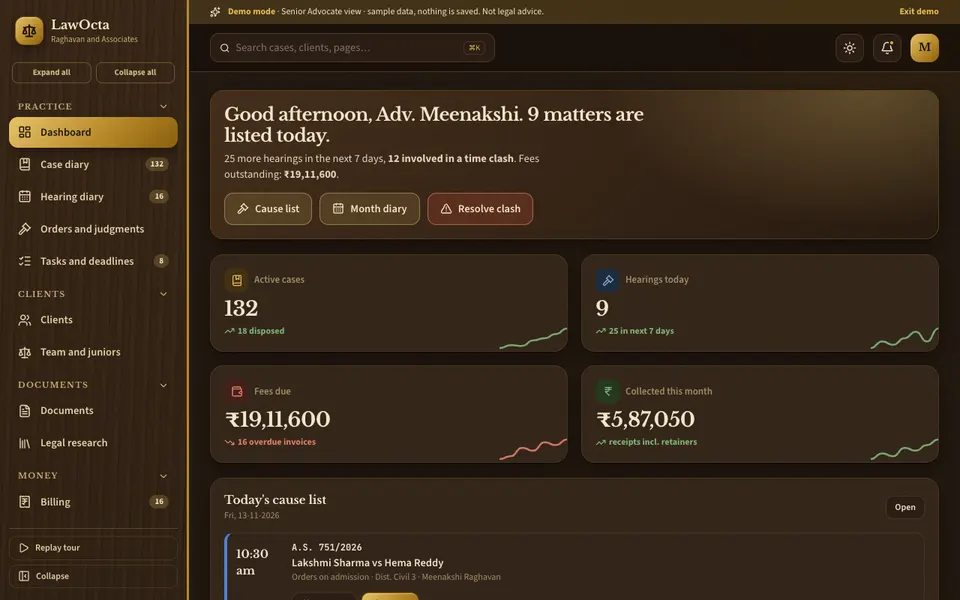
LawOcta is a practice diary: a case list, a month grid of hearings coloured by court with clash warnings and drag-to-adjourn that captures a reason, a limitation tracker that counts down to a date the advocate has entered, document templates, and billing with fee agreements, expenses and GST invoices. It solves the morning-of surprise when two appearances overlap. It is not legal advice and decides no legal limits. Deep dive: case management software for advocates. Try the LawOcta demo.
Money in motion: lenders and subscription businesses
When the business is the recurring flow of cash itself, the key screens are schedules, ladders and boards that show who has not paid and what happens next.
LoanOcta, for NBFCs, microfinance, chit funds and gold loans
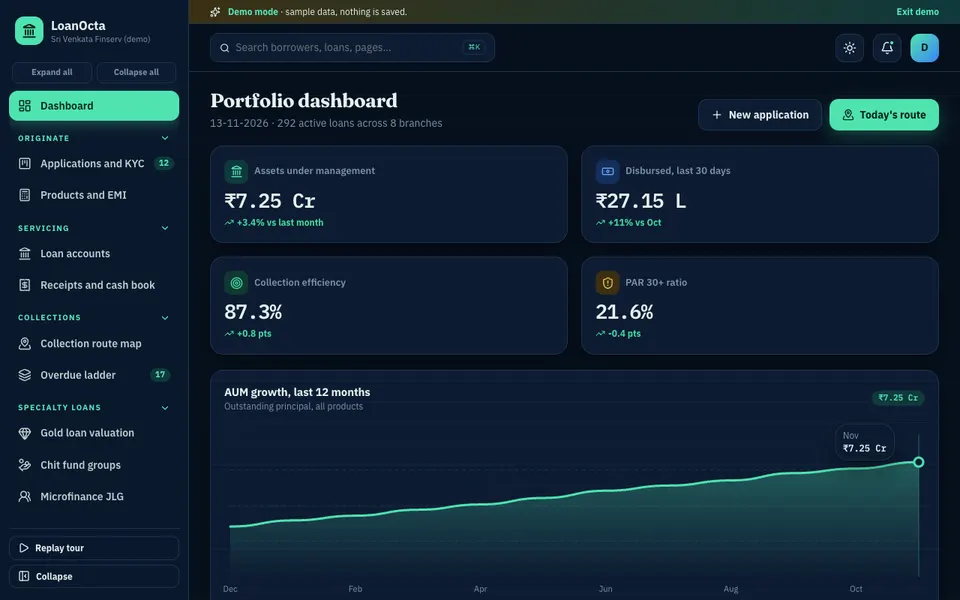
LoanOcta has a drag pipeline for applications with a KYC document checklist, an EMI calculator that compares flat and reducing methods with a full schedule, receipts and a cash book, a collection route map, an overdue ladder by days past due, and gold valuation, chit and group-lending screens. It solves daily collection discipline: a route, a recorded payment or promise, and cash reconciled the same day. Credit decisions on screen are simulated. See loan management software for small lenders and the LoanOcta demo.
SubscribeOcta, for SaaS and membership businesses
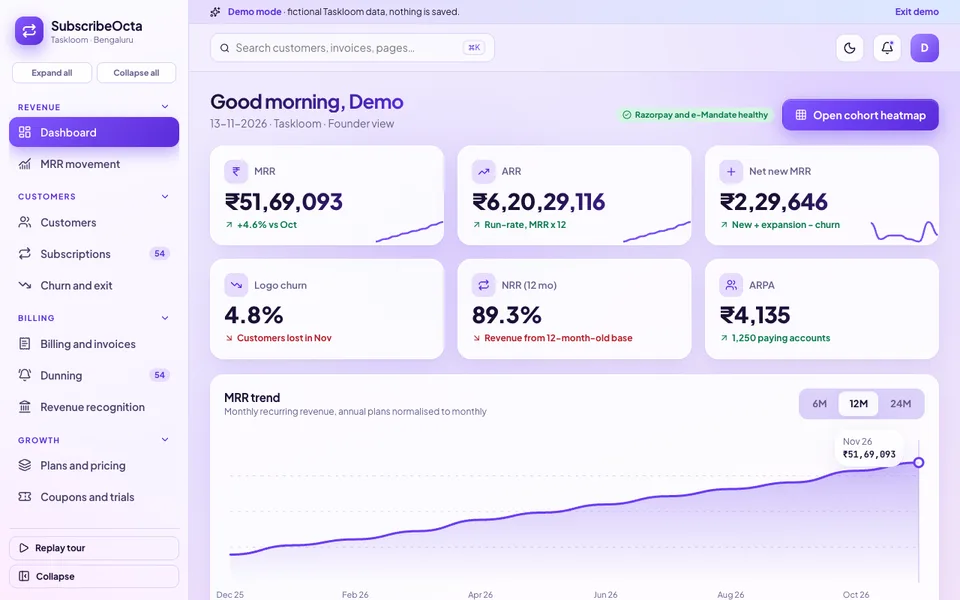
SubscribeOcta shows MRR, a five-way MRR waterfall, a cohort retention heatmap you can flip between logo and revenue, a drag dunning board for failed payments, GST invoices, a deferred revenue schedule and a price-change simulator. Its best contribution is separating growth you added from decline you did not notice. The guide is subscription billing software: dunning and MRR tracking, and the live view is the SubscribeOcta demo.
Reporting and EU readiness: three demos for finance teams
The last cluster is for teams that turn records into reports, and for small firms selling into the EU. Two of these are explicitly simulated, and we say so plainly.
ReportOcta, for finance, operations and agency teams
ReportOcta loads a CSV, profiles its columns, and lets you group, filter and compare periods, then build charts, pivots, dashboards and paginated reports. Roles can limit which rows a person sees, and scheduled sends are previewed rather than delivered. It solves the weekly paste-and-screenshot routine. It uses no AI: every number is plain calculation. Read turn a CSV into a dashboard and open the ReportOcta demo.
InvoiceOcta, for Irish and EU SMEs and their accountants
InvoiceOcta is a simulated e-invoicing readiness layer built around a fictional company. You compose an invoice, generate a UBL file, run 41 rule checks that explain each failure in plain words, and try a simulated inbox with duplicate detection and matching. It is not a certified or compliant system, and nothing is submitted anywhere. It teaches why a structured invoice differs from a PDF. See e-invoicing readiness for SMEs and the InvoiceOcta demo.
ComplyOcta, for SMEs and firms selling into the EU
ComplyOcta is a simulated evidence tracker with one library of 71 controls mapped to short, illustrative summaries of three frameworks, an evidence vault with fingerprints and expiry, risks, suppliers, incidents, and an audit pack you can generate. The framework text is unverified and it carries a not-legal-advice banner. Using it does not make anyone compliant. Read compliance evidence tracker for SMEs and open the ComplyOcta demo.
How the eight demos compare
This table lists only what each demo's own pages show. A blank cell means it is not a focus of that demo.
| Demo | Dated work queue | Money records | Documents or evidence | Role-based views |
|---|---|---|---|---|
| CAOcta | Compliance calendar, notices queue | Billing, receipts, ageing | Document tracking per client | |
| InsureOcta | 60-day wheel, renewal ladder | Commission statements | Documents and KYC, claim checklists | Four roles |
| LawOcta | Hearing diary, limitation tracker | Fee agreements, GST invoices | Templates with merge fields | Four roles |
| LoanOcta | Overdue ladder, collection routes | Receipts, cash book | KYC checklist per application | Four roles |
| SubscribeOcta | Dunning board with retries | GST invoices, deferred revenue | Four roles | |
| ReportOcta | Simulated schedules, alerts | Four roles, row limits | ||
| InvoiceOcta | Simulated send and reporting queue | Invoices, credit notes | Archive, XML import | Four roles |
| ComplyOcta | Tasks and 90-day agenda | Evidence vault, audit pack | Four roles |
How to try the demos in 15 minutes
All eight run in the browser on desktop, tablet and phone. They use sample data, nothing you do is saved, the data resets when you refresh, and any assistant that looks like AI is simulated and scripted. Treat them as a way to see a shape, not as products with customers.
- Pick the two demos closest to your work from the cluster sections above, and open each in its own tab.
- On the login or landing screen choose the demo account or demo workspace. Any sign-in works, and a guided tour may start.
- Walk the same flow in both: find something due this week, open the record behind it, then find the money attached to it.
- Switch roles where the demo offers it and note which screens a junior or a client would not see.
- Write down three gaps: a field you would add, a step the demo skips, a report you would want. That list is your first scope.
Mistakes to avoid when buying finance and compliance software
- Buying a calendar when the real problem is missing documents or unassigned owners.
- Letting software hard-code rates, thresholds or deadlines you cannot see and edit.
- Treating a coverage percentage or a green status as proof of compliance.
- Skipping roles: seniors, juniors, clerks and clients should not all see the same money.
- Moving all history in one go instead of starting with live work and keeping old files readable.
- Forgetting reconciliation: totals in reports must match the underlying records, and cash must match the bank.
Questions to ask any builder
- Who owns the data and the code, and can I export everything in a standard format?
- Can I edit dates, rates and checklists myself without calling you?
- What is in the first release, and what is deliberately left for later?
- How are roles, audit history and deletions handled?
- Which parts are simulated or placeholder, and which are real?
- Is hosting priced separately, and who looks after backups?
Getting a version built around your own workflow
If one of these demos is close but not quite right, that is the normal starting point. Zenocta begins with a conversation about how your work moves today, then writes a scoped, fixed-price proposal that names the first release, such as a calendar, documents and billing for a practice, or a loan book, receipts and an overdue ladder for a lender. Hosting and the domain are billed separately. Our post on the software development process from idea to launch shows the steps, and the hub of all demo apps lists the other sectors. When you are ready, tell us how your business runs, or browse our production apps on Google Play to see how we build and ship.
Try it live
Open the real thing: demos run in a new tab with sample data, apps link to their own page.
 Live demoCAOcta live demoCompliance calendar, GST matrix, ITR board, notices and billing for a sample CA firm.
 Live demoLoanOcta live demoEMI schedules, collection routes, overdue ladder and gold valuation on sample data.
 Live demoSubscribeOcta live demoCohort heatmap, dunning board and MRR movement for a fictional company.
- ABrowse allAll demo appsBrowse every interactive industry demo Zenocta has built.
- ZBrowse allZenocta appsProduction apps live on Google Play.
- TBrowse allTalk about a custom buildDescribe how your business works and we will scope a fixed-price proposal.
Frequently asked questions
01What software does a small CA firm or advocate need first?
Start with a dated work queue linked to client records: a compliance calendar or hearing diary, plus document tracking. Add billing and time logging once the queue is trusted. Enter the dates and values you have verified yourself, and check the current rules for anything that changes.
02Can software make my business compliant?
No. Software organises records, reminders and evidence, but it cannot certify that you meet any rule. Your adviser and the official sources decide what applies and when. Treat any coverage score or green status as a measure of your tracking, not of your legal standing.
03Should I use spreadsheets, a ready-made app or a custom build?
Use a spreadsheet while one or two people handle a few dozen clients. Move to an app when your process is close to the common one. Choose a custom build when your service mix or reporting is unusual and drives revenue, and keep version one small.
04Are the Zenocta finance demos real products?
No. They are interactive demos with sample data: nothing is saved, data resets on refresh, and any assistant that looks like AI is simulated and scripted. InvoiceOcta and ComplyOcta are simulated readiness demos. They show what a custom build could contain.
05How is a custom finance or compliance system priced?
Zenocta works from a scoped, fixed-price proposal after a conversation about your process, naming the modules in the first release. Hosting and the domain are billed separately. You can start small, for example a calendar, documents and billing, and extend later.