In this guide
You send a PDF invoice, your customer's accounts clerk retypes it into their system, and a typo turns a payment into a three-week query. Governments and large buyers in many countries are moving towards invoices that software can read directly, and small businesses are asking what they actually need to do. This guide explains e-invoicing readiness for SMEs in plain terms: what UBL and EN 16931 mean, what to check in your own process, and what a simulated readiness demo can and cannot tell you.
Read this first
This article describes software and general concepts. It is not legal, tax or compliance advice. Rules, formats and dates differ by country and change over time, so check the current rules and mandates for your country with your tax authority or accountant.
What is an e-invoice, and how is it different from a PDF?
A PDF invoice is a picture of an invoice. A person can read it, but software cannot reliably extract the buyer's VAT number or the line totals. An e-invoice in the structured sense is a data file, usually XML, where every fact has a named field: seller, buyer, dates, lines, tax category, totals, payment details. The receiving system reads the fields directly, with no retyping.
The structured file can still be shown to a human as a readable page. The difference is that the data underneath is the source of truth, not the picture.
What do UBL and EN 16931 actually mean?
UBL: a file format
UBL is an XML vocabulary for business documents. An invoice in this format is a text file with tags such as the invoice number, issue date, party details and invoice lines. A credit note has its own document type with a similar shape. Think of it as the envelope-less letter: only the content, in a strict layout.
EN 16931: a common set of business terms
EN 16931 is a European standard that defines the core business terms an electronic invoice carries, such as invoice number, tax category and payment terms, plus rules about how they relate. Formats like UBL are ways of writing those terms down. When people say an invoice is "EN 16931 style", they mean it follows those core terms and checks.
Business rules: the part that catches errors
The format says where a value goes. Business rules say whether it makes sense. Typical rules: the invoice total must equal the sum of lines plus tax, a tax category that needs an exemption reason must carry one, and a reverse-charge sale needs both parties' tax identifiers. Validation is running every rule and listing each failure in plain words.
Networks and delivery
Some countries route e-invoices over a network of access points, where the sender hands the file to a provider that delivers it to the buyer's provider. Others use direct exchange or a portal. Which route applies to you depends on your country and customers, which is exactly the part to check against current rules.
Where does the invoice process break today?
- Retyping. Buyers key your PDF into their ledger, so every number is entered twice.
- Totals that do not add up. Rounding differences between systems produce a one-cent mismatch that blocks automatic matching.
- Missing identifiers. A buyer's tax number left blank, or a reverse-charge note forgotten on a cross-border sale.
- Duplicate invoices. The same invoice arrives twice, once by email and once through a portal.
- Credit notes that float free. A correction that never points back at the invoice it corrects.
- No trail. Nobody can show who approved, changed or sent what.
A worked example: why rounding method matters
This example uses made-up numbers and a made-up 10% rate purely for arithmetic. It is not a real rate and not a statement about any country's rules.
An invoice has three lines, each with a net amount of 10.05 in the same tax category.
| Method | Calculation | Tax | Gross total |
|---|---|---|---|
| Round tax per line | 1.005 rounds to 1.01, three times | 3.03 | 33.18 |
| Round tax per category | Net 30.15 times 10% is 3.015, rounds to 3.02 | 3.02 | 33.17 |
Same invoice, one cent apart, depending on the method. If your system rounds one way and your customer's matching system rounds the other, the invoice fails an automatic check even though neither side made an error. This is why serious engines calculate in whole minor units (cents) rather than decimals, and why rules specify the method. Check which method your applicable rules require.
How do you get ready, step by step?
- Find out what applies to you. Ask your accountant or tax authority which obligations exist for your country, your size and your customers, and on what timeline. Do not rely on a blog post, including this one.
- Clean your master data. Legal names, addresses, tax numbers and bank details for every customer and supplier. Structured invoices expose bad data immediately.
- Check what your invoicing tool can produce. Can it export structured data, or only PDFs? Does it support credit notes that reference the original?
- Run sample invoices through validation. Build a normal invoice, a credit note and a cross-border sale, and read every failure.
- Prepare to receive. Receiving a structured invoice is a separate job from sending one: you need an inbox, an approval route and matching against purchase orders.
- Define roles. Who may create, approve, send and archive? An accountant and a clerk should not have the same rights.
- Plan the archive. Decide how long you keep files and how you can show they have not been altered. Check the retention period that applies to you.
- Rehearse a failure. Practise a rejection and a corrected resend before it happens for real.
Sending and receiving are different problems
Most readiness talk focuses on sending. For many small businesses, receiving is the bigger change. Incoming invoices need validation, duplicate detection and matching. A two-way match compares the invoice with the purchase order. A three-way match adds the goods receipt, so you pay only for what you ordered and received, within agreed tolerances. If you buy goods regularly, our guide to procurement software and three-way matching shows the whole chain from requisition to payment. For businesses that also issue tax invoices in India, the basics are in how to make a GST invoice for a small business.
Spreadsheet, invoice maker or readiness software?
| Need | Spreadsheet or word processor | Basic invoice maker | Purpose-built e-invoicing layer |
|---|---|---|---|
| Structured data output | No | Often PDF only | Generates and parses structured files |
| Rule validation | Manual checking | Basic required-field checks | Named rules with plain-language failures |
| Credit notes | Separate file by hand | Sometimes | Linked to the original invoice |
| Receiving and matching | Manual | Rarely | Inbox, duplicate check, 2-way and 3-way match |
| Access control | Whoever has the file | Owner login | Roles that change routes and actions |
| Audit trail | None | Limited | Tamper-evident log |
What to ask any e-invoicing vendor
- Which structured format and which rule set do you validate against, and how are they kept current?
- Is each validation failure explained in plain words, with the rule it broke?
- Do you calculate in whole minor units, and which tax rounding method do you apply?
- Can I receive, not only send, and does the inbox detect duplicates?
- Are credit notes linked back to the invoice they correct?
- Which delivery routes and networks do you actually connect to, today, in production?
- Who is certified or approved to do what, according to which authority? Ask for the proof, not the claim.
- Can different people have different rights, and is every change logged?
- How do I export everything if I leave?
Common mistakes
- Assuming a PDF with a QR code is the same as a structured invoice. It is not, unless your rules say so. Check.
- Testing only the happy path. Your first cross-border sale or credit note is where the gaps show.
- Treating readiness as a switch. It is a set of habits: clean data, validation before sending, a receiving route and an archive.
- Trusting a tool that claims to make you compliant. Compliance depends on your facts and your jurisdiction, not on a badge.
What the InvoiceOcta demo shows
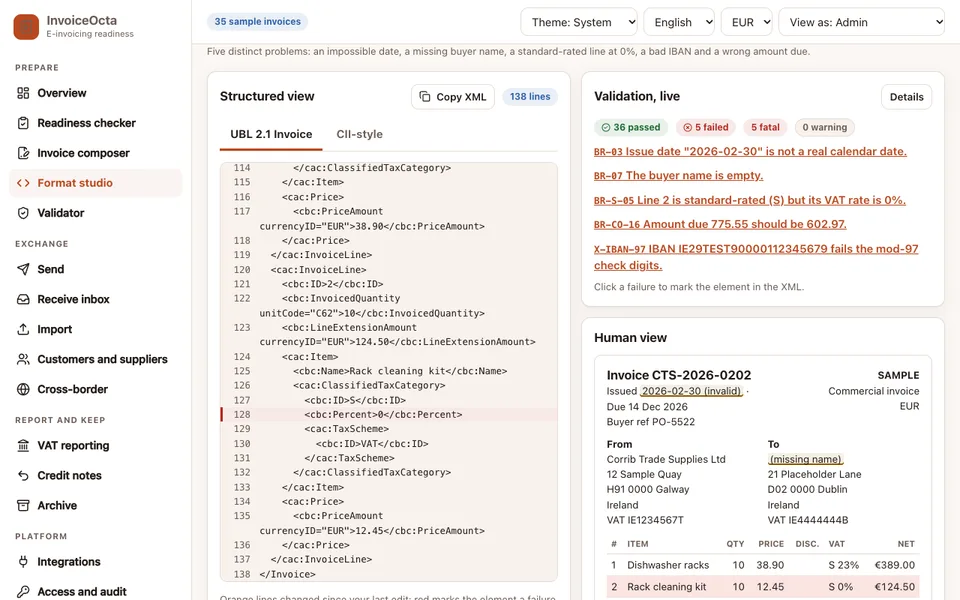
The InvoiceOcta demo is an interactive example of a readiness layer, built around a fictional Galway company, Corrib Trade Supplies Ltd. It runs in the browser on desktop, tablet and phone layouts. It is simulated readiness, not a certified or compliant system and not affiliated with or approved by any authority. All names, tax numbers and bank details are invented sample data, nothing is saved and the page resets when you refresh. The invoice file generation, the tax arithmetic and the validation run for real in your browser, while delivery, the directory and reporting to an authority are simulated. Check the current rules and mandates for your own country.
- Overview and readiness checker: a summary page and a readiness checker page to see where an invoicing process stands.
- Composer: build an invoice with lines, allowances, charges and tax categories. Totals are calculated in whole minor units.
- Format studio: generate UBL 2.1 invoices and credit notes, inspect the XML and see a readable view of the same data.
- Validator: run 41 business rules (a subset in the EN 16931 style, plus Peppol-style and demo checks), each with a passing and a failing example, and read each failure in plain words.
- Send and inbox: simulated delivery states for outgoing invoices, and an inbox for incoming ones with duplicate detection and two-way and three-way matching.
- Import: read XML, JSON or CSV files or pasted text in memory. PDFs are not parsed.
- VAT reporting: a simulated near-real-time reporting queue with retries and a reconciliation view. Nothing is submitted anywhere.
- Customers and suppliers, cross-border, credit notes, integrations: party records, a cross-border reverse-charge scenario, credit notes and placeholder connectors with canned data.
- Access, archive, settings: a View as switch for Admin, Accountant, AP clerk and Read-only auditor that really changes what each role can reach, a hash-chained audit log, an archive and appearance settings.
The scenario buttons are the quickest teaching tool: a valid invoice, five rule failures, a credit note, a cross-border reverse charge sale, and a rejected-then-corrected invoice.
How do you try it?
- Open the demo and choose Try demo workspace on the landing page (a fake login).
- Go to the Validator and load the five-failures scenario. Read each message.
- Open the Composer, change a line amount and watch totals and rule results update.
- Switch View as to Read-only auditor and note which pages and buttons disappear.
- Browse the full list of Zenocta demo apps to see the same approach in other industries.
Getting an e-invoicing layer built for your business
A real build would start from the invoicing and accounting tools you already use, the formats your customers expect and the rules your accountant confirms apply to you. Zenocta scopes that as a fixed-price proposal after a conversation about your process, and it can sit beside our production apps or your existing systems. If this sounds like your problem, send us a short description of how you invoice today.
Try it live
Open the real thing: demos run in a new tab with sample data, apps link to their own page.
 Live demoInvoiceOcta live demoBuild a UBL invoice, run the 41 rule checks, try the simulated inbox and switch between four roles.
- ABrowse allAll demo appsSee every interactive industry demo built by Zenocta.
- ZBrowse allZenocta appsProduction apps live on Google Play.
- TBrowse allTalk about a custom buildDescribe how you invoice today and get a scoped, fixed-price proposal.
Frequently asked questions
01What is the difference between UBL and EN 16931?
UBL is an XML file format for business documents. EN 16931 is a European standard that defines the core business terms and rules an electronic invoice carries. A UBL file can be written to follow EN 16931.
02Is a PDF invoice an e-invoice?
In the structured sense, no. A PDF is a readable picture, while a structured e-invoice is an XML data file that software can read field by field. Whether a PDF is acceptable for your case depends on your current rules, so check them.
03Does the InvoiceOcta demo make my business compliant?
No. It is a simulated readiness demo with sample data. The XML and tax arithmetic run in your browser, but delivery and reporting are simulated, and it is not certified or approved by any authority. Check the current rules for your country.
04Why does one cent matter on an invoice?
Receiving systems often match totals exactly. If sender and receiver round tax differently, per line versus per category, the totals differ by a cent and the automatic check fails even though nobody made a mistake.
05What should an SME do first about e-invoicing?
Ask your accountant or tax authority what applies to your country, size and customers and when. Meanwhile clean your customer and supplier records, test your tool with sample invoices and plan how you will receive structured invoices.