In this guide
Every partner in a CA firm knows the due dates. What nobody can answer at 6 pm on the day before a deadline is which of the 40 clients with work due this week still have not sent their documents. The calendar is rarely the problem: the work around the calendar is. This guide is about practice management software for CA and tax firms, and how to judge whether a tool actually removes that late-evening scramble.
One boundary first. This article is about software for running a practice. It gives no tax advice, quotes no rates or due dates, and names no statutory forms. For anything about the rules themselves, check the current rules from the official sources and your own professional judgement.
Why do firms miss work that everyone saw coming?
Most firms start with a shared spreadsheet and a WhatsApp group. It works for a few dozen clients. Then the volume grows and the same four failures appear every filing season.
- The due date is known, the dependency is not. A return cannot be prepared until the client sends sales and purchase details. The spreadsheet shows the deadline but not the missing document.
- Requests live in chat threads. An article asks a client for bank statements on WhatsApp, the client replies after three days, and nobody else in the firm can see that the request was ever made.
- Notices arrive by post, email or portal and land on one person's desk. If that person is on leave, the reply date still runs.
- Hours disappear. A partner spends forty minutes on a client call, an article spends a day on a reconciliation, and neither shows up on an invoice because the fee was agreed as a flat amount months ago.
Notice that only the first item is a date problem. The other three are visibility problems, and a better calendar does not fix them.
What is a compliance calendar really made of?
A calendar is a view. Underneath it sits a simple model, and a good tool makes this model explicit.
- A client has services. For example monthly returns, quarterly deductions, an annual income tax filing, an audit. The service list is the source of everything else.
- A service creates recurring tasks. One task per period, each with a due date, an assignee and a status such as to do, in progress, in review, filed.
- A task depends on documents. Each service has a standard list of what you need from the client, and each item has its own status.
- The calendar and the board are just two views of the same tasks. A month grid for planning, a kanban board for the daily push.
The arithmetic shows why a manual calendar collapses. Take a firm with 60 clients who each have two monthly filings. That is 120 tasks every month and 1,440 a year, before quarterly work, annual returns, audits and notices are counted. Nobody maintains 1,440 hand-typed rows reliably. Software generates them from the service list and you only handle the exceptions.
Tip
Ask any vendor to add one new client with three services while you watch. If you then have to create every task by hand, the product is a calendar with a form, not a practice system.
How do you stop chasing clients by hand?
Document chasing is where junior staff lose the most time, and it is also the easiest part to standardise. A workable approach has three parts.
A checklist per service
For each service, keep the standard list of what is needed. A return preparation might need the sales register, the purchase register and a bank statement for the month. An individual filing needs income documents, investment proofs and statements. The list is written once and attached automatically to every new task.
A status for every item
Four statuses are enough: requested, received, verified, overdue. The difference between received and verified matters. A file that arrived is not yet a file someone has opened and found complete.
One place to see who is waiting on whom
The most useful screen in the whole system is a filtered list: every request overdue by more than three days, grouped by client, with the channel used to ask (WhatsApp, email or a client portal). Staff then send the second reminder from the list instead of hunting through chats.
How should a firm handle notices?
A notice is a small project with a hard stop. It has an issuing authority, a subject, a severity, a reply date, a status and an owner. Treat it that way. A simple notice queue sorts by reply date, flags severity, and walks each item through new, drafting, replied and closed.
Two habits help. First, assign an owner on the day the notice is logged, never "the team". Second, store the reply, the annexures and the acknowledgement against the same record, so that when the same client receives a related notice a year later, the history is one click away. The content of each reply is professional work for the partner. Software only makes sure it starts on time and nothing is lost.
Where does fee leakage come from, and how do you see it?
Leakage is billable effort that never reaches an invoice. It is almost never dramatic. It is a dozen small things per month. Here is a made-up example for one client, with invented hours and rates, to show how it adds up.
| Work logged in the month | Hours | Rate (₹/hr) | Value (₹) |
|---|---|---|---|
| Reconciliation of purchase data | 6 | 1,200 | 7,200 |
| Notice reply drafting | 4 | 1,800 | 7,200 |
| Client advisory call | 1 | 3,500 | 3,500 |
| Total effort | 11 | 17,900 |
If the agreed monthly retainer is ₹12,000, the effort was worth ₹5,900 more than the firm billed. That may be acceptable for a long-standing client. The point is that you should decide it knowingly. Without time entries you never see the gap, and you cannot have the fee conversation with evidence. Time logging works only when it takes ten seconds, so a good system lets staff log time against a task from the task itself.
Spreadsheet, paper or purpose-built: how do the approaches compare?
| Question | Spreadsheet and chat | Paper files and registers | Purpose-built practice software |
|---|---|---|---|
| Recurring tasks created for you | Copy and paste each period | Written by hand | Generated from each client's service list |
| Missing documents visible | Only if someone remembers | Physical file check | Item-level status per task |
| Notice reply tracking | One person's inbox | Register entry | Queue with owner, severity and reply date |
| Time and fee realisation | Rarely recorded | Not recorded | Time entries compared with invoices |
| Works when a staff member leaves | Depends on the file | Depends on the cupboard | History stays with the client record |
| Setup effort | Low | None | Higher, then lower running effort |
Spreadsheets are a reasonable start. The honest signal that you have outgrown one is that the person who built it has become a single point of failure.
What should you ask any software vendor?
- Can a new client and their services generate recurring tasks automatically, and can I change a client's services later without breaking history?
- Can I see missing documents per task, not only per client?
- Who can see what? Can a junior see all clients, or only those assigned, and can a client ever see another client's data?
- How is client data stored, who has access to it, and how do I export everything if I leave?
- Can invoices, receipts, dues and retainers sit in the same system as the work?
- Who updates due-date rules when the authorities change them, and how will I know the update has been applied?
- Is there an audit trail of who changed a task or a status?
- Does it work on a phone for partners who review between meetings?
The sixth question matters most. If a tool hard-codes dates, it is a liability. If it lets the firm own and edit the rules, it is a tool. For wider thinking on protecting client records, read our note on small business cybersecurity.
What are the common mistakes when a firm moves to software?
- Migrating everything at once. Start with one service line for one season. Monthly returns are a good pilot because feedback comes every month.
- Importing messy client data. Duplicate clients and missing identifiers produce duplicate tasks. Clean the list first.
- No rule for who updates statuses. If staff update a status only when they remember, the board becomes fiction. Decide that the status changes when the work moves, and review the board in a ten-minute stand-up.
- Skipping billing integration. Firms that track work in one place and invoices in another recreate the leakage problem. If you already run billing in a separate tool, read our guide on GST billing software for small businesses before you decide how the two should connect.
- Treating AI features as authority. Any draft a tool produces is a starting point for a professional to review.
What the CAOcta demo shows
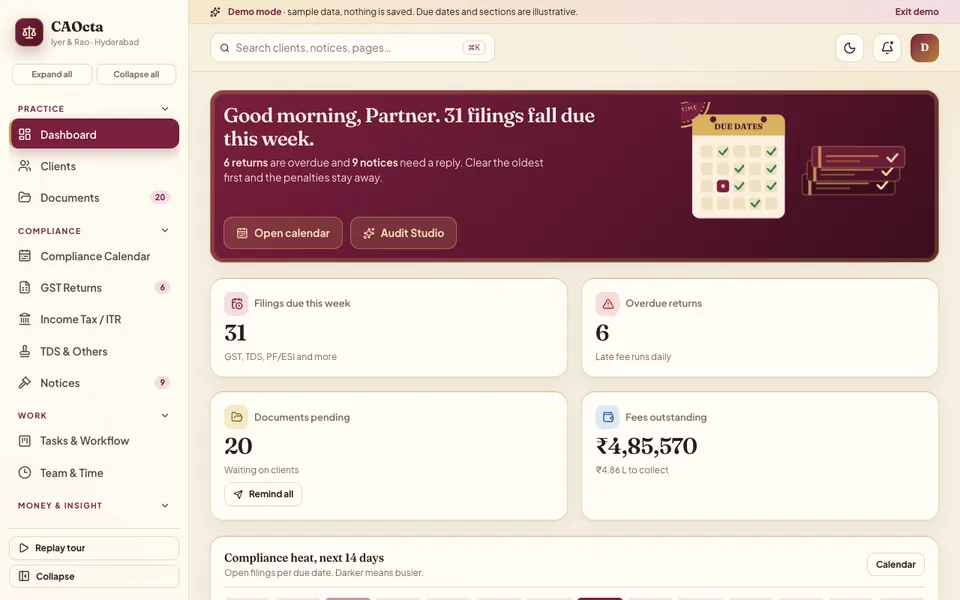
CAOcta is an interactive demo of practice management for an Indian CA or tax firm, built by Zenocta to show what a custom system can contain. It runs in the browser on desktop, tablet and phone. It uses a made-up firm and clients, nothing you do is saved, the data resets on refresh, and every AI-style tool is simulated and scripted. Dates, sections and amounts inside are illustrative and are not tax or legal advice.
The modules, as listed in the demo's own navigation:
- Dashboard, Clients and Documents. A client list with a profile drawer and an add-client form, plus document tracking per client.
- Compliance Calendar. A month view of everything coming up, so partners can plan workload before the week begins.
- GST Returns. A return matrix showing clients against filing periods at a glance.
- Income Tax / ITR. A drag board with stages from documents received to e-verified, plus a funnel view.
- TDS & Others. A tracker for deduction returns and other recurring filings.
- Notices. A queue with severity, reply date and status.
- Tasks & Workflow and Team & Time. A kanban board from to do to filed, utilisation by person and a place to log time.
- Billing and Analytics. Invoices, receipts, dues, ageing, recurring retainers and a ledger statement, plus four analytics tabs.
- Audit Studio. Seven simulated assistants: a notice reply drafter, a reconciliation finder, a document scanner and classifier, a due-date risk and workload balancer, a client query bot, a checklist generator and a fee leakage finder. These are scripted demonstrations to show where assistance could fit, not real analysis.
The demo also fires a simulated live event every so often, such as a new notice or a client upload, and opens a command palette with Cmd or Ctrl plus K.
How to try it in five minutes
- Open the CAOcta demo and press Try Demo Account on the login screen. Any sign-in works, and the guided tour starts.
- Go to the Compliance Calendar, then open the GST Returns matrix and scan the clients against filing periods.
- Open Documents and look for requests marked overdue, then open Notices and sort by reply date.
- Drag a card on the ITR board, then open Team & Time and see utilisation by person.
- Visit Billing and read the ageing of dues, then run the fee leakage finder in Audit Studio and remember it is simulated.
More demos of this kind are on the demo apps page, and Zenocta's production mobile apps are listed under apps.
Getting a system like this built for your firm
Every firm has its own service mix, naming and review habits. A custom build starts from your list of services and your document checklists rather than from a generic template. Zenocta works from a scoped, fixed-price proposal: you describe how work moves today, we agree which modules belong in version one, and a first release could cover the calendar, documents, notices and time. If you would like to talk it through, get in touch. Wider reading on where small firms save money by going digital is in our post on how MSMEs reduce costs through digital transformation.
Try it live
Open the real thing: demos run in a new tab with sample data, apps link to their own page.
 Live demoCAOcta live demoClick through the compliance calendar, GST matrix, ITR board, notices, billing and Audit Studio with a sample firm.
- ABrowse allAll demo appsBrowse every interactive industry demo Zenocta has built.
- ZBrowse allZenocta appsProduction apps live on Google Play.
- TBrowse allTalk about a custom buildTell us how your firm works and we will scope a fixed-price proposal.
Frequently asked questions
01What is practice management software for a CA firm?
It is software that holds the firm's clients, services, recurring tasks, documents, notices, time and invoices in one place. Its main job is to show who owes what by which date, and what is blocking the work, rather than to give tax advice.
02Is a shared spreadsheet enough for a small CA practice?
For a few dozen clients, often yes. It stops working when one person becomes the only one who understands it, when tasks must be copied every period, or when missing documents and notices are tracked in chats instead of the sheet.
03Does the software know the current due dates and rules?
That depends on the build. A well-designed system lets the firm own and edit its calendar rules and shows who changed them. Always confirm rules, dates and forms from the official sources; software should never be your only check.
04Is the CAOcta demo real client software?
No. It is an interactive demo with a made-up firm and clients. Nothing is saved, data resets when you refresh, and the Audit Studio assistants are simulated and scripted. Dates and amounts inside are illustrative, not tax or legal advice.
05How do I get a practice system built for my firm?
Share your service mix, document checklists and how notices and billing work today. Zenocta will scope the modules for a first release and send a fixed-price proposal. You can start the conversation through the contact page.