In this guide
An advocate's working day is decided by a list the court publishes, not by the advocate's own calendar. Nine matters in three courts, a junior who was told to appear in one of them, a client who wants an update, and an invoice that has been pending since the last order: all of this lives in a diary, a clerk's notebook and a few phones. This guide covers case management software for advocates and small law firms, with a focus on the hearing diary and billing.
It describes software for running a practice. It contains no legal content and no legal advice, and nothing here tells you how to conduct a matter. Where a rule, limit or fee is involved, check the current rules.
What does an advocate's diary have to do that a phone calendar cannot?
A phone calendar stores events. A practice diary has to understand matters. Compare what each must handle:
- One matter, many dates. A case moves through hearings, adjournments and orders over years. The diary must show the history and the next date together.
- Several people attend one matter. The senior advocate argues, the junior mentions, the clerk files. Each needs a different view of the same date.
- Dates move. A hearing is adjourned, and the new date has to replace the old one everywhere, with the reason recorded.
- Dates collide. The same advocate can be listed in two courts at the same hour. A calendar will happily store both entries.
- Every date has money attached. Appearances, drafting and conferences are billable work, and an unrecorded appearance is an unbilled one.
That is why firms outgrow calendar apps quickly. The data model is different, not just the screen.
What should one case record hold?
Keep a single record per matter. Whatever the software, the minimum set is the same:
- Parties and the client, with contact details and who at the firm owns the file.
- Court, case number and practice area, entered as the court gives them.
- Current stage and next date, so the list view can be sorted by what comes next.
- Every order and direction, in date order, with the file attached.
- Documents and drafts with versions, so the filed copy and the working copy are never confused.
- Time spent, fee agreement and invoices raised against the matter.
The record is also the thing that lets work continue when a junior leaves or a clerk is on leave. If the knowledge is in the record, the firm owns it.
How should a hearing diary work?
Start from the cause list
Each morning has a cause list: which matters are listed today, in which court, at what time, and who is appearing. A good diary prints or displays that list in one view, ordered by time and grouped by court, so that the clerk and the junior are working from the same page. A month grid, coloured by court, shows the shape of the weeks ahead: heavy days, empty days and the courts that dominate your calendar.
Catch clashes before they become missed hearings
A clash warning compares the advocate and the time slot across matters and flags overlaps. Take a simple case: an advocate is listed at 10:30 in one court and at 10:30 in another. The software should raise that the day the second date is entered, not on the morning. The fix is a human decision, such as sending the junior, seeking a pass-over or asking for another date, but the diary gives time to make it.
Record why a hearing was adjourned
Dragging a hearing to a new date is easy. The valuable part is capturing the reason at that moment, because it is nearly impossible to reconstruct later. After a quarter, the reasons become a management report. Here is an invented example with made-up counts:
| Reason recorded | Adjournments | Share |
|---|---|---|
| Other side sought time | 14 | 35% |
| Matter not taken up | 12 | 30% |
| Documents awaited | 8 | 20% |
| Settlement discussions | 6 | 15% |
| Total | 40 | 100% |
If a fifth of adjournments are caused by documents the firm was waiting for, that is a process problem you can fix, such as asking clients earlier. The other categories tell you about the court and the opposition, which you can plan around but not change. Without the reason, all 40 look the same.
How do you track deadlines without the software deciding them?
Deadlines are different from hearings. A hearing date is set by a court. A deadline counts toward a last date, such as a time limit for filing, a reply or an appeal. The correct approach for software is modest: the advocate calculates the last date from the rules and enters it, and the software counts down visibly and reminds the right people. The tool should never claim to compute legal limits for you. Check the current rules each time and treat the software as a reminder, not a source of law.
Useful features are simple. A tasks list for filings with an assignee and a due date. A countdown tracker listing every limitation date sorted by days left, with colour as the date approaches. And an escalation, so a task due in two days with no progress is visible to the senior advocate, not just the junior.
Tip
Double-entry is cheap insurance. For the few dates that would be catastrophic to miss, keep the software reminder and one independent alert, such as the partner's own phone calendar. Software reduces risk but never replaces a second pair of eyes.
How should a small firm handle billing?
Billing in a practice has more shapes than in a shop. Some matters are fixed-fee, some hourly, some on retainer, and expenses such as court fees and copies are passed through. The mistake is to keep each shape in a separate sheet. Keep them in one system tied to the matter, so that the fee agreement, hours, expenses and receipts all point to the same case.
Here is an invented example of a time-based bill with made-up hours and rates:
| Item | Quantity | Rate (₹) | Amount (₹) |
|---|---|---|---|
| Senior advocate, hearing and conference | 5 hours | 4,000 | 20,000 |
| Junior advocate, drafting and filing | 8 hours | 1,500 | 12,000 |
| Expenses at cost (court fees, copies) | 1 | 2,500 | 2,500 |
| Total before tax | 34,500 |
Tax is added as the current rules require, and your accountant should confirm how it applies. If the client has a retainer of ₹50,000 on account, the invoice draws it down to ₹15,500, and the system should show that balance so a top-up is requested before the next large step. Three reports are worth looking at monthly: billed versus collected, receivables ageing, and hours by advocate. If you issue invoices today by hand, our walkthrough on how to make a GST invoice covers the basics of a clean invoice.
Who should see what: juniors, clerks and clients?
Privilege and confidentiality make access control a core requirement. At minimum, define four roles: the senior advocate, who sees everything; a junior, who sees the matters allocated; a clerk, who sees diary and filing tasks but not fee data; and a client, who sees only their own matter updates. An allocation board that shows each junior's open matters and hours helps spread work before someone is overloaded. For a wider look at protecting sensitive files, read our note on small business cybersecurity.
Spreadsheet, paper diary or purpose-built software?
| Question | Paper diary | Spreadsheet | Purpose-built software |
|---|---|---|---|
| Today's cause list | Written each morning | Filter by date | One view, ordered by time and court |
| Clash warnings | Memory | None | Flagged when the date is entered |
| Adjournment reasons | Scribbled or lost | If remembered | Captured at the moment of change |
| Deadline countdown | Margin notes | Manual formulas | Tracker with days left |
| Billing tied to the matter | Separate bill book | Separate sheet | Time, fees and receipts on the case |
| Access by role | Whoever holds the book | Everything or nothing | Roles and allocations |
What to ask a vendor
- Can I see today's cause list and a month grid by court, and can I move a date and record the reason in one step?
- Does it warn me about two listings for the same advocate at the same time?
- Can a junior see only allocated matters, and can a clerk see the diary but not fees?
- Is every document version kept, with who changed what?
- Where is the data stored, who can access it, and how do I export everything?
- Does it work on a phone in a corridor between hearings?
Common mistakes
- Trusting software for legal calculations instead of entering dates you have verified.
- Skipping the reason field to save a click, then losing the one report that explains delays.
- Starting with every module. Begin with the hearing diary and tasks, then add billing.
- Sharing one login. It destroys the audit trail and the role boundaries.
What the LawOcta demo shows
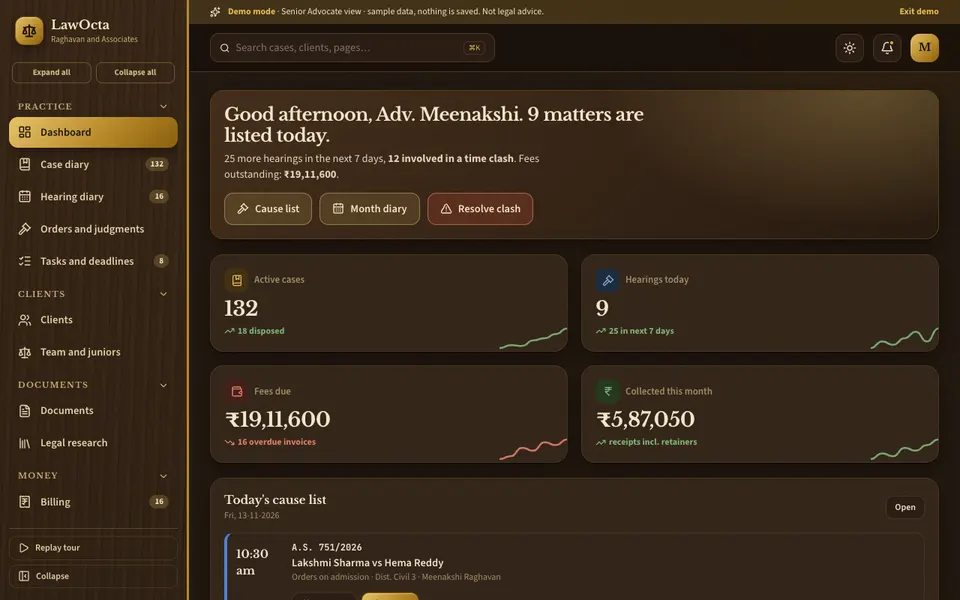
LawOcta is an interactive practice diary demo for advocates and small law firms, made by Zenocta to show what a custom build could contain. It runs in the browser on desktop, tablet and phone, in light or dark. All people, courts, case numbers and citations are fictional, nothing is saved, data resets on refresh, and the Brief Studio outputs are simulated. It is not legal advice.
- Dashboard, Case diary and Hearing diary. A case list with about 150 sample matters, and the signature month grid coloured by court, with a daily cause list, clash warnings and drag-to-adjourn with reason capture.
- Orders and judgments, Tasks and deadlines. Every order and direction across matters, and filing tasks with a limitation tracker that counts down to the entered date.
- Clients and Team and juniors. About 90 sample clients and an allocation board where you drag a matter onto a junior.
- Documents and Legal research. Templates with merge fields and versions, plus saved notes and fictional citations.
- Billing and Reports. Time, fee agreements, retainers, expenses, GST invoices and receipts, and reports on practice mix, hearings, adjournment reasons, billed versus collected and receivables ageing.
- Brief Studio. Seven simulated helpers: case summary, draft writer, precedent finder, hearing predictor, limitation advisor, redact and extract, and client update. These are scripted demonstrations to show where assistance could sit, and their output must never be relied upon.
How to try it
- Open the LawOcta demo and choose Try Demo Account on the login screen.
- Open the Hearing diary, find a day with a clash warning and read today's cause list.
- Drag a hearing to a new date and give a reason, then open Reports to see adjournment reasons.
- Check the limitation tracker under Tasks and deadlines, then open Billing and read a sample invoice.
- Switch roles between Senior Advocate, Junior Advocate, Clerk and Client and see what changes.
More demos are on the demo apps page, and our production mobile apps are under apps.
Getting a practice diary built for your chambers
Every chambers works differently: its courts, practice areas, fee styles and ways of dividing work between seniors, juniors and clerks. A custom build begins with your own cause-list routine and billing shapes. Zenocta works from a scoped, fixed-price proposal: we agree a first release, such as the diary, tasks and one billing path, and extend it after you have used it. To talk it through, get in touch. If you want to know how we run a build from first call to launch, see our post on our software development process.
Try it live
Open the real thing: demos run in a new tab with sample data, apps link to their own page.
 Live demoLawOcta live demoClick through the hearing diary, case diary, limitation tracker, billing and Brief Studio with fictional matters. Not legal advice.
- ABrowse allAll demo appsBrowse every interactive industry demo Zenocta has built.
- ZBrowse allZenocta appsProduction apps live on Google Play.
- TBrowse allTalk about a custom buildDescribe how your chambers works and we will scope a fixed-price proposal.
Frequently asked questions
01What is case management software for advocates?
It is software that keeps each matter's parties, court details, orders, documents, hearings, tasks and billing in one record, and shows a daily cause list and diary. Its job is to organise the practice, not to give legal advice.
02Why not use a phone calendar for hearings?
A calendar stores events but does not know the matter behind them. It cannot warn about two listings for one advocate, record why a hearing was adjourned, or link the appearance to billable time and the case history.
03Can software calculate limitation periods for me?
It should not. The advocate verifies the last date from the current rules and enters it, and the software counts down and reminds the team. Treat any tool as a reminder, never as a source of law.
04Is the LawOcta demo legal software I can use for my cases?
No. It is an interactive demo with fictional people, courts, case numbers and citations. Nothing is saved, data resets on refresh, and the Brief Studio helpers are simulated. It is not legal advice.
05How do I get a practice diary built for my chambers?
Describe your courts, practice areas, fee styles and how work is shared with juniors and clerks. Zenocta will scope a first release and send a fixed-price proposal. Start through the contact page.