In this guide
A customer sends a long security questionnaire on Monday and wants it back by Friday. Someone digs through shared drives for last year's policy, a screenshot from an access review and a supplier contract, and answers from memory where the files cannot be found. Next quarter a different customer asks overlapping questions and the scramble starts again. This guide explains how a compliance evidence tracker for SMEs works, why one control library beats a folder per framework, and what a simulated demo can show you.
Read this first
This article describes software for organising your own records. It is not legal advice, and no software makes a business compliant with anything. Which rules apply to you, and by when, depends on your facts and your country, so check with your adviser and the official sources.
Why does compliance work get repeated?
Small businesses selling to larger customers, or operating in the EU, are asked to show they manage security, personal data and sometimes AI systems responsibly. The questions overlap heavily, but the paperwork usually does not.
- One folder per framework. The same access policy is saved three times, with three slightly different names.
- Evidence with no expiry. A penetration test summary from two years ago is still in the folder, and nobody notices it is stale.
- No owner. Everyone agrees something needs doing, and nobody is named for it.
- Incidents handled in chat. When something goes wrong, the timeline lives in messages and is reconstructed later.
- Questionnaires answered from scratch. Each customer questionnaire becomes a new project.
- Supplier risk is a hunch. You depend on vendors but cannot show when you last assessed them.
What does "control once, comply many" mean?
The idea is simple. Instead of tracking each framework separately, you keep one list of controls, the things your business actually does, such as "admin accounts use a second sign-in step" or "access is reviewed every quarter". Each control has an owner, a status and a review frequency. Then you map each control to the requirement summaries it helps satisfy, in as many frameworks as it applies to.
The payoff is that one piece of evidence, one policy or one access review report, supports several requirements at once. When it expires, you see every requirement it affects. That mapping is often called a crosswalk.
Evidence, in plain terms
Evidence is a record that proves a control exists and works: a policy document, an exported setting, a signed review, a test report. Good evidence has a date, a validity period, a named owner and a way to show it has not been altered. Hashing a file, which produces a short fingerprint of its exact contents, lets you check later that the file you present is the file you stored.
Requirement summaries versus the legal text
Trackers usually show short paraphrased summaries of framework requirements, because the full texts are long and legal. Summaries help staff understand what a control is for. They must never be treated as the law itself, and they need checking against the official sources and your adviser.
A worked example with made-up numbers
This example is illustrative only. It does not say what any framework requires.
Your control: "Administrator accounts use a second sign-in step." You link it to three requirement summaries across a security framework, a data-protection framework and an AI-governance framework. Your evidence is an exported settings report dated 15 March 2026, with a validity of 12 months.
| Item | Value (sample) |
|---|---|
| Evidence date | 15 March 2026 |
| Validity | 12 months |
| Expires | 15 March 2027 |
| Sixty-day warning starts | 14 January 2027 |
| Requirement summaries it supports | 3 |
From 14 January the tracker flags it as expiring. If it lapses, three summaries lose their current evidence at once, which is why seeing "what changes if this item expires" beats finding out during a customer audit.
Coverage works similarly. Suppose one framework summary links to 8 controls and 6 of them have current evidence. Coverage is 6 divided by 8, which is 75%. The gap list is the remaining 2 controls, each with its missing evidence and owner. A number like that is a to-do list generator, not a verdict about your business.
How do you build an evidence tracker, step by step?
- Take a first look at what might apply. A short applicability questionnaire can help you ask the right questions, but only your adviser can say what applies to you.
- List your real controls. Write what you do, not what a framework says. Start with access, backups, change control, supplier checks and incident handling.
- Name an owner and a review frequency for each. A control without a person's name will not be reviewed.
- Attach evidence with a date and a validity period. Replace evidence by adding a new version, so the history is preserved.
- Map controls to requirement summaries. Do it once, then reuse it for every framework and questionnaire.
- Turn gaps into tasks. Each missing item gets an owner and a due date.
- Keep registers current. Records of processing, an inventory of AI systems, a supplier list and an incident log are the usual four.
- Build a pack on demand. Choose a framework and a period, and export what you track and where the gaps are.
What registers does a small business need?
Risks
A simple risk register scores each risk by likelihood and impact on a five-by-five grid, records the treatment and a review date, and shows the residual risk after treatment. Two numbers multiplied give a score, for example likelihood 4 and impact 3 gives 12, which you then rank.
Suppliers
Keep a list of vendors with a short questionnaire, a score and an expiry for each assessment. A supplier that fails reassessment should trigger a task, not a shrug.
Incidents
Record severity, a timeline, root cause and lessons learned. Notification clocks differ by rule and situation, so any tool that shows them should present them as configurable and unverified, and you should confirm the real requirements.
Personal-data records, impact screening and requests
Many businesses keep a register of what personal data they process and why, a screening checklist for when a deeper impact assessment is needed, and a log for individuals' requests with an identity check and a response clock. Keep an eye on how long you hold data, and check the current rules.
AI systems
If you use or build AI features, keep an inventory of each system, its purpose and who is accountable. A rules-based classifier can walk through questions and show its reasoning, but it is a conversation starter, not a legal determination. For general ideas on running a lean security programme, see our guide to small business cybersecurity.
Spreadsheet, shared folder or purpose-built tracker?
| Need | Spreadsheet | Shared drive folders | Purpose-built tracker |
|---|---|---|---|
| One control, many frameworks | Extra columns, easily drift | Duplicate copies | Crosswalk from one library |
| Evidence expiry | Manual reminders | None | Dates, validity and 30, 60 and 90 day views |
| Proof a file is unchanged | None | None | Stored fingerprint and re-check |
| Who may see restricted items | Whoever holds the file | Folder permissions | Roles that filter views and exports |
| Questionnaire reuse | Copy and paste | Search by memory | Auto-filled from the library |
| History of changes | Version history at best | File dates | Tamper-evident audit log |
What to ask any compliance-software vendor
- Is the framework text clearly marked as a summary, with a source and a status I can verify?
- Does it ever claim to make me compliant, ready or certified? If yes, ask for the basis.
- Can one control and one piece of evidence support several frameworks?
- Do I see evidence expiring in advance, and what else it affects?
- Can I prove a stored file has not changed since it was uploaded?
- Do different roles see different items, including an external auditor with read-only access?
- Can I export my data, including the audit log, in an open format?
- Who updates the framework summaries when rules change, and how will I know?
Mistakes to avoid
- Treating a coverage percentage as a result. It measures your tracking, not your standing under any rule.
- Collecting evidence nobody reads. Fewer, current, owned items beat a large archive.
- Letting the control library mirror one framework's structure. Write controls in your own language so they stay useful if rules change.
- Skipping the restricted-access question. Incident details and some evidence should not be visible to everyone, including auditors by default.
- No review rhythm. A tracker that is updated once a year is a snapshot, not a system. If you also manage vendors, our post on procurement software and three-way matching shows a related approval discipline.
What the ComplyOcta demo shows
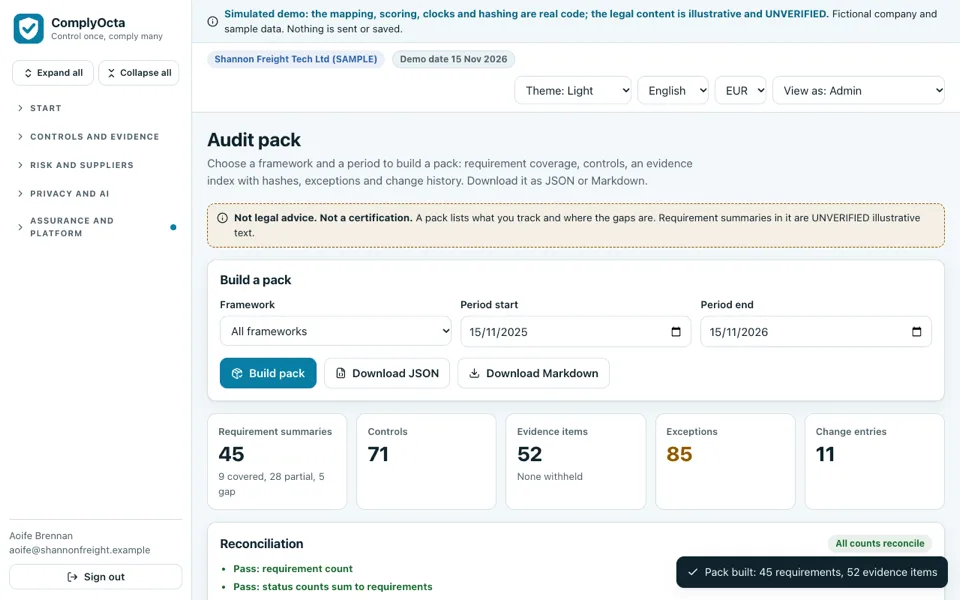
The ComplyOcta demo is an interactive example of a tracker, built around a fictional Irish software and logistics company, Shannon Freight Tech Ltd. It runs in the browser on desktop, tablet and phone layouts. It is a simulation: the framework summaries are short, illustrative and unverified, the people, suppliers and systems are invented, nothing is saved, and the page resets when you refresh. The mapping, scoring, clocks and hashing are real code in the browser, while anything that sends, files or certifies is not done. It carries a banner on every page that it is not legal advice and not a certification.
- Applicability check: 12 questions that suggest which of three frameworks may be relevant, why, and a first-90-days plan. It works without logging in.
- Overview: coverage rings, controls by status, evidence expiring in 30, 60 and 90 days, overdue tasks, open incidents and top gaps, plus a weekly digest and a coverage trend.
- Frameworks and controls: requirement summaries per framework, 71 controls with owners and frequency, and the "control once, comply many" view.
- Evidence vault: add evidence by upload or paste with a real SHA-256 fingerprint, a version chain when you replace a file and a tamper re-check. PDFs are not parsed.
- Tasks and calendar: owners, due dates, overdue logic, simulated reminders and a 90-day agenda.
- Risks and suppliers: a five-by-five heatmap, a 20-question security questionnaire with scoring and expiry, and a customer questionnaire auto-filled from the control library with missing-evidence flags.
- Incidents, records of processing, impact screening and requests: a register with illustrative clocks and a draft notification generator that never sends, plus the personal-data registers.
- AI systems and policies: an inventory with a rules-based classifier that shows its reasoning step by step, and five sample policy templates with acknowledgement tracking.
- Audit pack and access: build a pack by framework and period as JSON or Markdown, four roles with a view-as switch and a hash-chained audit log with tamper detection.
Five scenarios, such as evidence lapsing, a ransomware incident or a supplier failing reassessment, let you watch the whole workspace react.
How do you try it?
- Open the demo and choose Try demo workspace (a fake session).
- On the Overview, run the evidence-lapses scenario and watch coverage and tasks change.
- Open Evidence, replace an item and look at the version chain.
- Open Suppliers and fill the customer questionnaire from the library.
- Switch View as to the read-only auditor and see which restricted items disappear. Other industries are listed in all Zenocta demo apps.
Getting a tracker like this built for your firm
A real build starts from the controls you actually run, the questionnaires customers send you and the people who need restricted access. Your adviser decides what applies, and the software organises your records. Zenocta scopes that as a fixed-price proposal. Our production apps show how we build and ship, and you can start the conversation here.
Try it live
Open the real thing: demos run in a new tab with sample data, apps link to their own page.
 Live demoComplyOcta live demoClick through controls, evidence, risks, suppliers, incidents, registers and an audit pack on sample data.
- ABrowse allAll demo appsBrowse every interactive industry demo from Zenocta.
- ZBrowse allZenocta appsProduction apps live on Google Play.
- TBrowse allTalk about a custom buildDescribe your controls and questionnaires and get a scoped, fixed-price proposal.
Frequently asked questions
01What is a compliance evidence tracker?
It is software that records your controls, the evidence that supports them, owners, review dates and expiry, and links each control to the framework requirements it helps with. It organises your records; it does not decide what applies to you.
02What does control once, comply many mean?
You write each control once, in your own words, and map it to every requirement summary it supports across frameworks. One piece of evidence then serves several requirements, and you update it in one place.
03Does the ComplyOcta demo make a company compliant?
No. It is a simulated demo with fictional data and short, illustrative, unverified summaries. It carries a not legal advice and not a certification notice on every page. Check with your adviser and the official sources.
04Why does evidence need an expiry date?
Evidence goes stale: a review from two years ago proves little today. A validity period lets the tracker warn you 30, 60 or 90 days ahead and show which requirements lose current evidence if it lapses.
05Can Zenocta build a custom compliance tracker?
Yes. Zenocta scopes custom software as a fixed-price proposal after learning your controls, customer questionnaires and roles. Your adviser still decides what rules apply; the software keeps your evidence organised and current.