In this guide
A kirana store makes its money in small margins and loses it in three quiet places: the credit notebook, the back shelf and the phone call to the distributor. A customer who owes you for six weeks, a carton of biscuits that expires before it sells, and a fast-moving item you ran out of on Saturday all cost real rupees, and none of them shows up on the day's cash count.
Why does a kirana store make money on paper and still run short of cash?
Daily sales look healthy because the counter is busy. The cash does not follow because it is tied up in three places at once.
- Udhaar: goods given on credit, recorded in a notebook, collected whenever the customer remembers.
- Stock: cartons bought in bulk, some of which will sit until their date runs out.
- Distributors: payments and orders happening on different days, by phone, with no running total.
Billing software helps with the first rupee at the counter, and we have covered that in our guide to billing and inventory software for small retailers. This article takes a narrower angle: credit control, expiry and reorder, the three levers that decide whether a kirana store is really profitable.
How does udhaar credit control work, in plain terms?
Credit is a normal part of neighbourhood retail. It brings loyal customers and it is also an unsecured loan from you to them. A workable system needs four things.
A ledger per customer, written at the moment of sale
The entry happens on the bill, not in the evening. If the bill is marked as credit, the customer's balance rises right then, and the next bill shows the running total. This removes the "I think I paid last week" argument because both sides see the same figure.
A credit limit that you set on purpose
Choose a limit for each customer, based on how they have behaved. A household that clears its balance at month end can have a higher limit than one that pays in fragments. The limit is useful only if the counter staff are warned when a bill would cross it.
Ageing, so you know which balances are old
A balance of ₹2,000 that is three days old is normal. The same ₹2,000 after two months is a collection problem. Ageing splits the total owed into time buckets so you can see the difference.
A reminder that is polite and regular
Most people pay when asked kindly and specifically. A short message with the amount and the date of the last purchase works better than a general reminder.
What does an udhaar ageing report look like? A worked example
These figures are invented, to show how to read the report:
| Age of balance | Amount owed (₹) | What to do |
|---|---|---|
| 0 to 15 days | 18,000 | Normal. No action. |
| 16 to 30 days | 9,500 | Friendly reminder with the amount. |
| 31 to 60 days | 6,200 | Phone call. Pause new credit until a part-payment arrives. |
| Over 60 days | 4,300 | Personal visit or a firm conversation. |
| Total udhaar | 38,000 |
The total looks manageable, but ₹10,500 of it is already over 30 days. That is the number to chase, and a notebook rarely shows it because the entries are scattered over many pages.
Tip
Decide on one rule and tell customers about it: for example, no new credit when the balance is over a set age. A rule applied to everyone feels fair, and it is easier to say "the system will not let me" than to refuse a neighbour in person.
How do you stop stock from expiring on the shelf?
Expiry in a kirana store is different from expiry in a pharmacy. You carry hundreds of packaged items with printed dates, and nobody is going to check each one daily. The goal is to surface the few items that will not sell in time, early enough to do something about them.
The useful question is not "what expires this month?" but "what will not sell before it expires?" Compare the number of units on the shelf with how fast the item normally sells.
A made-up example: a biscuit pack sells about 1.5 packs a day. You hold 24 packs and the date is 12 days away. Selling 1.5 a day for 12 days clears 18 packs, so 6 packs are at risk. That is the moment for a small markdown, a bundle at the counter, or returning the cartons to the distributor if your agreement allows it. A week later the same 6 packs are simply a loss.
Why a shelf map helps
Dates are also a physical problem. The old stock sits behind the new stock. A shelf-by-shelf colour view, with red for soonest to expire, tells your staff where to look and which items to pull to the front. First in, first out only happens when someone can see the order.
How do you decide what to reorder, and when?
Reordering by feel works until the shop gets busy, and then you either run out of fast items or over-buy slow ones. A simple rule is better than memory.
The reorder point is the daily sales rate multiplied by the days you need to cover: the distributor's delivery time plus a small safety margin. With invented numbers, an item sells 6 packs a day, delivery takes 2 days, and you want 1 day of buffer. The reorder point is 6 x (2 + 1) = 18 packs. When stock falls to 18, you order. If you want each order to last a week, you order 6 x 7 = 42 packs.
A list grouped by distributor, ready to send, saves the most time. You do not want to build a separate list by hand for each supplier. Our guide to FMCG distributor software shows the same relationship from the supplier's side, which helps when you negotiate order timings.
Where do WhatsApp orders fit?
Many kirana customers already order by message: a list of items and an address. The risk is that an order gets buried among personal chats. Treating a message order as a real order, with its own entry, items matched to your stock and a status, makes sure it is packed and delivered. For a broader view of message-first selling, see our post on WhatsApp CRM for small sales teams.
Spreadsheet, notebook or purpose-built software?
| Question | Notebook | Spreadsheet | Purpose-built store software |
|---|---|---|---|
| Running udhaar balance per customer | Scattered pages | A sheet that someone must update | Updated on the bill |
| Ageing of balances | Added by hand | Possible with formulas | Shown automatically |
| Items at risk of expiry | Found by chance | Needs dates and sales rates | Compared with sales speed |
| Reorder list by distributor | From memory | Manual filtering | Generated from stock levels |
| Barcode billing | No | No | Yes |
Kirana store software earns its place when it replaces the notebook for credit and the memory for reorders, not when it merely prints a bill.
How do you roll it out without slowing the counter?
- Begin with the udhaar customers. Enter the top thirty or so balances first. These are the ones that matter.
- Bill every sale for a week. Even cash sales. The stock numbers will only be right if every item is scanned.
- Enter expiry dates on the fast-moving cartons first. You do not need every item on day one.
- Review the reorder list with your best salesperson. Adjust the safety margin until the list matches your instinct, then trust it.
- Add reminders and loyalty after the basics are stable.
What should you ask a kirana software vendor?
- Is the udhaar balance updated on the bill, and does it warn when a credit limit is crossed?
- Can I see ageing buckets and send a reminder from the same screen?
- Does it work with barcode scanners and handle items without barcodes?
- Can stock carry an expiry date, and does it compare that with sales speed?
- Can the reorder list be grouped by distributor?
- Does it work on a slow connection, and what happens during an outage?
- How are GST bills generated, and who updates the settings when the rules change? Check the current rules.
What mistakes do store owners make?
- Setting no credit limit at all. The limit is the control. Without it, ageing just records a problem that already happened.
- Entering stock once and never again. Stock numbers decay unless every sale and every purchase passes through the system.
- Chasing small balances first. Start with the largest and the oldest.
- Ignoring slow movers. A slow item with a long date is not at risk. A medium item with a short date is. Look at both.
What the KiranaOcta demo shows
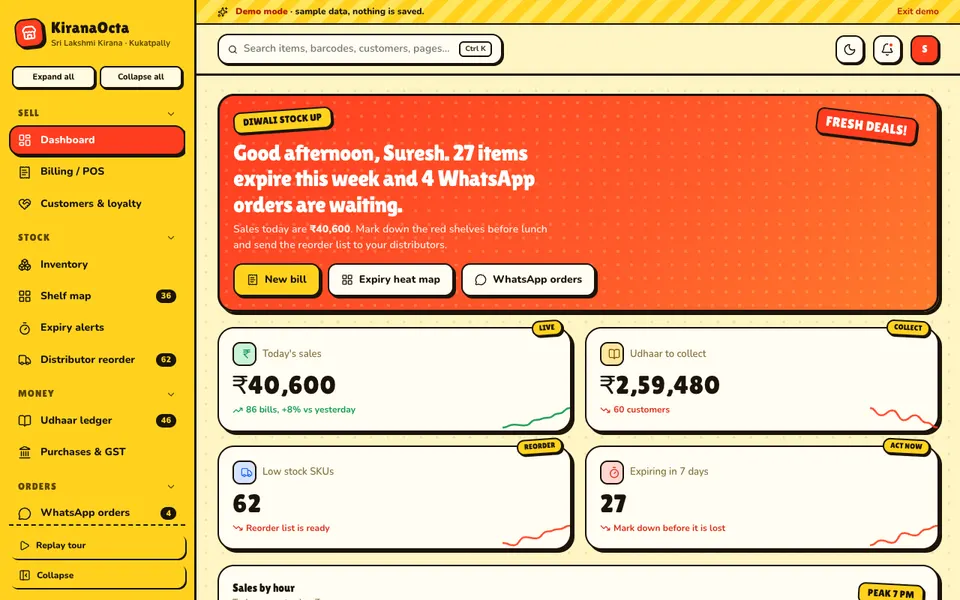
KiranaOcta is an interactive demo for a sample store, Sri Lakshmi Kirana in Kukatpally. All people and numbers are synthetic, nothing is saved, and data resets when you refresh. The Shelf Studio holds seven AI-style tools, and they are simulated, not real models. It is a demonstration of what a custom build could contain, not a product with real shops using it.
- Dashboard. Today's sales, udhaar to collect, low-stock items, items expiring this week and waiting WhatsApp orders.
- Billing and POS. Barcode billing with GST.
- Customers and loyalty. The people behind the ledger, with loyalty.
- Inventory and Shelf map. Stock levels and the shelf-by-shelf expiry heat map.
- Expiry alerts. A list of items running out of date.
- Distributor reorder. A reorder list grouped for your suppliers.
- Udhaar ledger. Credit balances per customer.
- Purchases and GST. Purchase entries and a GST summary.
- WhatsApp orders. Message orders as real orders, plus reports, staff and a Ctrl/Cmd+K command palette.
How to try the KiranaOcta demo
Open the KiranaOcta demo and select Try Demo Account on the login screen. Start with the Udhaar ledger to see the balances, then open the Expiry heat map and Distributor reorder. The demo also pushes sample live events such as a new WhatsApp order, so stay on the dashboard for a few moments. You can compare it with other sample businesses on the demo apps page.
Getting a store system built for your shop
A single general store and a three-outlet supermarket chain need different credit rules and different reorder logic. Zenocta builds custom software for small businesses and has its own apps on Google Play. If you want credit control, expiry tracking and reorder lists fitted to how your store runs, write to us and we will respond with a scoped, fixed-price proposal.
Try it live
Open the real thing: demos run in a new tab with sample data, apps link to their own page.
 Live demoKiranaOcta live demoOpen a sample kirana store: barcode billing, udhaar ledger, expiry heat map, distributor reorder and WhatsApp orders.
- ABrowse allAll demo appsBrowse every interactive demo, each with a sample company and nothing saved.
- ZBrowse allZenocta appsProduction apps live on Google Play.
- TBrowse allTalk about a custom buildTell us how your store handles credit, stock and suppliers and get a scoped, fixed-price proposal.
Frequently asked questions
01What is an udhaar ledger?
It is a record of goods sold on credit, kept per customer. In software, the balance rises when a bill is marked as credit and falls when a payment arrives, so both you and the customer can see the same running total at any time.
02How can a kirana store track expiry without checking every item?
Record expiry dates on the fast-moving cartons first and compare units on hand with the daily sales rate. Items that will not sell before their date are the ones at risk. A colour-coded shelf view shows staff where to look.
03How do I decide when to reorder an item?
Multiply the daily sales rate by the days you must cover, which is the distributor delivery time plus a safety margin. When stock falls to that number, place the order. Group the items by distributor so each call or message is one list.
04Is KiranaOcta a real store product?
No. KiranaOcta is an interactive demo with a fictional store and synthetic data. Nothing is saved, data resets on refresh, and the seven Shelf Studio tools are simulated, not live models. It shows what a custom store system could include.
05Can Zenocta build a custom system for my store?
Yes. Zenocta builds custom business software. We begin with how you give credit, hold stock and order from distributors, then return a scoped, fixed-price proposal for billing, udhaar, expiry tracking and reordering.