In this guide
A mobile shop is two businesses in one room. At the counter it sells devices that are each unique, tracked by a number printed inside the box. At the back it repairs devices that customers want back today. Most shop software is built for the first business and ignores the second, which is why the repair bench still runs on sticky notes and phone calls.
Why are phones harder to stock than almost anything else you sell?
A carton of cables is interchangeable: one unit is the same as the next. A phone is not. Each handset has its own identity, its own purchase cost, its own supplier invoice and its own warranty story. When ten units of the same model sit in the cabinet, they are ten different items to the system, and the system should know which one left the shop.
Without that, three problems appear again and again:
- A customer comes back with a handset and the shop cannot prove it sold that exact unit.
- Stock counts match by model but not by variant, so the colour or memory size a customer wants is "in stock" on paper and missing on the shelf.
- A returned or exchanged handset goes back into the cabinet with no record of what was done to it.
What is IMEI stock, and how does it actually work?
The IMEI is the identifier of a handset. A phone with two SIM slots usually carries two. IMEI-level stock means each unit is recorded when it arrives, linked to the supplier purchase, and then moved through states: in stock, sold, in repair, returned, refurbished. At the point of sale, the person at the counter scans or enters the number, and the bill carries it.
This gives you three practical benefits. First, you can answer "did we sell this phone?" in seconds. Second, you know the exact cost of each unit, so margin is real, not averaged. Third, ageing becomes visible: a handset that has sat in the cabinet for four months is a different problem from one that arrived last week, and the system can show you which is which.
Tip
Do not start by entering every old unit. Begin with new purchases from the day you switch over, and enter existing stock model by model as you count it. In a month you have the unit-level picture without a weekend of data entry.
How do EMI and exchange change the sale?
For higher-priced handsets, most sales are not a single payment. A customer may pay a down payment, finance the rest through a partner, and hand in an old phone as part of the price. Each part has a different record.
An EMI sale, with made-up figures
A handset is sold for ₹24,000. The customer pays ₹4,000 now and ₹20,000 is financed. If the finance partner deducts a processing fee of ₹400 (an invented figure, as fees vary by agreement), the shop will receive ₹19,600 later. So the money collected today is ₹4,000, and ₹19,600 is a receivable that should be tracked until the settlement arrives. A shop that records only "sold for ₹24,000" overstates its cash by ₹19,600 until the day the settlement lands.
An exchange, with made-up figures
A new handset is priced at ₹18,000. The customer's old phone is valued at ₹4,500, so the customer pays ₹13,500. That old phone is now your stock, and it has its own life.
| Step | Amount (₹) |
|---|---|
| Old phone taken at exchange value | 4,500 |
| Spare parts used in refurbishing | 600 |
| Technician labour | 400 |
| Total cost of the refurbished phone | 5,500 |
| Resale price | 7,500 |
| Margin on the refurbished phone | 2,000 |
Without a refurbishing record, shops tend to remember the exchange value and forget the parts and labour, and refurbished stock looks more profitable than it is.
How should a repair bench be organised?
A repair is a small project with a customer waiting. The common failure is not the repair itself but everything around it: nobody told the customer the estimate, the part has not arrived, or the handset is ready but nobody called. The remedy is the same as for any workshop: a board with one card per device and a column for each stage.
A typical seven-stage flow reads like this: received, diagnosed, estimate sent, waiting for part, in repair, quality check, ready for pickup. Four details make it work in practice.
- Estimate approval is a step, not a conversation. The repair does not start until the customer has approved the cost. Record who approved and when.
- Part status sits on the card. A small chip such as "ordered", "arrived" or "not needed" tells the technician at a glance whether work can begin. It also answers the customer's most common question without interrupting anyone.
- Promised date is visible and overdue cards stand out. This is the single best defence against calls asking for updates. Our garage post covers the same idea in garage management software for workshops, and the lessons transfer directly.
- Delivery is confirmed. A one-time code sent to the customer and read out at pickup proves the right person collected the right device.
How do spare parts and warranty fit in?
Spare parts are a small-value, high-volume stock: screens, batteries, charging ports. They need three things: a reorder level, a link to the repair that used them, and a way to record a defective part sent back to the supplier. When parts are not tied to tickets, the shelf and the register drift apart.
Warranty has two sides. Customers have warranty on the handsets and repairs you sold; you have warranty claims against your suppliers. A return-to-supplier record, kept per unit, shows which items went back, what was agreed and whether credit has come. Warranty terms vary by brand and product, so always follow the manufacturer's terms and check the current rules rather than assuming a standard period.
Spreadsheet, paper or purpose-built software?
| Need | Paper and notebook | Spreadsheet | Purpose-built mobile shop software |
|---|---|---|---|
| Stock by IMEI | Impractical | Workable for a small cabinet | Native, scanned at sale |
| Repair status at a glance | Sticky notes | Filtered rows | A board with stages |
| Parts tied to repairs | Rarely | Manual | Linked to tickets |
| EMI settlement tracking | Memory | A column nobody updates | Shown as receivable |
| Staff seeing only what they need | Not possible | Separate files | Role-based menus |
How do you roll this out in a busy shop?
- Start the repair board first. It is the part customers feel, and a card per device takes seconds to create.
- Scan new stock from day one. Do not wait for a full stocktake.
- Move the sale to the new bill. Add exchange and EMI fields once staff are comfortable with plain sales.
- Link parts to tickets. Count the spare parts shelf once and set reorder levels.
- Add roles. Let the technician see the bench, the accountant see settlements and the sales team see the counter.
What should you ask a mobile shop software vendor?
- Can it hold two IMEIs for dual-SIM handsets, and search by either?
- Does it handle exchange, with the old phone entering stock at its agreed value?
- Can EMI be recorded as a receivable until the finance partner settles?
- Does the repair board show estimate approval and part status?
- Can customers confirm delivery with a code?
- Can I limit what each role sees?
- Does it support multiple outlets with a combined and a per-outlet view?
What mistakes do mobile shops make with software?
- Using it for sales only. The repair bench is where goodwill is won or lost.
- Ignoring exchanged phones. They are stock with their own cost. Record them properly.
- Letting every employee see cost prices. Roles exist for a reason.
- Skipping the promised date. A repair without a date is a repair nobody can chase.
What the MobiOcta demo shows
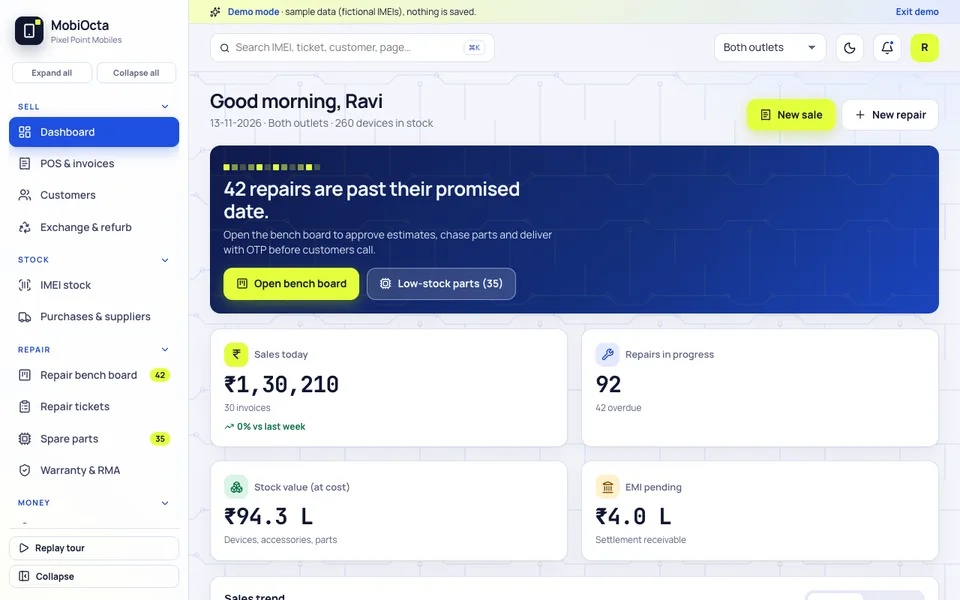
MobiOcta is an interactive demo for a sample two-outlet shop, Pixel Point Mobiles. Every IMEI, customer and amount is fictional, nothing is saved and the data resets on refresh. The Bench Studio has seven AI-style tabs, which are deterministic scripts, not real models. It illustrates what a custom build could include and is not a product with real shops behind it.
- Dashboard. Sales today, repairs in progress, stock value and EMI pending, with a prompt about repairs past their promised date.
- POS and invoices. The counter sale, with EMI and exchange.
- Exchange and refurb. Taking an old handset in and bringing it back to saleable condition.
- IMEI stock and Purchases and suppliers. Unit-level stock and the purchases behind it.
- Repair bench board and Repair tickets. The signature module: seven stages, drag or arrows, part-status chips, estimate approval and customer OTP delivery.
- Spare parts and Warranty and RMA. Parts stock and the return-to-supplier trail.
- EMI and finance. The settlement view.
- Roles. Owner, Sales Executive, Technician and Accountant, and a View as role option that filters the menu.
How to try the MobiOcta demo
Open the MobiOcta demo and choose Try Demo Account on the login screen. Go to the bench board and move a card between stages, then switch to a Technician view from the account menu to see how the menu changes. Compare it with other shop-floor tools on the demo apps page, or read our guide to billing and inventory software for retail shops for the counter side.
Getting a mobile shop system built around your counter and bench
A single-counter shop that repairs a few phones a day has different needs from a chain with a central repair lab. Zenocta builds custom software and also publishes its own apps on Google Play. If you would like IMEI stock, EMI, exchange and a repair board shaped to your business, talk to us about a custom build and we will return a scoped, fixed-price proposal.
Try it live
Open the real thing: demos run in a new tab with sample data, apps link to their own page.
 Live demoMobiOcta live demoOpen a sample mobile shop: POS with EMI and exchange, IMEI stock, repair bench board, spare parts and warranty.
- ABrowse allAll demo appsBrowse every interactive demo, each with a sample company and nothing saved.
- ZBrowse allZenocta appsProduction apps live on Google Play.
- TBrowse allTalk about a custom buildTell us how your counter and repair bench work and get a scoped, fixed-price proposal.
Frequently asked questions
01What is IMEI stock management?
It records each handset by its IMEI number from purchase to sale, rather than just counting models. You can see the cost, supplier and state of every unit, find which one a customer bought, and spot handsets that have sat unsold for too long.
02How should a mobile shop record an EMI sale?
Record the down payment as cash collected and the financed amount, less any partner fee, as a receivable until the finance partner settles. That keeps cash figures honest. Fee terms depend on your agreement, so confirm them with the partner.
03What should a repair bench board show?
One card per device with its stage, promised date, estimate approval and part status, such as ordered or arrived. Overdue cards should stand out, and delivery should be confirmed so the right customer collects the right handset.
04Is MobiOcta a real product used by shops?
No. MobiOcta is an interactive demo with a fictional two-outlet shop, fictional IMEIs and synthetic data. Nothing is saved, it resets on refresh, and the Bench Studio tabs are scripted simulations. It shows what a custom system could contain.
05Can Zenocta build software for my mobile shop?
Yes. Zenocta builds custom business software. We start with how you stock, sell and repair, then provide a scoped, fixed-price proposal covering IMEI stock, EMI and exchange, the repair board, spare parts and warranty returns.