In this guide
A temple trust, an NGO, a poultry farm and a farmer producer group have little in common on paper. In practice they share one weakness: the whole operation depends on people believing the records. Donors, funders, buyers and members will forgive a slow week, but not a receipt that cannot be traced, a grant balance nobody can explain or a farmer's account that changes depending on who is asked. This guide looks at software for temples, trusts, NGOs and farms through that lens, and shows how to decide what to use before you buy or build anything.
Read this first
This is a guide to software for running an organisation, not advice on tax receipts, charity registration, CSR rules, veterinary practice or crop decisions. Those rules and recommendations change and differ by place and by case. For every one of them the answer is: check the current rules with your adviser, your funder, a qualified professional or the official source.
Why do trusts, NGOs and farms share the same software problem?
Look past the sector words and you find three shared conditions.
- They run on trust. People hand over money, produce or time on the strength of a promise, so the record of what happened is the product as much as the temple service, the project or the harvest.
- They run on records. A donation, a voucher, a daily mortality entry or a weigh slip is small on its own and valuable only when it can be found, added up and explained months later.
- They run on seasons. Festivals, grant tranches, batch cycles and sowing windows set the rhythm. Work arrives in surges and is quiet in between, so software must handle peaks and not just averages.
That is why a single guide can cover them. The questions to ask of software are the same: does it capture the entry at the moment it happens, does it link the entry to a person and a purpose, and can it produce the report the other side expects?
What jobs does software need to do?
Map the jobs before you look at features. Most organisations here need some mix of the following.
- Money in. Donations, grants, input sales, produce sales or buyer payments, each with a mode, a purpose and who recorded it.
- Money out. Expenses, vouchers and feed or input purchases, tied to a budget head or a cost line, with the bill attached.
- People and parties. Donors, devotees, beneficiaries, volunteers, farmers, buyers and staff, each with a history.
- Stock and physical counts. Hundi cash, inputs, lots of produce, feed, eggs, vaccination supplies.
- The calendar of the season. Festivals and sevas, reporting dates, vaccination dates, crop stages.
- Reports for outsiders. Trustees, funders, members and buyers each want a different view of the same records.
Record-keeping that survives scrutiny
This is where the sector's software earns its keep, and where most spreadsheets fail. Seven habits matter more than any feature list.
- Record at the moment it happens. An entry made at the counter, in the shed or at the weighbridge is worth more than one reconstructed on Sunday.
- Give every entry an identity. A sequential receipt, voucher or slip number means a missing number is visible. Check the current rules for the receipt format that applies to you, and make sure the format is yours to edit.
- Link the entry to a purpose. A donation belongs to a campaign or seva, a voucher to a budget head, a feed purchase to a batch, an input sale to a farmer.
- Record who entered it. Staff turnover is normal, so the person must be on the record, not in memory.
- Count physical things twice. Two people, a denomination sheet and a same-day match to the bank deposit make a cash count routine. The same thinking applies to a weighbridge slip, which records loaded weight, empty weight and the net.
- Net lines, but show both. A farmer ledger that nets input credit against produce value must still show each line.
- Reconcile on a schedule. Totals in reports should match the underlying records every month, not only at year end.
A short example with made-up numbers. A farmer delivers produce with a loaded weight of 3,450 kg and an empty weight of 2,200 kg, so the net weight is 1,250 kg. At a sample rate of ₹30 per kg the value is ₹37,500. The farmer took inputs on credit worth ₹12,800, so the net payable is ₹37,500 minus ₹12,800, which is ₹24,700. If the ledger shows only the ₹24,700, a dispute about the rate or the credit is hard to settle. If it shows the weight, the rate, the value and the credit, the conversation takes a minute.
Tip
Run paper and the new system in parallel for a short period, then switch the official record only after a month of numbers that match. Keep old paper readable and filed, and never delete history to make a migration look tidy.
What reports does each reader expect?
A report is a promise kept to someone outside the organisation. Decide who they are, then check that your records can answer their usual questions.
| Reader | What they usually ask | Records that answer it |
|---|---|---|
| Trustees and donors | How much came in, for what, and was it receipted? | Donations by campaign, receipts issued against pending, recurring pledges |
| Funders and CSR partners | How much of each instalment is used, and what did it reach? | Tranche schedule, vouchers by budget head, beneficiary and indicator counts |
| Farmers and members | What is my balance and why? | Weigh slips, rates, input credit, the ledger |
| Buyers and farm owners | What was delivered, at what rate, what is outstanding? | Buyer record, weigh slip, rate board, balances, expenses and profit and loss |
| Auditors and regulators | Can every figure be traced? | Numbered entries, attachments, an audit trail. Check the current rules for formats and filings. |
A second made-up example, this time for a funder report. A sample grant tranche is ₹10,00,000 and vouchers recorded against it total ₹7,50,000, so utilisation is 75 percent. That figure is only useful if each voucher is tied to a budget head with the bill attached. Otherwise the 75 percent is a guess that has to be rebuilt at quarter end.
Spreadsheet, register, ready-made app or custom build?
There is no single right answer, and the decision should follow your volume, your reporting load and how unusual your method is.
| Approach | Works well when | Starts to hurt when | Ask yourself |
|---|---|---|---|
| Paper registers | A handful of entries a day and one trusted keeper | You must answer a question across months or people | Could we find every March receipt in ten minutes? |
| Spreadsheets | One person, one project or one shed | Several people enter data, or one file holds money and people together | Who last changed this cell, and why? |
| Ready-made app | Your method is the common one | You work around it or key reports are fixed | Can I export all my data and edit the formats? |
| Custom build | Your funders, festivals, batches or ledgers follow your own method | You try to build everything in the first release | What is the smallest first release that removes our worst report? |
A useful rule of thumb: pick the approach that fixes your single most painful report. Our post on building a first version without wasting budget applies directly, and why every MSME should invest in custom software explains when the investment is worth it.
Trusts and NGOs: two demos
TrustOcta, for temples, trusts and NGOs
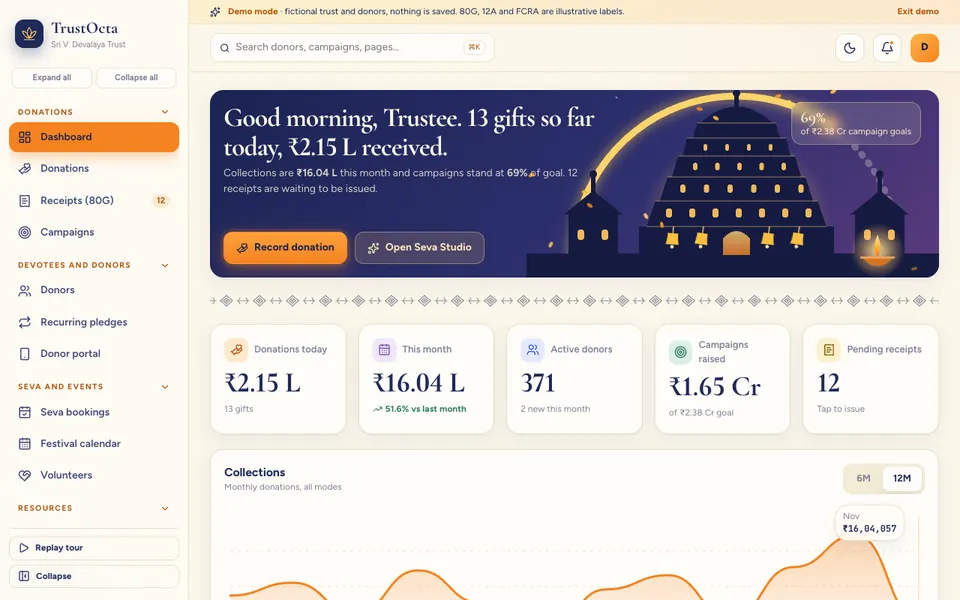
TrustOcta follows a fictional trust and can switch between a temple workspace and an NGO workspace. Its pages cover donations and receipts, campaigns, donors and recurring pledges, a donor portal, seva bookings, a festival calendar, volunteers, a hundi and counter page, inventory, expenses with approvals and compliance items that are illustrative only. It solves the connection between a donation, its campaign, its receipt and the donor's history on one screen. Read temple and trust management software or open the TrustOcta demo.
NGOOcta, for NGOs running CSR projects
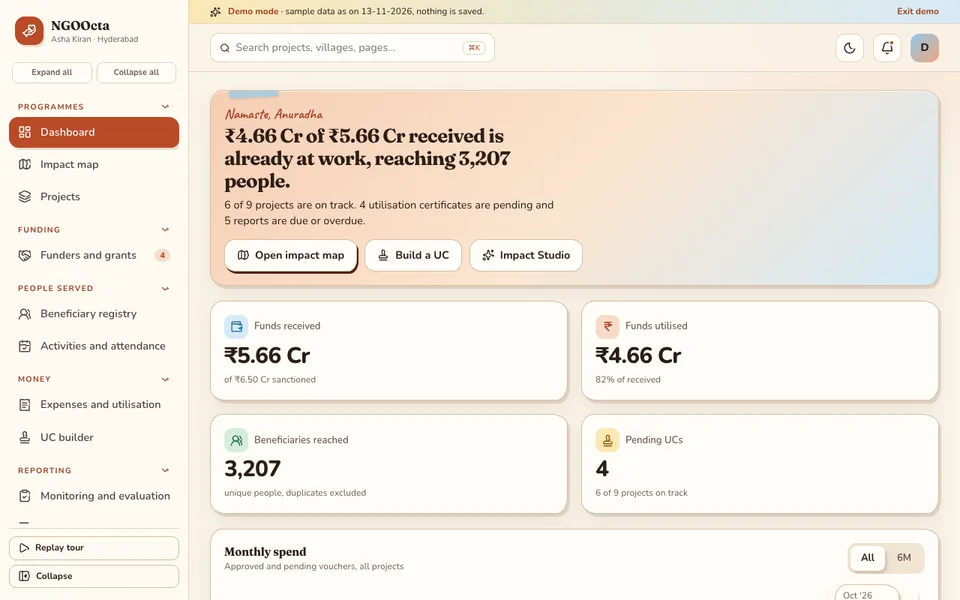
NGOOcta is built around one fictional NGO. It has an impact map where a ring around each project pin switches between fund utilisation, beneficiaries reached and indicator achievement, plus grants with tranche schedules, a beneficiary registry, activities and attendance, voucher entry against budget heads, and a utilisation certificate builder whose format is illustrative and not for filing. It solves the gap between money spent and people reached. See NGO project management software for CSR grants and try the NGOOcta demo.
Farms and farmer groups: two demos
PoultryOcta, for poultry and aquaculture farms
PoultryOcta follows a made-up owner with three farms. Its Shed Grid shows a health dial per batch for mortality, feed conversion, weight against target and climate. Other pages cover batches, feed, eggs, ponds, daily mortality, a drag-and-drop vaccination calendar, buyers with a rate board and lifting kanban, weigh slips, expenses, and profit and loss. It solves a daily routine that is comparable across sheds. For feed conversion, a made-up batch that ate 2,100 kg of feed for 1,200 kg of live weight has a ratio of 1.75, and 60 deaths among 2,000 chicks is 3 percent, but the demo gives no veterinary advice. Read poultry farm management software or open the PoultryOcta demo.
AgriOcta, for farms, FPOs and mandi traders
AgriOcta follows a made-up farmer producer group. It has a field plots map with a season scrubber, a crop calendar, farmers and land records, an input shop with credit, produce lots with weighbridge slips, a mandi price board with a best-market comparison after freight, and sales with a farmer ledger. All prices are sample data, and scheme information must be checked against official sources. It solves the question a member asks most often: what is my balance? See farm and FPO management software and the AgriOcta demo.
How the four demos compare
The table lists only what each demo's own pages show.
| Demo | Money records | People ledger | Seasonal planning | Reports |
|---|---|---|---|---|
| TrustOcta | Donations, receipts, hundi count, expenses | Donors, pledges, volunteers | Festival calendar, seva bookings | Four analytics views |
| NGOOcta | Grants, tranches, vouchers | Beneficiary registry, volunteers and staff | Reporting calendar per grant | Impact reports, utilisation builder |
| PoultryOcta | Buyers, rates, expenses, profit and loss | Buyers, team | Vaccination calendar, batch cycle | Reports with CSV export |
| AgriOcta | Input shop, sales, farmer ledger | Farmers and plots, traders | Crop calendar, season scrubber | Reports page |
Each demo also has a simulated studio of scripted helpers that look like AI. They are demonstrations of where assistance could sit, not real models and not advice of any kind.
How to try the demos in 15 minutes
All four run in the browser on desktop, tablet and phone. They use sample data, nothing you do is saved, the data resets when you refresh, and anything that looks like AI is simulated and scripted.
- Open the demo closest to your work, plus one from the other cluster to see how a different sector solves a similar problem.
- Press Try Demo Account on the login screen. Any sign-in works.
- Follow one entry end to end: a donation to its receipt, a voucher to a certificate, a feed entry to a batch dial, a weigh slip to a ledger.
- Find the physical count: the hundi page, the weigh slip or the shed grid, and ask whether your staff would use it on a phone.
- List three gaps: a field, a report or a step your organisation does differently. That list is the start of a scope.
Mistakes to avoid, and what to ask a builder
- Choosing software for its dashboards before checking that the entry screens are quick enough for the counter, the shed or the field.
- Hard-coding receipt wording, certificate formats or scheme details that you cannot edit when the rules change.
- Giving every volunteer or helper access to money screens. Roles matter, and our note on small business cybersecurity covers the basics.
- Switching over at the busiest point of the festival, grant or batch cycle.
- Treating a simulated assistant, a forecast or a price board as a source of truth.
Questions to ask any builder
- Who owns the data and the code, and can I export everything?
- Can I edit receipt, certificate and report formats myself?
- Does it work on a phone at the counter, shed or field, and what happens with poor connectivity?
- How are roles, deletions and an audit trail handled?
- What is in the first release, and what is left for later?
- Is hosting priced separately, and who looks after backups?
Getting a version built around your own way of working
If one of these demos is close, the useful next step is a short conversation about your funds, festivals, grants, sheds, plots or ledgers. Zenocta then writes a scoped, fixed-price proposal for a first release, such as donations, receipts and campaigns for a trust, or batches, daily records and buyers for a farm. Hosting and the domain are billed separately. Our post on how MSMEs reduce costs through digital transformation explains why starting small works, and our software development process shows the steps. See all demo apps, our production apps on Google Play, or talk to us about a custom build.
Try it live
Open the real thing: demos run in a new tab with sample data, apps link to their own page.
 Live demoTrustOcta live demoDonations, receipts, hundi counting, seva bookings and volunteers for a sample trust.
 Live demoNGOOcta live demoImpact map, grants with tranches and a utilisation builder on sample data.
 Live demoPoultryOcta live demoShed Grid health dials, vaccination calendar and buyers kanban on sample data.
- ABrowse allAll demo appsBrowse every interactive industry demo Zenocta has built.
- ZBrowse allZenocta appsProduction apps live on Google Play.
- TBrowse allTalk about a custom buildDescribe your trust, project or farm and we will scope a fixed-price proposal.
Frequently asked questions
01What should temple or trust software record for every donation?
At minimum the donor, amount, mode, purpose or campaign, a sequential receipt number and who recorded it. Receipt wording and exemption details depend on your registrations and change over time, so check the current rules and make sure the format is yours to edit.
02How can an NGO see how much of a grant is spent and what it reached?
Record each voucher against a budget head at the time of spending, link it to a grant and tranche, and track beneficiaries and indicators in the same system. Then utilisation, reach and results sit side by side. Formats funders require should be checked with each funder.
03Is farm software worth it for one poultry shed or a small farmer group?
Often yes, if you start small. Begin with one shed and daily records, or one centre with weigh slips and a ledger, and prove the routine before adding selling, money and more sites. A spreadsheet may be enough until several people enter data.
04Are these four demos real products with real data?
No. TrustOcta, NGOOcta, PoultryOcta and AgriOcta are interactive demos with sample data. Nothing is saved, data resets on refresh, and any tool that looks like AI is simulated and scripted. They give no tax, veterinary or agronomy advice.
05How does Zenocta price a custom build for an organisation like mine?
Zenocta starts with a short conversation about your funds, reports, sheds or plots, then prepares a scoped, fixed-price proposal for a first release. Hosting and the domain are billed separately. You can extend the system once real use shows what matters most.