In this guide
On the day after a big festival, a temple office has a stack of receipt books, a bag of counted cash, a list of seva bookings in someone's phone and a WhatsApp group full of volunteer names. Every one of those records matters, and none of them agrees with the others without someone sitting down to reconcile them. This guide explains what temple and trust management software needs to do, and how to judge whether a tool fits the way your trust really works.
Where does the money and the paperwork leak?
Temples, charitable trusts and small NGOs share a particular problem: trust is the whole business, and trust depends on records that stand up to questions. The usual weak points are easy to name.
- Receipts. Hand-written books get lost, numbers skip, and a donor who asks for a duplicate months later waits while someone searches.
- Cash boxes. Counts are written on loose sheets, and the figure that reaches the bank slip is not always the figure the counters saw.
- Seva and event bookings. Slots live in a notebook or a phone, and double bookings are found on the day.
- Donor memory. A family that gave generously for ten years is remembered by one trustee, not by the trust.
- Volunteers. Rotas are arranged by calls and messages, and the person who arranged them becomes a single point of failure.
- Spending. Bills are kept in a bag, approvals are verbal, and the annual accounts are rebuilt from scratch.
None of this is carelessness. It is what happens when a small group of committed people run a large, emotional, festival-driven operation with notebooks.
What should a donation and receipt record hold?
A donation record has to answer the questions a donor, a trustee and an auditor will each ask later. At minimum, each entry should capture the following.
- Donor name and contact details, with a clear way to record an anonymous gift.
- Amount, date and mode (cash, UPI, cheque, bank transfer, or a gift in kind).
- Purpose or campaign: general fund, a festival, a building project, annadanam, education.
- A sequential receipt number that cannot be reused or skipped without a reason.
- Who recorded it, and when, so every entry has an owner.
Receipts deserve their own care. Whether a receipt carries an exemption statement, what details it must show and who may issue it depend on the trust's registrations and on rules that change. This guide will not tell you what to print. Check the current rules for receipts and exemptions with your auditor or chartered accountant, and make sure the software can adapt the receipt format when those rules change.
Tip
Ask for the receipt template to be editable by you, not locked by the vendor. A format that needed a developer to change is a format that will be wrong the day the rules change.
Donor data is personal data. Limit who can see donor phone numbers and addresses, keep access by role, and check the current data protection requirements that apply to you. Our note on small business cybersecurity covers the basics of keeping records safe.
How do you control hundi counting?
The hundi, or donation box, is the part of temple finance where process matters most, because cash is counted by people and nobody else saw it go in. A sound routine has three parts: the box is opened and counted by at least two people, the count is written on a standard sheet by denomination, and the sheet total is matched to the bank deposit.
Here is a made-up count to show the shape of the sheet. These numbers are invented for illustration.
| Denomination | Count | Amount (₹) |
|---|---|---|
| ₹500 notes | 40 | 20,000 |
| ₹100 notes | 120 | 12,000 |
| ₹50 notes | 200 | 10,000 |
| ₹20 notes | 300 | 6,000 |
| Coins (weighed and counted) | mixed | 2,350 |
| Total | 50,350 |
The arithmetic is 20,000 plus 12,000 plus 10,000 plus 6,000 plus 2,350, which is ₹50,350. If the bank deposit slip says anything else, the difference is a question to answer the same day, not a number to carry forward. Software helps in two ways: it forces the count into the same structure every time, and it keeps the history so a trustee can compare this month's hundi with the same festival last year.
How do seva bookings, pledges and campaigns fit together?
Seva and event bookings
A seva booking is a small reservation: a ritual or offering, on a date, for a named devotee, with a fee. The problem is capacity and timing. If a particular seva has 40 places on a given morning and 28 are booked, 12 remain, and the system should show that figure at the moment someone is booking, not after. A festival calendar helps the office see which days will be heavy so that bookings, volunteers and supplies can be planned together.
Recurring pledges
Many trusts rely on regular givers who promise a monthly amount. With an invented example, 25 donors pledging ₹500 each month bring in ₹12,500 a month, which is ₹150,000 over twelve months. Without a pledge record, nobody notices when one of them misses a month. With one, a gentle reminder goes out, and the trust keeps its most loyal supporters.
Campaigns
A campaign is simply a goal with a target, a deadline and a running total, such as a new annadanam hall or a school scholarship fund. Tying each donation to a campaign lets you tell donors honestly how far you are, and lets trustees see which appeals actually raise money.
How do you roll out trust software without upsetting the routine?
- Agree what counts as the record. Decide that from a chosen date, the system, not the book, is the official record.
- Set up the basics. Trust details, funds and campaigns, receipt series, and who may do what.
- Import donors carefully. Bring over regular donors first and clean duplicates before they multiply.
- Run receipts in parallel for a month. Issue both the paper and the system receipt for a short period, and compare.
- Move the hundi count next. Use the standard count sheet at the next opening and reconcile to the bank.
- Add seva, volunteers and expenses. These bring daily value once receipts are trusted.
- Review with the trustees. Show them the dashboards and agree which reports they want each month.
What should you ask a vendor, and what goes wrong?
Questions to ask
- Can we change the receipt format ourselves when the rules change?
- Are receipt numbers sequential, and is every cancellation recorded with a reason?
- Can one trust run more than one fund or programme, and report on each separately?
- Who can see donor contact details, and can access be limited by role?
- Does the hundi count record the people involved and reconcile to the bank deposit?
- Can we export every record in a standard format if we change systems?
- Does it work in our regional language for notes and messages, and on a basic phone?
Common mistakes
- Treating a temple like a shop. Point-of-sale software does not understand funds, purposes and festival peaks.
- Giving everyone full access. Not every volunteer should see donor details or edit past receipts.
- Skipping the audit trail. If edits and deletions are not logged, the system cannot answer questions it was bought to answer.
- Neglecting donor thanks. Receipts are a record, but a timely thank-you is what brings people back.
Notebook, spreadsheet or purpose-built software?
| Approach | Works when | Breaks when |
|---|---|---|
| Receipt books and notebooks | A small shrine with few donors and one trustee in charge | Duplicates are requested, books are lost, or accounts must be assembled at year end |
| Spreadsheets | One careful person owns the file | Several people edit, receipts must be numbered in sequence, or donor history must be searched |
| Purpose-built trust software | Donations, seva, volunteers and spending all need to agree with each other | The receipt format is locked, or nobody is trained to use it |
If your trust is small, a well-kept sheet may still serve you. For a related idea on collections and dues in a community setting, see our guide to apartment maintenance management software.
What the TrustOcta demo shows
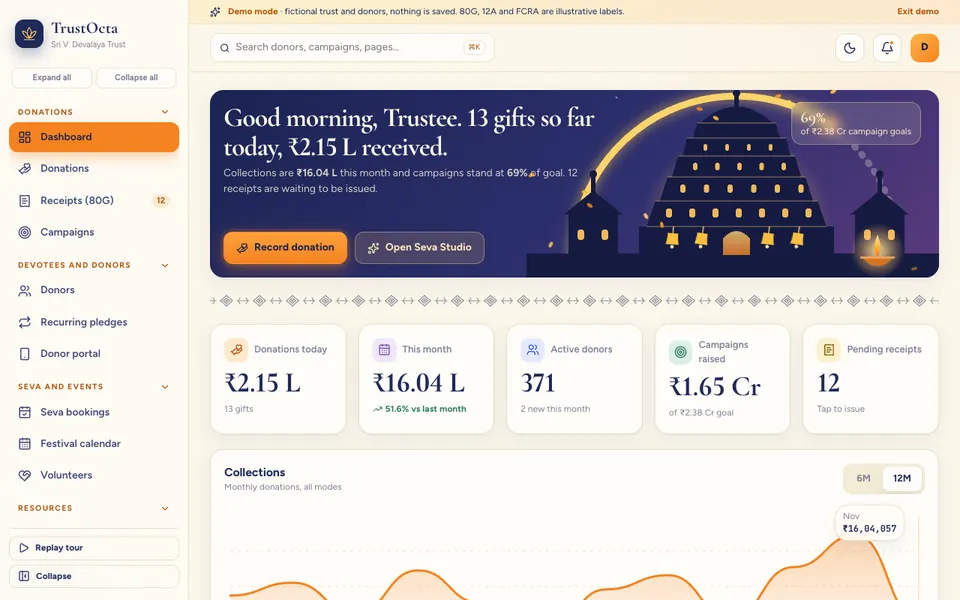
TrustOcta is an interactive demo for temples, charitable trusts and NGOs. It runs on sample data, every sign-in simply enters, nothing is saved, and everything resets when you refresh the page. Labels such as exemption and registration names inside the demo are illustrative only, and the seven tools in Seva Studio that look like AI are simulated and scripted, not real models. Festival dates are approximate labels, and the Hindi and Telugu copy is template text.
The pages, grouped as the demo groups them:
- Donations: a dashboard, a donations list, a receipts page and campaigns.
- Devotees and donors: donors, recurring pledges and a donor portal that shows what a giver would see.
- Seva and events: seva bookings, a festival calendar and volunteers.
- Resources: a hundi and counter page for the count, inventory, expenses with approvals, and programmes.
- Compliance and insights: a compliance page with illustrative items, the four analytics views, Seva Studio and settings, where you can switch the workspace between temple and NGO.
- Seva Studio (simulated and scripted): a donor retention predictor, a thank-you and appeal writer in English, Hindi and Telugu, a campaign copy generator, a festival-aware fundraising forecast with a confidence band, bill scanning that turns a bill into an expense, a volunteer matcher that assigns people to a rota, and a duplicate and anomaly guard.
Printing uses the browser's print dialog, and the receipt download is a simple HTML file. The point of the demo is to let a trustee see the connections: a donation, its campaign, its receipt and the donor's history on one screen.
How to try it
Open the demo and use Try Demo Account on the login screen. Look at the hundi and counter page, then open a campaign and follow a donation through to its receipt. When you are done, the demo apps page lists every other sample you can explore.
How do you get trust software built around your organisation?
Every trust runs differently. Some have a single shrine and a handful of trustees, others run schools, kitchens and clinics under one registration. A useful first step is a short conversation about your funds, your festival calendar, your receipt process and who needs to see what. From that we can prepare a scoped, fixed-price proposal for a custom build. Read how we work in our piece on why custom software pays off for small organisations, or talk to us about a custom build. You can also see our published Android apps on the apps page.
Try it live
Open the real thing: demos run in a new tab with sample data, apps link to their own page.
 Live demoTrustOcta live demoClick through donations, receipts, hundi counting, seva bookings, volunteers and Seva Studio, with sample data.
- ABrowse allAll demo appsBrowse every interactive industry demo with sample data.
- ZBrowse allZenocta appsProduction apps live on Google Play.
- TBrowse allTalk about a custom buildDescribe how your trust works and get a scoped, fixed-price proposal.
Frequently asked questions
01What does temple and trust management software do?
It keeps donations, receipts, donor history, campaigns, seva bookings, volunteers, hundi counts and expenses in one record, so trustees can answer questions quickly and the office does not rebuild accounts from notebooks at year end.
02Can software issue receipts that meet exemption rules?
Software can issue numbered receipts in a format you configure, but the required wording and details depend on your registrations and on rules that change. Check the current rules with your auditor, and choose a tool where you can edit the format.
03How should a hundi count be recorded?
Have at least two people count, record the total by denomination on a standard sheet, and match the sheet total to the bank deposit the same day. Software keeps the sheets in one structure and lets trustees compare counts across festivals.
04Is the TrustOcta demo a live system with real donors?
No. It is an interactive demo with sample data. Every sign-in simply enters, nothing is saved, and data resets on refresh. Exemption labels are illustrative and the Seva Studio tools are simulated and scripted, not real models.
05How do I get trust management software built for my organisation?
Start with a short conversation about your funds, festival calendar, receipt process and who needs access. Zenocta then prepares a scoped, fixed-price proposal for a custom build. Use the contact page to begin.