In this guide
The grant is signed, the first tranche reaches the bank, and a small NGO team is suddenly running projects in several villages while answering to several funders at once. Each funder wants a different report, each field team keeps its own register, and the finance person is reconstructing spending from a pile of bills the night before a deadline. This guide explains what NGO project management software has to do for CSR-funded work, and how to choose or commission it well.
Why do grants go wrong after the money arrives?
Winning a grant is the visible achievement. The harder work is the next twelve months of showing that the money did what the agreement said. Most trouble comes from four gaps.
- Money and activity are tracked separately. Finance knows what was spent, programmes know what was delivered, and nobody holds both in one view.
- Tranche timing is managed from memory. The next instalment often depends on reporting on the last one, and a missed date can stall a project.
- Beneficiary lists are scattered. Each village team keeps a register, the same household appears twice, and the headline number is hard to defend.
- Reports are rebuilt from scratch. Every funder format is filled by hand, so the same figures are copied into several documents and drift apart.
Software cannot fix a weak project, but it can stop a good project from looking disorganised.
How does a CSR grant flow from agreement to utilisation certificate?
The vocabulary varies between funders, but the flow is steady. Understanding it makes every software feature easier to judge.
- Grant agreement. It sets the amount, the project, the budget heads, the conditions and the reporting calendar.
- Tranches. The money arrives in instalments, each with a due date and often a condition.
- Spending against budget heads. Every expense is a voucher recorded against a head such as training, materials, travel or staff.
- Utilisation and variance. You compare what was budgeted with what was spent, head by head.
- Utilisation certificate and statement of expenditure. Funders usually ask for a signed statement showing how a tranche was used. The exact format is theirs, so check each funder's current requirements.
- Progress and impact reporting. Narrative and indicator data go to the funder on the reporting calendar.
Here is a made-up example with invented numbers. A ₹12,00,000 grant is released in three tranches of 40%, 30% and 30%, which is ₹4,80,000, ₹3,60,000 and ₹3,60,000, adding up to the full ₹12,00,000. After the first tranche, the project has spent ₹4,20,000. Utilisation is 4,20,000 divided by 4,80,000, which is 87.5%. Many agreements ask for a certain share of a tranche to be used and reported before the next is released, so knowing that figure on any given day is worth a great deal. Check your own agreement for its exact terms.
A second example, also invented: the training head was budgeted at ₹1,50,000 and ₹1,68,000 has been spent. The variance is ₹18,000 over, which is 12% of the head (18,000 divided by 1,50,000). The system should show that while there is still time to correct it, not on the day of the report.
Tip
Record each voucher against a budget head at the moment of spending, with a photo of the bill attached. Reconstructing heads at quarter end is where most utilisation errors are born.
What should you track about the people you serve?
A funder wants to know how many people were reached and what changed for them. That needs three connected records, not one.
A beneficiary registry
One row per person or household, with village, district, programme and enrolment date. The most valuable feature is duplicate detection, because the same family often enrols in more than one activity. Personal data about vulnerable people deserves care: limit access by role, record consent in the way your organisation requires, and check the current data protection rules that apply to you. Our note on keeping records secure covers the basics.
Activities and attendance
Sessions, camps, trainings and distributions, each with who attended. Attendance logged in the field, ideally from a phone, is the evidence behind every reach number.
Indicators
An indicator is a measurable result with a target, for example 500 women trained as the target and 380 trained so far. That is 380 divided by 500, which is 76% achieved. Tracking indicator achievement next to spending is what lets a director say whether money and results are moving together.
Why show money and reach on one map?
Projects spread across districts and villages are hard to picture in a table. A map that places each project as a pin gives the director a sense of geography at once. The more useful idea is to wrap each pin in a ring that can show one of three measures: how much of the project's funds have been used, how many beneficiaries have been reached, or how much of the indicator targets have been achieved. Flip between them and a mismatch appears immediately. A project with a nearly full spending ring and a thin reach ring is a conversation to have this week, not at the year-end review.
How do you roll out project software without overloading field teams?
- List funders and grants first. Enter each agreement, its tranche schedule, its budget heads and its reporting dates.
- Set up projects and indicators. Link each project to a grant, a place and a few indicators that matter, not forty of them on day one.
- Move finance next. Start entering vouchers against budget heads from a chosen date and attach bill images.
- Bring in the registry. Import existing beneficiary lists, clean duplicates and agree how new people are added.
- Give field staff a simple attendance entry. The simpler it is, the more complete the evidence will be.
- Generate one report the old way and the new way. Compare the numbers before you trust the system for a funder submission.
What should you ask a vendor, and what goes wrong?
Questions to ask
- Can we model several funders, grants and tranche schedules, each with its own conditions and reporting dates?
- Are vouchers recorded against budget heads with variance shown as you go?
- Can the utilisation certificate and statement of expenditure be built from vouchers, and can we change the format per funder?
- Does the beneficiary registry detect duplicates and limit access by role?
- Can field staff log attendance from a phone, including with weak connectivity?
- Can we export our data and reports if we change systems or funders?
- Is there an audit trail for edits to vouchers and registry entries?
Common mistakes
- Too many indicators. Forty indicators on day one means none are filled in properly.
- Buying donor software for grant work. Donation tools do not understand tranches, budget heads or utilisation.
- Forgetting field reality. If entry takes ten minutes on a slow phone, it will not happen in the village.
- Mixing consent and convenience. Collect only what the programme needs about beneficiaries.
Spreadsheet, shared drive or purpose-built software?
| Approach | Works when | Breaks when |
|---|---|---|
| Spreadsheets per project | One or two small grants and one person who owns the files | Several funders ask for different views of the same spending |
| Shared drive with folders and reports | The team is small and disciplined about naming and versions | Figures are copied across documents and start to disagree |
| Purpose-built grant and impact software | Money, people served and indicators have to be reported together | Rolled out without cleaning registry data or simplifying field entry |
For organisations that raise funds from individual givers as well as CSR funders, a donor-focused system is a separate need. We cover it in our guide to temple and trust management software.
What the NGOOcta demo shows
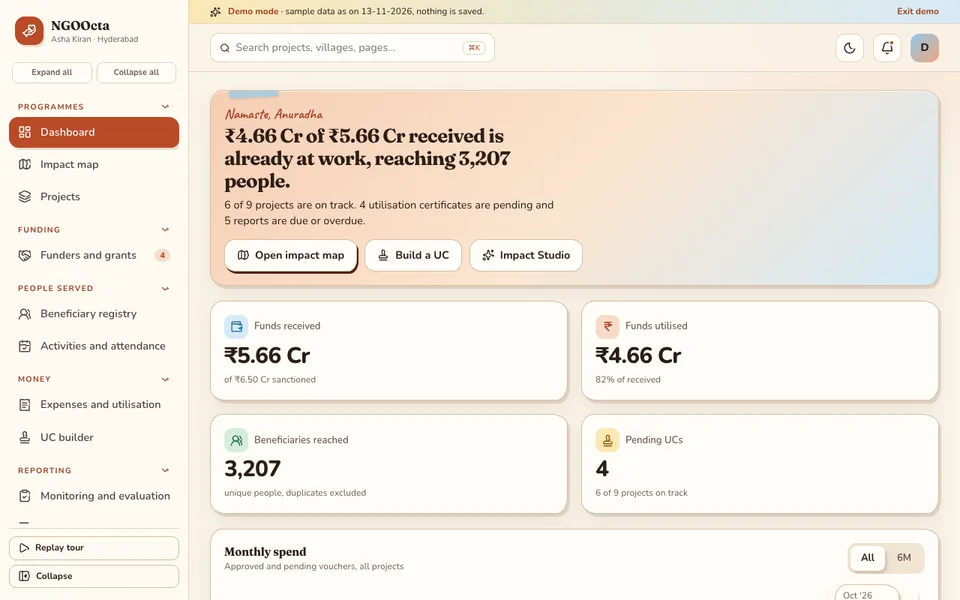
NGOOcta is an interactive demo built around one fictional NGO, Asha Kiran Foundation. Everything in it is sample data, nothing you do is saved, and it resets when you refresh. The seven tools in Impact Studio that look like AI are simulated and scripted, not real models, and compliance items in the demo are notes, not legal advice.
The sample organisation also has about 3,200 beneficiaries. The pages, in the demo's own order:
- Dashboard: funds received against utilised, beneficiaries reached, projects on track and pending certificates.
- Impact map: the signature screen, with a fund-utilisation ring around each project pin. Toggle the ring between utilisation, beneficiaries reached and indicator achievement, and open a pin for indicator progress, spending by budget head and field photos.
- Projects, and Funders and grants: the grant agreement, tranche schedule, conditions, reporting calendar and compliance flags for each grant.
- Beneficiary registry, and Activities and attendance: the people served and the sessions that serve them.
- Expenses and utilisation, and UC builder: voucher entry against budget heads, variance, light bank reconciliation and tranche-wise utilisation. The UC builder fills a certificate and statement of expenditure from vouchers once you pick a grant and tranche. Its format is illustrative and not for filing.
- Monitoring and evaluation, Impact reports, and Reports and analytics: the reporting layer.
- Volunteers and staff, Documents, Team and roles, and Settings: the organisation behind the work.
- Impact Studio (simulated and scripted): a report writer, eligibility checker, anomaly detector, forecaster, proposal drafter, story summariser and donor messages.
How to try it
Open the demo and choose Try Demo Account on the login screen. Start on the Impact map, switch the ring between utilisation and reach, then open the UC builder and pick a grant and tranche to see a certificate fill itself. The demo apps page has many more samples.
How do you get project software built around your funders?
No two NGOs report in quite the same way, because no two funder agreements are the same. The best starting point is a short conversation about your grants, your reporting formats and the two or three reports that take the most time. From that we can write a scoped, fixed-price proposal for a custom build. Our advice on building a first version without wasting budget applies here too: start with the reports that hurt most. When you are ready, talk to us about a custom build, or see our published Android apps on the apps page.
Try it live
Open the real thing: demos run in a new tab with sample data, apps link to their own page.
 Live demoNGOOcta live demoOpen the Impact map, switch rings between spend, reach and indicators, and fill a utilisation certificate from vouchers.
- ABrowse allAll demo appsBrowse every interactive industry demo with sample data.
- ZBrowse allZenocta appsProduction apps live on Google Play.
- TBrowse allTalk about a custom buildDescribe your funders and reports and get a scoped, fixed-price proposal.
Frequently asked questions
01What is NGO project management software?
It is software that connects grants, tranches, spending against budget heads, beneficiaries, activities and indicators, so an NGO can see money and results together and produce funder reports without rebuilding the same figures by hand.
02What is a utilisation certificate?
It is a signed statement, usually with a statement of expenditure, showing how a funded tranche was used. Funders set their own formats and requirements, so check each funder's current rules. Software can fill the figures from your vouchers.
03How can software help with tranche-based CSR grants?
It records each tranche with its date and conditions, compares spending to the amount received, and shows reporting deadlines. Many agreements link the next instalment to reporting on the last, so seeing utilisation daily lowers the risk of delay.
04Is the NGOOcta demo a real organisation's data?
No. It is an interactive demo around one fictional NGO with made-up data. Nothing is saved, it resets on refresh, the Impact Studio tools are simulated and scripted, and compliance notes in the demo are not legal advice.
05How do I get a grant tracking system built for my NGO?
Start with a short conversation about your funders, grant agreements and the reports that take most time. Zenocta then prepares a scoped, fixed-price proposal for a custom build. Use the contact page to begin.