In this guide
A rooftop solar installer sells a product that takes weeks to deliver and decades to serve. Between the first phone call and the first unit generated, the job passes through survey, design, quote, subsidy paperwork, procurement, installation and approval, usually tracked across a phone, a spreadsheet and a folder of photos. Solar installer software ties those hand-offs together so the customer, the crew and the office are all looking at the same job.
Where a solar job gets stuck between the first call and the first unit
Most installers describe the same pattern. Enquiries arrive from calls, WhatsApp, a website form and referrals. They are noted in different places, and follow-ups depend on someone remembering. A surveyor visits and takes measurements on paper or in a phone gallery. Back at the office, someone re-enters the roof dimensions to design a layout, then builds a quote in a spreadsheet, then separately prepares the subsidy application.
Each re-entry is a chance for an error. A quote based on an old roof measurement leads to a panel count that does not fit. A bill of materials copied from a previous job misses a structure item, and the crew discovers it on the roof. Subsidy files wait in a queue nobody is watching. After installation, the customer's phone number is in a notebook, and the first cleaning visit is never scheduled.
The eight stages worth tracking
- Lead. Capture the source, the contact, the monthly bill and the type of property, and assign an owner.
- Site survey. Record roof type, usable area, orientation, shading objects, structure condition, the electrical connection and photos.
- Design. Place panels on the measured roof and estimate generation, including shade loss.
- Bill of materials. Panels, inverter, mounting structure, cables, protection devices and balance-of-system items, priced.
- Quote. A proposal showing system size, price, expected savings, payback and, where relevant, financing and subsidy.
- Subsidy and approvals. Application, utility approval and disbursal, each with its own status. Check the current rules for your state and scheme.
- Installation. Crew schedule, material issue and commissioning.
- After-sales. Monitoring, scheduled cleaning, breakdown tickets and an annual maintenance contract, or AMC.
None of these is complicated on its own. The cost is in the waiting and re-entering between them, which is exactly what a connected system removes.
From electricity bill to system size: a worked example
Sizing is the step where software saves the most time, because it starts from numbers the customer already has. The figures below are invented to show the method, not to predict any real yield, which depends on location, tilt, shading and equipment.
| Step | Assumption or calculation | Result |
|---|---|---|
| Monthly consumption | From the customer's bill | 400 units |
| Daily consumption | 400 / 30 | 13.3 units a day |
| Assumed generation | 4 units per kW per day (illustrative) | - |
| System size needed | 13.3 / 4 | about 3.3 kW |
| Panel count | 3.3 kW / 0.55 kW panels (illustrative) | 6 panels |
| Roof check | 6 panels must fit the usable, unshaded area | Confirmed at survey |
The roof check is where reality intervenes. A water tank, a staircase headroom or a neighbouring building can cut the usable area, and the design drops from six panels to five. Good software lets you place panels on the roof drawing, see the estimated generation change as you add or remove them, and carry the final count straight into the bill of materials and quote.
Capacity utilisation factor, explained
Once plants are running, you need a simple way to tell a healthy one from a sick one. The capacity utilisation factor, or CUF, compares actual generation with the maximum the plant could produce if it ran at full rated power all day, every day.
For a made-up 5 kW plant that generated 7,300 units in a year: 5 kW x 8,760 hours is 43,800 units at theoretical maximum, and 7,300 / 43,800 is about 16.7 percent. Compare a plant with its own history and with its neighbours on the same city's sun, and a dip stands out. Soiled panels, a failing inverter or a new shadow all show up as a lower CUF or a lower performance ratio before the customer calls.
Tip
Offer the annual maintenance contract at handover, while the customer is still pleased. A contract with scheduled cleaning visits turns a one-time sale into recurring work, and the monitoring data tells you which visits matter most.
Subsidy tracking is a second pipeline
Where a subsidy scheme applies, the customer's file moves through its own stages: application, utility inspection or approval, commissioning report and disbursal. Each can sit for days or weeks. Treat it like a sales board, with a card per customer, the stage it is in and the date it entered that stage. A file that has been in one column for too long is the one to chase.
A word of caution on rules: subsidy amounts, eligibility conditions, portals and documents change over time and differ by state. Build the software to track stages and documents, and keep the rule values editable, so you can follow the current rules rather than hard-code last year's.
Spreadsheet, paper or purpose-built software?
| Approach | Fine for | Struggles with |
|---|---|---|
| Notebook and phone gallery | A founder doing every job personally | Follow-ups, photo retrieval, handing a job to a crew |
| Spreadsheets plus a quote template | A handful of live jobs at a time | Re-entry between survey, BOM and quote; subsidy status; service reminders |
| Purpose-built installer software | Several surveyors, crews and subsidy files in parallel | Needs your pricing and BOM rules loaded first; unnecessary for very low volume |
What to ask any vendor
- Does one survey record flow through design, BOM, quote and subsidy without re-entry?
- Can surveyors work on a phone on the roof, with photo capture and a measurement checklist?
- Is the BOM editable for our own brands, structures and prices, and does it update when the panel count changes?
- Does the quote show payback and, if we offer finance, an EMI view?
- Can we change subsidy rule values ourselves, or is that a developer job?
- Does it track stock with reorder alerts for panels, inverters and structures?
- Can it schedule cleaning visits and AMC renewals and remind the customer?
- What are the hosting and support costs, stated separately from the build?
Mistakes installers make when they digitise
- Starting with monitoring. It is attractive, but the sales and survey flow is where time is lost first.
- Hard-coding subsidy values. They will change. Keep them as settings.
- Letting the survey be optional. A design made without a survey record is a guess.
- Ignoring stock. A promised install date means little if the inverter has not arrived.
- Forgetting the second sale. AMC and cleaning are easier to sell with a system that already knows each plant.
The general case for building around your own process is in why every MSME should invest in custom software, and how MSMEs can reduce costs through digital transformation explains where small firms usually save first. If your quotes also need invoices, see GST billing software for small business and check the current tax rules for solar supply and installation.
What the SolarOcta demo shows
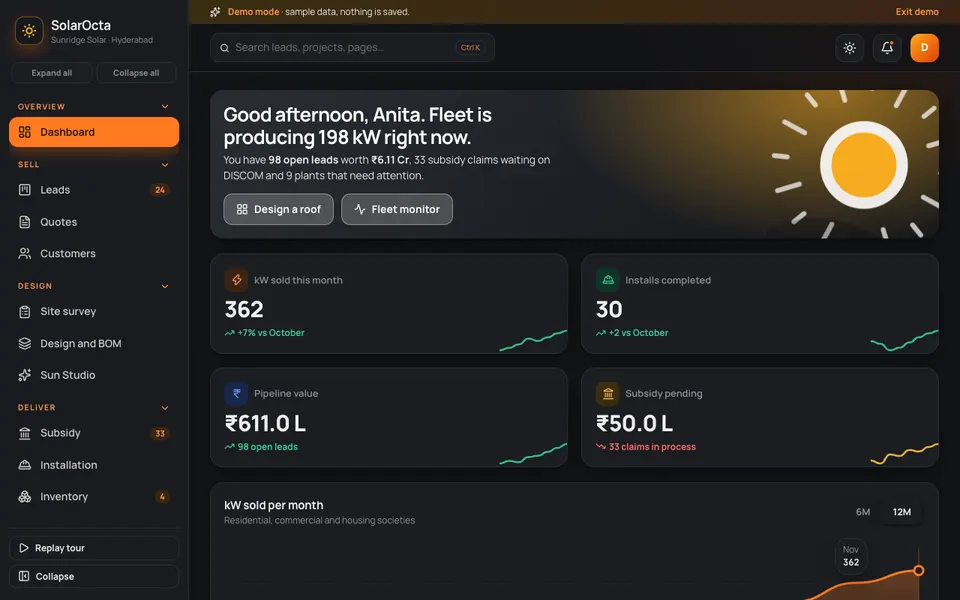
SolarOcta is an interactive demo for a rooftop solar installer, built by Zenocta around a sample installer in Hyderabad. All data is sample data: nothing is saved, it resets on refresh, and the tools in its Sun Studio are simulated, scripted behaviour rather than real models.
- Dashboard: kW sold this month, installs completed, pipeline value and subsidy pending, with a monthly chart.
- Leads: a board of columns, starting with New, where a new lead prompts you to book a site survey next.
- Quotes: a proposal with payback, EMI and a PM Surya Ghar style subsidy calculator. The scheme figures in a demo are illustrative, so check the current rules before using any.
- Customers: residential, commercial and housing-society accounts.
- Site survey: a checklist, photo placeholders and roof measurement for the surveyor on site.
- Design and BOM: click or drag across the roof to add and remove panels, watch generation and shade loss update, then price the bill of materials.
- Subsidy: claims shown from application to utility approval to disbursal.
- Installation and Inventory: installations by stage, and panels, inverters, structures and balance-of-system with reorder alerts.
- Monitoring: fleet generation today and plant status, healthy, fault or offline.
- AMC and tickets: annual maintenance contracts, cleaning visits and breakdown tickets, where you drag a visit onto a day.
- Reports, Team and Settings: a sales funnel, installer productivity, staff and company defaults.
- Sun Studio: a bill-to-system sizing tool, a roof auto-layout from a satellite image, a shade and yield estimator, a subsidy eligibility checker, a fault predictor from inverter data, a cleaning schedule optimiser and a proposal writer. Each is a scripted demonstration. The roof is not really read from a satellite image.
How to try it
Open the SolarOcta demo and choose Try Demo Account on the login screen. Then walk the flow in order: open a lead, go to Site survey, then Design and BOM and add a few panels, then Quotes and Subsidy, and finish in AMC and tickets. The demo apps page lists other industries if you want to compare.
Getting installer software built around how you work
Installers differ on brands, pricing, survey forms, the schemes they handle and how crews are organised, so a generic tool rarely fits. Use the demo to mark what you would keep and what you would change. Zenocta is a Hyderabad software studio with 11 people, whose most experienced members have more than nine years in the field, serving clients in India and abroad. We reply with a scoped, fixed-price proposal. When you are ready, tell us about your installation business, and you can browse our production apps on Google Play to see how we work.
Try it live
Open the real thing: demos run in a new tab with sample data, apps link to their own page.
 Live demoSolarOcta live demoPlace panels on a roof, see sample yield and shade loss, price the BOM and move subsidy claims along, all with sample data.
- ABrowse allAll demo appsSee the other interactive industry demos.
- ZBrowse allZenocta appsProduction apps live on Google Play.
- TBrowse allTalk about a custom buildDescribe your installation business and get a scoped, fixed-price proposal.
Frequently asked questions
01What should solar installer software include?
At minimum: lead tracking, a site survey checklist with photos, roof design with a bill of materials, quotes with payback, subsidy claim tracking, an installation board, stock control, and AMC with service tickets. Monitoring is useful, but the sales and survey flow usually pays back first.
02How do I size a rooftop solar system from an electricity bill?
Divide monthly units by 30 for daily use, then divide by the units a kilowatt generates per day at that location. Round to a panel count and check it fits the unshaded roof. The generation figure varies with location, tilt and shade, so confirm it with a proper estimate.
03Can the software calculate subsidy amounts automatically?
It can, but amounts and eligibility change by scheme and state. A sound build keeps those values editable settings and tracks claim stages and documents, so you can follow the current rules rather than rely on figures fixed at build time.
04Is SolarOcta a real product for sale?
No. It is an interactive demo with sample data that shows what Zenocta can build for rooftop solar installers. Nothing is saved, it resets on refresh, and the Sun Studio tools are simulated. A real system would be scoped around your own business.
05Why track AMC inside the same system?
Because the plant details, customer contact and monitoring history already live there. Scheduling cleaning visits and renewals from the same record is easier than rebuilding a list later, and it turns completed installs into recurring service work.