In this guide
In a small warehouse, the stock is usually in two places: on the racks and in the spreadsheet, and they only agree on the day someone checks. A pick sheet sends a picker to the wrong bin, a truck is received on a handwritten note, and a client asks for a stock report that takes the evening to produce. Warehouse management software for small warehouses fixes this by giving every unit a location, every movement a record, and every client a clear statement.
Where a small warehouse loses accuracy
Most stock errors are born in three places. The first is the dock, where goods are counted against a delivery challan by someone in a hurry, and a short or damaged carton is noted nowhere. The second is putaway, where stock goes to whichever space is free and nobody records which. The third is picking, where a picker grabs a nearby carton of the right product but the wrong batch.
Each of these is small. Together they create phantom stock, which shows on paper but is not on the shelf, and lost stock, which is on the shelf but not on paper. Both lead to the same bad day: an order cannot be completed, a client is told the wrong number, and a manual count is ordered at the worst possible time.
Receiving: what a GRN really records
GRN stands for goods receipt note. It is the document that says what actually arrived, not what was supposed to arrive. Many warehouses also get an advance shipping notice, or ASN, from the client or supplier, listing what is on the way. The comparison of the two is where the value sits.
Consider an illustrative inbound with made-up numbers. The ASN says 200 cartons of one product. The dock team counts 196 and finds 2 of them with crushed corners. A useful GRN records: expected 200, received 196, short 4, damaged 2, good 194. The 194 go to putaway, the 2 go to a quarantine location, and the shortfall is flagged to the client the same hour, while the truck driver can still be asked about it.
The better systems then suggest a putaway bin, based on space and the product's picking frequency, and ask the operator to confirm the bin by scanning it. That one scan is what makes the stock findable later.
Bin locations: a map of your stock
A bin location is a named address, such as zone, rack, level and position, assigned to a space on the racks. Without it, stock is "somewhere in B". With it, a picker is sent to one spot and an auditor can count one spot. Locations also let you see the warehouse as a picture: which bins are full, which sit empty, which products are picked often and should live near the dispatch area.
A heat map makes this visible. Colour the bins by how full they are, how often they are picked, how soon their contents expire or which client owns them, and patterns appear that no list would show: fast movers buried in the back, slow movers taking prime positions, one client occupying more space than their contract covers.
FEFO, FIFO and why the batch matters
FIFO means first in, first out: ship the oldest arrival first. FEFO means first expired, first out: ship the stock that expires soonest. For goods with a shelf life, such as food, cosmetics or pharma-type products, FEFO is the safer rule, because arrival date and expiry date are not the same thing.
A made-up case: batch A arrived on 5 November and expires on 15 January; batch B arrived on 1 November but expires on 28 February. FIFO would ship B first. FEFO ships A first, since it will go out of date sooner. To follow FEFO you must record batch and expiry at the GRN, which is another reason to get receiving right.
From orders to the dispatch dock
Picking one order at a time wastes steps. Wave picking groups several orders into a wave, usually by cut-off time or carrier, and produces pick lists sorted by route through the warehouse, so a picker walks the aisle once. Then comes packing, where scanning each item against the order catches wrong-item errors before the box is sealed, followed by labels and a handover to the carrier.
Tip
If you can only fix one thing first, fix the pack-and-scan step. It is the last chance to catch a wrong item or a wrong quantity before a client or a customer finds it, and it also gives you a clean record of what left the building.
Cycle counts instead of a once-a-year panic
A cycle count is a small, regular count of a few bins or products, instead of a full stock take that stops operations. You choose items by value, speed or past error, count them, compare with the system, and approve or investigate the variance.
Illustration with invented figures: the system shows 120 units in a bin, the count finds 117, a variance of 3 units, or 2.5 percent. The question is not just "adjust it" but "why": a mis-pick last week, a damaged unit not written off, or a putaway into the next bin. Many small counts like this keep stock accurate and teach you where your process leaks.
Billing clients as a 3PL
A third-party logistics provider, or 3PL, stores and ships goods for other businesses, and earns money from recorded events: storage for the space used, handling for each unit received or picked, packing materials, and sometimes returns processing. If those events are in the system, billing becomes a calculation, not a negotiation.
| Charge (illustrative) | Basis | Quantity | Rate | Amount |
|---|---|---|---|---|
| Storage | Per bin per month | 40 bins | ₹50 | ₹2,000 |
| Pick and pack | Per unit | 1,500 units | ₹8 | ₹12,000 |
| Subtotal | ₹14,000 |
All rates above are made up. Tax on such invoices depends on your situation, so check the current GST rules with your accountant. The point is that a client can see the quantity behind every line, which cuts disputes.
Spreadsheet, paper or purpose-built software?
| Approach | Suits | Falls short |
|---|---|---|
| Paper registers and challans | A small room, one product family, one person who knows where everything is | Nothing to search, no batch or expiry control, stock reports by hand |
| Spreadsheets | A single warehouse with low order volume and a careful owner | No locations, no scan validation, multiple users overwrite each other, client billing is manual |
| Purpose-built warehouse software | Several clients, many SKUs, daily orders and cut-off times | Needs bin labelling and receiving discipline; excessive for a few dozen SKUs |
A sensible rollout for a small warehouse
- Label the racks. Give every bin a name and a printed label before any software goes live.
- Load the item master. SKU, description, unit, batch and expiry rules, and the client who owns it.
- Start with receiving. Raise GRNs and putaway in the system for new stock only.
- Do an opening count. Count existing stock by bin once and load it, so the system starts true.
- Move outbound next. Wave picking and pack verification, beginning with one client.
- Start weekly cycle counts. A short list, the same day each week.
- Turn on client billing and reports. Compare the first statements with your own records.
Questions to ask any vendor
- Does it record batch and expiry at receipt and support FEFO picking?
- Can it suggest a putaway bin and require a bin scan to confirm?
- Does it work with handheld scanners or phone cameras, and what happens on a weak connection?
- Can several clients' stock be kept separate, with each client seeing only their own?
- Does it handle discrepancies at the GRN, returns and damaged goods?
- Can charges be configured per client and billed from recorded events?
- Does it support cycle counts with an approval step for variances?
- What are the hosting and support costs, quoted separately from the build?
Common mistakes
- Software before labels. Without clear bin names, scans have nothing to confirm.
- Adjusting stock without a reason. Every adjustment should carry a cause, or you learn nothing from it.
- Mixing clients in one location without a rule. It makes billing and audits painful.
- Skipping the opening count. Starting from a wrong number means every report is wrong from day one.
- Buying for the warehouse you hope to have. Begin with what you run now, and extend.
If part of your business is retail stock, billing and inventory management software for retail shops covers the shop side. For clients that manufacture, business automation ideas for manufacturing companies shows what sits upstream, and how MSMEs can reduce costs through digital transformation gives the wider picture.
What the WareOcta demo shows
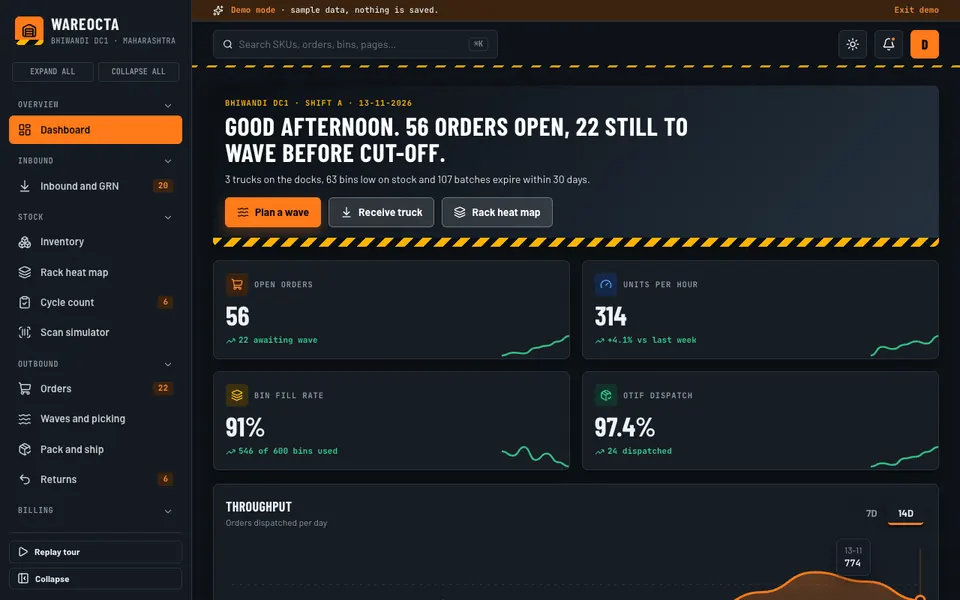
WareOcta is an interactive demo of warehouse and 3PL software, made by Zenocta around a sample distribution centre. All of it is sample data. Nothing is saved, it resets when you refresh the page, and the barcode scanning and the Stock Studio tools are simulated, based on fixed rules rather than real models.
- Dashboard: throughput, bin fill, dock status, an order cut-off clock and a live floor feed.
- Inbound and GRN: ASNs, a drag-to-dock schedule, receiving with discrepancy, and a putaway suggestion.
- Inventory: about 400 SKUs with batch and expiry, and FEFO ordering.
- Rack heat map: 3D-style racks coloured by occupancy, pick frequency, expiry or client, where you can click a bin.
- Cycle count: variance with an approval step.
- Scan simulator: a handheld-style screen for receiving, putaway and picking.
- Orders, Waves and picking: drag orders into waves and get route-sorted pick lists.
- Pack and ship: scan verification, labels and carrier handover.
- Returns: a place to process returned goods.
- 3PL billing and Clients: per-client billing with GST invoices, using obviously fake sample GSTINs.
- Reports, Team and shifts, Settings: reporting, a drag-to-roster shift view and configuration.
- Stock Studio: a slotting optimiser, stock-out forecaster, pick-path optimiser, damage photo inspector, dock scheduling, labour planner and a natural-language inventory query. Each is labelled Simulated AI in the demo, and is a rule-based demonstration, not a real model.
How to try it
Open the WareOcta demo and click Try Demo Account on the login screen, with no sign-up. Take the short guided tour or skip it. A good path: open Inbound and GRN and receive a truck, check the Rack heat map colouring by expiry, release a wave from Orders, and finish with a Cycle count. Other industries are on the demo apps page.
Getting warehouse software built around your floor
Warehouses differ in layout, client contracts, label formats and carriers, so the best system is one shaped to yours. Use the demo to decide which screens you need, and what you would change. Zenocta is a Hyderabad software studio of 11 people, whose most experienced members have more than nine years in the field, serving clients in India and abroad. We respond with a scoped, fixed-price proposal. When you are ready, tell us about your warehouse, and look at our production apps on Google Play to see our work.
Try it live
Open the real thing: demos run in a new tab with sample data, apps link to their own page.
 Live demoWareOcta live demoOpen the 3D rack heat map, receive a truck, plan a wave, run a cycle count and view client billing, all with sample data.
- ABrowse allAll demo appsSee the other interactive industry demos.
- ZBrowse allZenocta appsProduction apps live on Google Play.
- TBrowse allTalk about a custom buildDescribe your warehouse and get a scoped, fixed-price proposal.
Frequently asked questions
01What is a GRN in a warehouse?
A GRN, or goods receipt note, records what actually arrived at the dock: quantities received, shortages, damages and batch details. Comparing it with the advance notice or purchase order catches problems while the delivery vehicle is still there.
02What is the difference between FIFO and FEFO?
FIFO ships the oldest arrival first. FEFO ships the stock that expires soonest first. For goods with a shelf life, FEFO avoids older arrivals with later expiry blocking newer stock that would otherwise go out of date.
03How often should a small warehouse do cycle counts?
Many run short counts weekly or even daily on a rotating list, favouring fast-moving, high-value or error-prone items. Regular small counts keep stock accurate and show where errors begin, unlike a once-a-year stock take.
04Is WareOcta something I can buy?
No. It is an interactive demo with sample data that shows what Zenocta can build for warehouses and 3PLs. Nothing is saved, it resets on refresh, and the scanner and Stock Studio tools are simulated. A real system is scoped to your operation.
05Can a 3PL bill clients automatically from warehouse data?
Yes, when storage and handling events are recorded in the system. Charges per bin, per unit or per order can be calculated per client, and the invoice can show the quantity behind each line. Tax treatment should be checked against the current rules.