In this guide
Two customers are promised the same generator for the same Saturday. One of them walks away, a third returns a camera with a cracked lens and says it came that way, and the deposit register has three entries nobody can match to a booking. Rental is a simple business with a hard bookkeeping problem. This guide explains how to manage rental bookings and deposits properly, and what equipment rental software should do for you.
Why do rental businesses double-book assets and lose deposits?
A rental asset can only be in one place at a time, and every booking has to respect that. On paper and in chat, availability lives in someone's head. When two people take bookings, the head is out of date.
Deposits fail for a different reason. A deposit is money you hold but do not own. It must be recorded when taken, linked to a booking, and either returned or partly kept after the asset comes back. When the record is a line in a notebook, you cannot easily prove what was held, or what was deducted and why.
- Double bookings come from availability that is not visible to everyone at once.
- Disputes about damage come from having no condition record at checkout.
- Lost deposits come from not linking the money to a booking.
- Idle assets come from not knowing which items actually earn.
What is an availability calendar, and how does clash detection work?
An availability calendar is a Gantt-style grid: each asset is a row, each day is a column, and every booking is a bar across the dates it covers. A free gap is a bookable window. Looking at it for five seconds tells you what is rented, what is free and when the next gap opens.
Clash detection is the rule behind it: you cannot place a booking on an asset if its dates overlap another booking. A good system checks this the moment you try, and tells you which booking you collide with, so you can offer an alternative asset or a different day. Buffer time matters too. A scaffolding set coming back on Friday evening is not truly available for a Saturday morning pickup if it needs inspection and cleaning first, so many businesses block a turnaround window after each return.
Tip
Block a short turnaround window after every return, such as a few hours for inspection and cleaning. It costs you a little availability and saves you from handing out equipment that is not ready.
What does the booking lifecycle look like from enquiry to return?
- Enquiry and quote. The customer asks about an asset and dates. You check the calendar and send a quote with the daily rate, any delivery charge and the deposit.
- Booking confirmed. The dates are blocked on the calendar. An advance or deposit may be collected.
- Checkout. The asset leaves with a condition record: photos, meter or hour reading, fuel level and accessories handed over.
- Rental period. You watch the return date and contact the customer if it is close.
- Return and inspection. The asset is compared with its checkout record, and any damage is logged as a ticket.
- Settlement. The final invoice includes any extra days or damage charges, and the deposit is returned or partly deducted.
When every step produces a record, a disagreement turns into a lookup. If you have never written down what an invoice must contain, read our guide on how to make a GST invoice before building your template.
How should you hold, deduct and refund a deposit?
Treat a deposit as a liability from the first day. The ledger needs one row per booking, showing the amount taken, how it was taken, any deduction with a reason and the amount returned.
An illustrative ledger with invented numbers:
| Booking | Deposit held (₹) | Deduction (₹) | Reason | Refunded (₹) |
|---|---|---|---|---|
| Generator, 2 days | 10,000 | 0 | Returned clean, full fuel | 10,000 |
| Camera kit, 3 days | 15,000 | 2,500 | Damaged lens hood, ticket raised | 12,500 |
| Scooter, 5 days | 3,000 | 400 | Late return by half a day | 2,600 |
The ledger keeps you honest in both directions. Customers see a reason for every deduction, and you can show that you returned what you did not need to keep. Match the deduction to a damage ticket and the condition photos from checkout, and a dispute rarely survives the evidence.
Deposits and rent are also part of how PG and hostel managers think, so that guide is a useful comparison for any business that holds money against a physical thing.
How do you handle damage and maintenance?
Treat damage as a ticket with a status, not a conversation. A ticket has the asset, the booking, photos, an estimated repair cost and a state such as open, repaired or written off. It does two jobs: it supports the deduction from the deposit, and it blocks the asset from being booked until it is fixed.
Maintenance is related but planned. Generators need servicing after a number of running hours, vehicles after a number of kilometres, and scaffolding needs inspection of its parts. When maintenance dates and hours are tracked per asset, you can schedule service into quiet windows on the calendar instead of discovering a failure when the customer arrives. The idea is the same as in our guide to workshop job cards and service reminders.
What does utilisation tell you?
Utilisation is the share of days an asset was out earning compared with days it was available. If a generator was available for 30 days and rented for 18, its utilisation is 60 percent. That single number shows which assets pay for themselves.
Low utilisation does not always mean "sell it". Maybe the rate is too high, the asset is poorly advertised, or it is always in the workshop. High utilisation with frequent damage might mean it is time to raise the price or the deposit. Without the number, you decide by feel, and feel favours the assets you like.
Late returns and no-shows
Late returns are the quiet cost of rental. A set that comes back a day late is a day you could not rent to someone else. Your terms should say what a late day costs, and the system should apply it consistently rather than the person at the counter deciding each time. No-shows are the other side: a booking that holds dates and never turns up. An advance payment and a clear cancellation rule protect you. Software can also flag customers whose history suggests a risk, though a human should decide what to do.
Notebook, spreadsheet or rental software?
| Need | Notebook and calls | Spreadsheet | Rental software |
|---|---|---|---|
| See availability | Memory | A grid you colour by hand | Availability Gantt with clash detection |
| Prevent double booking | Hope | Check before you promise | System blocks overlapping dates |
| Track deposits | A column in a register | A separate sheet | Deposit ledger linked to the booking |
| Record damage | Argument at the counter | A note in a cell | Damage ticket with photos and cost |
| Know what earns | Guess | Pivot table once a quarter | Utilisation analytics per asset |
| Invoice | Hand-written | Template | Invoice from the booking, with payments |
How do you roll out rental software?
- Create the asset register. One row per item, with category, rate and any identifying number.
- Load future bookings first. Enter confirmed bookings so the calendar tells the truth from day one.
- Take every new booking in the system. Stop using a second diary.
- Introduce the checkout and return checklist. Photos and readings at both ends.
- Start the deposit ledger for new bookings. Do not try to rebuild history.
- Review utilisation monthly. Use it to decide on rates and purchases.
What should you ask a rental software vendor?
- Does the calendar work on a phone, not just with a mouse? Is there a quick-book form for touch screens?
- Does it stop overlapping bookings, and can I set a turnaround buffer?
- Can deposits be linked to a booking and to a damage ticket?
- Can I export reports as CSV?
- Can customers sign or accept a quote online?
- What does it cost, and is hosting billed separately?
Common mistakes
- Skipping condition photos at checkout. Without a "before", you cannot prove a "damaged".
- Mixing deposits with revenue. It makes cash look better than it is.
- One rate for everything. Weekends, long rentals and peak seasons usually deserve different prices.
- Believing a forecast. A demand predictor is a hint, not a promise.
What the RentOcta demo shows
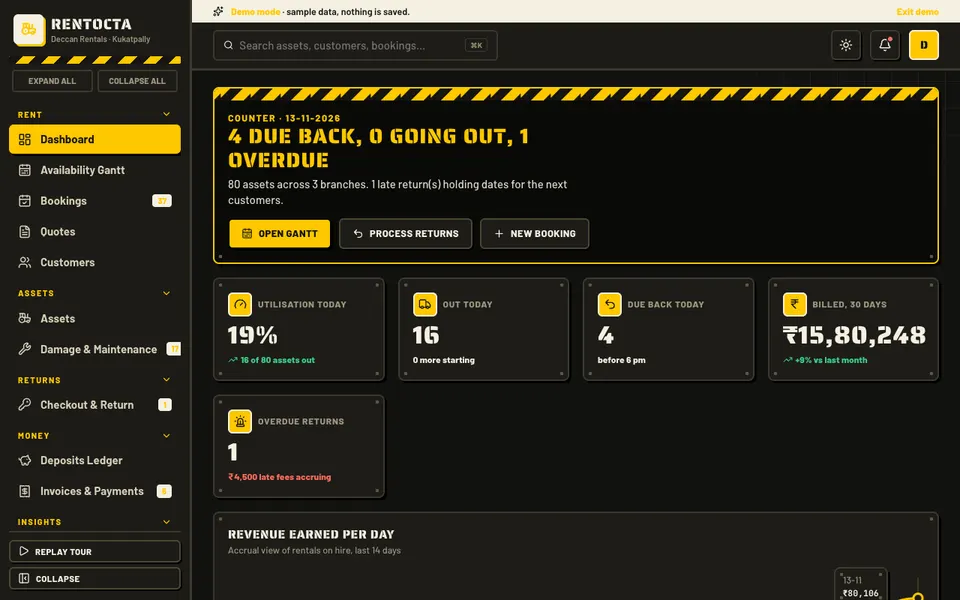
RentOcta is an interactive Zenocta demo of a rental management product for equipment and vehicle rental businesses in India: JCBs, scaffolding, generators, cameras and sound, two-wheelers and cars. All data is synthetic, nothing is saved, state resets on refresh, and the AI tab is simulated. It is a demo of what could be built, not a product with customers.
- Availability Gantt (the signature module). Drag to create a booking, drag to move or extend it, with clash detection and a Quick book form for touch screens.
- Dashboard, Bookings and Quotes. The day-to-day view and the enquiry-to-booking flow.
- Customers and Assets. The people and the items.
- Damage and Maintenance. Tickets and service.
- Checkout and Return and the Deposits Ledger. The condition record and the money held.
- Invoices and Payments. The final bill and what has been paid.
- Utilisation analytics and Reports. Including CSV export.
- Team and Settings. Access and configuration.
- Fleet-Lite Studio (simulated AI). Dynamic pricing, damage detector, demand forecaster, best asset recommender, late-return and no-show risk, maintenance predictor, and a quote and WhatsApp writer in English, Hindi and Telugu.
How to try the RentOcta demo
- Open rentocta.zenocta.com.
- On the login screen, choose Try Demo Account.
- Open the availability Gantt, drag across a free gap to create a booking, then try to overlap another to see the clash warning.
- Walk through Checkout and Return, then the Deposits Ledger.
- Open Fleet-Lite Studio and try the dynamic pricing tab. Refresh the page to reset the sample data.
Other sample businesses are on the demo apps page.
Getting a rental system built around your assets
A JCB hire business, a camera rental studio and a two-wheeler rental shop have different rules about deposits, buffers and damage. A system built around your own terms is easier to use than a generic one. Zenocta builds custom software, starting with a conversation about your current process and ending in a scoped, fixed-price proposal. When you are ready, talk to us about a custom build, or browse the apps live on Google Play.
If your assets are delivered and serviced at customer sites, see our article on dispatching technicians, and for the fleet side of vehicle rental read fleet management software.
Try it live
Open the real thing: demos run in a new tab with sample data, apps link to their own page.
 Live demoRentOcta live demoOpen a sample rental business: drag-to-book availability Gantt, checkout and return, deposits ledger and damage tickets.
- ABrowse allAll demo appsBrowse every interactive demo, each with a sample company and nothing saved.
- ZBrowse allZenocta appsProduction apps live on Google Play.
- TBrowse allTalk about a custom buildTell us how your business runs and get a scoped, fixed-price proposal.
Frequently asked questions
01What is equipment rental software?
It is software that manages the rental cycle: asset records, an availability calendar, quotes and bookings, checkout and return with condition records, deposits, damage and maintenance tickets, invoices and payments, and reports on utilisation.
02How do I prevent double booking of rental equipment?
Use an availability calendar where each asset is a row and each booking a bar, with clash detection that refuses overlapping dates. Adding a turnaround buffer after each return protects you from handing out equipment that is not ready.
03How should rental deposits be tracked?
Keep a ledger with one row per booking showing the deposit taken, any deduction with its reason and the amount refunded. Link deductions to a damage ticket and the checkout photos so both sides can see the evidence.
04Is RentOcta a real rental product?
No. RentOcta is an interactive demo with synthetic data. Nothing is saved, state resets on refresh, and the Fleet-Lite Studio AI tabs, such as dynamic pricing and damage detection, are simulated. It shows what a custom rental system could contain.
05Can Zenocta build rental software for my business?
Yes. Zenocta builds custom business software. We start with your assets, deposit rules and booking habits, then provide a scoped, fixed-price proposal for a rental system built around your terms.