In this guide
A gym, a diagnostic lab, a vet clinic, a dental practice, an optical shop and a home-care agency look nothing alike, but their owners share one headache: the work happens in front of a patient or member, and the paperwork that holds it together happens in whatever is nearest, such as a diary, a register or a WhatsApp group. This guide looks at software for gyms, labs and clinics as business software: scheduling, records, follow-up, billing and stock. Clinical decisions stay with qualified people, and nothing here is medical advice.
What jobs does software need to do in health and care?
Whatever the setting, the business side repeats six jobs. Naming them helps you see which one your own practice handles worst.
- Scheduling: chairs, classes, visits, collection slots and kennels, with clashes caught before the day starts.
- Records: one profile per person, patient or pet, with history that a colleague can pick up.
- Follow-up: recalls, renewals, vaccination dates and report delivery, so people return or hear back without anyone remembering.
- Money: advances, instalments, claims, dues, partner ledgers and one clear invoice.
- Stock and supplies: medicines with batches and expiry, reagents, frames and lenses, equipment.
- Staff and compliance: who is on, who has done which training, who may see which record.
Health-related records are sensitive, so a seventh job sits behind all six: access control and backups. Check the current data protection rules that apply to health information where you operate, and read our note on small business security basics before you choose a vendor.
Software records and reminds
The systems described here run the business around care: bookings, notes, reminders, stock and invoices. They do not diagnose, prescribe or decide treatment. Anything labelled a prompt or a flag is a nudge for a qualified person to look again, never a verdict.
How do you choose between paper, a spreadsheet and a purpose-built system?
The honest dividing line is usually complexity, not headcount. A practice with one practitioner and a small, stable client list can live on a diary. Once there are several staff, outside labs, recurring follow-ups or visits in other people's homes, the cost of one missed follow-up exceeds the cost of a system.
| Need | Paper and diary | Spreadsheet | Purpose-built software |
|---|---|---|---|
| Schedule with clash checks | Visual, but clashes found late | Manual colour-coding | Warns before you confirm |
| History compared over time | Digging through cards | One tab per person gets unwieldy | Charts and side-by-side views |
| Recalls and reminders | Memory | Filter by date | A daily list with message templates |
| Outside parties (labs, partners, funders) | Notepad | A tracking sheet | Linked statuses and ledgers |
| Who saw or changed what | Not recorded | Version confusion | Roles and an audit trail, if built in |
If you want a general checklist before you look at a specific trade, start with clinic management software features.
Six practices, six demos
Zenocta has built an interactive demo for each of the businesses below, with a fictional organisation and sample data. The summaries say who each suits and what you can really click through. Each links to a deeper article and to the live demo.
Gyms and studios: FitOcta
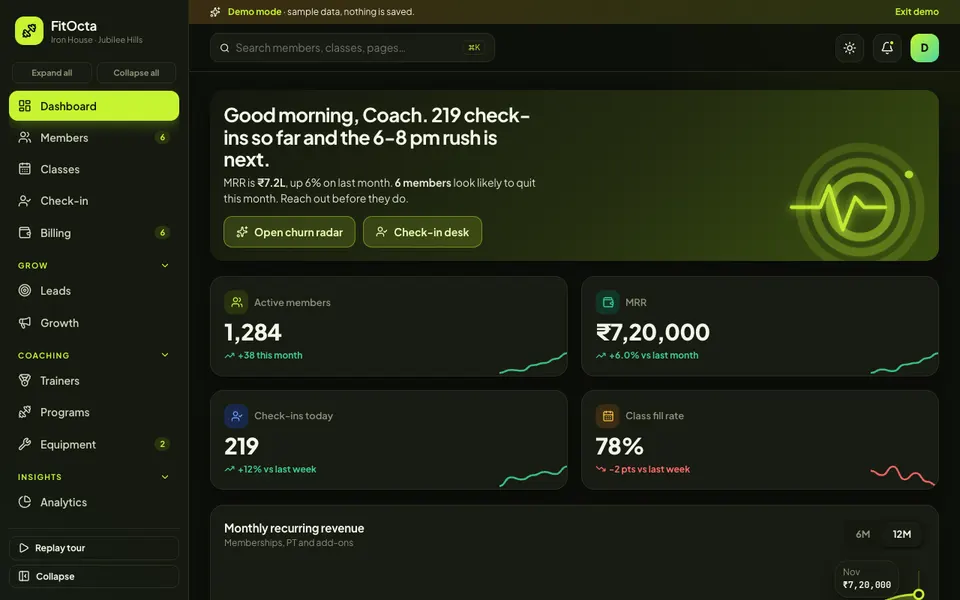
For gyms that make their money in the months after joining. The demo has a dashboard with monthly recurring revenue and check-ins, member profiles with freeze and renew, a weekly class grid with waitlists, a check-in desk where an expired membership is stopped with a renew prompt, billing with dues and auto-debit recovery, and a drag-and-drop lead pipeline. It solves best the invisible-churn problem: seeing who stopped coming before they cancel. Read the gym management software guide or open FitOcta.
Diagnostic labs: LabOcta
For labs that move samples between collection points and a main bench. The demo has an order screen that produces a barcode label, a six-stage sample board, result entry with reference-range gauges, flags, delta checks and a recorded critical call-back, validate-and-release steps, a home collection map, referral doctor tracking and quality control charts. It solves best the where-is-my-sample question. See the diagnostic lab software guide or try LabOcta.
Vet clinics: VetOcta
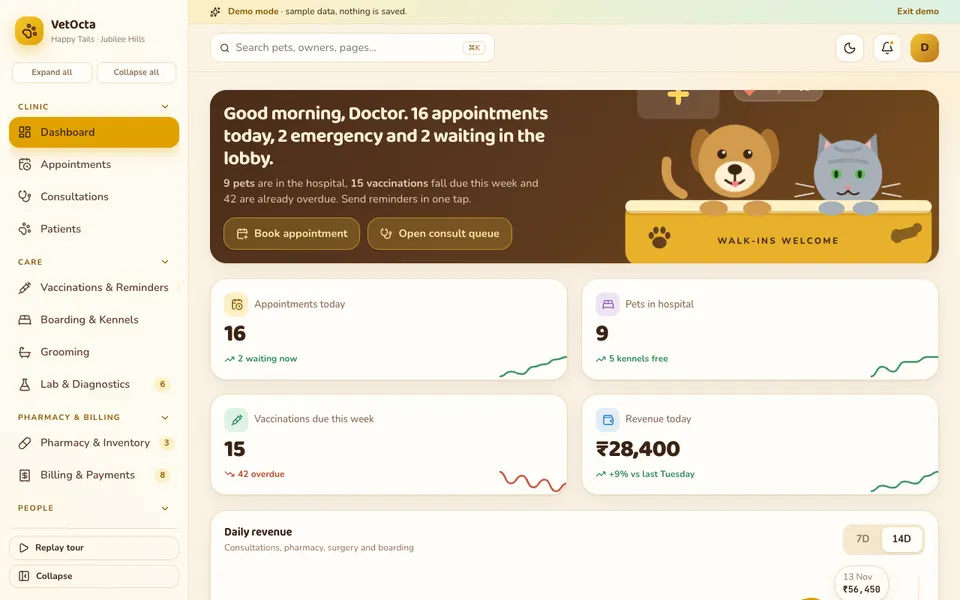
For clinics that run a consulting room, a pharmacy and boarding under one roof. The demo has a draggable appointment day, SOAP consultation notes, a pet profile with a weight chart and vaccination timeline, reminders, a kennel board that bills at check-out, grooming, and pharmacy batches with expiry. It solves best the card-index problem, where a pet's history is a lost card. Read the vet clinic software guide or open VetOcta.
Home-care agencies: CareOcta
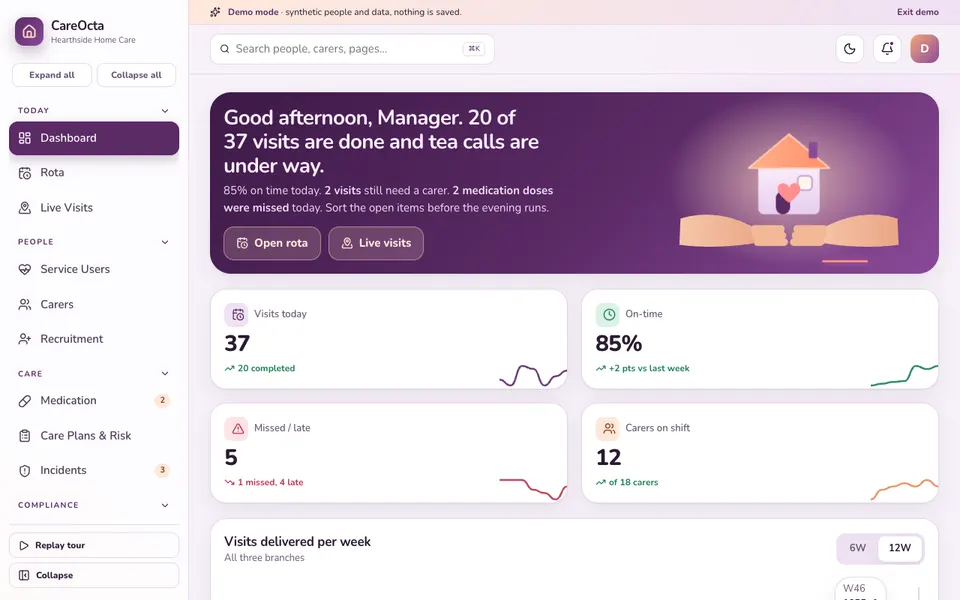
For agencies in the UK and Ireland whose work moves between homes. The demo has a drag-and-drop rota with conflict and travel warnings, a live visits view, an electronic medication record, care plans with a family portal preview, a compliance matrix with chase and renew actions, and invoicing and payroll pages. It solves best the 7.40 a.m. scramble of rebuilding a day from messages. See the home care agency software guide or try CareOcta.
Optical shops: OptiOcta
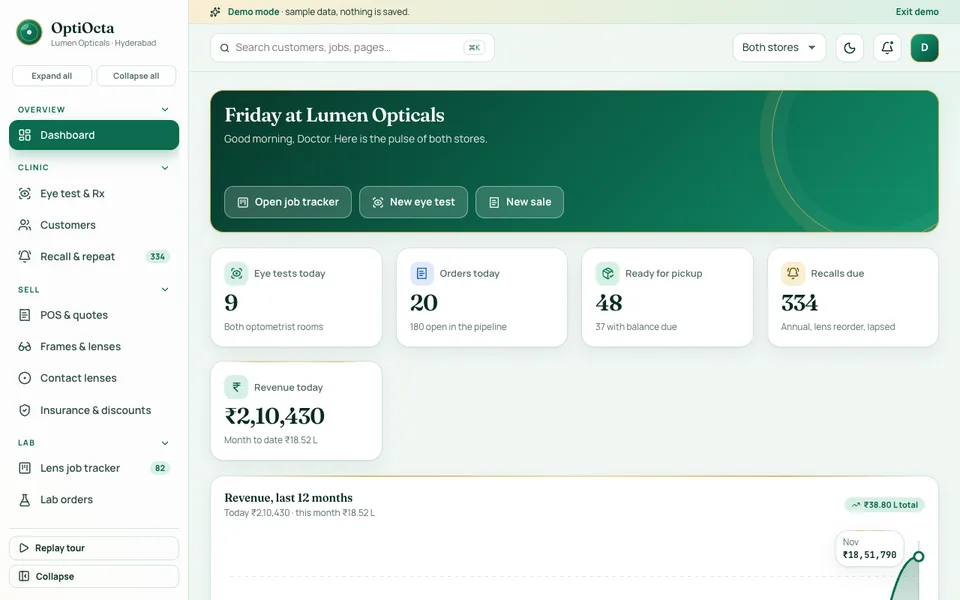
For optical retail where every pair is a made-to-order job. The demo has an eye-test and Rx card with right and left eye values, history compare, a POS quote built from frame, lens and coating with an advance, a six-stage lens job tracker where late jobs glow red, lab orders, insurance and discounts, and a recall list. It solves best the made-to-order tracking gap between the sale and pickup. Read the optical shop software guide or open OptiOcta.
Dental and specialty clinics: DentOcta
For clinics where the chair is the scarce resource. The demo has a chair schedule with drag-to-move and a clash check, a tooth chart in two numbering systems, phased treatment plans with an EMI view, lab orders with status, recalls with message templates, an autoclave log and billing with advances, instalments and claims. It solves best the accepted-but-never-booked treatment problem. See the dental clinic software guide or try DentOcta.
How do the six demos compare?
A blank cell means the demo does not feature it, not that a custom build could not add it.
| Demo | Scheduling | Records | Follow-up | Billing and stock |
|---|---|---|---|---|
| FitOcta | Class grid, waitlists | Member profiles | Renewals, lead pipeline | Dues, auto-debit recovery |
| LabOcta | Home collection bookings | Patient history with trend charts | Report sharing | Invoices, B2B ledger, reagents |
| VetOcta | Draggable appointments, kennels | Pet profile, SOAP notes | Vaccination reminders | Part payments, pharmacy batches |
| CareOcta | Rota with travel warnings | Care plans, eMAR | Compliance chase and renew | Invoicing and funding, payroll |
| OptiOcta | Today's queue | Rx card, history compare | Recall list | Quote with advance, frame stock |
| DentOcta | Chair schedule, clash check | Tooth chart, treatment plans | Recalls with templates | Advances, instalments, claims, inventory |
Every one of these demos also includes a studio of simulated AI-style tools: six in FitOcta and seven in each of the others. They are scripted illustrations, so judge the demos on their workflow pages.
What does a good follow-up routine look like?
Follow-up is the one job that every one of these six practices shares, and the one that most often depends on memory. A gym calls members who stopped visiting. A vet clinic works through vaccination dates. An optical shop or dental clinic messages people due a check. A lab sends a report. An agency chases an expiring certificate. The software produces the list. A person has to clear it.
Here is an invented example to show why the habit matters. A clinic has 80 people due a recall this month. The front desk contacts all 80, and 30 percent book a visit. That is 24 visits (80 x 0.3). At an average spend of ₹1,200 a visit, the routine brings in ₹28,800 (24 x 1,200) that would otherwise have waited for luck. These are made-up figures, not a forecast for any practice. What holds for every practice is the pattern: a short list cleared on a fixed day beats a long list attacked once a quarter.
- Choose one weekday and one time for the follow-up hour, and put it in the rota.
- Keep messages short, name the practice and offer two time slots instead of an open question.
- Record the outcome (booked, no reply, wrong number) so the next list is cleaner.
- Check the current rules on messaging and consent before sending reminders in bulk.
For ideas on keeping booked appointments honoured, our guide to reducing no-shows with a booking app applies well beyond salons.
How do you try the demos in 15 minutes?
- Pick the one or two demos nearest your practice and open them in the browser.
- Press Try Demo Account on the login screen. A guided tour starts and can be replayed.
- Walk your busiest hour. Book or move a slot, open a record, send or review a follow-up, then raise a bill.
- Test the small screens. Reception staff and field staff use phones and tablets, so try the phone layout.
- Note every gap. Where your intervals, forms, rota rules or price list differ is where a custom build earns its place.
Before you click
Each demo uses a fictional organisation and invented people. Nothing is saved, data resets on refresh, and every AI-style tool is simulated. They are not clinical tools, they are not for real patient, pet or client records, and nothing in them is advice. Find the rest of the sample businesses on the demo apps page.
What mistakes do practices make when buying software?
- Digitising the report but not the process. A tidy PDF does not help if the sample, the lens job or the lab case was still tracked by hand.
- Importing every old record on day one. Start with active clients and open work, and add history later.
- Trusting a flag as a decision. Risk scores, anomaly checks and dose helpers are prompts. A qualified person checks and decides.
- Weak access control. Front desk, practitioners, carers and partners should each see only what they need.
- Bad contact data. Recalls and reminders fail on wrong phone numbers far more often than on technology.
- Training only the owner. The front desk and the field team use the system most. If it is slower than the diary, the diary returns.
- Running two systems forever. Set a date to retire the paper.
What should you ask a builder?
- Which parts of the demo are real and which are simulated? Ask to see a working flow, not a slide.
- Can my own intervals, recall rules, plan structures or visit windows be configured by me?
- How are roles set, and can staff see only the records they need?
- What audit trail shows who entered, changed or released a record?
- How is health data stored and backed up, and which data protection rules apply to my country? Check the current rules.
- Can I export every record, invoice and stock list if I leave?
- Who owns the data? Hosting and the domain are usually billed separately from the build, so ask for the ongoing cost in writing.
- How will rollout be staged so the practice keeps running?
Getting a version built around your practice
A single-chair dental clinic and a multi-branch dental group, a village gym and a studio chain, a three-carer agency and one with several branches: each needs a different build. Zenocta starts from how your scheduling, records, follow-up and billing run today, then returns a scoped, fixed-price proposal for the modules you need. To begin, tell us about your practice. You can see how we build and ship in our production apps on Google Play, and our post on why MSMEs invest in custom software explains when a custom route makes sense.
Try it live
Open the real thing: demos run in a new tab with sample data, apps link to their own page.
 Live demoFitOcta live demoMembers, class grid, check-in desk, billing and a lead pipeline for a sample gym.
 Live demoLabOcta live demoOrder and barcode, sample board, result entry with gauges, reports and home collection for a sample lab.
 Live demoDentOcta live demoChair schedule, tooth chart, phased treatment plans, lab orders and recalls for a sample clinic.
- ABrowse allAll demo appsBrowse every interactive demo, each with a sample company and nothing saved.
- ZBrowse allZenocta appsProduction apps live on Google Play.
- TBrowse allTalk about a custom buildTell us how your practice runs and get a scoped, fixed-price proposal.
Frequently asked questions
01Is this software meant to make medical or clinical decisions?
No. Software for gyms, labs and clinics runs the business around care: bookings, records, reminders, stock and invoices. Diagnosis, prescribing and treatment choices stay with qualified people. Any flag or risk indicator in a system is a prompt for a person to look again, not a verdict.
02Can a small clinic or gym manage with a spreadsheet?
A very small practice can, if one careful person owns it. Trouble starts with several staff, recurring follow-ups, outside labs or visits to people's homes. At that point missed recalls and lost history usually cost more than a proper system, even for a small team.
03How should health data be protected in a system like this?
Ask about role-based access, an audit trail of who entered or changed records, backups and data export, and where data is stored. Rules for health information differ by country, so check the current data protection rules that apply to you before choosing a vendor.
04Are the health and care demos usable with real patient records?
No. Each demo uses a fictional organisation and invented people. Nothing is saved, data resets on refresh and AI-style tools are simulated. They are for exploring what a custom build could contain, not for real patient, pet, member or client information.
05What does a custom build for a practice involve?
We start from how your scheduling, records, follow-up and billing work today, agree the modules, and return a scoped, fixed-price proposal. Rollout is staged so the practice keeps running, usually beginning with the schedule and records before reminders and billing.