In this guide
At 7.40 on a weekday morning, a carer rings the office to say she is running late, a second carer is off sick, and a family has just phoned to ask where the morning visit has got to. The coordinator is rebuilding the day from a whiteboard, a spreadsheet and a WhatsApp group. Home care agency software exists for exactly this moment: it puts the rota, the care plans, the medication records and the compliance picture in one place, so the coordinator is steering, not scrambling.
Why is a home care rota harder than an ordinary shift rota?
In a shop or a factory, people turn up to one place. In domiciliary care, the work moves. Each carer travels between service users' homes, each visit has a window the person is expecting you in, and each person has their own needs, preferences and risks. The result is a scheduling problem with many moving parts:
- Visits have fixed windows. A medication-linked or mealtime visit cannot simply slide by an hour.
- Travel time is real work time. A rota that ignores it is optimistic, and every visit after the first one runs late.
- Continuity matters. Service users and families value seeing familiar faces, so swapping carers has a human cost.
- Paper and messaging leave gaps. Handwritten medication charts, notes in a home file and instructions in group chats are hard to audit and easy to lose.
- Compliance never stops. Checks, training and certificates expire, and someone has to notice before an inspection does.
How do visits, travel and conflicts work in a rota?
A visit is a service user, a time window, a duration, the tasks and, ideally, a preferred carer. A rota assigns visits to carers and checks three things: the carer is free, the carer is able and approved to do the tasks, and the carer can physically get from the previous visit in time.
Here is an invented example of a travel conflict, the kind a good system flags before the day begins.
| Illustrative item | Time |
|---|---|
| Visit A starts | 08:00 |
| Visit A lasts 30 minutes, ends | 08:30 |
| Estimated travel to visit B | 20 minutes |
| Earliest arrival at visit B | 08:50 |
| Visit B is booked for | 08:45 |
| Result | 5 minutes late before the day starts |
Spotted at planning time, this is a five-minute fix: move the second visit, swap the carer or add a gap. Spotted at 08:50 on the day, it is a late visit and a phone call from a worried relative. If your rota is still a shared spreadsheet, the same logic of shifts, availability and clash checking is covered in attendance management software for small teams, and the idea of site rosters appears in facility management software for service agencies.
Live visits and missed-visit risk
A live view of today's visits shows which carers have started, which are on their way and which have not checked in. Check-in and check-out times, however they are captured, also give you a factual record of the time spent. The most useful screen in the office is the one that shows a visit is late while there is still time to do something about it.
Medication, care plans and the family portal
Electronic medication administration records
An electronic medication administration record, or eMAR, replaces the handwritten chart. For each service user it lists the medicines and the times they are due, and the carer records what happened: given, refused, or not given with a reason. The advantages are practical. Entries are legible and timestamped, a missed entry is visible straight away to the office, and there is no chart to lose. The software records and reminds. It never decides what a person should take, and decisions about medicines stay with the prescriber and the agency's qualified staff.
Care plans and risk assessments
A care plan describes what a person needs and how they like it done, and a risk assessment records what could go wrong and how it is managed. They are living documents. When a carer opens the visit on a phone, the relevant plan should be one tap away, not in a folder in the person's hallway. Version history matters too, so you can show what the plan said on a given date.
The family portal
Many families want reassurance without ringing the office. A family view can show upcoming visits, who is coming and short updates, with permissions set by the agency and the service user's wishes. It reduces inbound calls and builds trust, provided access is tightly controlled. Treat the permissions as seriously as any other personal data, and see our note on small business security basics for the habits that matter.
How do you keep carer compliance under control?
Every carer has a set of items that must be current: identity and suitability checks, mandatory training, supervision and any certificates your roles require. A compliance matrix is a grid with carers down the side, items across the top and a colour in each cell. Green is current, amber is expiring soon and red is overdue. Because it is a grid, one glance tells you who needs chasing this week, and a chase or renew action can sit right beside the cell.
Audits and inspection readiness follow the same logic: a checklist that is worked through regularly and not only the week before an inspection. The detail of what you must hold and evidence depends on your regulator and your country, so check the current rules for your regulator, and treat any software checklist as a prompt, not a statement of what the rules require.
How do you roll out home care software step by step?
- Map your branches, service users and carers. Names, contact details, skills and any restrictions, cleaned before import.
- Define visit types and tasks. Personal care, meal preparation, medication prompts and so on, using your own terms.
- Build the rota in the system, beside the old one. Compare for a week and note the conflicts the software finds that you did not.
- Introduce visit check-in on carers' phones. Keep the instructions to two or three taps, and train in small groups.
- Move medication records over. Start with a pilot group of service users, and agree an exception process for when a phone is unavailable.
- Load care plans and risk assessments. Prioritise the highest-risk people first.
- Turn on the compliance matrix, then invoicing and payroll links. Do the money side last, once visit data is dependable.
Tip
Ask two experienced carers to try the carer-side screens before the whole team does. If a carer with twenty visits a day finds a step slow, everyone else will too, and it is much cheaper to fix before launch.
What to ask a vendor, and which mistakes to avoid
Questions for any home care software vendor
- Does the rota check travel time and carer availability, and warn about conflicts before the day starts?
- How do carers record check-in and check-out, and what happens with poor signal?
- Does the eMAR record given, refused and not-given with a reason, and alert the office to a missed entry?
- Are care plans versioned, and can a carer see the right one during the visit?
- How are family portal permissions set, and can access be withdrawn quickly?
- Does the compliance view show expiry dates for each carer and flag what is coming up?
- Where is personal data stored, who can see it, and how is it backed up? Check the current data protection rules that apply to your country and regulator.
- Can I export all records if I leave, and what is simulated versus working today?
- Hosting and domain are usually billed separately from the build, so is the ongoing cost written down?
Mistakes agencies make
- Optimistic travel times. If travel is guessed too low, the whole day runs behind and carers get blamed.
- Ignoring continuity. A technically perfect rota that changes carers every day will upset people.
- Treating predictions as facts. A late-visit or deterioration risk flag is a prompt for a human to look, not a verdict.
- Overcomplicated carer screens. Carers work in other people's homes, not at a desk, so every extra tap costs time.
- Loose family access. A portal without careful permissions becomes a privacy problem.
- Leaving compliance to the last minute. The matrix only helps if someone reviews it weekly.
Spreadsheet, paper or purpose-built home care software?
| Approach | Works well for | Where it breaks |
|---|---|---|
| Paper rota and charts | A very small agency with a few regular clients | No conflict checks, no instant view of missed doses, records in homes, hard to audit |
| Spreadsheet and messaging groups | A growing team with one careful coordinator | Travel and clash checking is manual, medication evidence is weak, compliance expiry gets missed |
| Purpose-built care software | Agencies with several branches, many carers and regular inspection | Needs good data, carer training and clear permissions, and takes weeks to embed properly |
What the CareOcta demo shows
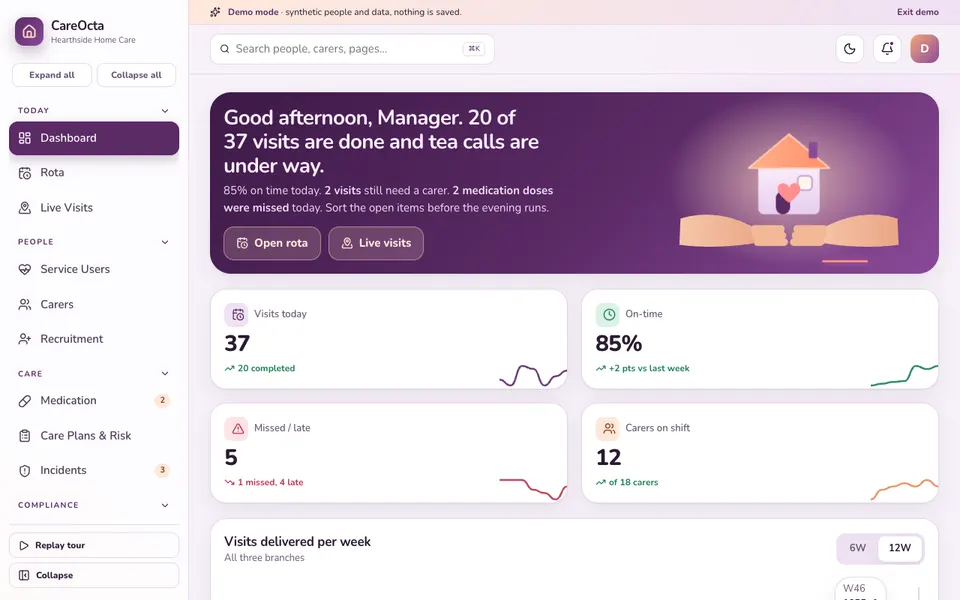
CareOcta is one of Zenocta's interactive demo apps for home care agencies in the UK and Ireland. It uses synthetic data only, nothing is saved, everything resets on refresh, and the AI-style tools are simulated and do not replace professional judgement. Maps and GPS are mocked, and regulator names are labels only.
- Dashboard, Rota and Live Visits: a drag-and-drop timeline with conflict and travel warnings, plus a stylised map with mock check-in and check-out.
- Service Users, Carers and Recruitment: profile drawers and a recruitment kanban.
- Medication (eMAR): the electronic medication record view.
- Care Plans and Risk: including a family portal preview shown as a phone screen.
- Incidents and Safeguarding: with complaints and compliments alongside.
- Compliance Matrix, Audits and Training: chase and renew actions, a mock inspection checklist and training records.
- Invoicing and Funding, Payroll and Mileage: batch invoice generation and marking paid, then pay and mileage.
- Analytics: Overview, Visits, Quality and People tabs. Settings: currency in pounds or euros and a regulator label.
- Care Studio (simulated): a smart rota builder, missed or late visit risk, a daily note writer, falls and deterioration risk, a compliance forecaster, a family update writer and inspection readiness.
Be aware of the demo's own limits: dragging a visit uses desktop drag and drop, so on a phone use the visit dialog instead, and travel times come from a toy grid rather than real roads.
How to try it
Open the demo and choose Try Demo Account on the login screen to start the replayable spotlight tour. Move a visit on the rota to see a conflict warning, open the compliance matrix to chase an expiring item, and look at the family portal preview. You will see how a coordinator's morning could feel with the right screens in front of them.
Getting a home care system built for your agency
Agencies differ in funding arrangements, branch structure and how much they want families to see. A custom build can follow yours. Zenocta is a Hyderabad team working remotely with clients worldwide. Explain how your rota, medication records and compliance work today on the contact page, and we will return a scoped, fixed-price proposal. You can also look at our production apps on Google Play to see how we build and ship, and browse more sector examples in the demo app library.
Try it live
Open the real thing: demos run in a new tab with sample data, apps link to their own page.
 Live demoCareOcta live demoOpen a sample home care agency: drag-and-drop rota, live visits map, eMAR, care plans with a family portal preview, compliance matrix and a simulated Care Studio.
- ABrowse allAll demo appsBrowse every interactive demo, each with a sample company and nothing saved.
- ZBrowse allZenocta appsProduction apps live on Google Play.
- TBrowse allTalk about a custom buildTell us how your agency runs and get a scoped, fixed-price proposal.
Frequently asked questions
01What does home care agency software do?
It plans the visit rota and checks travel and availability, records visits and check-in times, holds care plans and risk assessments, keeps electronic medication records, tracks carer compliance and training, and supports invoicing, payroll and a family view.
02What is an eMAR in home care?
An electronic medication administration record replaces the paper chart. Carers record whether each medicine was given, refused or not given with a reason, with a timestamp, so the office can see gaps quickly. It records what happened and does not advise on medicines.
03Is CareOcta a real care product?
No. CareOcta is an interactive demo with synthetic branches, service users and carers. Nothing is saved, data resets on refresh, maps and GPS are mocked, and the Care Studio tools are simulated and do not replace professional judgement.
04Does CareOcta show what my regulator requires?
No. The regulator names in the demo settings are labels only, and its audit checklist is a mock. Requirements depend on your country and regulator, so check the current rules for your regulator before relying on any software checklist.
05Can Zenocta build home care software for my agency?
Yes. Zenocta builds custom business software. We start with how your rota, medication records and compliance work today, then provide a scoped, fixed-price proposal covering the modules your agency needs.