In this guide
Most gym owners can tell you how many people joined last month. Far fewer can tell you how many quietly stopped coming, which renewals are due this week, or why the Tuesday evening class is empty while the Saturday one has a waitlist. This guide explains how gym management software handles memberships, check-in, classes and retention, and what to demand before you commit to any of it.
Why do gyms lose members without noticing?
A gym is a subscription business that looks like a retail one. Money arrives on joining day, so owners watch sign-ups. The real money is in the months after, and that is exactly where paper registers and spreadsheets go blind.
Here is how the day-to-day usually breaks:
- Expiry dates live in a notebook or a spreadsheet tab. Nobody checks it on the day, so a lapsed member walks in and the front desk either lets them through for free or has an awkward conversation.
- Dues are chased from memory. The person at the desk knows who owes money until they go on leave.
- Enquiries sit in WhatsApp chats. A trial visit is promised, nobody follows up, and the lead goes to the gym down the road.
- Class bookings are a group chat. The trainer finds out who is coming when they arrive, and cancellations never free a slot for anyone else.
- Absence is invisible. A member who came four times a week and now comes once a fortnight is about to cancel, and nothing in the notebook shows it.
Gym management software is the single record that connects these: the member, the plan, the payments, the visits and the conversations around them.
Which numbers should a gym owner watch?
You do not need a dashboard full of charts. You need a handful of numbers that you read the same way every week.
MRR, renewals and churn in plain words
Monthly recurring revenue (MRR) is the fee income your current members produce in a normal month. Renewals are the memberships ending soon that you want to extend. Churn is the share of members who leave in a month. Retention is simply the other side of churn: the share who stay.
A rough rule of thumb is that the average member stays about one divided by the monthly churn rate. At 5% monthly churn that is about 20 months. At 4% it is about 25 months. One percentage point sounds small, but it changes how long every member pays you.
A worked example with made-up numbers
Take an invented gym with 300 members paying an average of ₹1,500 a month. Monthly churn of 5% means 15 members leave each month (300 x 0.05). That is ₹22,500 a month of fees walking out of the door (15 x 1,500), before you count the cost of replacing them.
| Illustrative figures | At 5% churn | At 4% churn |
|---|---|---|
| Members leaving each month (of 300) | 15 | 12 |
| Fees lost each month at ₹1,500 | ₹22,500 | ₹18,000 |
| Rough average stay (1 / churn) | 20 months | 25 months |
| Rough fees from one member over that stay | ₹30,000 | ₹37,500 |
Keeping just 3 more members a month (15 minus 12) protects ₹4,500 of monthly fees. These are invented figures to show the arithmetic, not a benchmark for any real gym. Your own churn is the number to find first, and software is what makes it findable.
How do check-in, classes and leads work together?
The front desk as a revenue checkpoint
Check-in is the one moment every member passes the system. If the desk screen shows the member's photo, plan and expiry, three good things happen. Active members walk straight in. Expired members are stopped politely with an option to renew on the spot. Frozen or unpaid memberships are visible without anyone having to ask. Whether the check-in is by QR code, a membership number or a manual search matters less than the fact that every visit is recorded, because those records are the raw material for retention work later.
Classes, waitlists and trainers
A weekly class grid with a booking limit and a waitlist solves two problems at once. Members stop showing up to a full room, and a cancellation automatically offers the slot to the next person. Over a few weeks, the grid also tells you which time slots are consistently full and which are consistently empty, which is more useful for scheduling than anyone's opinion. If you want ideas for cutting no-shows on booked slots, our guide on reducing no-shows with a booking app applies almost directly.
Leads, trials and referrals
A lead pipeline is a board of columns such as new enquiry, trial booked, trial done and joined. Each enquiry is a card you move along. The discipline is simple: nobody should be sitting in a column for a week without a next action. Referral and challenge campaigns belong here too, since a member who brings a friend is the cheapest lead you will ever get. For the membership billing side, see how another business handles it in salon management software with memberships.
How do you roll out gym software without disrupting the floor?
- List your plans exactly as you sell them. Monthly, quarterly, annual, student, couples, personal training add-ons. The software has to match your real price list.
- Clean the member list before importing. Remove duplicates, fix phone numbers and confirm each person's real expiry date. Bad data on day one makes the system look wrong.
- Set up the desk first. Check-in and renewals are what staff use all day, so get those right before you touch campaigns or analytics.
- Move classes and bookings next. Run the old group chat and the new grid side by side for a week, then switch off the chat.
- Add dues chasing and leads. Once visits and payments are clean, turn on reminders and the lead board.
- Review retention weekly. Pick one day, look at who has stopped visiting, and make the calls. The software shows the list; a person still has to make the call.
Tip
Run the first month with one "retention hour" a week. Open the list of members who have not visited in a set number of days, and phone or message each one personally. The habit matters more than the tool.
What should you ask any gym software vendor?
- Can I export my full member, payment and visit history at any time, in a common format?
- What happens at check-in when a membership is expired, frozen or unpaid?
- Can I freeze, extend and transfer memberships with an audit trail of who did it?
- How are payment dues and failed auto-debits tracked and chased?
- Does the class booking handle waitlists, cancellations and trainer assignment?
- Which features are real, and which are simulated or on a roadmap? Ask for a live walk-through, not a slide.
- If you use face or biometric check-in, how is that data stored and which rules apply? Check the current rules for your location.
- Who owns the data, where is it hosted, and what does hosting cost? Hosting and domain are normally billed separately from the build.
- Can staff with different roles see only what they should, for example trainers not seeing billing?
What are the most common gym software mistakes?
- Buying features instead of fixing the front desk. A beautiful analytics page is useless if the check-in data behind it is patchy.
- Importing messy data. Wrong expiry dates cause wrong renewals, and staff stop trusting the screen.
- Treating AI as magic. A churn score is only as good as the visit history under it, and it still needs a person to act on it.
- Skipping staff training. If the desk team find it slower than the notebook, they will quietly go back to the notebook.
- Ignoring freezes and pauses. Medical breaks and travel are normal, and a system without proper freeze logic ends up with wrong dues and annoyed members.
- Never reviewing the numbers. Software that nobody opens on a Monday is an expensive notebook.
Spreadsheet, paper or purpose-built software?
| Approach | Works well for | Where it breaks |
|---|---|---|
| Paper register | A very small studio with a handful of regulars | No expiry alerts, no history, easy to lose, hard to see trends |
| Spreadsheet | Up to a few dozen members and one person managing it | Manual dues chasing, no check-in control, no bookings, version confusion between staff |
| Purpose-built gym software | Growing gyms and studios with several staff, classes and plans | Needs setup, clean data and staff habits; value depends on actually using the retention view |
The honest dividing line is usually not size but complexity. A gym with classes, trainers, auto-debits and a lead pipeline outgrows a spreadsheet quickly, even with only a hundred members. If you are weighing whether to commission something rather than rent a generic tool, our post on why MSMEs invest in custom software covers the trade-offs.
What the FitOcta demo shows
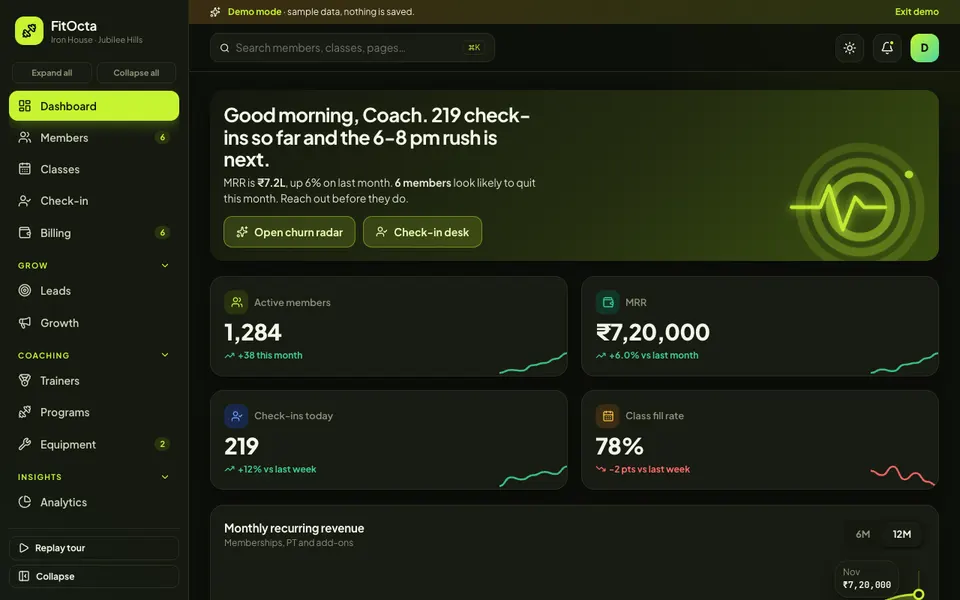
FitOcta is one of Zenocta's interactive demo apps. It is a sample gym with synthetic data. Nothing you do is saved, everything resets when you refresh, and the AI features are scripted demonstrations rather than real models. It exists to show what a custom gym system could contain.
The modules, as the demo lists them:
- Dashboard: MRR, check-ins, activity rings, a live feed and upcoming renewals, so the owner's Monday view is one screen.
- Members: a profile drawer, adding a member with a payment, freezing and renewing. This is the core record everything else hangs off.
- Classes: a weekly grid with booking, waitlist and adding a class.
- Check-in desk: QR, face or manual modes, where expired members are denied with a renew prompt. Face and QR are simulated in the demo.
- Billing: dues, auto-debit recovery, payments and plans.
- Leads: a drag-and-drop pipeline from enquiry to joined.
- Trainers, Programs and Equipment: trainer records, a program builder with a member-app preview including a rest timer, and equipment tracking.
- Analytics: four tabs of reporting.
- Growth: campaigns, referrals and challenges.
- AI Studio (simulated): a churn radar with win-back offers, an AI program builder, a smart class scheduler, a crowd predictor, a meal scanner and a WhatsApp coach chat. Treat these as a picture of what is possible, not as working predictions.
How to try it
Open the demo and choose Try Demo Account on the login screen. A guided tour starts and you land inside the sample gym. Try freezing a member, running a check-in for an expired membership, and dragging a lead along the pipeline. You can also use the command palette with Ctrl or Cmd plus K, and switch between light and dark.
Getting a gym system built for your business
If your gym, studio or chain has its own plans, class types, trainer pay rules or a mobile experience you want members to love, a custom build can follow your way of working instead of forcing you into someone else's. Zenocta is a Hyderabad team whose most experienced members have 9+ years in the field, with clients worldwide, and we start from how your members actually move through your business. Tell us about it on the contact page and we will return a scoped, fixed-price proposal. Zenocta also publishes production apps on Google Play, so you can see how we build and ship.
Try it live
Open the real thing: demos run in a new tab with sample data, apps link to their own page.
 Live demoFitOcta live demoOpen a sample gym: members, class grid, check-in desk, billing, lead pipeline, analytics and a simulated AI Studio.
- ABrowse allAll demo appsBrowse every interactive demo, each with a sample company and nothing saved.
- ZBrowse allZenocta appsProduction apps live on Google Play.
- TBrowse allTalk about a custom buildTell us how your gym or studio runs and get a scoped, fixed-price proposal.
Frequently asked questions
01What does gym management software do?
It keeps one record of each member: plan, payments, freezes, renewals and visits. It also runs check-in, class bookings with waitlists, dues chasing and a lead pipeline, so the owner can see renewals and churn instead of guessing from a notebook.
02How do I reduce member churn at my gym?
First measure it: how many members left last month, divided by how many you had. Then review visit history weekly, contact members whose attendance has dropped, and offer renewals before expiry. Software shows who to call, but a person still has to make the call.
03Is FitOcta a real gym product?
No. FitOcta is an interactive demo with a sample gym and synthetic data. Nothing is saved, data resets on refresh, and the AI Studio tools such as the churn radar are scripted demonstrations, not real models. It shows what a custom build could include.
04Does FitOcta really use face recognition or AI coaching?
No. Face and QR check-in, the churn radar, program builder, class scheduler, crowd predictor, meal scanner and WhatsApp coach chat are all simulated in the demo with synthetic data. They illustrate possible features, not working models.
05Can Zenocta build a gym system for my business?
Yes. Zenocta builds custom business software. We start with your plans, classes and desk workflow, then return a scoped, fixed-price proposal covering memberships, check-in, billing, leads and the reports you actually need.