In this guide
A pet owner walks in with a dog that needs its booster, and the receptionist flips through a card index to find out when the last one was given. The card is missing. The owner thinks it was "around the monsoon". That small scene repeats in clinics every day, and it is the reason veterinary clinic software exists: to hold the pet's history, remind owners before things are due, and keep the pharmacy, boarding and billing in step with the consulting room.
Where do vet clinics lose time and money?
A small animal clinic is really four businesses in one building: a consulting practice, a pharmacy, a boarding and grooming service, and a relationship with pet parents that should last the pet's lifetime. Paper cards and a spreadsheet can carry that for a while. Then the cracks show.
- Vaccination dates live on cards. If the card is lost or the owner changes phone number, the due date is lost with it.
- Walk-ins and appointments collide. An emergency arrives while three booked patients wait, and nobody can see the day at a glance.
- Medicines expire on the shelf. Batches are not tracked, so expiry is discovered by accident.
- Boarding is a whiteboard. Kennels are double-booked, feeding notes are missed, and the final bill is added up from memory.
- Repeat visits depend on goodwill. The clinic only sees the pet again when the owner remembers to come.
- Consultation notes are inconsistent. Each vet writes differently, so a colleague covering a shift cannot pick up where another left off.
What should a pet's record contain?
A good record follows the pet, not the visit. The owner is the contact, but the patient is the animal, and one owner can have several pets with different histories.
The core profile
At minimum: species and breed, date of birth or approximate age, sex, microchip or tag if any, owner contact details, known allergies and a weight history. A weight chart is more useful than a list of numbers, because a slow trend is easy to miss in a table.
The vaccination timeline
Each vaccination needs a name, the date given, the batch if you track it, and the date the next dose is due. Those intervals are decided by your veterinarians and follow the guidance they work to, so the software should let the clinic configure them rather than hard-code someone else's schedule. If this idea sounds familiar from human health, our guide on tracking a child's vaccination schedule and growth uses the same logic of a dated record, a next-due date and a reminder.
Consultation notes in SOAP format
Many clinics structure notes as SOAP: Subjective (what the owner reports), Objective (what the vet observes and measures), Assessment (the vet's conclusion) and Plan (treatment and follow-up). A fixed structure makes notes quicker to write and easier for another vet to read. Prescriptions link to the same record so that what was prescribed and dispensed is never separated from why.
How do vaccination reminders actually work?
A reminder is nothing more than three facts and a list: the date a vaccine was given, the interval your vets set for it, and the owner's contact number. From those, the system works out the due date and builds a list of pets coming due.
An invented example: a vaccine is recorded on 10 January and your clinic's interval for it is 12 months, so the next dose is due on 10 January the following year. If you choose to message owners 14 days ahead, the reminder goes out on 27 December. The date arithmetic is trivial for software and tedious for a human, which is the whole point.
Now the business side, again with made-up numbers. Suppose 200 pets are coming due this quarter and your team contacts every owner. If half of them book, that is 100 visits. At an average spend of ₹800 per visit, that is ₹80,000 of work (100 x 800) that depends on a reminder and not on luck. These figures are illustrative, not a forecast for any real clinic. What does hold for any clinic is that the list is only valuable if someone actually works through it each week.
Tip
Record a working mobile number and a preferred contact method for every pet parent at the first visit. A beautiful reminder system with wrong numbers does nothing, and fixing data at the counter is far cheaper than fixing it later.
Pharmacy, boarding and grooming: the revenue around the consultation
Pharmacy and stock
Medicines and consumables are bought in batches, each with its own expiry date. A clinic pharmacy needs the same discipline as any dispensing shop: record batches on receipt, dispense against a batch, and watch expiry dates. We explain the mechanics in batch and expiry tracking for pharmacy billing, and most of it applies directly.
Boarding and kennels
A kennel board shows each kennel, who is staying, and for how long. Moving a pet between kennels, noting feeding or medication instructions, and checking out with a bill that already includes the stay, grooming and any medicine should be a few taps. The common failure is double-booking, which a visible board prevents.
Grooming and billing
Grooming is a schedule problem: one groomer, time slots, and a service menu. Billing ties everything together: consultation, medicine, boarding and grooming on one invoice, with the option of part payments for larger bills. Tax handling depends on current rules, so check what applies to you rather than relying on a template.
How do you roll out vet clinic software step by step?
- Define your services and price list. Consultations, vaccines, procedures, boarding rates and grooming packages, as you actually charge them.
- Enter or import the pet and owner records you rely on. Start with active patients seen in the last year, not every card in the cabinet.
- Load vaccination history and intervals. Have your vets confirm the intervals once, then let the system calculate due dates.
- Move the appointment book. Run the day view alongside the old diary for a week, then retire the diary.
- Start consultation notes. Agree one SOAP layout, one prescription habit and one way to attach lab results.
- Bring in the pharmacy batches. Count stock once, enter batches and expiry, and dispense through the system from then on.
- Switch on reminders and review them weekly. Pick a day and clear the list.
What to ask a vendor, and which mistakes to avoid
Questions that separate real systems from slideware
- Is the record organised by pet, with several pets per owner and a full history?
- Can the clinic set its own vaccination intervals and reminder timing?
- How are reminders sent, and what happens when a number is wrong or the owner has opted out?
- Can I track medicine batches and expiry, and see items about to expire?
- Does boarding check-out feed straight into the invoice?
- Can I export all records, invoices and stock data if I ever leave?
- What is simulated or planned versus working today? Ask to see it live.
- Who owns the data, and how is it backed up? Hosting and domain are normally billed separately from the build.
Mistakes clinics repeat
- Trusting a generic dose helper. Dose calculations belong in the hands of a qualified vet who checks every figure. Software can speed up arithmetic but must never replace professional judgement.
- Importing everything on day one. A large pile of old, unverified records makes the new system feel untrustworthy. Import active patients first.
- Ignoring the owner's phone number. Reminders fail on bad contact data far more often than on technology.
- Letting the whiteboard survive. Two systems side by side, forever, means neither is right.
- Forgetting different species. Cats, dogs, rabbits and birds have different needs, so check how the vendor handles non-dog patients.
Paper cards, spreadsheet or purpose-built clinic software?
| Approach | Works well for | Where it breaks |
|---|---|---|
| Paper cards and a diary | A one-vet practice with a small, stable client base | Lost cards, no reminders, no stock view, hard to cover a colleague's patients |
| Spreadsheet | Tracking one thing well, such as a vaccination list | No linked records, no appointments or billing, manual reminders, easy to overwrite |
| Purpose-built vet software | Clinics with several staff plus pharmacy, boarding or grooming | Needs data cleaning, vet buy-in on note formats and steady weekly habits |
If you already run a human-health style practice in the same building, our clinic management software checklist is a useful companion, since the front-desk problems overlap even though the patients differ.
What the VetOcta demo shows
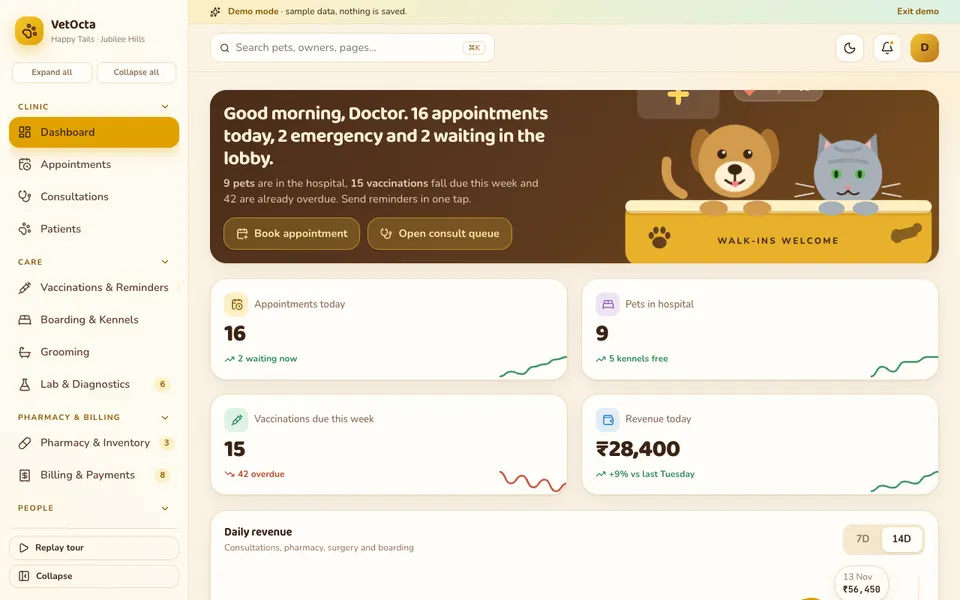
VetOcta is one of Zenocta's interactive demo apps: a sample Hyderabad vet clinic with synthetic data and masked phone numbers. Nothing is saved, data resets when you refresh, and every AI-style tool is simulated. Dose ranges, tax and prices are illustrative, and nothing here is veterinary advice.
- Dashboard and Appointments: a day view where you can drag a booking to reschedule it.
- Consultations: a queue, SOAP notes, prescriptions and a dose helper (illustrative).
- Patients: a pet profile with a weight chart, vaccination timeline, allergies and a body map.
- Vaccinations and Reminders, Boarding and Kennels, Grooming, Lab and Diagnostics: the care modules. Kennels can be dragged to move, and tapped to check out and bill.
- Pharmacy and Inventory: batches, expiry and dispensing. Billing and Payments: invoices and part payments.
- Pet Parents, Team and Rota, Reviews: a CRM with loyalty, staff scheduling and feedback.
- Analytics: Overview, Clinical, Revenue and Retention tabs.
- Vet Studio (simulated): symptom triage, a SOAP note writer, a vaccine reminder predictor, a dose calculator, image analysis of a mock skin photo or X-ray, a pet-parent chatbot, and an expiry and demand forecast.
Two honest limits: the body map uses a feline outline even for rabbits and birds, and appointment dragging does not work by touch on phones, so tap a booking to act instead.
How to try it
Open the demo and pick Try Demo Account on the login screen for a replayable spotlight tour. Then reschedule an appointment, open a pet's vaccination timeline, and check a kennel out to see the bill. Simulated walk-in and emergency events appear every so often to show how a live day might feel.
Getting a vet clinic system built for your practice
A single-vet clinic, a hospital with boarding, and a pet-care chain all run differently, and a custom build can follow yours. Zenocta is a Hyderabad team serving clients worldwide remotely. Tell us how your clinic handles records, reminders and stock on the contact page, and we will return a scoped, fixed-price proposal. For a sense of how we ship software, see our production apps on Google Play.
Try it live
Open the real thing: demos run in a new tab with sample data, apps link to their own page.
 Live demoVetOcta live demoOpen a sample vet clinic: appointments, SOAP consultations, pet profiles, vaccination timeline, kennels, pharmacy and a simulated Vet Studio.
- ABrowse allAll demo appsBrowse every interactive demo, each with a sample company and nothing saved.
- ZBrowse allZenocta appsProduction apps live on Google Play.
- TBrowse allTalk about a custom buildTell us how your clinic runs and get a scoped, fixed-price proposal.
Frequently asked questions
01What does veterinary clinic software do?
It keeps a record for each pet and owner, schedules appointments, stores consultation notes and prescriptions, tracks vaccinations and reminders, manages pharmacy stock with expiry, handles boarding and grooming, and produces invoices in one linked system.
02How do vaccination reminders work in vet software?
The system stores the date a vaccine was given and the interval your clinic has set. It calculates the next due date and lists pets coming due, so staff can message owners ahead of time. Accurate contact details make it work.
03Is VetOcta a real veterinary product?
No. VetOcta is an interactive demo with a sample Hyderabad clinic and synthetic data. Nothing is saved, data resets on refresh, and the Vet Studio tools, including triage and image analysis, are simulated. It is not veterinary advice.
04Can the dose calculator in VetOcta be used for real animals?
No. The dose calculator is an illustrative demonstration with sample figures. Real dosing must be decided and checked by a qualified veterinarian. The demo shows how such a helper could sit in a consultation screen, nothing more.
05Can Zenocta build vet clinic software for my practice?
Yes. Zenocta builds custom business software. We begin with how your clinic handles records, reminders, stock and boarding, then provide a scoped, fixed-price proposal for exactly the modules you need.