In this guide
A patient phones to ask whether their report is ready. The front desk does not know, so they walk to the bench, ask the technician, walk back and call the patient. Multiply that by fifty calls a day and you can see why diagnostic labs feel permanently behind. Good diagnostic lab software replaces those walks with a record of where every sample is, what stage it is at and when the report will be released.
Where does the workflow break in a busy lab?
Labs often start with a billing counter, a register and a printer. It works while volume is low. As collection centres, home visits and referral doctors are added, the same gaps open up:
- Sample identity depends on handwriting. Names are copied onto tubes and again onto worksheets, and every copy is a chance for a mix-up.
- Nobody knows where a sample is. It left the centre, it should have reached the main lab, but the only evidence is a phone call.
- Results are typed more than once. The analyser prints, someone types it into a report template, someone else checks it by eye.
- Reports go out late or to the wrong person. The patient asks for it on WhatsApp, and the desk forwards a photo of a printout.
- Referral money is tracked in a notebook. Commission is paid to doctors from memory, and nobody can see which doctors have stopped sending patients.
- Quality control lives in a binder. If a reagent lot drifts, the evidence is on paper that nobody plots.
A laboratory information system, usually shortened to LIS, is the software that ties order, sample, result, report and payment into one chain.
What is the journey of a sample, from order to report?
Whatever the size of the lab, each sample passes through the same stages. A sensible system makes each stage a visible status, not a conversation.
Order and barcode
The counter registers the patient (or finds the existing record), picks tests or a package, applies any discount and takes payment. The order generates a barcode label. That label is the sample's identity from this point on. Nobody should be rewriting the patient's name onto a tube.
Collection, receipt and processing
The sample is collected at the centre or at home, carried to the lab, and received by scanning the barcode. Receipt is a recorded event with a time, which is how you later find out where the delay happened. From there the sample is processed on an analyser or at the bench.
Result entry, review and release
Results arrive from the analyser or are entered by hand. The system compares each value with a reference range and flags the ones outside it. A second person (or a rule engine) validates the results before release. Only validated results go into the report, and release is another timestamped event.
Delta checks and critical values
Two safety ideas are worth knowing. A delta check compares today's value with the same patient's previous value and flags a sudden jump for a second look, since it may be a real change or a sample mix-up. A critical value is a result so far outside the range that the lab calls the referring doctor or patient immediately and records that call. Both are workflow controls. Deciding what thresholds apply and what a result means is for your qualified staff and your accreditation requirements, not for the software.
How do you measure and shorten turnaround time?
Turnaround time (TAT) is the time from collection to released report. It matters because it is what patients feel. It only improves when you can see which stage is slow. With stage timestamps, the overall number splits into pieces.
An invented example for one routine sample:
| Stage (illustrative figures) | Minutes |
|---|---|
| Collection to receipt at lab | 90 |
| Receipt to loading on analyser | 30 |
| Analyser run | 45 |
| Result review and validation | 25 |
| Report release | 10 |
| Total turnaround | 200 |
Those 200 minutes make the point. The analyser run, the part everyone assumes is the bottleneck, is 45 of them. The biggest block is transport from the collection point. Without timestamps you would be arguing about the wrong stage. If you want a wider view on trimming running costs through better process records, see how MSMEs reduce costs through digital transformation.
Home collection, centres and referral doctors
Growth in a diagnostic business usually comes from three places, and each brings its own tracking problem.
- Home collection. Bookings need a time slot, an assigned phlebotomist and a sensible route. A map view of the day's visits shows when one person is overloaded while another has gaps.
- Collection centres and B2B. Other clinics or centres send samples under agreed rates. You need a ledger per partner, so you can see what they owe you.
- Referral doctors. Volume per doctor, any commission arrangement, and a way to notice when a regular referrer goes quiet. Treat any commission arrangement with care and check the current rules that apply to you.
How do you roll out lab software step by step?
- Write down your test menu and packages. Names, codes, sample types, reference ranges and prices, exactly as they are on your price list.
- Decide your sample stages. Collected, in transit, received, processing, validated, released. Use the words your staff already use.
- Start with the counter and barcode labels. Registration and ordering are used all day, and getting them right fixes sample identity first.
- Add receipt scanning and the sample board. Run it beside the old register for a week and compare.
- Move result entry and validation. Connect analysers if you need to, and decide who validates and who releases.
- Add reports and sharing. Standardise the report layout, then turn on sharing by message or email.
- Layer on QC, inventory and analytics. These pay back later, once the daily chain is stable.
Tip
Pick one slow test and trace five real samples through the new stages in the first week. The timestamps will show where your actual delay is, and staff will see the value straight away.
What should you ask any lab software vendor?
- Does every sample get a unique barcode from the order, and can it be scanned at receipt?
- Can the system connect to my analysers, and which models? Ask for a live demonstration, not a brochure.
- How are reference ranges set, edited and versioned, and who is allowed to change them?
- Does it support validation roles, delta checks and a recorded critical-value call-back?
- How are quality control runs recorded and plotted over time?
- Is there an audit trail showing who entered, changed, validated and released each result?
- How is patient data protected, who can see which records, and what are the backup arrangements? Check the current data protection rules that apply to health information.
- Can I export every order, result and invoice if I leave?
- Hosting and domain are usually billed separately from the build. Is the ongoing cost clear in writing?
What are the common mistakes?
- Digitising the report but not the sample. A pretty PDF does not help if the tube was still mislabelled by hand.
- Skipping the validation step to save time. Release controls are what protect the lab when something looks odd.
- Setting reference ranges casually. Ranges depend on method, age and sex, so they need to be reviewed by your qualified staff, not guessed.
- Treating quality control as a monthly chore. Plotted daily, QC shows a drift early. Reviewed monthly, it only explains the problem afterwards.
- Weak access control. Health records are sensitive. Our note on small business security basics covers passwords, roles and backups that apply here.
- Never reviewing referral and TAT numbers. The data exists, but it only helps if someone looks at it weekly.
Paper register, spreadsheet or purpose-built LIS?
| Approach | Works well for | Where it breaks |
|---|---|---|
| Paper register and handwritten labels | A tiny collection point with a handful of daily samples | Mislabelling risk, no status visibility, slow report retrieval, no trends |
| Spreadsheet plus word-processor reports | A small lab with one operator | Retyped results, no validation trail, no barcode identity, version confusion |
| Purpose-built lab software | Labs with several centres, home collection and referrals | Needs a clean test menu, trained staff and, for analyser links, careful integration work |
The jump happens when samples start moving between locations. At that point, identity and status stop being a matter of memory. Practices that already run a clinic management system often find the lab is the next place where the same discipline pays off.
What the LabOcta demo shows
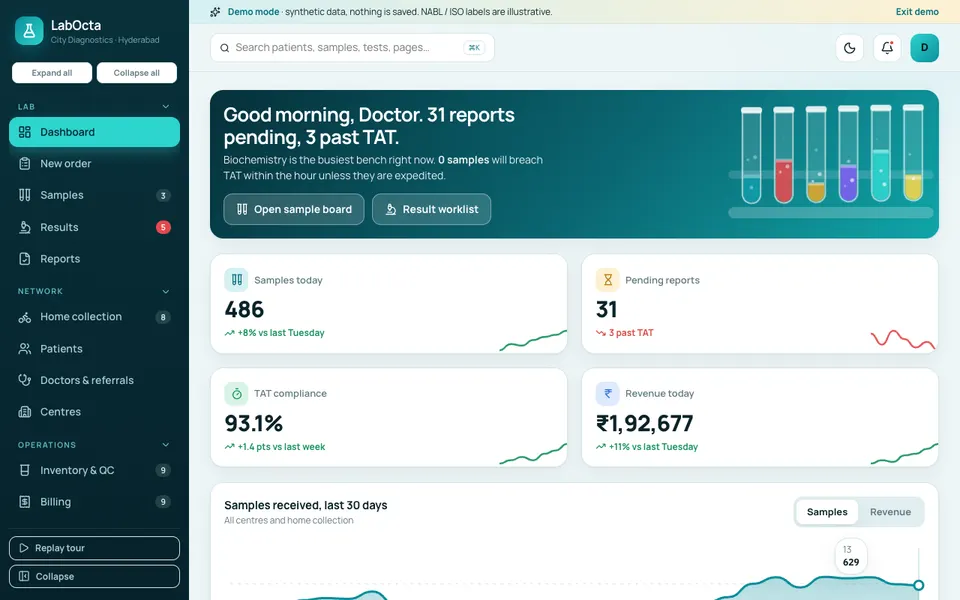
LabOcta is one of Zenocta's interactive demo apps: a diagnostic lab information system with sample data. Nothing is saved, everything resets on refresh, and anything AI-like is simulated. Barcodes and QR codes are decorative and not scannable, and accreditation labels and the tax handling on invoices are illustrative only.
- New order: patient search or registration, tests and packages, discount, payment and a barcode label.
- Samples: a drag-and-drop board with six stages, barcode receive and a timeline drawer for each sample.
- Results: a worklist and entry screen with reference-range gauges, automatic flags, delta checks, critical call-back, validate and release, plus a report preview.
- Reports: a report sheet with a QR-style code, sharing by message or email, and verification.
- Home collection: bookings, assignment and a map with routes.
- Patients: history with trend charts. Doctors and referrals: volume, commission and leakage. Centres: including B2B partners.
- Inventory and QC: reagents, Levey-Jennings charts with Westgard rules and analyser records.
- Billing: invoices, dues and a B2B ledger. Analytics, Settings and a command palette round it out.
- Lab Studio (simulated): auto-validation with a rule engine, plain-language summaries in English, Hindi and Telugu (template-based), prescription OCR, a turnaround predictor and bottleneck finder, a reagent forecast, a home-collection route optimiser, and referral leakage insights.
How to try it
Open the demo and choose Try Demo Account on the login screen to start a guided tour. Then place a new order, drag a sample along the board, enter a result and release a report. It is software for running a lab, not clinical guidance, and nothing in the demo is medical advice.
Getting a lab system built for your business
Every lab has its own test menu, centre network and reporting style. If a generic product does not fit, a custom build can follow your workflow, your report layout and your partner model. Zenocta is a Hyderabad team with clients worldwide, working remotely. Describe how a sample moves through your lab today on the contact page and we will return a scoped, fixed-price proposal. You can also see our production apps on Google Play to judge how we build.
Try it live
Open the real thing: demos run in a new tab with sample data, apps link to their own page.
 Live demoLabOcta live demoOpen a sample lab: new order, sample board, result entry with gauges, report sheet, home collection map, QC charts and a simulated Lab Studio.
- ABrowse allAll demo appsBrowse every interactive demo, each with a sample company and nothing saved.
- ZBrowse allZenocta appsProduction apps live on Google Play.
- TBrowse allTalk about a custom buildTell us how samples move through your lab and get a scoped, fixed-price proposal.
Frequently asked questions
01What is a laboratory information system (LIS)?
A LIS is software that follows a lab test from order to released report. It records patient and order details, generates sample barcodes, tracks sample stages, captures and validates results, produces reports and usually handles billing, quality control and inventory.
02How does sample tracking work in a diagnostic lab?
The order generates a barcode label that stays with the sample. Each stage, such as collected, received, processing, validated and released, is recorded with a time, so staff can see where any sample is and where delays happen.
03Is LabOcta a real lab product?
No. LabOcta is an interactive demo with a sample lab and synthetic data. Nothing is saved, data resets on refresh, barcodes are decorative, and the Lab Studio tools such as prescription OCR and auto-validation are simulated. It shows what a custom build could contain.
04Does LabOcta give medical or clinical guidance?
No. It demonstrates software for running a lab business. Its flags, summaries and any AI-style tools are simulated with synthetic data and are not medical advice. Clinical decisions and reference ranges are for qualified lab staff.
05Can Zenocta build a lab system for my diagnostic business?
Yes. Zenocta builds custom business software. We start with your test menu, centres and reporting style, then provide a scoped, fixed-price proposal for ordering, sample tracking, results, reports and billing.