In this guide
A patient agrees to a crown and a root canal in the chair, leaves to think about the cost, and is never contacted again. Six months later the same patient is in someone else's clinic. This guide looks at dental clinic software through that gap: what a good system tracks between visits, and what to ask before you choose or build one.
Where does a dental clinic lose time and revenue?
Most small clinics run on a mix of an appointment book, paper cards, a spreadsheet for lab cases and a phone full of WhatsApp chats. It works while the clinic has one or two chairs. As volume grows, the same leaks appear.
- Accepted treatment that is never booked. The plan lives in the dentist's head or on a card in a drawer.
- Chair clashes and idle gaps. A long procedure is booked over a short one, or a cancellation leaves an hour nobody fills.
- Lab cases without a clock. The crown was due on Tuesday, nobody checked, and the patient arrives on Wednesday.
- Recalls that depend on memory. Patients due for a check-up are only called when someone happens to remember.
- Payments scattered across notebooks. Advances, instalments and insurer claims are tracked separately, so nobody knows the true balance.
Software does not fix these by being clever. It fixes them by putting each item on a list that someone has to clear.
What does a chair schedule need to do?
A dental appointment book is different from a salon or a clinic diary because the chair is the scarce resource. A good schedule shows each chair as a column, each booking as a block as long as the procedure, and the dentist or hygienist assigned to it.
Clash checks and drag-to-move
When a patient asks to move from 11:00 to 12:30, the receptionist should be able to drag the block and have the system warn if the slot is taken. That one feature removes the most common double-booking. It also makes cancellations easier to refill, since the free block is visible on the screen.
Walk-ins and the live day
A schedule is also a picture of the day as it happens: who is in the chair, who is waiting, how many visits are still to come. If the clinic can see that at a glance, the front desk can answer a phone call honestly instead of guessing.
How should a tooth chart and a treatment plan work together?
A tooth chart is a visual record of each tooth. Clinics use different numbering systems, so software should let the clinician choose the one they work with and switch between adult and child charts. Each tooth can carry a state, so a glance shows what has been done, what is planned and what is under way.
The chart is where a treatment plan starts. The dentist selects teeth and procedures, and the system turns them into plan items with prices. This is the point where many clinics lose the patient, so the shape of the plan matters.
Why phases beat one big total
A single quote for a large amount invites a pause. A plan split into phases, such as relief first, then restorative work, then finishing, lets the patient say yes to the first step and see the rest as a sequence. Each phase has its own items and cost, and the clinic can see which phases are complete.
Here is an illustration with made-up figures:
| Phase | Items | Amount (₹) |
|---|---|---|
| Phase 1 | Consultation, scaling, one filling | 4,500 |
| Phase 2 | Root canal and crown | 14,000 |
| Phase 3 | Second crown | 7,500 |
| Plan total | 26,000 |
If the patient pays ₹5,000 as an advance and the first phase costs ₹4,500, the account shows ₹500 of credit carried into phase 2. Phases 2 and 3 come to ₹21,500, so the patient still owes ₹21,000 for the rest of the plan. The patient sees a path, and the front desk sees exactly what is owed.
For larger plans, an instalment or EMI view helps the conversation: the clinic can show a monthly figure alongside the total, and track each instalment as it is paid.
Lab orders: the part of the workflow nobody tracks
Crowns, bridges, aligners and dentures are made outside the clinic. Each one is a small supply chain: a case is sent, a due date is promised, the case returns, and the patient is booked for the fitting. When this lives on a notepad, the weak point is always the same: nobody sees the due date until the patient is at the door.
A lab order record should hold the patient, the work, the lab, the date sent and the date due. A status list, such as sent, in progress, received and fitted, lets the front desk see overdue cases at the start of the day. Linking the fitting appointment to the lab case is better still, because the schedule then shows which fittings are at risk.
Recalls: how a clinic keeps patients coming back
A recall is a planned reminder: this patient is due for a routine visit, or for the next phase of a plan. The interval is set by the dentist for each patient. The software's job is to turn those dates into a daily or weekly list, with a message template ready to send.
Tip
Work the recall list at the same time every day, for example ten minutes before the clinic opens. A short list cleared daily beats a long list attacked once a quarter. Keep the message short, name the clinic and offer two time slots rather than an open question.
If you want ideas on keeping appointments honoured once they are booked, our guide to reducing no-shows with a booking app covers reminders that apply to clinics as well. Check the current rules on messaging and patient consent before you send reminders in bulk.
A rollout plan that does not stop the clinic
- List your chairs, doctors and procedure lengths. The schedule is only as good as the durations you give it.
- Move the appointment book first. Run paper and software side by side for a week, then retire the paper.
- Import patients with phone numbers. Recalls and receipts depend on clean contact details.
- Start treatment plans on new cases only. Do not rebuild every old plan on day one.
- Add lab orders and billing next. Each has a clear owner: the assistant for labs, the front desk for billing.
- Switch on recalls last. By then the visit history is good enough to produce a sensible list.
What to ask any dental software vendor
- Can I drag a booking between chairs and be warned about clashes?
- Can the tooth chart use the numbering system my clinic uses, for adults and children?
- Can a treatment plan be split into phases with a price per phase?
- Does billing handle advances, instalments and insurer or TPA claims, with a printable receipt?
- Can I see every lab case with its due date and status in one place?
- Does the recall list use my intervals and give me message templates?
- Who owns the patient data, and can I export it in a standard format?
- How are backups and access control handled? Check the current data protection rules that apply to you.
Common mistakes when choosing clinic software
- Buying for features, not for the daily routine. Test the receptionist's day first: booking, moving, collecting a payment, printing a receipt.
- Skipping the data clean-up. Duplicate patients and missing phone numbers make recalls useless.
- Treating the software as clinical advice. It records and reminds. The dentist decides on treatment.
- Ignoring stock and sterilisation records. They are easy to leave for later, and hard to reconstruct.
- Training only the owner. The front desk and assistants use the system more than anyone.
Spreadsheet, paper or purpose-built software?
| Need | Paper and notebook | Spreadsheet | Purpose-built software |
|---|---|---|---|
| Chair schedule with clash check | Manual | Awkward | Built in |
| Tooth chart | Drawn by hand | Not practical | Visual and linked to the plan |
| Phased treatment plan | Card in a drawer | Possible, error-prone | Structured, with progress |
| Lab due dates | Notepad | Manual sort | Status and overdue list |
| Recalls | Memory | Filter by date | Daily list with templates |
| Billing and balances | Several notebooks | Manual formulas | Advances, instalments, receipts |
A spreadsheet can carry a very small practice. Once you have several chairs, lab cases and phased plans, the cost of one missed follow-up is higher than the cost of a proper system. For a wider checklist of clinic software features, see our guide to clinic management software features.
What the DentOcta demo shows
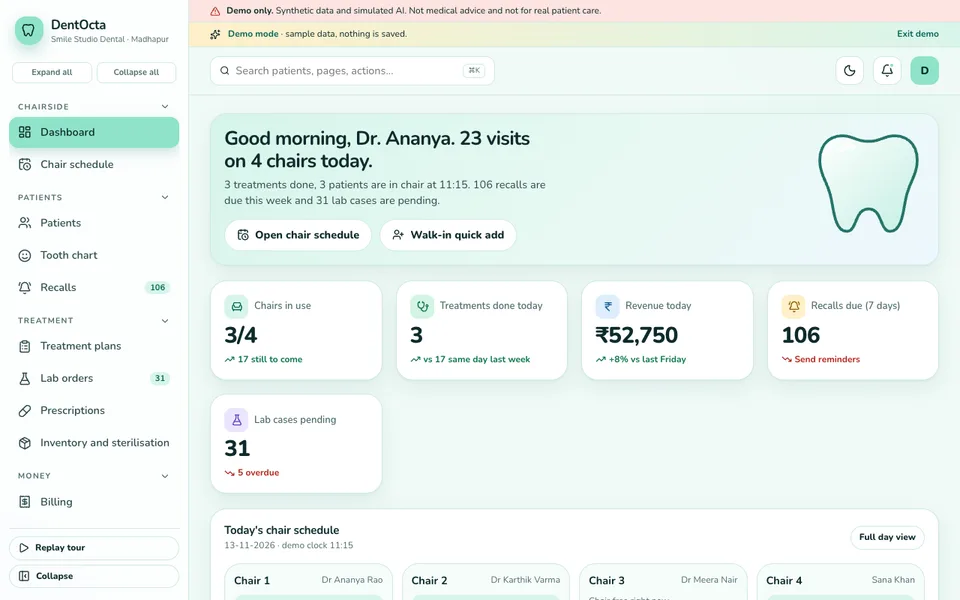
DentOcta is an interactive demo of a dental and specialty clinic system. It opens with a sample clinic and synthetic data. Nothing you do is saved, the data resets when you refresh, and the Smile Studio tools are scripted simulations, not real AI. It is demo only, not medical advice and not for real patient care.
Here are the modules you can click through, and why each matters.
- Dashboard. Chairs in use, treatments done, revenue today, recalls due and pending lab cases on one screen.
- Chair schedule. Bookings you can drag to move, with a clash check, so you can feel how rescheduling should work.
- Patients and tooth chart. A visual chart in both numbering systems, for adults and children, with treatment states on each tooth.
- Recalls. A list of patients due to return, with message templates for WhatsApp.
- Treatment plans. Phased plans with an EMI view, the part that most affects whether patients proceed.
- Lab orders. A list of cases and their status, so overdue work is visible.
- Prescriptions and inventory. Prescription records, stock and an autoclave log for sterilisation.
- Billing. Billing with GST, advances, instalments, TPA claims and printable receipts. Tax rules change, so check the current rules for real use.
- Reports and team commission. Summaries of work done and how a team member's commission is worked out.
- Smile Studio. Seven simulated AI tools that show how assistants could fit into a clinic. Their output is scripted.
How to try the demo in five minutes
Open the demo and press Try Demo Account on the login screen. A guided tour starts and can be replayed from the sidebar. Then try three things: drag a booking on the chair schedule to another time, open the tooth chart and look at how a tooth's state is shown, and open a treatment plan to see the phases and the EMI view. Browse the other pages at your own pace, and see the rest of our work on the demo apps page.
Getting clinic software built around your practice
A dental clinic is not generic. A single-dentist clinic, a multi-chair practice and an orthodontic centre need different modules, different plan structures and different recall rules. Zenocta builds custom business software, and we begin with how your chairs, patients, labs and follow-ups really run. You then get a scoped, fixed-price proposal for the modules you need. If a custom build suits you, talk to us about your clinic. If you are weighing the wider case, our post on how MSMEs reduce costs through digital transformation sets out the thinking, and our production apps show what we ship.
Try it live
Open the real thing: demos run in a new tab with sample data, apps link to their own page.
 Live demoDentOcta live demoOpen a sample clinic: chair schedule, tooth chart, treatment plans, lab orders, recalls and billing.
- ABrowse allAll demo appsBrowse every interactive demo, each with a sample company and nothing saved.
- ZBrowse allZenocta appsProduction apps live on Google Play.
- TBrowse allTalk about a custom buildTell us how your clinic runs and get a scoped, fixed-price proposal.
Frequently asked questions
01What does dental clinic software do?
It runs the business side of a clinic: the chair schedule, patient records, a tooth chart, treatment plans, billing and receipts, lab orders, prescriptions, stock and recall reminders. It does not replace a dentist's clinical judgement.
02What is a dental recall system?
A recall system lists patients who are due to return, for example for a check-up, and helps the clinic contact them with a message template. It turns follow-up from something staff remember into a daily list they work through.
03Why do dental clinics need phased treatment plans?
Large treatments are easier to accept and schedule when they are split into phases, each with its own items and price. The clinic can see which phases are done, which are pending, and what the patient has paid so far.
04Is DentOcta a real clinic product?
No. DentOcta is an interactive demo with a sample clinic and synthetic data. Nothing is saved, data resets on refresh, and its Smile Studio tools are simulated. It is demo only, not medical advice and not for real patient care.
05Can Zenocta build dental clinic software for my practice?
Yes. Zenocta builds custom business software. We start with how your chairs, patients, labs and follow-ups work today, then provide a scoped, fixed-price proposal for the modules you actually need.