In this guide
A customer comes back on the promised day for new glasses and is told they are "still at the lab". Nobody can say which lab, when they were sent, or why they are late. Meanwhile the prescription is in a paper file and the advance receipt is in a drawer. Optical shop software exists to make that conversation short: it ties the prescription, the frame and lens choice, the payment and the lab job into one record that anyone behind the counter can open.
Where do optical shops lose jobs and customers?
An optical shop looks like retail, but its main product is made to order. Every pair is a small manufacturing job: measured, specified, ordered from a lab, edged and fitted, checked and handed over. That makes it fragile in ways ordinary shops are not.
- Prescriptions are on paper. Old values are hard to find, comparing two eye tests means digging out two cards, and a lost card means a repeat test.
- Jobs vanish into the lab. You know a pair was sent, but nobody tracks when it is due back or who is chasing it.
- Frame stock is guesswork. Popular models run out, slow ones sit on the display, and the count on the wall never matches the register.
- Advances and balances blur. A partly paid order is remembered, not recorded.
- Repeat customers are not called. The person who bought glasses two years ago will buy again, but only if somebody reminds them.
- Insurance and discounts are handled by hand. Claims and corporate arrangements need paperwork that is easy to misplace.
Prescriptions, history and recalls
How to read an Rx card in plain words
A prescription card lists values for each eye, written as OD (right) and OS (left). Sphere is the main lens power. Cylinder and axis describe the correction for astigmatism, and the axis is an angle. Add is extra power for near work in multifocal lenses. PD, the pupillary distance, is the spacing between the eyes and is used to centre the lenses in the frame. Visual acuity is often noted too. Your optometrist decides every one of these numbers. The software's job is only to store them accurately and show them clearly.
A drawn power chart of those values on the job card helps the lab and the fitting bench confirm they are working from the right numbers at a glance.
History compare
Putting two tests side by side, this year's and last year's, makes change obvious to the optometrist and to the customer. It is also a basic sanity check: if one value looks very different from the previous record, someone should look again before the order goes to the lab. Treat any such flag as a prompt for a qualified person to check, never as a verdict.
Recalls and repeat business
A recall is a reminder to a customer that a check or a replacement is due. The data needed is simple: the date of the last test or purchase, the interval your shop works to, and a contact number. Reviewing the list weekly and messaging the people on it is one of the cheapest sources of repeat business, much like the follow-up discipline we describe in reducing no-shows with a booking app.
How should you set up frames, lenses and the sale?
A spectacle sale has three parts: a frame, lenses suited to the prescription, and coatings. Each has its own cost and selling price, and each has stock behind it, although lens stock is usually a lab order rather than a shelf. Point-of-sale software for an optical shop needs to put them in one quote and show the total clearly.
Here is an invented example showing why per-line margin matters.
| Line (illustrative figures) | Cost (₹) | Sell (₹) | Margin (₹) |
|---|---|---|---|
| Frame | 1,200 | 2,400 | 1,200 |
| Prescription lenses | 900 | 1,800 | 900 |
| Coating | 150 | 500 | 350 |
| Total | 2,250 | 4,700 | 2,450 |
The overall margin works out to about 52 percent (2,450 divided by 4,700). If the customer pays a 50 percent advance, ₹2,350 is collected now and ₹2,350 is due at pickup. Those are made-up numbers to show the arithmetic, not typical prices. What matters is that the advance and the balance are recorded against the job, so nobody has to remember them.
Tax, discounts and insurance
Different items can fall under different tax treatment, so the system should handle more than one rate on the same bill. Check the current rules for what applies to your shop rather than relying on a template. Discounts, corporate arrangements and insurance claims need an approval and a status, such as pre-authorised, submitted or settled, so you can see money still owed to you. If you also run a general store counter, our guide on billing and inventory software for retail shops covers the stock side in more depth, and the principles behind GST billing software for small businesses apply to the invoice itself.
How does a lens job travel from counter to pickup?
Once the sale is made, the order becomes a job. A clear set of stages gives everyone the same picture. A typical pattern is: received, sent to lab, edging and fitting, quality check, ready, delivered. Each job card should carry the customer, the frame, the lens and coating choices, the prescription, the promised date and the advance paid.
Three habits keep the board honest:
- Promise a date from a standard turnaround. Received date plus the usual days for that lens type gives a promised date, which the board then watches.
- Make lateness loud. A job past its promised date should stand out in colour so someone calls the lab before the customer calls you.
- Record lab orders as their own record. When work goes to an outside lab, note which lab, when it was sent and what is due back, so you can compare labs over time.
When a job is ready, a message to the customer closes the loop, and the balance is collected at delivery. Remakes, where something needs redoing, deserve their own note so you can see which labs or lens types cause them.
How do you roll out optical shop software?
- List your frames, lenses, coatings and prices. Include brands, models and the lab you use for each lens type.
- Bring across active customers and their latest prescription. Start with recent customers; you can add older records later.
- Move eye tests and Rx entry first. It is a daily task and gives the system accurate data from day one.
- Switch the counter to quotes and billing. Run the new bill and the old one side by side for a few days.
- Track every new job on the board. Drag or move cards through the stages, and remind staff to update status as they hand work on.
- Count and enter frame stock. Do one proper stock count so the system and the shelf start from the same number.
- Start recalls. Once visits and purchases are recorded, review the recall list weekly.
Tip
For the first month, start every morning with a two-minute look at the job board. Ask which jobs are late, which are ready and which customers need a call. That one habit catches most problems before a customer does.
What to ask a vendor, and which mistakes to avoid
Questions that matter
- Does the prescription record store OD and OS values, PD and visual acuity, and print a clear Rx card?
- Can I compare two tests for the same customer side by side?
- Is the quote built from frame, lens and coating with separate cost and sell prices?
- Can the bill carry more than one tax rate, and how are the rates kept up to date?
- Does the job board show stages, promised dates and late jobs, and can it record outside lab orders?
- How are insurance claims and corporate discounts tracked and their status shown?
- Are recalls generated from test and purchase dates, with contact details attached?
- Can I export customers, prescriptions, jobs and invoices if I leave? What is simulated and what is working today?
- Hosting and domain are normally billed separately from the build, so is the ongoing cost clear in writing?
Mistakes optical shops make
- Retyping prescriptions by hand at the lab stage. Every manual copy is a chance for a wrong digit.
- No promised date on the job. Without a date, "late" has no meaning.
- Counting frames once and trusting it forever. Stock drifts quickly without sales linked to inventory.
- Treating suggestions as decisions. Lens or coating suggestions are sales prompts, and the optometrist and dispenser still choose what suits the customer.
- Letting recall lists age. A list nobody reads is just another file.
Paper files, spreadsheet or purpose-built optical software?
| Approach | Works well for | Where it breaks |
|---|---|---|
| Paper Rx cards and job slips | A single small shop with few jobs a week | Lost cards, no history compare, no job status, no recalls |
| Spreadsheet | Tracking frame stock or a recall list | No linked prescription, quote and job, easy to overwrite, hard to see late jobs |
| Purpose-built optical software | Shops with several staff, outside labs or more than one store | Needs clean stock data, consistent entry at the counter and weekly review habits |
Before you buy anything, it can help to compare it with the general shape of a clinic management checklist, since the eye-test room has many of the same record-keeping needs.
What the OptiOcta demo shows
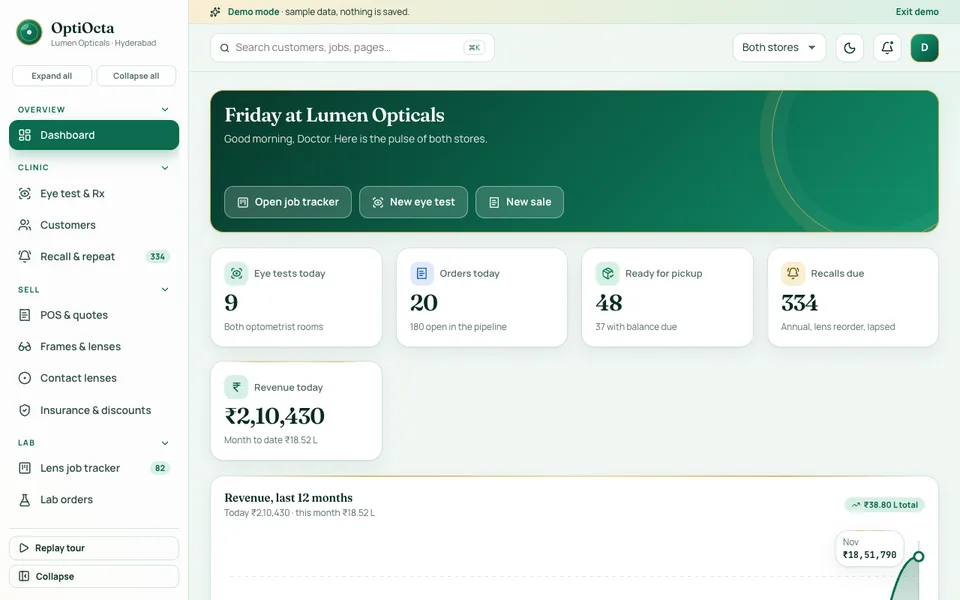
OptiOcta is one of Zenocta's interactive demo apps: a sample optical retail business with synthetic data. Nothing is saved, data resets on refresh, and every AI-style tool is simulated. Tax rates and prices on the bills are demo values, and nothing in it is clinical advice.
- Dashboard: tests, open orders, jobs ready for pickup, recalls due and revenue at a glance.
- Eye test and Rx: new exam, history and compare, and today's queue, with OD and OS values, PD, visual acuity and a printable Rx card.
- Customers and Recall and repeat: customer records and a recall list.
- POS and quotes: frame, lens and coating suggestions by power, tax slabs, discounts, insurance claim and advance.
- Frames and lenses, Contact lenses, Insurance and discounts: the catalogue and claims side of the shop.
- Lens job tracker: every job card carries a drawn Rx power chart, you drag between stages (or use the arrows on touch), and late jobs glow red.
- Lab orders and Delivery and pickup: the outside lab trail and the handover.
- Reports: Overview, Sales mix, Clinic and GST tabs, with CSV export.
- Team and Settings: staff and configuration, with role choices at sign-in.
- Lens Studio (simulated): a lens recommender, face-shape fit, an Rx anomaly checker, a delivery predictor, a recall writer, a coating upsell and a dispensing assistant.
How to try it
Open the demo and choose Try Demo Account on the login screen to start a guided tour. Enter an eye test, build a quote in the POS, then open the job tracker and move a card along. It shows what an optical shop screen could look like with your own stock, labs and price list behind it.
Getting optical shop software built for your business
A single store, a chain with a central lab, and an eye-care clinic with a retail counter all run differently, and a custom build can follow yours. Zenocta is a Hyderabad team serving clients worldwide remotely. Describe how a job moves from the eye test to pickup on the contact page and we will return a scoped, fixed-price proposal. You can also look at our production apps on Google Play to see how we build and ship.
Try it live
Open the real thing: demos run in a new tab with sample data, apps link to their own page.
 Live demoOptiOcta live demoOpen a sample optical shop: eye test and Rx card, POS quote with advance, lens job tracker with Rx power charts, lab orders, recalls and a simulated Lens Studio.
- ABrowse allAll demo appsBrowse every interactive demo, each with a sample company and nothing saved.
- ZBrowse allZenocta appsProduction apps live on Google Play.
- TBrowse allTalk about a custom buildTell us how your optical shop runs and get a scoped, fixed-price proposal.
Frequently asked questions
01What does optical shop software do?
It stores eye tests and prescriptions, builds quotes from frames, lenses and coatings, records advances and invoices, tracks each lens job through lab and fitting stages to pickup, manages frame stock and insurance claims, and generates recall reminders for repeat visits.
02How does lens job tracking work?
Each sale becomes a job card carrying the customer, frame, lens, prescription and promised date. It moves through stages such as received, sent to lab, edging and fitting, quality check, ready and delivered, and late jobs are highlighted so staff can act early.
03Is OptiOcta a real optical product?
No. OptiOcta is an interactive demo with a sample optical business and synthetic data. Nothing is saved, data resets on refresh, and the Lens Studio tools, such as the lens recommender and Rx anomaly checker, are simulated. It shows what a custom build could include.
04Does OptiOcta give prescription or clinical advice?
No. It demonstrates software for running an optical business. Its suggestions and checks are simulated with sample data. Prescriptions and lens choices must always be decided and verified by qualified optical professionals.
05Can Zenocta build software for my optical shop?
Yes. Zenocta builds custom business software. We start with how a job moves from eye test to pickup in your shop, then provide a scoped, fixed-price proposal covering the Rx records, billing, job tracker and recalls you need.