In this guide
A slab pour slips by four days because the cement did not arrive, the plastering crew then sits idle, and by the time the client asks for the next running bill nobody can say how much work is truly complete. Contractors rarely lose money on one big mistake. They lose it in small delays that nobody saw coming. This guide covers construction project management software features for contractors, and how to judge them before you commit.
Why do construction projects overrun even when the plan looks good?
Most sites start with a decent plan: a schedule on paper or in a spreadsheet, a cost estimate, and a site engineer with a notebook. The plan is fine. What breaks is the link between the plan and what happens on site each day.
- The schedule is updated weekly, so a delay that began on Monday is discovered on Saturday.
- Material requests come by phone, so purchases are late or duplicated.
- Labour attendance lives in a register, so wages are calculated by hand at week end.
- Subcontractor measurements are agreed on site and written on loose paper, so bills start with an argument.
- The owner sees cost only when the accountant finishes the month.
Good software shortens that distance. It does not replace the engineer's judgement, but it makes the day's facts visible while you can still change the outcome.
What is a Gantt chart, and why does the dependency matter?
A Gantt chart lays tasks out as horizontal bars against a calendar. Each bar starts when the task starts and ends when it ends. Alone, that is just a picture. What makes it useful for a contractor is dependency: plastering cannot begin until brickwork is done, and brickwork cannot begin until the slab below has cured.
When tasks are linked, one change cascades. If the slab slips by four days, every dependent bar moves with it, and you instantly see the new finish date. Without links, a delay in one place leaves the chart looking healthy while the real handover date quietly moves.
Tip
Link only the dependencies that are real. Over-linking makes every small slip look like a crisis, and under-linking hides the ones that matter. Review the critical path with your site engineer once a week.
How do you read an S-curve?
An S-curve plots cumulative progress against time. Early on, progress is slow while the site is set up. In the middle, work is at full speed and the line climbs steeply. Near the end it flattens again with finishing and snagging. Joined up, the shape resembles an S.
The useful version draws two lines: the planned curve and the actual curve. When the actual line sits below the plan, you are behind. When the gap widens week after week, the project is drifting and needs a decision, such as more labour, a second shift or a revised handover. One practical caution: a curve only moves when progress is recorded, so tasks that have not started should not be expected to shift it.
What is a BOQ, and why is it your baseline for money?
A bill of quantities (BOQ) lists every item of work with its unit, quantity and rate. It becomes the contract's price list and the baseline for every bill you raise. If the BOQ is clean, billing is routine. If it is loose, every bill becomes a negotiation.
Here is an illustrative line with invented numbers:
| Item | Unit | Quantity | Rate (₹) | Amount (₹) |
|---|---|---|---|---|
| RCC slab, first floor | cum | 85 | 7,800 | 6,63,000 |
| Brickwork, external walls | cum | 40 | 6,200 | 2,48,000 |
Rate analysis is the work behind a rate: cement, steel, sand, labour and equipment for one unit of the item. When it is kept with the BOQ, you can see which materials drive cost and what a price change in steel would do to a line. Add a percent-complete column per item and the BOQ turns from an estimate into a progress tracker.
How should materials move from request to receipt?
Materials fail in two directions: too little, which stops work, and too much, which ties up cash and gets stolen or spoiled. A tidy flow has four steps, and each one leaves a record.
- Requisition. The site engineer raises a request for the material, the quantity and the date needed.
- Approval and purchase order. The office approves it and issues a PO to a supplier at an agreed rate.
- Goods receipt. When material arrives, the store records what was actually delivered against the PO.
- Stock and consumption. Stock levels update, and consumption is compared with what the BOQ says the work should use.
A kanban view of requisitions (requested, approved, ordered, received) makes bottlenecks obvious: a column that keeps filling up is a supplier or an approver you need to chase.
Labour and wages: attendance first, payment second
Wages are calculated from attendance, so the attendance record decides everything downstream. A grid with workers down the side and days across the top, marked present, absent or half day, is enough to start. From it, wages follow by rate, with advances deducted. When labour is supplied through contractors, the same grid tells you what each contractor's gang is owed.
If you want to see how attendance and pay connect more generally, our guides on attendance management and payroll and attendance cover the basics for any workforce.
What is an RA bill, and how does it avoid arguments?
A running account (RA) bill is an interim bill for work completed so far. Instead of one invoice at the end, you raise bills as measured work progresses. The steps are: raise, measure, approve, pay. The measurement is the part that causes disputes, so it should be recorded against the BOQ item, with the quantity already billed shown beside it.
An illustrative example using the slab above: the contract quantity is 85 cum. Measured to date is 51 cum, which is 60 percent. Earlier bills covered 30 cum. This bill therefore claims 21 cum at ₹7,800, which is ₹1,63,800. Retention and tax deductions follow the contract terms, so check the current rules and your agreement for those.
Because every bill shows quantity this time, quantity to date and quantity previously billed, double billing becomes visible immediately. That protects both you and the client.
Spreadsheet, paper or construction software?
| Need | Paper and phone | Spreadsheet | Construction project software |
|---|---|---|---|
| Schedule with dependencies | Wall chart | Manual bars, no cascade | Gantt where a shift cascades to dependants |
| Progress against plan | Verbal updates | Hand-drawn chart | S-curve updated from recorded progress |
| BOQ and cost control | Printed BOQ | Formulas that break on copy | BOQ with percent complete per item |
| Materials | Phone orders | Stock sheet | Requisition, PO and goods receipt flow |
| Wages | Muster register | Weekly sheet | Attendance grid feeding wages |
| Sub-contractor bills | Loose measurements | One sheet per contractor | RA bills with quantity to date and previous |
What should contractors ask a software vendor?
- Can the schedule be edited on a tablet or phone, or only on a desktop?
- When I shift a task, do dependent tasks move, and can I see the new end date?
- Does the BOQ support my own rate analysis, and can I import an existing one?
- Can site staff raise material requests from the site, even with poor signal?
- How are RA bills generated, and are previous quantities carried forward correctly?
- Can I export everything to a spreadsheet, and who owns the data?
- What is ongoing cost, and what happens if I stop paying? Hosting is usually billed separately.
Common mistakes when adopting project software
- Trying to track everything on day one. Start with schedule, materials and billing. Add safety, drawings and equipment later.
- Letting the schedule go stale. A Gantt that is not updated weekly is worse than no Gantt, because people trust it.
- Entering a rough BOQ. If the baseline is vague, every report built on it is vague too.
- Expecting AI to run the site. Any delay predictor or photo-progress reader is only as good as the data and the engineer who checks it.
What the BuildOcta demo shows
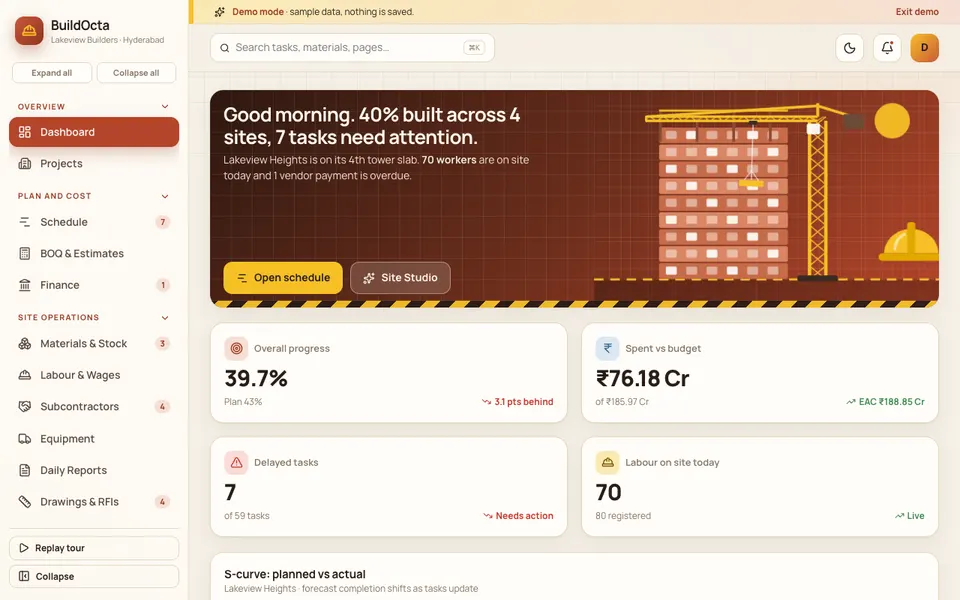
BuildOcta is an interactive Zenocta demo of construction project management for Indian builders and contractors. It uses a sample company with synthetic data. Nothing is saved or sent anywhere, the data resets on refresh, and the AI features are scripted simulations, not real models. It is a demo of what could be built for you, not a product with customers.
- Dashboard and Projects. An overview, and a detail page per project.
- Schedule. A Gantt with drag-to-shift and dependency cascade, and editable progress.
- BOQ and Estimates. Rate analysis, totals with GST, percent complete and an add-item form.
- Materials and Stock. Stock, a requisition kanban with drag and drop, purchase orders and goods receipt.
- Labour and Wages. An attendance grid, wages and contractors.
- Subcontractors and RA Bills. Raise, measure, approve and pay.
- Equipment, Daily Reports, Drawings and RFIs, Safety and Quality, Finance. The supporting modules a site office usually needs.
- Site Studio (simulated AI). Progress from photos, delay risk predictor, BOQ estimator, material reorder forecast, a safety check for PPE, a daily report writer with typed or simulated voice input, and a subcontractor bill checker.
The demo's date is fixed (13 November 2026), and its tax and deduction rates are illustrative, so do not read them as advice. The Gantt drag uses pointer events and has no touch-specific tuning.
How to try the BuildOcta demo
- Open buildocta.zenocta.com.
- On the login screen, choose Try Demo Account. Any sign-in works, and a guided tour starts.
- Open Schedule and drag a task to shift it. Watch the dependent tasks move.
- Open BOQ and Estimates, then Subcontractors and RA Bills to follow a bill from raised to paid.
- Open Site Studio and try the delay risk predictor. Refresh the page to reset everything.
Other sample businesses are listed on the demo apps page.
Getting construction software built for your firm
Contracting firms differ a lot: residential builders, civil contractors and interior fit-out teams all measure and bill differently. The right software follows your contract style, not the other way round. Zenocta builds custom business software and begins with a conversation about how your sites run today, followed by a scoped, fixed-price proposal. If that sounds useful, talk to us about a custom build, or browse the apps Zenocta has published on Google Play.
For a simpler starting point, see how partners can share costs in our article on construction expense tracking, and if you are an owner planning a build, read how to choose the right house plan.
Try it live
Open the real thing: demos run in a new tab with sample data, apps link to their own page.
 Live demoBuildOcta live demoOpen a sample contractor: drag a Gantt task and watch dependencies move, then follow a BOQ item to an RA bill.
- ABrowse allAll demo appsBrowse every interactive demo, each with a sample company and nothing saved.
- ZBrowse allZenocta appsProduction apps live on Google Play.
- TBrowse allTalk about a custom buildTell us how your business runs and get a scoped, fixed-price proposal.
Frequently asked questions
01What features should construction project management software have?
At minimum: a schedule with dependencies, progress tracking against plan, a BOQ with percent complete, materials requisition and stock, labour attendance and wages, and subcontractor RA bills. Safety, drawings and equipment modules are useful next.
02What is an RA bill in construction?
A running account bill is an interim bill raised for work measured so far, instead of one invoice at the end. Each bill shows the quantity measured to date and what was billed earlier, so only the new work is claimed.
03What does an S-curve show?
An S-curve plots cumulative progress against time for the planned and the actual work. Progress is slow at the start, fast in the middle and slow again at finishing, so the line forms an S. A gap between the two lines shows delay.
04Is the BuildOcta demo a real product?
No. BuildOcta is an interactive demo with a sample company and synthetic data. Nothing is saved, data resets on refresh, and the Site Studio AI tools are simulated. It shows what a custom construction system could contain.
05Can Zenocta build construction software for my firm?
Yes. Zenocta builds custom business software. We begin with how your sites, contracts and billing work, then provide a scoped, fixed-price proposal for the modules you actually need.