In this guide
A distributor's salesman covers forty shops a day, takes orders by phone call and notebook, and has no idea which shop is already sixty days behind on payment. The godown ships the goods anyway, because the order was booked, and the money sits in the market for another month. FMCG distributor software earns its place when it connects two things most teams keep apart: where the salesman goes, and how much each shop already owes.
Why do beats and credit usually live in different places?
In many distributorships the beat plan is a printed route sheet or a memory, and the credit position is a ledger kept by the accountant. The salesman sees the first. The accountant sees the second. Nobody sees both at the moment an order is taken.
- Beat plans that drift. Shops get visited when it is convenient, not on the planned day, so some outlets are over-served and others are missed for weeks.
- Orders booked over the limit. The salesman wants the sale, the shop wants the stock, and the limit is a number in an office book.
- Collections chased by guesswork. The accountant knows the total but not which bill is old, or which shop is about to be visited.
- Schemes passed on without a calculation. A free-goods offer sounds generous until you work out what it costs per sale.
- Near-expiry stock found late. Short-dated batches are discovered when a retailer complains, not when there is still time to move them.
What is a beat, and what makes a good one?
A beat is a fixed route that a salesman covers on a set weekday: a list of shops in a local area, visited in a sensible order. Good beats share a few properties.
Compact and repeatable
The shops on one beat are close together, and the salesman returns on the same weekday each cycle. That rhythm teaches shopkeepers when to expect a visit, so they have their order ready and their cash set aside.
Sequenced by distance
The order of stops matters. Starting at the godown and always going to the nearest unvisited shop is a simple rule that cuts riding distance. Software can compute the total route length for each day, so you can see whether Thursday is twice as long as Tuesday.
Flexible when it has to be
Shops close, new outlets open and salesmen take leave. A beat plan should let a manager move a shop to another day, or to another beat, without redrawing the whole route.
How credit control works, in plain terms
Credit control is a set of numbers you check before you release goods. Four are enough for most distributors.
- Credit limit. The most a shop may owe at any one time.
- Outstanding. What the shop owes now, bill by bill.
- Ageing. How old each unpaid bill is, grouped in bands such as up to 30 days, 31 to 60, 61 to 90 and over 90.
- Overdue share. The part of the outstanding that is older than the agreed credit period.
A shop with a high outstanding that is all recent is a different risk from a shop with a smaller outstanding that is mostly old. A risk score combines the signals into one number, so that the salesman sees a simple colour on a pin instead of reading a ledger.
A credit check worked through with made-up numbers
These figures are illustrative. Take a shop with a credit limit of ₹50,000 and an outstanding of ₹38,000.
| Ageing band | Amount (₹) |
|---|---|
| 0 to 30 days | 20,000 |
| 31 to 60 days | 12,000 |
| 61 to 90 days | 6,000 |
| Total outstanding | 38,000 |
If the credit period is 30 days, everything older than that is overdue: ₹12,000 plus ₹6,000 is ₹18,000, which is about 47% of the outstanding. Limit use is 38,000 divided by 50,000, which is 76%. Now the salesman tries to book an order of ₹16,000. The new total would be ₹54,000, which is ₹4,000 over the limit and 108% use. A good system does not just refuse. It shows the salesman the overshoot, blocks the booking, and lets a manager override with a reason, or lets the salesman collect part of the old balance first so the order fits.
Tip
Put the credit position on the same screen as the order, not in a separate report. A limit that is visible at the moment of booking changes behaviour. A limit that is read in the accounts office a week later does not.
What does a scheme really cost you?
Retail schemes come in two common shapes: free goods, such as "buy 10, get 1", and slab discounts, where a bigger quantity earns a better rate. The "10+1" offer gives the retailer 11 units for the price of 10. The free unit is 1 out of 11, which is about 9.1% of the list value of the goods you hand over.
Now compare that with your trade margin. If your margin on that product is 7% of list value, a 10+1 scheme that you fund yourself gives away more than you earn on the sale. That can still be sensible when the principal company reimburses part of it, or when the order is a bulk one that would otherwise go elsewhere. The point is to know before you offer it. A scheme simulator, which tests a free-goods or slab offer against sales history, turns that from a gut feeling into a figure.
Collections: from ageing report to a conversation
An ageing report is only useful if someone acts on it. Three habits matter.
- Collect on the beat visit. The salesman who is standing in the shop is the best collector. Show the shop's old bills on his screen, so he asks for a specific amount.
- Record part payments properly. Cash, cheque and UPI all happen, and a bill is often paid in pieces. The system must allocate each receipt to the right bill, so the ageing stays truthful.
- Send reminders that match the situation. A friendly note for a recent bill is different from a firm one for a bill that is three months old. Write them in the language the shopkeeper uses.
For the paperwork side, our guide to making a GST invoice explains the fields a clean invoice needs. Check the current rules for the invoicing details that apply to your business.
Batches and expiry: the stock side of credit
For pharma and packaged food, stock is tracked by batch, and the oldest-expiry batch should leave first. That rule is often shortened to FEFO, first expiry, first out. Software lists batches by expiry date, warns about those nearing it, and helps you plan returns to the company before the stock becomes a loss. Our guide to batch and expiry tracking goes deeper. For storage layout and picking, see warehouse management for small warehouses. Check the current rules on drug licensing and record keeping before you design your own process.
Choosing or commissioning distributor software
Spreadsheet, notebooks or purpose-built software?
| Approach | Works for | Where it breaks |
|---|---|---|
| Paper route sheets and a ledger | A few salesmen and a few dozen shops | Credit is visible only in the office, no route totals, slow to change |
| Spreadsheets | Small teams with one careful accountant | No live limit check at order time, easy to overwrite, no map of the beat |
| Purpose-built distributor software | Several salesmen, hundreds of retailers, many SKUs and schemes | Needs master data to be loaded and kept clean |
What to ask any vendor, or your own developer
- Does the order screen show the shop's limit and outstanding before I book?
- Can a manager override a blocked order, and is the override recorded?
- Can I move a shop to another day or beat in one step?
- Are receipts allocated bill by bill, including part payments?
- Does it handle schemes and show margin while I add items?
- Is stock tracked by batch with expiry alerts?
- Can the salesman use it on a phone and on a poor connection?
Common mistakes
- Setting limits once and forgetting them. Review the limit when a shop grows or slows down.
- Treating all overdue the same. A bill five days late and a bill ninety days late need different responses.
- Too many beats on one weekday. A salesman who cannot finish the route will skip the hard shops, which are often the ones that owe the most.
- Using software to replace judgement. A risk score is a prompt to look. The manager still decides.
What the DistriOcta demo shows
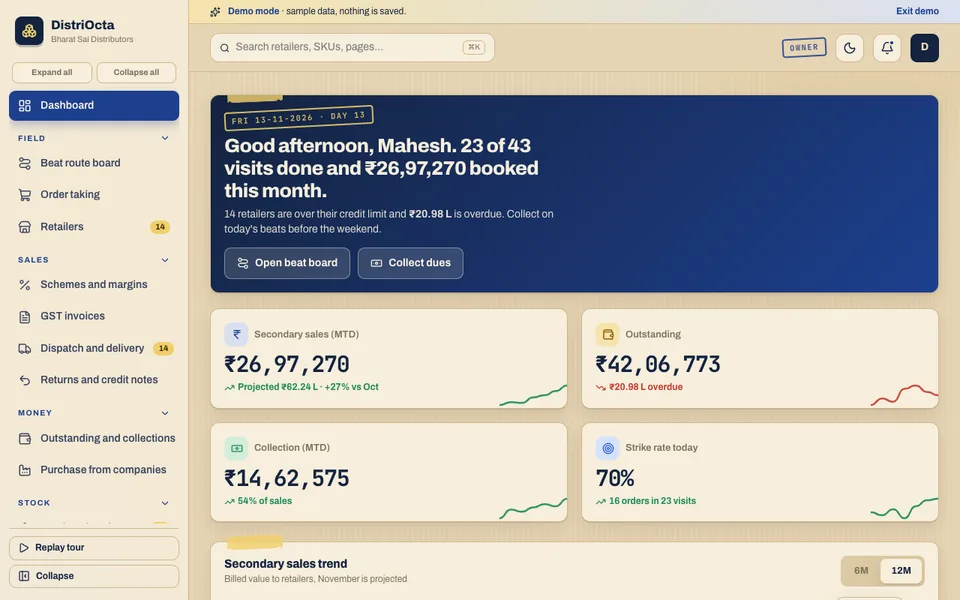
DistriOcta is an interactive demo for a sample distributor. It uses synthetic data, nothing is saved, the data resets on refresh, and every tool called an assistant is scripted and simulated.
- Beat route board. Pick a salesman and a weekday. Shops appear as pins on a stylised area map, coloured by credit risk or by outstanding amount. Drag a pin to another day or another beat, or tap it to take an order or collect. A day sheet shows planned visits, done, orders and collection, and the route length from the godown.
- Order taking. Search products, see schemes such as 10+1 and slab discounts applied automatically, watch margin update, and see the credit limit block an order or ask for an override.
- Retailers. The list of outlets, with a menu badge that counts retailers over their credit limit.
- Schemes and margins, GST invoices, dispatch and delivery, returns and credit notes. The sales-to-delivery chain.
- Outstanding and collections. Bill-wise ageing, part receipts in cash, cheque or UPI, and reminders.
- Purchase from companies. Purchase orders to the principals, goods receipt into batches, and claims for scheme, expiry and damage.
- Stock and expiry. Batch-wise stock, first-expiry picking, near-expiry alerts and return planning.
- Reports, Team and Settings. The management view.
- Beat Studio. A beat optimiser, order suggester, credit-risk scorer, scheme impact simulator, collection reminder writer in Hindi, English and Telugu, demand forecaster and voice order taking, all simulated.
How to try it
Open the DistriOcta live demo and press Try Demo Account on the login screen. Go to the beat board first: switch the colouring between credit risk and outstanding, drag a red pin to another day, then tap it and try to take an order above the limit. After that, open outstanding and collections. See the rest of the samples on the demo apps page, and Zenocta's production apps on the apps page.
Getting something like it built
Every distributor has a different mix of principals, schemes, beats and credit habits, so a generic product usually forces you to bend your process. Zenocta builds custom business software from Hyderabad, working with clients worldwide remotely. We start by mapping your beats, your credit rules and your invoices, then send a scoped, fixed-price proposal for the modules you need. If that sounds useful, talk to us about a custom build.
Try it live
Open the real thing: demos run in a new tab with sample data, apps link to their own page.
 Live demoDistriOcta live demoOpen the beat route board with risk-coloured pins, take an order with schemes, check ageing and try the simulated Beat Studio.
- ABrowse allAll demo appsBrowse every interactive demo, each with a sample company and nothing saved.
- ZBrowse allZenocta appsProduction apps live on Google Play.
- TBrowse allTalk about a custom buildTell us how your beats and credit work today and get a scoped, fixed-price proposal.
Frequently asked questions
01What is a beat in FMCG distribution?
A beat is a fixed route a salesman covers on a set weekday, made up of shops in one local area visited in a sensible order. Repeating it each cycle lets shopkeepers expect the visit and have their order and payment ready.
02How does software help control credit to retailers?
It shows each shop's limit, outstanding and ageing at the moment an order is booked, blocks or flags orders above the limit, records part payments bill by bill, and helps the team send the right reminder at the right time.
03How do I know if a scheme is worth offering?
Work out the free value as a share of the goods handed over, for example 1 free in 11 is about 9.1%, then compare it with your margin and any support from the principal. A simulator can test it against sales history.
04Is DistriOcta a real distributor product?
No. DistriOcta is an interactive demo with a sample distributor and synthetic data. Nothing is saved, data resets on refresh, and Beat Studio tools are simulated and scripted. It shows what Zenocta can build.
05Can Zenocta build distributor software for my business?
Yes. Zenocta builds custom business software. We begin with your beats, retailers, schemes and credit rules, then send a scoped, fixed-price proposal for the modules you need.