In this guide
A customer sends a message asking for a price at 9:40 in the evening. The salesperson who usually handles it is off, the owner is in a meeting, and the message sits unread until morning. By then the customer has chatted with two competitors. This guide shows how a WhatsApp CRM for small business sales teams closes that gap, and how to choose or build one sensibly.
Why do chat-led sales slip through the cracks?
For many small businesses, chat is the front door: customers tap a link, send a message and expect a quick answer. The trouble is that chat apps were built for conversations, not for selling as a team. Common symptoms follow.
- One phone holds everything. If the person who owns the number is away, nobody knows what was promised.
- No owner for each conversation. Two salespeople answer the same customer, or neither does.
- No stage and no next step. A chat can say "I will think about it" and then disappear because nothing reminds anyone to follow up.
- Broadcasts to everyone. The same offer goes to the whole contact list, including people who bought last week.
- No numbers. The owner cannot say how many enquiries arrived, how fast they were answered or how many became orders.
A sales CRM built around chat gives each of these a home, without asking customers to change how they reach you.
What is a shared team inbox and why does it matter?
A team inbox puts every conversation into one screen that several people can open. A typical layout has three panes: the list of conversations, the open thread and the customer details. The key features are small but important.
Assignment, notes and message status
Each conversation has an owner, shown clearly. Internal notes let colleagues leave context that the customer cannot see, such as "wants the 3-seater in grey, budget fixed". Message ticks show whether a message was sent, delivered or read. Together these remove the questions that eat time: who is handling this, what did we say, did they see it.
From a chat to a lead
The most useful single action in the inbox is converting a conversation into a lead. A lead carries a name, a source, a stage, a value and a next task. Without that step, promising conversations drift. With it, a salesperson opens a list of today's follow-ups and works through it.
How should the lead pipeline be organised?
Keep the stages few and honest. A small team might use new, contacted, quoted, negotiating, won and lost. A kanban board makes it obvious where leads are piling up, and a list view with filters helps when you need to find a specific lead quickly.
For each lead, record the product or service of interest, the expected value and the date of the next action. At the end of the week, the owner can ask three questions: how many new leads, how many moved a stage, how many have no next action. The last number is the one to bring to zero.
Tip
Add one rule to your team's routine: no lead leaves a conversation without a next task and a date. This single habit improves follow-up more than any automation.
Response time: the metric that predicts sales in chat
In a chat-led business, the first reply often decides who gets the order. A system should track the time from a customer's first message to the first human reply, and show conversations that have waited longer than your target. Countdown timers on each waiting conversation, plus routing rules that send new chats to the right team member, keep the target honest.
Set a target you can actually meet, say five minutes during working hours, and measure it for a month before tightening it. Also decide what happens after hours: an automatic acknowledgement that tells the customer when to expect a reply is better than silence.
Broadcasts: how to reach customers without annoying them
A broadcast sends one message to a chosen group. The quality of the group matters more than the wording. Build audiences from fields you actually hold, such as customers who enquired about a product, or those who bought more than a year ago. Preview the message the way a customer will see it on a phone before sending.
Track what happens afterwards. Here is an illustrative funnel with made-up numbers for one campaign:
| Step | Count | Rate |
|---|---|---|
| Messages sent | 1,000 | |
| Delivered | 900 | 90% of sent |
| Read | 450 | 50% of delivered |
| Replied | 90 | 20% of read |
| Became leads | 18 | 20% of replies |
The point of such a funnel is comparison. If the next campaign to a better-built audience lifts replies from 90 to 130 out of the same send, you know what to repeat. Messaging platforms have their own rules on consent, templates and costs, which change over time, so check the current rules before running campaigns.
Where does automation help, and where does it not?
Automation is best at the first minute: greet the customer, ask what they need, and route the chat. A flow builder lets a manager draw this as a simple diagram: if the customer asks about prices, tag the conversation and assign it to the sales team; if no human has replied in a set time, alert the manager.
Keep a person in charge of pricing, negotiation and any promise. Customers can tell when they are talking to a script, and a wrong automated reply costs more than a slow human one. If you want a wider view of where automation fits small firms, see our post on how AI is changing small and medium businesses in India.
Catalogue, links and templates
Three smaller features save a lot of typing. Saved reply templates keep answers to common questions consistent. A catalogue of products lets the team share items with a price and image in a click. Click-to-chat links and QR codes, placed on a website, a shop counter or a poster, let customers start a conversation that is tagged with its source from the first message.
A rollout plan for a small sales team
- Choose the business number and who has access. Decide who may see conversations and who may reply.
- Define your stages and sources. Five or six stages, and a short list of lead sources.
- Import contacts and tag them. Clean duplicates and record how each contact was acquired.
- Create ten reply templates. Cover the questions that make up most of your enquiries.
- Set response targets. Start with a target you can meet and an after-hours acknowledgement.
- Add broadcasts and automations last. Once the inbox and pipeline are in daily use, the data will be good enough to segment and automate.
What to ask any CRM vendor
- Can several people work in one inbox, with assignment and internal notes?
- Can a conversation become a lead with a stage, value and next task?
- Does it show response times and waiting conversations?
- Can I build broadcast audiences from fields and preview messages?
- Can I create simple automations without code?
- How does it handle customer consent and opt-outs? Check the current rules.
- What happens to my contacts and conversations if I leave? Can I export them?
- Who can see which data, and how is access controlled? Our guide to small business security lists the basics worth asking about.
Common mistakes
- Importing a messy contact list. Duplicates and old numbers waste every campaign.
- Over-automating on day one. Start with the inbox and pipeline; add flows when you know your common questions.
- Too many stages. Ten stages means nobody updates them.
- Measuring volume only. Message counts say little: look at response time and lead movement.
- Ignoring consent. Sending to people who did not expect it harms your reputation and may break platform rules.
Spreadsheet, personal phone or purpose-built CRM?
| Need | Personal phone | Spreadsheet | Purpose-built CRM |
|---|---|---|---|
| Team access to chats | One person only | Not applicable | Shared inbox |
| Lead stages and tasks | Memory | Manual | Kanban, tasks and reminders |
| Response time | Unmeasured | Hard to log | Timers and targets |
| Targeted broadcasts | Broadcast lists | Copy and paste | Segments with a preview |
| Reports | None | By hand | Dashboards and analytics |
A spreadsheet is fine for a one-person business. Once two or more people share the work, a shared system pays for itself in the leads it stops losing. For the bigger picture, see why every MSME should invest in custom software.
What the LeadOcta demo shows
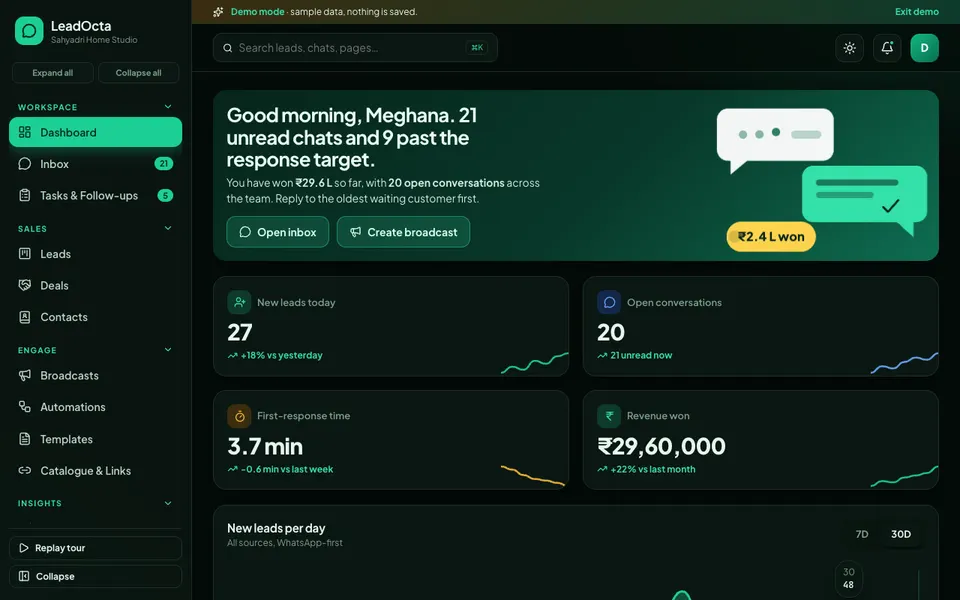
LeadOcta is an interactive demo of a chat-first sales CRM for a sample workspace called Sahyadri Home Studio. All data is synthetic, nothing is saved, data resets on refresh, and the Chat Studio tools are scripted simulations, not a real model. No real messages are sent, QR codes are decorative and template approval is illustrative.
- Dashboard. New leads, open conversations, first-response time and revenue won.
- Inbox. A three-pane chat view with ticks, internal notes, assignment and a convert-to-lead action.
- Leads and Deals. A kanban with drag and drop, a list view and a lead drawer, plus won, lost and forecast views.
- Contacts. Segments and import.
- Broadcasts. An audience builder, a phone preview and an animated funnel.
- Automations. A visual flow builder.
- Templates, Catalogue and Links. Saved replies, products, click-to-chat links, QR codes and forms.
- Tasks and Team with SLA. Follow-up tasks, countdown rings, performance and routing rules.
- Analytics. Four tabs of reports.
- Chat Studio. Seven scripted tools: an auto-reply bot, a lead qualifier, a message rewriter for English, Hindi and Telugu, intent and sentiment tagging, a best-time-to-send suggestion, a conversation summariser and a broadcast copy generator.
How to try the demo
Open the demo and press Try Demo Account on the login screen for a guided tour, which you can replay from the sidebar. Then open the inbox, convert a conversation into a lead, drag it across the kanban and look at the SLA timers under Team. On a touch device, drag and drop does not work, so use the stage chips in the lead drawer. More builds are on our demo apps page.
Getting a CRM built around your sales conversations
Every sales team has its own stages, products and handover rules, and off-the-shelf tools rarely match all three. A custom build can fit your pipeline, your reports and the way your team already works. Zenocta builds custom business software: we begin with how enquiries arrive and who handles them, then send a scoped, fixed-price proposal. If you would like that, talk to us about a build, and see the apps we already publish.
Try it live
Open the real thing: demos run in a new tab with sample data, apps link to their own page.
 Live demoLeadOcta live demoOpen a sample workspace: team inbox, lead kanban, broadcasts, automations, templates and SLA timers.
- ABrowse allAll demo appsBrowse every interactive demo, each with a sample company and nothing saved.
- ZBrowse allZenocta appsProduction apps live on Google Play.
- TBrowse allTalk about a custom buildTell us how your sales conversations run and get a scoped, fixed-price proposal.
Frequently asked questions
01What is a WhatsApp CRM?
It is a sales system built around chat conversations. It gives a team a shared inbox, turns chats into leads with stages and tasks, supports broadcasts to segments, and tracks response times, so conversations no longer live on one person's phone.
02Why do small sales teams need a shared inbox?
A shared inbox lets any team member see a conversation, assign it, add internal notes and reply on time. It also keeps the history when a salesperson is on leave or leaves the company.
03Should I automate customer replies?
Automate the repetitive first step, such as a greeting, a question about what the customer needs and routing to the right person. Keep pricing, negotiation and closing with people. Always check the current messaging rules and customer consent requirements.
04Is LeadOcta a real CRM product?
No. LeadOcta is an interactive demo with a sample workspace and synthetic data. Nothing is saved, data resets on refresh, and its Chat Studio tools are simulated. Message sending, QR codes and template approval are illustrative.
05Can Zenocta build a custom sales CRM for my team?
Yes. Zenocta builds custom business software. We start with how enquiries arrive and who handles them, then provide a scoped, fixed-price proposal for the inbox, pipeline, broadcast and automation features you need.