In this guide
A customer writes in about a missing order. The email lands in a shared mailbox, two agents open it, one replies and the other does not know. Three days later the customer writes again, angrier, and nobody can say who owns the problem. This guide looks at helpdesk software for small support teams, and at the two ideas that fix most of this: ownership and time targets.
Why does a shared mailbox stop working?
Most support teams start with a shared email address, then add a chat widget, then a phone number, then messages from social channels. Each new channel makes the picture more fragmented. The symptoms are familiar.
- No owner. Several people can see a message, so everyone assumes someone else is handling it.
- No clock. A request that has waited two days looks the same as one that arrived five minutes ago.
- No history. An agent answers without knowing that the same customer wrote last week.
- The same answers typed again and again. Questions about delivery, refunds and passwords make up most of the volume.
- No feedback loop. The team does not know whether customers were satisfied, or which topics cause the most contacts.
A helpdesk addresses each of these by making the ticket, not the message, the unit of work.
What is a ticket and why does it matter?
A ticket is a record for one customer issue. It holds every message on that issue, an owner, a status, a priority, tags and a timer. A conversation in a thread view, with the customer's details alongside, means an agent sees past orders, earlier tickets and notes without hunting for them.
Customer view in one panel
When an agent opens a ticket, a side panel should show who the customer is, how many times they have written and what they bought. It saves questions the customer has already answered, and it shows whether this is a repeat problem.
Internal notes
Agents need a private space to leave context for each other: "refund approved by manager", "waiting for courier reply". Notes keep handovers clean when a ticket passes between shifts.
How do SLAs actually work?
A service level agreement, or SLA, is a promise about time. Support teams usually set two targets for each priority: how fast the first human reply goes out, and how fast the issue should be resolved. The helpdesk starts a timer when the ticket arrives and shows how much time is left.
Here is an example with invented targets. Set your own to match your team.
| Priority | First response | Resolution |
|---|---|---|
| Urgent | 15 minutes | 4 hours |
| High | 1 hour | 8 hours |
| Normal | 4 hours | 24 hours |
| Low | 8 hours | 72 hours |
The point is not to hit every number. It is to see problems before they happen. A view of tickets about to breach lets a lead reassign work an hour early instead of apologising a day late. Decide how business hours count towards the timer, because a ticket received at night should not show as late in the morning.
Tip
Start with only two priorities and realistic targets. A team that meets a modest target for a month can tighten it. A team that sets an unreachable target teaches itself to ignore the timers.
Knowledge base: the cheapest way to cut ticket volume
Every question that agents answer more than a few times a week is a missing help article. A knowledge base lets you write answers once, publish them in a help centre and embed a search box in your app or website. Votes on articles show which ones help. A gap view, listing questions customers searched for with no good result, tells you what to write next.
Keep articles short and structured: the problem, the steps, what to do if it still fails. Review the most-viewed articles every month, because a wrong help article generates more tickets than no article at all.
Macros and automations: removing typing, not people
A macro is a saved reply, often with fields such as the customer's name and order number, that an agent can insert and edit. It keeps tone consistent and saves minutes on every ticket.
An automation is a rule: if something is true, then do something. Examples include tagging a ticket as billing when the subject mentions a refund, raising priority for a customer who has written three times, or notifying a lead when a timer is close to breaching. A good builder lets you test a rule on a sample ticket before turning it on.
Keep a person in the loop for anything involving money, complaints or exceptions. If you want a wider view of where automation helps small teams, our post on how AI is transforming small businesses in India is a good start, and top AI trends to watch in 2026 covers where the tools are heading.
Workload and capacity: the arithmetic of a backlog
Many backlogs are just arithmetic. Suppose a team of four agents each resolves about twelve tickets a day, so the team can handle 48. If 55 tickets arrive daily, the queue grows by 7 each day, which is 35 over a five-day week. No amount of effort will fix that: the answer is either fewer tickets, through better help articles, or more capacity.
A workload view showing tickets per agent, with the ability to move tickets between agents, helps balance the load. It also shows whether one agent is overloaded while another has spare time.
CSAT: measuring how customers felt
CSAT, or customer satisfaction, is a short survey sent after a ticket is closed. A common calculation is positive ratings divided by responses. For example, suppose you sent 200 surveys and received 80 responses, and 68 rated the experience positively. The response rate is 80 out of 200, or 40%, and CSAT is 68 out of 80, which is 85%.
The number is only a start. Read the comments on low scores, and look at which topics, agents or channels produce them. A feedback view that lets you filter by topic turns CSAT from a score into a to-do list.
A rollout plan for a small support team
- Collect every channel in one place. Email first, then chat and any messaging channel you use.
- Define two or three priorities and their SLA targets. Keep them achievable.
- Write ten macros. Take them from the answers your agents type most often.
- Publish your first ten help articles. Choose the questions with the highest volume.
- Add a handful of automations. Tagging and routing first, escalation rules after.
- Turn on CSAT surveys. Review the scores and comments each week.
- Review volume by topic monthly. Use it to decide what to write, fix or automate next.
What to ask any helpdesk vendor
- Does every message become a ticket with an owner, a status and a timer?
- Can I set SLA targets by priority and see tickets about to breach?
- Does it handle business hours in the SLA timer?
- Is there a knowledge base with search, votes and a gap view?
- Can I build macros and test automation rules before they go live?
- Does it show workload per agent and let me move tickets?
- Can I run CSAT surveys and filter results by topic and agent?
- How is customer data stored and protected, and can I export it? Our guide to small business security lists what to ask.
Common mistakes
- Too many priorities and tags. If agents cannot choose quickly, they stop choosing.
- Automating replies that need judgement. Refund and complaint replies need a human.
- Never retiring old articles. Outdated help creates new tickets.
- Chasing CSAT instead of fixing causes. A score only improves when the underlying problem does.
- Ignoring the after-hours experience. An acknowledgement that sets expectations is better than silence.
Shared mailbox, spreadsheet or purpose-built helpdesk?
| Need | Shared mailbox | Spreadsheet | Purpose-built helpdesk |
|---|---|---|---|
| Ownership | Unclear | Manual column | Assigned and visible |
| Time targets | None | Manual formulas | Timers and breach warnings |
| Customer history | Search the inbox | Separate sheet | One customer panel |
| Repeated answers | Copy and paste | Not applicable | Macros and help articles |
| Satisfaction | Anecdotes | Manual survey | CSAT with filters |
A shared mailbox can serve a team of one or two with low volume. As soon as several people answer, a helpdesk pays back in fewer dropped requests. For the broader argument, see why every MSME should invest in custom software.
What the DeskOcta demo shows
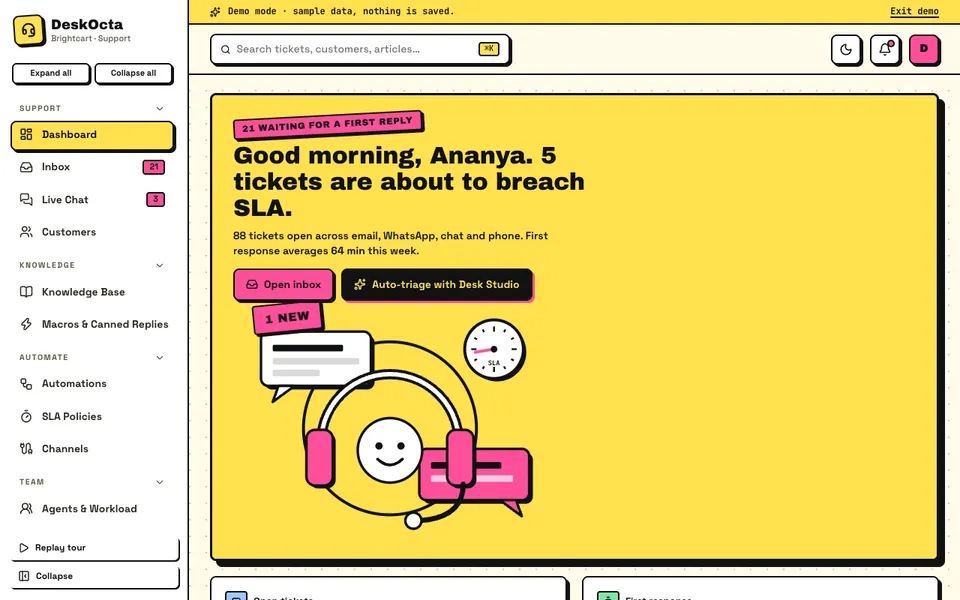
DeskOcta is an interactive demo of a support desk for a fictional online store called Brightcart. All data is synthetic, nothing is saved and data resets on refresh. New tickets, customer replies and SLA warnings arrive on a script, and the Desk Studio tools are scripted simulations, not real AI.
- Dashboard. Tickets waiting for a first reply, tickets about to breach SLA and open tickets across channels.
- Inbox and Live Chat. Tickets with a thread and a customer panel, plus a live chat view where visitor activity is simulated.
- Customers. Customer records linked to their tickets.
- Knowledge Base. An editor with live preview, article votes, a help-centre widget and a gaps view.
- Macros and Canned Replies. Saved replies for common questions.
- Automations. An if-then rule builder with a test option.
- SLA Policies and Channels. Time targets, and a preview of the chat widget.
- Agents and Workload. Drag tickets between agents to balance load.
- CSAT and Feedback. Survey results and comments.
- Analytics. Overview, Volume, Performance and Customers tabs.
- Desk Studio. Seven scripted tools: auto-triage, a reply drafter, a ticket summariser, a knowledge-base gap finder, a duplicate and spike detector, an escalation and CSAT risk predictor and a chatbot deflection simulator.
How to try the demo
Open the demo and press Try Demo Account on the login screen for a guided tour. Then open the inbox, read a ticket with its customer panel, look at the SLA timers, drag a ticket to another agent under Agents and Workload, and build an automation rule and test it. On touch devices, use the Move to menu on each card instead of dragging. Business hours are editable in the demo but are not applied to the SLA maths. More builds are on our demo apps page.
Getting a support desk built around your team
Every support team has its own channels, priorities and escalation paths. A custom build can match your SLA rules, your knowledge base structure and your reports, and connect to your own order or customer data. Zenocta builds custom business software: we begin with how customer requests reach you and who answers them, then send a scoped, fixed-price proposal. If that sounds right, talk to us about your support desk, and see the apps we already publish.
Try it live
Open the real thing: demos run in a new tab with sample data, apps link to their own page.
 Live demoDeskOcta live demoOpen a sample support desk: ticket inbox, live chat, knowledge base, SLA policies, automations and CSAT.
- ABrowse allAll demo appsBrowse every interactive demo, each with a sample company and nothing saved.
- ZBrowse allZenocta appsProduction apps live on Google Play.
- TBrowse allTalk about a custom buildTell us how your support runs and get a scoped, fixed-price proposal.
Frequently asked questions
01What is helpdesk software?
It is a system that turns customer messages from email, chat and other channels into tickets with an owner, a priority and a timer. It adds replies, notes, a knowledge base, automations and reports so a team can respond consistently.
02What is an SLA in customer support?
A service level agreement sets time targets for support, usually a first-response time and a resolution time for each priority. The helpdesk starts a timer when a ticket arrives and warns the team before a target is missed.
03What is CSAT and how is it calculated?
CSAT is customer satisfaction. After a ticket closes, the customer rates the experience. A common calculation divides the number of positive ratings by the number of responses. If 68 of 80 responses are positive, CSAT is 85%.
04Is DeskOcta a real helpdesk product?
No. DeskOcta is an interactive demo with a fictional store and synthetic data. Nothing is saved, data resets on refresh, and its Desk Studio tools are simulated. Timers and incoming events are scripted to show how a live desk feels.
05Can Zenocta build helpdesk software for my team?
Yes. Zenocta builds custom business software. We start with how customer requests reach you and who answers them, then provide a scoped, fixed-price proposal for the ticketing, SLA, knowledge base and reporting features you need.