In this guide
A busy salon looks calm from the front desk and chaotic behind it. Three stylists are mid-service, a walk-in is waiting, a bridal trial is due at four and someone has phoned to ask whether her prepaid package is still valid. Salon management software replaces the paper diary and the guesswork with one live picture of who is where, what is owed and who earned what.
What goes wrong when a salon runs on a diary and a phone?
The paper diary is a good tool until the salon has more than a couple of stylists. Then the weaknesses stack up. Bookings arrive from the phone, WhatsApp and walk-ins, and only some of them make it into the book. Two clients are given the same stylist at the same time. Packages are sold on a slip of paper and nobody knows how many sittings are left. Commission is calculated at month end from memory and a pile of bills, and every stylist has a slightly different version of what they are owed.
The results are familiar to any salon owner:
- Gaps in the day that could have been filled from a waitlist.
- No-shows with no deposit and no follow-up. We cover that problem in more depth in our guide to reducing salon no-shows.
- Arguments about packages, expiry dates and what was redeemed.
- Stylist disputes about commission, which damage trust more than almost anything else.
How should a salon appointment calendar work?
The best calendar for a salon is a day view with one column per stylist and a time grid down the side. Each appointment is a block sized to the service duration. At a glance you see who is free, who is overbooked and where the gaps are. Colours by service category, such as hair, skin, nails and bridal, help the owner read the day in a second.
Live chair status
Booked is not the same as arrived, and arrived is not the same as in the chair. A status on each block, from booked to arrived to in-chair to done, tells the receptionist whether a client is waiting, whether a stylist is running late and when the next slot really opens. It also lets the owner see utilisation: how much of the day each stylist is actually working.
Moving and filling the day
Salons reshuffle constantly. A good calendar lets you drag an appointment to another stylist or time, and checks for a clash before accepting the move. It also makes walk-ins quick to add and keeps a waitlist, so when a cancellation opens a slot you can offer it to someone who is waiting instead of leaving a chair empty.
Booking details that matter
A booking should support single services and combos, a stylist preference, add-ons that extend the duration, and a deposit where you want one. A deposit does more than collect money: it changes behaviour, and it is the most effective tool most salons have against no-shows.
Memberships, packages and the counter: how do they fit together?
A package sells several visits for one price, and a membership sells an ongoing benefit. Both are prepaid, which makes them good for cash flow and a source of confusion if tracked on paper. The rules to settle before you sell the first one are simple to state: what is included, how it is redeemed, when it expires and what happens to unused value.
A sample package with made-up numbers: a client pays ₹6,000 for four services valid for 90 days, so each visit has a redemption value of ₹1,500. After two visits, ₹3,000 of value remains. If the package is tracked in software, the receptionist sees the balance and the expiry date when the client arrives, and the bill shows a package redemption instead of a payment. If it is tracked on paper, someone has to find the slip. For how prepaid value is treated in your accounts, ask your accountant.
Billing at the counter
A salon bill is more varied than a retail bill. A single visit may mix services, a retail product, a discount, loyalty points, a package redemption, a tip and a split payment between cash and UPI. A point-of-sale built for salons handles those combinations without the receptionist reaching for a calculator, and produces a printable receipt that the client can keep. Our guide to GST billing software for small business covers the basics of compliant invoices; check the current tax rules for how your salon should invoice.
How do you pay stylist commissions fairly?
Commission is where trust is won or lost. The arithmetic is easy; the rules are the hard part. Each service has a commission percentage, products usually have a different one, and special cases, such as discounts and package redemptions, need a clear policy.
A made-up example with a 30 percent service commission rate shows why the policy matters:
| Situation | Basis | Stylist earns |
|---|---|---|
| Full-price service at ₹2,000 | Price paid | ₹600 |
| Same service, 20% discount, paid ₹1,600 | On the net amount | ₹480 |
| Same discounted service | On the list price (salon absorbs the discount) | ₹600 |
| Package visit with redemption value ₹1,500 | On the redeemed value | ₹450 |
None of these is the one correct answer. Each is a policy, and the stylists should know it in advance. What software adds is consistency: the same rule applied to every bill, with a statement the stylist can read, so a month-end disagreement becomes a lookup. If your staff are on salary plus commission, link the statement to payroll; our guide to attendance management software covers the attendance side of that.
Tip
Put the commission policy on one page and share it with every stylist before you switch on software. The system will apply whatever rule you give it, so ambiguity in the rule becomes ambiguity in the statement.
What about inventory, campaigns and feedback?
Salons use products inside services, for colour, treatments and waxing, and sell products across the counter. Tracking those uses by hand is why stock disappears. When each service has a known product usage, the system can deduct stock automatically as services are billed, and raise a low-stock alert before the colour you need runs out.
Campaigns are the other half of growth. A segment, such as clients who have not visited in 60 days, or clients with a package expiring this month, receives a message through WhatsApp, with an offer that suits them. Compared with a blast to everyone, a segmented message is cheaper, less annoying and easier to measure. Feedback after a visit, with a prompt to reply to reviews, closes the loop.
Diary, spreadsheet or salon software?
| Approach | Strength | Weakness |
|---|---|---|
| Paper diary | Simple, no training, no cost | Clashes, no waitlist, no history, no reminders |
| Spreadsheet | Good for a client list and monthly totals | Poor as a live calendar, no package balances, commission by hand |
| Salon management software | Calendar, packages, POS, commission and campaigns in one record | Needs setup, staff training and a clear commission policy |
How do you roll out salon software without disrupting the day?
- Load your service menu with durations and commission rates. Everything else depends on these.
- Add your team and their working hours. Include breaks so the calendar does not offer impossible slots.
- Import regular clients, not the whole history, and add others as they visit.
- Move bookings first. Run the calendar for a week before adding anything else.
- Add billing and packages. Enter open packages with their balances and expiry dates.
- Switch on commissions and campaigns last, when the underlying records are trustworthy.
Questions to ask any vendor
- Is there a calendar with a column per stylist and a clash check?
- Can I record walk-ins fast and fill gaps from a waitlist?
- Can I take deposits on bookings?
- Are package balances and expiry dates visible at the counter?
- Can commission rules cover discounts, products and package redemptions?
- Can I message segments of clients through WhatsApp?
- Does it work on a tablet or phone at the front desk?
- Can I export my client list?
Mistakes to avoid
- Selling packages without clear terms. Expiry and unused value should be written down.
- Changing commission rules mid-month. Announce changes in advance, and apply them from a start date.
- Ignoring durations. A calendar is only as good as the service times you give it.
What the SalonOcta demo shows
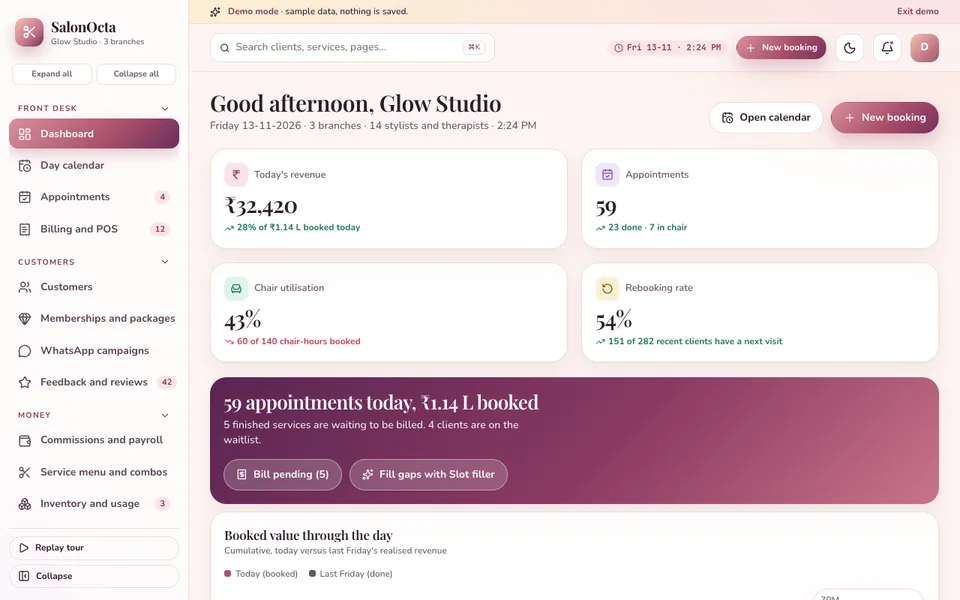
We built SalonOcta as an interactive demo for salons, spas, barbershops and bridal makeup studios. It is one of the demos on our demo apps page. The sample salon includes:
- Day calendar: a column per stylist on a time grid, blocks coloured by service category and status, live chair badges, drag to another stylist or time with a clash check, a Move form for touch, walk-in quick add and waitlist assign.
- Live clock: a simulated clock ticks so chair badges move from booked to arrived to in-chair to done, while simulated WhatsApp bookings, waitlist joins, reviews and stock alerts arrive as toasts.
- Appointments and booking flow: services or combos, stylist preference, add-ons, duration sum and deposit.
- Service menu and combos: commission percentages and product usage on each service.
- Memberships and packages: sell, redeem and expiry.
- Billing and POS: discounts, loyalty, package redemption, tips, split payment and a printable receipt.
- Commissions and payroll: statements per stylist.
- Inventory, WhatsApp campaigns with segments, feedback, reports, team and rota, settings and a customer portal.
- Glow Studio: seven tabs of simulated AI: look recommender, skin analysis (demo), smart rebooking, slot filler, commission explainer, review reply writer and bridal quote builder in English, Hindi and Telugu.
To be clear about what it is: the salon is fictional, all data is sample data held in memory, nothing you do is saved, the state resets when you refresh, and the Glow Studio tabs and the WhatsApp activity are simulated. It runs in the browser on desktop, tablet and phone layouts.
How to try it
Open the demo and choose Try Demo Account on the login screen. Watch the Day calendar for a minute to see the chair badges change, drag an appointment to another stylist, then open Commissions to see how a statement is built.
Getting salon software built for your business
Your service menu, package rules and commission policy are what make your salon yours, and software should follow them. To explore something like this, talk to Zenocta about a custom build. We will review your services, team structure and policies and send a scoped, fixed-price proposal. Zenocta has built 30+ apps from Hyderabad for clients across India and abroad, and you can see them on our apps page.
Try it live
Open the real thing: demos run in a new tab with sample data, apps link to their own page.
 Live demoSalonOcta live demoWatch chair badges move on the stylist-column calendar, redeem a package at the POS and open a commission statement, all on sample data.
- ABrowse allAll demo appsInteractive demos for dozens of industries, no sign-up needed.
- ZBrowse allZenocta appsProduction apps live on Google Play.
- TBrowse allTalk about a custom buildShare your services and commission policy and get a scoped, fixed-price proposal.
Frequently asked questions
01What should salon management software include?
At minimum a calendar with a column per stylist, walk-in and waitlist handling, a point of sale with discounts and split payments, packages and memberships with balances, commission statements, inventory and client messaging. Check each against how your salon works.
02How do I calculate stylist commission fairly?
Set a percentage per service and per product, then decide in writing how discounts and package redemptions are treated, for example on net amount or list price. Share the policy with stylists first. Software then applies the same rule to every bill.
03How can software reduce no-shows in a salon?
Take a deposit at booking, keep a waitlist to refill cancelled slots, and send reminders ahead of the appointment. The calendar shows gaps, so the receptionist can offer them to waiting clients straight away.
04Is SalonOcta a product I can subscribe to?
No. SalonOcta is an interactive demo with sample data for a fictional salon. Nothing is saved, the state resets on refresh, and the Glow Studio tabs and WhatsApp activity are simulated. It shows what Zenocta can build for a salon.
05How do I get salon software built for my business?
Contact Zenocta with your service menu, team structure and commission and package rules. We review them and send a scoped, fixed-price proposal for a custom build, delivered remotely from Hyderabad.