In this guide
Behind every laundry counter is the same quiet fear: a customer asks for a shirt that you cannot find. When garments arrive in a bag, get split across wash, dry-clean and press, and come back wrapped in plastic, it takes only one missing tag to turn a routine order into an argument. Laundry and dry cleaning software removes that fear by giving each garment its own identity and a visible journey.
Where laundry orders go wrong
A small laundry rarely loses stock to theft. It loses it to ambiguity. A slip is written at the counter, with a count of garments, a name and a phone number. Cloth tags are pinned on, but a few fall off in the wash. Items for dry-clean are separated from those for washing, and the slip stays with the wrong pile. Two orders from the same building come back in the same bag.
The other leak is time. Nobody knows precisely what is ready, what is delayed and what is waiting for a rider. Customers phone to ask, the counter staff walk to the back to look, and the answer is a guess. Payments are the third leak: advances noted on the slip, cash collected at the door by a rider, and a customer who says they already paid.
Tag every garment, not every order
The first discipline is a unique tag number per garment. An order number identifies the customer, and the tag identifies the item. In a made-up example, order SC-1042 has five garments, so the tags run SC-1042-1 to SC-1042-5, and each is printed or written and attached at the counter. A shirt that arrives at the ironing table can be scanned or looked up, and the screen shows whose it is, what service it needs and when it is promised.
At intake, record the type of garment, the service, and its condition: existing stains, a loose button, a faded patch. Photograph anything doubtful. This takes thirty seconds per item and is your best defence when someone later says "that mark was not there when I gave it".
The garment journey in eight stages
Laundry has a natural pipeline, and tracking each stage is what turns a vague "it will be ready soon" into a promise. Here are eight stages, each with a question worth asking.
| Stage | What happens | What to check |
|---|---|---|
| Received | Garments tagged at the counter or collected on a pickup run | Count matches the slip, condition noted |
| Sorting | Split by service, colour and fabric | No tag lost in the split |
| Washing or dry-clean | Machine cycle | Right programme for the fabric |
| Ironing | Pressing and finishing | Delicate items handled separately |
| Quality check | Inspection against intake notes | Stains removed or flagged, buttons intact |
| Packed | Folded or hung, covered, order assembled | All tags of the order present |
| Out for delivery | With a rider, or ready at the counter | Handover method and any cash to collect |
| Delivered | Customer has the order | Payment settled, feedback invited |
Once each stage is recorded, you can see where garments pile up. If most delays sit between ironing and quality check, you have an ironing capacity problem, not a customer service problem.
Tip
Quote turnaround from your own records. After a few weeks of stage data, you can say "ready by Wednesday evening" with confidence, and set a shorter express slot only where your data shows you can really deliver it.
Pickup and delivery without cash confusion
Doorstep service raises the stakes. A rider takes garments from a home, brings them to the store, and later returns them, often collecting payment. Three controls help. First, assign runs by time slot so each rider has a manageable route and customers get a window. Second, use a handover check such as a one-time code, so the customer confirms receipt and the rider cannot mark an order delivered by mistake. Third, record cash on delivery against the order, and reconcile each rider's cash at the end of the day, just as a shop reconciles a till.
A made-up example: a rider delivers eight orders and collects cash on three, ₹450, ₹720 and ₹310, a total of ₹1,480. At day end the rider hands over ₹1,480 and the system, which holds those same three figures, agrees. If it handed over ₹1,380, you would know to ask about three orders, not eight.
Price lists, billing and GST
A laundry typically prices by garment type and service: a shirt washed and ironed costs one amount, a suit dry-cleaned another. Keeping this as an editable price list, rather than prices remembered by the counter staff, means new orders use the current price everywhere, and a part-time employee quotes the same as the owner.
Billing then needs to handle discounts, advance payments, a customer wallet or prepaid balance, UPI and cash. If you are registered for GST, invoices have to follow the rules that apply to you, so check the current rules and confirm with your accountant. Our guide to GST billing software for small business explains what to look for.
Subscriptions: monthly plans for regular customers
Households and small offices often prefer a monthly plan over paying per order. Plans are usually sold by weight or by garment count. The software has to track a balance, renewals, and pauses when a customer travels.
An illustration with invented numbers: a customer buys a 20 kg monthly wash-and-fold plan. After two pickups of 5 kg and 7 kg, the usage balance shows 12 kg used and 8 kg left. The customer pauses the plan for a week while travelling, and the renewal date moves with it. Without a record, that conversation relies on memory, and both sides lose patience.
Spreadsheet, paper or purpose-built software?
| Approach | Works for | Breaks down when |
|---|---|---|
| Paper slips and cloth tags | One counter, low volume, staff who know every regular customer | Tags fall off, nothing to search, no stage visibility, advance payments get disputed |
| Spreadsheet or messaging groups | A small shop with a few pickups a day | No per-garment tracking, riders and counter disagree, subscriptions need manual balance tracking |
| Purpose-built laundry software | Multiple stores, riders, subscriptions and daily volume | Needs tag printing and counter discipline; heavy for a shop with a handful of orders a day |
A practical rollout
- Load your price list. Garment types and services, with the prices you charge today.
- Start at the counter. Raise every walk-in order in the system and attach printed or written tags.
- Add stage tracking in the back room. Whoever moves garments between stages updates the status.
- Bring riders in. Begin with one route and one time slot, with a handover check.
- Move regular customers to plans. Offer a subscription to the five or ten most frequent households first.
- Add inventory alerts. Detergent, chemicals, hangers, covers and tags, each with a minimum level.
- Review the weekly numbers. Revenue, turnaround and repeat customers by store.
What to ask any vendor
- Does every garment get its own tag, and can staff look one up by tag number?
- Can we record condition notes and photos at intake?
- Can we edit the price list ourselves and have new orders use it at once?
- Does it support rider runs by time slot, a handover code, and cash on delivery?
- Can customers hold a plan with a usage balance, renewal and pause?
- Does it handle damage claims, re-wash requests and lost items as a workflow?
- Can it run more than one store and show results per store?
- What are the hosting and support costs, quoted separately from the build?
Mistakes to avoid
- Tagging bags, not garments. One bag tag means one lost shirt makes the whole bag suspect.
- Skipping intake notes. A damage claim without a record is one you cannot dispute.
- Promising a time you have never measured. Use stage data to set realistic slots.
- Letting riders handle cash without a daily check. It is easy to fix on the day, hard weeks later.
- Selling plans without balance tracking. It looks generous until customers dispute their usage.
If your shop also sells retail items, billing and inventory management software for small retailers covers that side. For the wider argument, see why every MSME should invest in custom software.
What the LaundryOcta demo shows
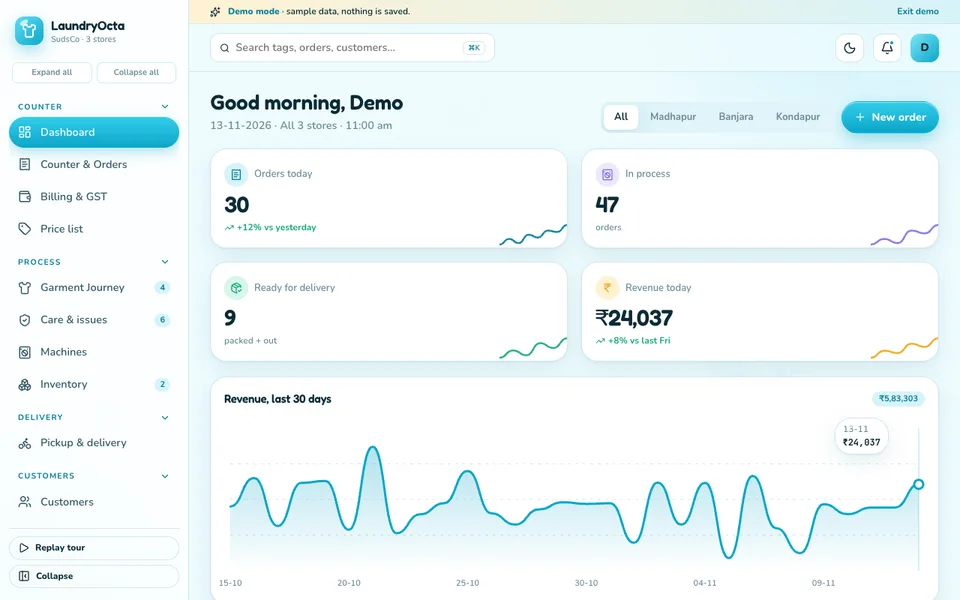
LaundryOcta is an interactive demo for laundry, dry-clean and wash-and-fold businesses, built by Zenocta around a sample three-store laundry. It uses sample data throughout. Nothing is saved, the data resets when you refresh, and the tools in its Wash Studio are simulated, scripted rather than real models.
- Dashboard: orders today, orders in process, ready for delivery and revenue, with a 30-day chart and a store filter.
- Counter and orders: take in garments, auto-generate tag numbers, print tags and collect an advance.
- Garment Journey: every garment from counter to doorstep, in eight stages. Drag cards between stages, or tap the arrows on touch screens, and use a scan-tag simulator.
- Pickup and delivery: rider runs by time slot, with a route map, OTP handover and cash on delivery.
- Price list: garment types priced per service, where editing a price changes new orders.
- Subscriptions: monthly kg and garment plans with usage balance, renewals and pause.
- Billing and GST: invoices, discounts, wallet, UPI and a print view.
- Customers, Care and issues: addresses, preferences, order history and loyalty, plus damage claims, re-wash requests and a lost-item workflow.
- Machines and Inventory: wash, dry, dry-clean and press machines with live cycles, and consumables with minimum-stock alerts.
- Reports, Team and Settings: revenue, turnaround and store results, staff and riders with attendance and payroll, and business settings.
- Wash Studio: a stain identifier, care suggester, turnaround predictor, route optimiser, churn and upsell, claim assessor and WhatsApp writer. These are scripted demonstrations. No photos are analysed and no messages are sent.
How to try it
Open the LaundryOcta demo and choose Try Demo Account on the login screen. Start with Counter and orders to create an order, then open Garment Journey and move its garments through the stages. Finish in Pickup and delivery and Subscriptions. The demo apps page has more industries to compare.
Getting laundry software built around your stores
Your tags, price list, riders and plans are specific to you, so a good system is shaped around them. Use the demo to decide what you would keep. Zenocta is a Hyderabad software studio of 11 people, whose most experienced members have more than nine years in the field, serving clients in India and abroad. We reply with a scoped, fixed-price proposal. When you are ready, tell us about your laundry, and you can see our production apps on Google Play.
Try it live
Open the real thing: demos run in a new tab with sample data, apps link to their own page.
 Live demoLaundryOcta live demoTake a sample order at the counter, drag garments through the journey tracker and open pickup runs and subscriptions.
- ABrowse allAll demo appsSee the other interactive industry demos.
- ZBrowse allZenocta appsProduction apps live on Google Play.
- TBrowse allTalk about a custom buildDescribe your stores and get a scoped, fixed-price proposal.
Frequently asked questions
01Why does each garment need its own tag number?
An order number only identifies the customer. A per-garment tag lets staff look up any single item at any stage, shows whose it is and which service it needs, and prevents swapped or missing items when tags fall off or orders are mixed.
02What stages should a laundry track?
A common pipeline is received, sorting, washing or dry-clean, ironing, quality check, packed, out for delivery and delivered. Tracking each stage shows where garments queue up and lets you promise realistic turnaround times.
03How do laundry subscriptions work in software?
The customer buys a plan by weight or garment count. The system tracks usage against the balance after each order, shows what remains, handles renewal dates and lets the customer pause, so there is a clear record behind every conversation.
04Is LaundryOcta a product I can sign up for?
No. It is an interactive demo with sample data that shows what Zenocta can build for laundries. Nothing is saved, it resets on refresh, and the Wash Studio tools are simulated. A real system would be scoped to your business.
05How should riders handle cash on delivery?
Record the amount against each order, use a handover code so delivery is confirmed by the customer, and reconcile each rider cash total with the system at the end of every day, so any gap is traced to specific orders.