In this guide
A tiffin service lives or dies on the evening before. By the time the last skip request lands on WhatsApp, the vegetables are already cut, the rider sheet is already printed and somebody has to guess how much dal to cook. This guide explains tiffin service software: how weekly menus, prep sheets, skips, wallets and delivery routes connect, and what to check before you buy or build one.
Where does a tiffin business lose money every week?
Most cloud kitchens start the same way: a menu posted on WhatsApp, subscribers paying by UPI, a notebook or spreadsheet for who gets what, and a rider who knows the lanes by memory. It works at 20 customers. Somewhere past 60 it starts to leak.
- Cooking for customers who have already skipped. The skip message arrived after the prep list was made, so the meal is cooked, packed and wasted.
- Guessing quantities. Prep is based on yesterday's feeling, not today's confirmed count, so the kitchen either runs short or over-cooks.
- Menus priced by instinct. A paneer dish sells well, but nobody has added up what it costs per plate, so the best seller may be the weakest on margin.
- Balances nobody can explain. A customer says they paid for 20 meals and received 17. Without a ledger, you argue from memory.
- Riders improvising routes. Two riders cross the same colony while a third area runs late.
The fix is not a bigger notebook. It is one place where the menu, the subscriber list, the skips and the routes all talk to each other, so that the count the kitchen cooks from is the same count the rider delivers to.
How does a weekly menu connect to cost and margin?
Most tiffin services publish a weekly menu: a lunch and sometimes a dinner for each day, often with a main plan and a variant such as light or no-onion. Treating the menu as a plan, not just a poster, is what makes the rest of the system work. Each dish carries a cost, so each week carries a cost.
Here is a made-up worked example, with illustrative numbers only. Suppose one lunch costs ₹38 in ingredients, ₹6 in packaging and ₹10 in delivery effort. That is ₹54 a meal. If the plan sells at ₹90 a meal, the margin is ₹36, which is 40% of the selling price (36 divided by 90). Now imagine you swap in a richer dish that costs ₹52 in ingredients. Cost rises to ₹68, margin falls to ₹22, and the same plate now earns about 24% of the price. A planner that shows this as you drag dishes into the week lets you balance an expensive Thursday against a cheaper Friday before you publish.
Two habits help here. First, cost dishes from a recipe, not from memory, and update the cost when vegetable prices move. Second, copy last week's menu as a starting point and change only what needs changing: most kitchens repeat a rotation, and re-typing it every Sunday is wasted effort.
What is a prep sheet, and why must it come from subscribers?
A prep sheet is the kitchen's work order for the day: how many meals of each kind to make, and how much of each ingredient that means. The common mistake is to build it from the menu alone. The menu says what you will cook. Only the subscriber list says how many people will eat it.
Take a made-up Monday. You have 80 active subscribers. Twelve have skipped, so 68 meals are due. If dal is cooked at 150 g per portion, you need 68 times 150 g, which is 10,200 g, or 10.2 kg. Without the skips you would have cooked 12 kg, almost two kilos too much, every day. Over a month, that is real money in lentils and gas alone.
A good prep sheet therefore does three things. It aggregates counts across plans and variants. It converts counts into ingredient quantities using the recipe. And it lets the cook tick items off as they are prepared, so the delivery lead can see how far the kitchen is without walking in. Variants matter: if 9 of the 68 meals are no-onion, the sheet should say so, because a wrong box is a lost customer.
Tip
Add a small buffer line to the prep sheet instead of padding every dish. For example, "5 spare meals" is easy to review and easy to reduce as your forecasts improve. Padding hidden inside each recipe never gets questioned.
How should skips, pauses and wallets work?
Skips need a cutoff, and the cutoff must be fixed
The rule that protects your kitchen is simple: a skip is valid only if it is made before a stated cutoff, say 7 PM the evening before. After that the meal is cooked and the customer is charged. What matters is that the rule is applied by the system the same way for every subscriber, so no one has to argue with a customer at 6 AM. When a skip arrives in time, it should flow straight into the next prep sheet, with no one copying messages from a chat.
Pauses and holidays are different from skips
A skip is one meal. A pause is a block of days, such as a family trip. Keep them separate in your data, because a pause usually ends on a known date and needs a restart reminder. A skip calendar per subscriber, where you can see every cancelled day at a glance, answers most billing disputes before they start.
A wallet turns plans into a running balance
A prepaid wallet is a balance the customer tops up. Each delivered meal deducts from it. Skipped meals deduct nothing, and some kitchens credit the amount back. The benefit is clarity: the customer sees what is left, you collect cash before you cook, and a low-balance reminder replaces an awkward chase. Whatever your rules are, write them down and make the software apply them, because wallet disputes are the fastest way to lose a loyal subscriber. Rules around food businesses, such as licences and food safety, change over time, so check the current rules for your area separately from any software decision.
How do you plan delivery routes and prove delivery?
Delivery is where a tiffin service meets the clock. Lunch has a window, often a narrow one near office hours, and a late box is a failed box. Software helps with three things.
- Zones and slots. Define the areas you serve and the delivery windows in each, so a new subscriber can only pick a slot you can actually meet.
- Route lanes per rider. Each rider gets an ordered list of stops. Moving a stop from one rider to another when someone is overloaded should take one drag, not a round of phone calls.
- Proof of delivery. A short code the customer shares at the door, or a tap that marks the stop done, gives you a log. When someone says the box never came, you can look at the time and the rider.
A map view with the rider moving along the route is not essential, but it cuts the "where is my food" calls, which can be a surprising share of a small kitchen's phone time.
How do you roll this out without disturbing the kitchen?
- Write down your current rules. Plans, prices, skip cutoff, pause policy, refund rule, delivery windows. If a rule is not clear on paper, software will only make the confusion faster.
- Enter your recipes and costs for one week of menu. Start with the dishes you cook most. Do not try to cost every dish before launch.
- Load subscribers with their plan, variant, address and balance. Clean the data once, here, instead of carrying errors into the new system.
- Run the prep sheet in parallel for one week. Cook from your old method, but compare the sheet's counts every morning. Fix mismatches in the data.
- Switch the skip flow. Tell subscribers where to request skips and what the cutoff is. Hold the cutoff firmly from day one.
- Add routes last. Once counts are reliable, move riders onto lanes and proof of delivery.
Spreadsheet, paper or purpose-built software?
A spreadsheet is a fair starting tool, and many kitchens run on one for a year. The question is what it cannot do once you grow.
| Need | Paper or notebook | Spreadsheet | Purpose-built software |
|---|---|---|---|
| Prep counts after skips | Recounted by hand | Possible with formulas, easy to break | Updates automatically from skips |
| Menu cost and margin | Rarely done | A separate sheet to maintain | Shown while you plan the week |
| Skip cutoff rule | Argued case by case | Manual check | Applied the same way every time |
| Wallet balances | Memory and notes | Fragile when edited by several people | Ledger per subscriber |
| Rider routes | Rider's memory | A printed list | Lanes, reorder and delivery log |
What to ask any vendor or developer
- Does the prep sheet recalculate when a skip arrives, and does it show variants such as no-onion?
- Can I set a skip cutoff once and have it applied to everyone?
- Can I see a full skip and wallet history for one subscriber?
- Does the menu planner show cost and margin per plate before I publish?
- Can I move a stop between riders in one step?
- Who owns my subscriber data, and can I export it at any time?
- Is hosting and domain cost separate and clearly stated?
Common mistakes
The first is launching with too many plans. Three clear plans are easier to cook and easier to explain than ten. The second is soft cutoffs: if you accept late skips "just this once" the rule stops meaning anything. The third is ignoring wastage. Tracking what was thrown away each day, with a reason, is the cheapest way to improve margin. The fourth is skipping customer feedback: a simple rating per meal tells you which dish to retire, long before subscribers leave.
What the TiffinOcta demo shows
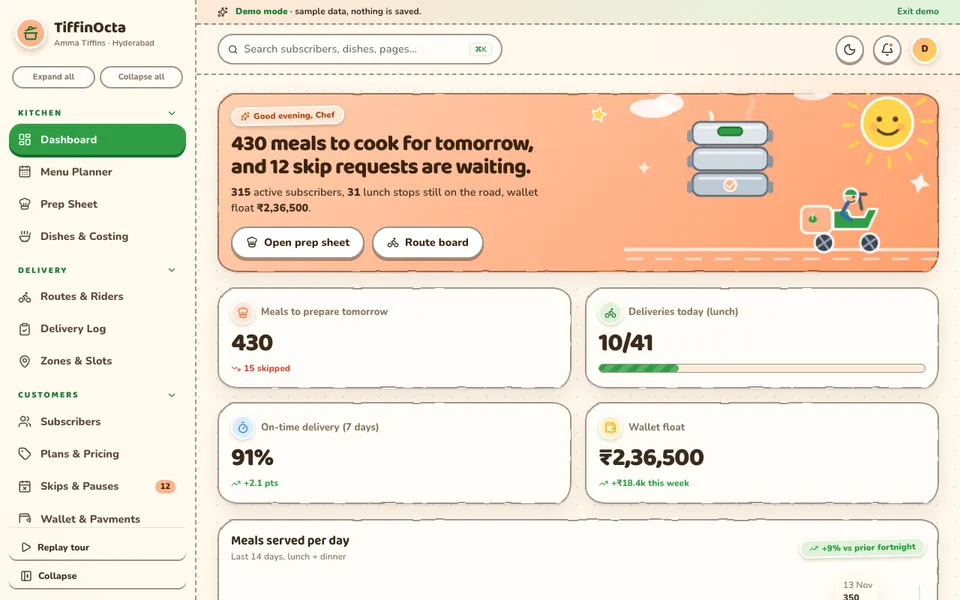
TiffinOcta is an interactive Zenocta demo for tiffin services, cloud kitchens and meal-plan startups, built around a fictional Hyderabad kitchen called Amma Tiffins. It uses sample data, nothing is saved and the data resets when you refresh. Everything described as "AI" is simulated and scripted, not a real model. The pages are grouped like this:
- Kitchen: Dashboard, a Menu Planner where you drag dishes into slots, copy a week, publish it and see cost and margin; a Prep Sheet with aggregated counts and ingredients you tick as prepared; and Dishes and Costing.
- Delivery: Routes and Riders with lanes, draggable stops, OTP verification and a map with a moving rider; a Delivery Log; and Zones and Slots.
- Customers: Subscribers, with a drawer showing the skip calendar, wallet and preferences; Plans and Pricing; Skips and Pauses with a phone preview; and Wallet and Payments.
- Quality: Feedback and Ratings, and Inventory and Wastage.
- Insights: Analytics in four tabs, a Settings page and the Tiffin Studio.
The Tiffin Studio holds seven scripted tools: a demand forecaster, a churn and pause predictor, a menu optimiser, a route optimiser, a WhatsApp order bot, a feedback summariser and a waste and portion advisor. Their apply buttons change the demo's own sample state, so you can see how a suggestion would flow into the prep buffer or the route board. The demo clock is pinned at 6:30 PM so the skip cutoff behaves the same way each time. On touch screens you tap a dish and then a slot instead of dragging.
How to try it
Open the demo, and on the login screen choose Try Demo Account. Start in the Menu Planner and watch the margin change as you move dishes, then open the Prep Sheet and compare it with the Skips and Pauses page. Our demo apps page lists the other industry demos.
Getting a tiffin system built around your kitchen
Every kitchen has its own plans, cutoffs and delivery geography, which is why a one-size app often fits badly. Zenocta builds custom software for small businesses: we start by learning how your week actually runs, then return a scoped, fixed-price proposal. You can talk to us about a custom build, or look at the production apps we have already shipped on the apps page. If you also take direct orders from a menu, our guide to an online food ordering system and our notes on kitchen display software cover the neighbouring ground. For recurring plans in another trade, see how laundry subscriptions are handled.
Try it live
Open the real thing: demos run in a new tab with sample data, apps link to their own page.
 Live demoTiffinOcta live demoOpen a sample tiffin kitchen: menu planner, prep sheet, routes and riders, skips, wallet and a scripted Tiffin Studio.
- ABrowse allAll demo appsBrowse every interactive demo, each with a sample company and nothing saved.
- ZBrowse allZenocta appsProduction apps live on Google Play.
- TBrowse allTalk about a custom buildTell us how your kitchen runs and get a scoped, fixed-price proposal.
Frequently asked questions
01What does tiffin service software actually do?
It connects your weekly menu, subscriber list, skip requests, wallet balances and delivery routes. The kitchen cooks from a confirmed count, riders get ordered stops, and each subscriber has a history of skips and payments you can show.
02Why should the prep sheet depend on skips?
Because cooking for customers who have already skipped wastes ingredients and gas every day. When a valid skip updates the next prep sheet automatically, the quantities match the meals actually due.
03Is a wallet better than monthly billing for a tiffin service?
A wallet collects money before you cook and gives the customer a clear balance after every meal. Monthly billing can suit some plans. Either works if the rules for skips and refunds are written down and applied consistently.
04Do I need a map and live rider tracking?
Not at the start. Ordered route lanes, a way to move a stop between riders and a simple delivery log solve most problems. Live maps mainly reduce where-is-my-food calls as you grow.
05Can Zenocta build a custom tiffin management app?
Yes. Zenocta builds custom software for small businesses. Share your plans, cutoffs and delivery areas and we return a scoped, fixed-price proposal. The TiffinOcta demo is only a sample with fictional data.