In this guide
It is Friday at 9 pm, every table is full, the waiter has lost a handwritten order, the kitchen is cooking a dish that was cancelled, and the cashier is adding up a split bill on a phone calculator. A restaurant does not usually fail on food. It fails on the flow between the table, the kitchen and the counter. This guide covers restaurant POS software features, QR ordering and the kitchen display system, and how to choose what your outlet actually needs.
What breaks in a restaurant during a rush?
Look at one order's path: the guest tells a waiter, the waiter writes a slip, the slip goes to the kitchen, the kitchen cooks, the waiter carries the dish, and the cashier prepares the bill. Every hand-off is a place where something gets lost.
- Handwritten orders are misread, so the wrong dish is made and the guest waits twice.
- The kitchen has no view of how long each ticket has been waiting.
- Stock is not deducted, so a dish stays on the menu after the ingredient has run out.
- Bills are totalled by hand, and split payments cause errors and delays.
- The owner learns what sold well only at the end of the month, if at all.
Software does not cook faster. It shortens the hand-offs and records what happened, so you can fix the real bottleneck rather than blame whoever was nearest.
What should restaurant POS software do at the counter?
The point-of-sale screen is where most staff time is spent, so it must be quick. A solid POS covers these basics:
- Build an order by tapping menu items, with modifiers such as "less spicy" or "extra cheese"
- Accept UPI, cash, card or a split of several methods on one bill
- Apply a coupon or offer without a manager's calculator
- Search past bills, reprint a copy and process a refund with a record of who did it
- Close a shift with a cash count, so what is in the drawer matches what the system says it should be
- Show a GST summary so your accountant does not have to rebuild it from bills (check the current rules for your outlet)
The shift close is worth dwelling on. A Z-report is the end-of-day summary of sales, payments and cash. When the counted cash does not match, you know the same night, not at month end.
How does QR ordering work, and when does it help?
With QR ordering, a code on each table opens the menu in the guest's phone browser, with no app to install. The guest chooses dishes and sends the order, and because the code belongs to a specific table, the kitchen knows where to deliver it.
It helps most where tables are many and waiters are few, such as busy cafes and food courts, because guests can order again without waiting to catch someone's eye. It matters less in a fine-dining room where the waiter is part of the experience. Think about three details before you adopt it:
- Does the order go straight to the kitchen, or wait for staff approval? A confirmation step prevents prank or mistaken orders.
- Can guests pay on the phone, or only order? Paying at the counter is fine if the bill is ready.
- What happens when the menu changes? An item that is out of stock must disappear from the QR menu immediately.
Tip
Print the table number on the QR sticker in large type. If a sticker falls off or ends up on the wrong table, staff can spot it at once, and no one eats at the wrong table's bill.
If you also take orders through your own website, our guide on online food ordering systems for restaurants covers that side.
What is a kitchen display system, and why replace paper tickets?
A kitchen display system (KDS) is a screen in the kitchen that shows orders as they arrive, replacing paper tickets. Each ticket carries a timer, so the cook sees what has been waiting longest. When a dish is ready, the cook marks it done, and the front of house sees the status.
The advantages are practical. Tickets cannot fall off a rail. Late orders turn a different colour. Stations such as grill, fry and dessert can see only their own items. And because the kitchen's actions are recorded, you finally have real preparation times to look at.
A KDS also opens the door to automatic stock deduction. If each dish has a recipe listing its ingredients, then marking the dish as cooked can deduct those ingredients from stock. Inventory stops being a monthly count and becomes something that moves through the day.
How does recipe costing show where you earn?
Recipe costing means working out the ingredient cost of one portion. For example, with invented figures: a paneer dish sells for ₹260, and the paneer, gravy ingredients, oil, spices and garnish cost ₹86. The food cost is 86 divided by 260, which is about 33 percent.
Once every dish has a recipe, you can see which items give a healthy margin and which look popular but earn little. When a supplier raises the price of paneer, you can see how every dish that uses it changes, and decide whether to adjust the price. The principles of tracking stock and cost are the same as in our guide to billing and inventory for retail shops.
Waste deserves its own log. A simple record of what was thrown away and why, such as spoiled, over-prepared or returned, usually shows two or three habits that account for most of it.
What is menu engineering?
Menu engineering plots each dish on two measures: how popular it is and how profitable it is. The four groups have standard names:
| Group | Popularity | Profit | What to do |
|---|---|---|---|
| Stars | High | High | Protect and feature them |
| Plowhorses | High | Low | Raise the price slightly or cut the cost |
| Puzzles | Low | High | Promote them or rename them |
| Dogs | Low | Low | Consider removing |
Delivery platforms complicate this. If a platform takes a commission, say ₹75 on a ₹300 order, that order earns far less than the same dish eaten in the restaurant. Looking at profitability by channel after commission shows whether a channel is worth the volume it brings.
Pen and paper, spreadsheet or restaurant software?
| Need | Pen and KOT slips | Spreadsheet | Restaurant software |
|---|---|---|---|
| Take an order | Handwritten slip | Not practical | POS or QR order sent to the kitchen |
| See kitchen delay | Shout and check | None | Live timers on the kitchen display |
| Know the stock | Weekly count | Manual update | Recipe-based deduction as dishes are cooked |
| Split and refund bills | Calculator | Formula | Split payments, reprint and refund log |
| Find best dishes | Gut feeling | Monthly pivot | Menu engineering view |
| Close the day | Count cash, hope | Add up bills | Shift close with a Z-report |
How do you roll out restaurant software without hurting service?
- Enter the menu and tables. Names, prices, modifiers and categories, checked against your printed menu.
- Train two cashiers on the POS during quiet hours. They train the rest.
- Start with billing. Run it beside the old method for a few days.
- Add the kitchen screen. Keep paper tickets on the side for a week.
- Add recipes for your top dishes first. Stock deduction becomes useful quickly even without a full menu.
- Add QR ordering last. By then the kitchen flow is stable.
What should you ask a restaurant software vendor?
- Does billing keep working if the internet drops, and does it sync afterwards?
- Can the POS and kitchen screen run on tablets I already own?
- How are online and aggregator orders brought in, and what happens when one fails?
- Can I export bills, stock and customer data?
- Who handles tax logic updates, and how are they delivered?
- What is the pricing model, and is hosting billed separately?
Mistakes restaurants make with software
- Adding every feature at once. Staff learn billing first, or they learn nothing.
- Skipping recipes. Without them, stock numbers never match reality.
- Letting QR orders bypass confirmation. The kitchen gets junk orders.
- Trusting AI suggestions without a limit. Predictions and price suggestions should be approved by the owner and capped.
What the RestaOcta demo shows
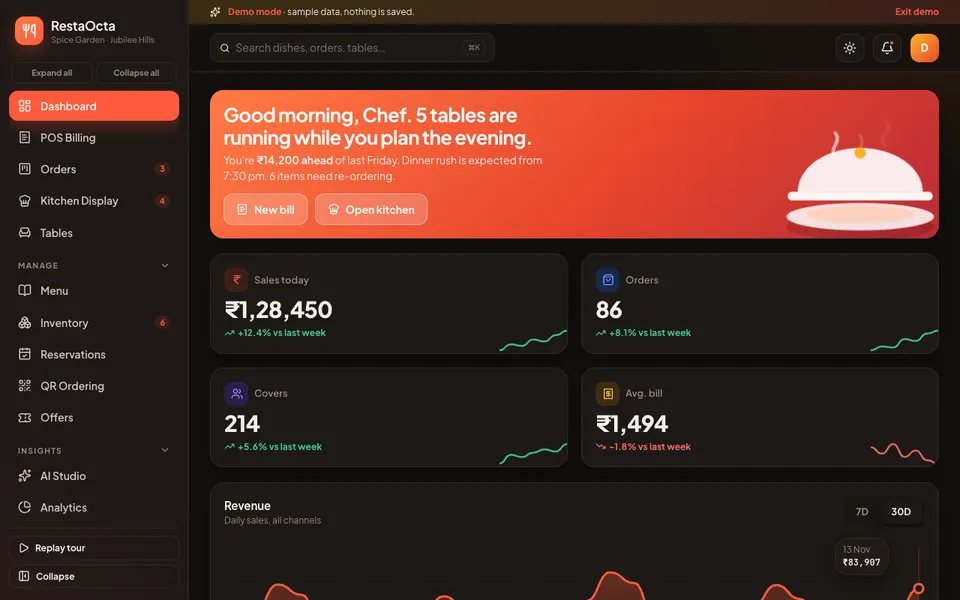
RestaOcta is an interactive Zenocta demo of restaurant POS, QR ordering, kitchen display, stock and reports. It uses sample data held in memory. Nothing is saved, the data resets on refresh, and the voice, vision, forecast and price-suggestion tools are scripted simulations, not real models. It is a demonstration of what a custom build could contain, not a product with customers.
- POS Billing. UPI, cash, card and split payment.
- Orders and Kitchen Display. A drag-and-drop order board, and live timers with recipe stock deduction.
- Tables, Menu, Inventory and Reservations. Inventory includes recipe costing.
- QR Ordering. A phone preview of the guest's view. The QR codes themselves are decorative.
- Customers and loyalty, Staff and shifts, Reports, Settings.
- Analytics (four tabs). Overview with today against last week and a seven-day forecast band, menu engineering (Stars, Plowhorses, Puzzles and Dogs), operations, and customers with retention and channel profitability after commission.
- Finance and Bills. P&L, expenses, shift close with cash count and Z-report, a GST summary, and bill search, reprint and refund.
- Offers, Feedback, purchase orders, wastage log and waitlist. Plus POS upsell suggestions and simulated aggregator orders.
- AI Studio (simulated). Voice phone ordering, predictive stock-outs and price suggestions with owner approval, a staffing planner, waste tracking, guest order tracking, an aggregator sync monitor, and an allergen guard.
The charts use sample numbers, and the demo has light and dark themes and respects reduced motion settings.
How to try the RestaOcta demo
- Open restaocta.zenocta.com on desktop, tablet or phone.
- On the login screen, choose Try Demo Account. A guided tour starts; you can replay it from the sidebar.
- Open POS Billing and make a split payment, then watch the order appear on Kitchen Display.
- Mark the dish ready and check the stock in Inventory.
- Open Analytics and the menu engineering view. Refresh to reset the data.
The demo apps page lists more sample businesses.
Getting a restaurant system built for your outlet
A single cafe, a multi-outlet chain and a cloud kitchen need different things from a POS. A custom system can match your menu, your table layout and the way your kitchen is organised. Zenocta builds custom software starting from a conversation about how a typical service runs, followed by a scoped, fixed-price proposal. If you want to explore it, talk to us about a custom build, or see the finished apps on Google Play.
If you also take bookings for appointments rather than tables, our article on reducing no-shows with a booking app covers the same confirmation habits.
Try it live
Open the real thing: demos run in a new tab with sample data, apps link to their own page.
 Live demoRestaOcta live demoOpen a sample restaurant: POS billing, order board, kitchen display with timers, QR ordering preview and menu analytics.
- ABrowse allAll demo appsBrowse every interactive demo, each with a sample company and nothing saved.
- ZBrowse allZenocta appsProduction apps live on Google Play.
- TBrowse allTalk about a custom buildTell us how your business runs and get a scoped, fixed-price proposal.
Frequently asked questions
01What features should restaurant POS software have?
Quick order entry with modifiers, UPI, cash, card and split payments, offers and coupons, bill search, reprint and refund, table management, a kitchen display, recipe-based stock, shift close with a Z-report, and reports for sales, menu and customers.
02How does QR ordering work in a restaurant?
Each table has a code that opens the menu in the guest's phone browser with no app to install. The guest orders from the table, and because the code identifies the table, the kitchen knows where the dish goes.
03What is a kitchen display system?
A kitchen display system is a screen that shows incoming orders with timers instead of paper tickets. Cooks mark dishes ready, late tickets stand out, and the recorded preparation times show where the kitchen is slow.
04Is RestaOcta a real restaurant product?
No. RestaOcta is an interactive demo with synthetic data held in memory. Nothing is saved, data resets on refresh, QR codes are decorative, and the voice, forecast and price suggestion tools are scripted simulations.
05Can Zenocta build a restaurant system for my outlet?
Yes. Zenocta builds custom business software. We start with your menu, tables and kitchen flow, then provide a scoped, fixed-price proposal for the POS, kitchen display, QR ordering and stock features you need.