In this guide
A homestay owner juggling bookings from three travel sites, a phone and a notebook knows the sinking feeling of a double booking. Larger independent hotels have the same problem with more rooms, more staff and more places to mislay a reservation. Hotel and homestay property management software puts every room, booking, guest and bill in one place, and the features below are what separate a useful system from a heavy one.
How a small property runs on notebooks and chat today
In many independent properties, reservations arrive through several doors: calls, messages, walk-ins, and one or more online travel sites with their own extranets. The owner or front desk notes them in a diary or spreadsheet. Room status is told by voice, as housekeeping calls up to say 204 is ready. Rates are changed on each travel site separately, and often forgotten for weekends or festivals.
The breakages are familiar. A room sold on two channels at once. A guest arriving before the room is clean. A bill added up from sticky notes at check-out. A review that goes unanswered for weeks. And at month end, no clear idea which rooms earned what, or which channel is worth its commission.
The tape chart: your whole property on one screen
A tape chart is a grid with rooms down the side and dates across the top. Each reservation is a bar that stretches across the nights it occupies. It is called a tape chart because the bars look like strips of tape laid on a calendar. In one glance you see who is in which room, which rooms are empty tonight and next weekend, and where a one-night gap sits between two bookings.
The useful behaviours are practical ones: click an empty cell to create a booking, drag a reservation to another room or date, and have the system refuse a move that would clash with another guest. That conflict check is the digital version of rubbing out a pencilled entry and noticing the next line is already taken.
Occupancy, ADR and RevPAR with a small example
Three figures describe how a property is doing. Occupancy is the share of available rooms that were sold. ADR, average daily rate, is room revenue divided by rooms sold. RevPAR, revenue per available room, is room revenue divided by all rooms available, which equals occupancy multiplied by ADR.
A made-up homestay with 10 rooms on one night, with 6 rooms sold and ₹21,000 of room revenue:
| Measure | Working | Result |
|---|---|---|
| Occupancy | 6 / 10 | 60% |
| ADR | ₹21,000 / 6 | ₹3,500 |
| RevPAR | ₹21,000 / 10, or 60% x ₹3,500 | ₹2,100 |
RevPAR matters because occupancy alone can mislead. Filling every room at a deep discount can lower RevPAR, while selling fewer rooms at a better rate can raise it. When you compare a week this year with the same week last year, RevPAR shows whether you are really earning more per room.
Tip
Look at RevPAR by day of week for a month. Most properties find that weekdays and weekends need different rates, and that one slow weekday is worth a small promotion while a busy weekend deserves a higher floor price.
Front desk: arrivals, departures and check-in
The front desk screen should answer three questions without clicking around: who is arriving today, who is leaving, and who is staying. Check-in captures guest details and identity documents, assigns a room, and records any advance paid. Check-out opens the folio, takes final payment and produces the invoice. If your property must collect identity documents or maintain guest registers, check the current rules that apply to you and make sure any software supports them.
Housekeeping: from dirty to ready
A room has a status, such as occupied, vacant dirty, cleaning in progress, ready or out of order. When status is shared, the front desk stops phoning housekeeping and housekeeping stops guessing which rooms to start with. A board of room tiles, with attendants assigned, lets a supervisor move a tile from dirty to ready, and the front desk sees it instantly. Maintenance requests belong in the same picture, because a room with a leaking tap should not be sold.
Rates, availability and channel sync
A rate calendar sets the price for each room type for each night. You will have a base rate, weekend and festival rates, and sometimes minimum-stay rules. Availability is how many rooms of each type remain to sell.
A channel manager is the part that keeps travel sites in agreement with your own system. When a room is sold on one site, availability should reduce everywhere. When you change a rate, it should push to every connected channel at once. This is where overbooking is prevented, so it deserves careful testing. Ask any vendor how long a sync takes, what happens when a channel is unreachable, and how a conflict is flagged.
Guest folios, billing and the night audit
A folio is the running account of a stay. Room charges post each night, and restaurant bills, laundry, extra beds or transport are added as they happen. Payments, advances and refunds are recorded against it. At check-out, the folio is the bill.
The night audit is the daily close: room charges are posted, the day's numbers are checked, reports are generated and the business date rolls over. Doing this at a fixed time every night, not when someone remembers, is what keeps month-end accounts clean. Invoices and taxes on stays must follow current rules, so confirm tax settings with your accountant. For a related look at billing, see GST billing software for small business.
Spreadsheet, paper or purpose-built software?
| Approach | Suits | Struggles with |
|---|---|---|
| Diary and notebook | A homestay with a few rooms and one owner always present | Overlaps, no history, no rates calendar, bills added up by hand |
| Spreadsheet calendar | A small property with low booking volume | No conflict checks, no channel sync, no folio, status passed by voice |
| Purpose-built property software | Several rooms, staff on shifts and multiple booking channels | Needs rooms, rates and taxes set up carefully; more than needed for a one-room stay |
Setting up a property system step by step
- Define rooms and types. Names, categories, capacity, amenities and base rates.
- Load future bookings. Enter every confirmed reservation so the tape chart is true from day one.
- Set rates and rules. Weekend and festival pricing, minimum stays and taxes.
- Train the front desk first. Bookings, check-in, check-out and folios.
- Bring in housekeeping. Shared room status and assigned attendants.
- Connect channels last. After the internal flow is stable, so sync errors are easier to read.
- Review weekly. Occupancy, ADR and RevPAR by day, plus reviews waiting for a reply.
Questions to ask any vendor
- Does it offer a tape chart with drag-and-drop moves and clash checking?
- Can it run on a phone or tablet for staff who are not at a desk?
- Does it sync rates and availability to the channels we use, and flag failures?
- Does the folio handle extra charges, advances, split payments and invoices?
- Is there a night audit that closes the day properly?
- Does housekeeping see room status live, with attendants assigned?
- Can we reply to guest reviews from the same screen?
- What are the hosting and support costs, quoted separately from the build?
Common mistakes
- Connecting channels before the property is clean. Fix room types and rates first, or errors multiply across sites.
- Ignoring housekeeping. Late room readiness is the commonest guest complaint, and it is a data problem.
- Setting one rate for the whole year. Demand moves, and so should price.
- Skipping the night audit. Missed postings show up as reconciliation arguments weeks later.
- Buying for a hotel chain when you run a boutique stay. Choose fewer modules that work well.
If your property has a restaurant, online food ordering for restaurants covers that side. If you also run shared accommodation, PG and hostel management software may be relevant, and why every MSME should invest in custom software gives the wider case.
What the StayOcta demo shows
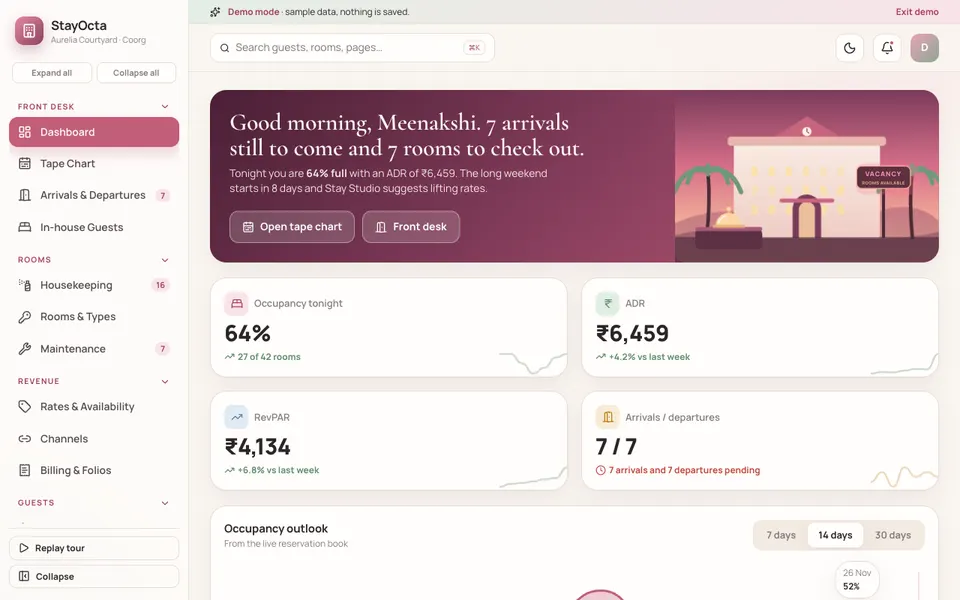
StayOcta is an interactive demo of property management software for independent hotels, resorts and homestays, built by Zenocta around a sample property in Coorg. All data is sample data. Nothing is saved, it resets on reload, and the identity fields, channel sync and Stay Studio tools are simulated. The tax figures shown are illustrative only.
- Dashboard: occupancy tonight, ADR, RevPAR and arrivals and departures, with an occupancy outlook.
- Tape Chart: create a booking from a cell or a button, and drag a reservation to another room or date with a conflict check. On touch devices, tap a bar to open the reservation drawer instead of dragging.
- Arrivals and Departures, and In-house Guests: check-in with a mock ID capture, room assignment and advance, and check-out with folio, payment and a GST invoice.
- Housekeeping: drag room tiles between statuses and assign attendants.
- Rooms and Types, and Maintenance: your inventory of rooms and the issues that take rooms out of service.
- Rates and Availability, and Channels: edit rates, and push channel inventory to simulated channels.
- Billing and Folios: post charges and payments against a guest account.
- Guests and Reviews: guest profiles, and replying to reviews.
- Analytics and Settings: four analytics tabs, plus property details, taxes, night audit and the team roster. You can close the night audit in the demo.
- Stay Studio: dynamic pricing with a 30-day suggestion heatmap, a no-show predictor, a review responder, an upsell engine, a concierge chatbot that escalates to the front desk, a housekeeping route optimiser and an overbooking guard with a demand forecast band. All are scripted rules over demo data, not real models.
The sample property has about 245 sample reservations from nine days back to thirty days ahead, and live events appear every so often to show how a busy day feels.
How to try it
Open the StayOcta demo. Any sign-in works, and Try Demo Account on the login screen starts a guided tour. Try three things: drag a booking to another room on the Tape Chart, check a guest in and then out to see the folio and invoice, and open Stay Studio to see a pricing suggestion applied to the rate calendar. More industries are on the demo apps page.
Getting property software built around your rooms
A heritage homestay, a beachside resort and a city business hotel need different screens, rate rules and staff flows. Use the demo to decide what you would keep. Zenocta is a Hyderabad software studio of 11 people, whose most experienced members have more than nine years in the field, serving clients in India and abroad. We reply with a scoped, fixed-price proposal. When you are ready, tell us about your property, and you can see our production apps on Google Play.
Try it live
Open the real thing: demos run in a new tab with sample data, apps link to their own page.
 Live demoStayOcta live demoOpen the tape chart, check a guest in and out, edit rates, push channel inventory and close the night audit with sample data.
- ABrowse allAll demo appsSee the other interactive industry demos.
- ZBrowse allZenocta appsProduction apps live on Google Play.
- TBrowse allTalk about a custom buildDescribe your property and get a scoped, fixed-price proposal.
Frequently asked questions
01What is a tape chart in a hotel system?
A tape chart is a grid with rooms down one side and dates across the top, where each reservation is a bar spanning its nights. It shows occupied rooms, vacancies and gaps at a glance, and lets staff create or move bookings directly.
02What is the difference between ADR and RevPAR?
ADR is room revenue divided by rooms actually sold. RevPAR is room revenue divided by all rooms available, so it also reflects empty rooms. RevPAR equals occupancy multiplied by ADR, which makes it a fuller measure of how well rooms earn.
03How does software prevent overbooking?
By keeping one live inventory that the front desk and every connected channel read from. When a room sells anywhere, availability falls everywhere. Check how a system handles delays and unreachable channels, because sync failures are what cause double bookings.
04Is StayOcta a property system I can subscribe to?
No. It is an interactive demo with sample data that shows what Zenocta can build for hotels and homestays. Nothing is saved, it resets on reload, and channel sync and Stay Studio are simulated. A real system would be scoped around your property.
05Do small homestays need a channel manager?
If you list on more than one booking site, yes, because manual updates lead to double bookings. A homestay that takes bookings only by phone and message can start with a tape chart, folios and housekeeping, and add channel sync later.