In this guide
An institute that teaches anyone, from a nine-year-old to a learner driver, ends up running the same four registers: who is enrolled, who turned up, who owes fees and who passed. When each register is a different notebook or spreadsheet, the same student is typed in four times and the principal learns about a problem a month late. This guide explains what software for schools, colleges and coaching institutes actually has to do, how to decide between a spreadsheet, a ready-made package and a custom build, and how four interactive demos handle the work in four different settings.
What jobs does software need to do in education?
Strip away the vocabulary and every institute does the following, whether it has 40 students or 4,000.
- Admissions. An enquiry becomes an application, an entrance or scholarship step, and an enrolled student with a fee plan.
- Timetable or roster. A teacher, a room (or a car) and a group of students are placed in the same hour, and no one is double-booked.
- Attendance. A daily or per-lesson record that the right adult can see quickly, not at the end of the term.
- Fees. A plan with a total, instalments and dates, receipts for every payment, and a short list of who is overdue.
- Assessment. Marks, tests, skill checklists or practical tests, turned into something a student or parent can act on.
- Communication. Notices, reminders and progress messages to parents or learners, sent in the language they read.
- People and assets. Teacher workload, instructor leave, vehicles, buses, library books and rooms.
The emphasis differs by setting. A coaching institute lives on batches, tests and instalments. A school adds transport, report cards and a large parent audience. A college adds exams that need seating plans, shortage lists and placements. A driving school replaces the timetable with a lesson roster and the exam with an official driving test. Keep that in mind as you read the demo sections below.
Who actually uses education software?
Most failed rollouts come from designing for one person, usually the owner, and forgetting the rest. List the people before you list the features.
- The front desk takes enquiries and fees all day and needs speed more than reports.
- Teachers and instructors mark attendance and enter marks between lessons, often on a phone, and will drop any screen that takes more than a minute.
- The academic head builds timetables and exam plans and needs clash warnings while building, not after publishing.
- Parents and learners need a clear view of dues, attendance and results, and a message that does not need a login to understand.
- The owner or principal wants a few numbers: enrolment, collections, overdue fees, attendance and results.
If your tool is built for the owner's dashboard but makes the front desk slower, the data will not be entered and the dashboard will be empty.
Spreadsheet, packaged software or custom build: how do you decide?
This is the choice that costs the most if you get it wrong, so it is worth slowing down. The table compares approaches, not products.
| Approach | Works well when | Starts to hurt when | Watch out for |
|---|---|---|---|
| Spreadsheets and paper registers | One branch, a few batches, one person keeps the records | Two people edit fees, or a timetable has more than a handful of teachers | No clash warning, no reminders, and the file lives on one laptop |
| Packaged software | Your process is common and you can adopt its terms and stages | You need a fee structure, grading scheme or roster rule it does not model | Paying for modules you never switch on, and workarounds that live in notes |
| Custom build | Your rules are the point: a fee plan, a seating rule, a roster logic or a parent view you want shaped your way | You cannot describe your own process or will not name an owner for it | Scope growing during the build; fix it with a clear first release |
Five questions that settle it
Answer these honestly and the choice usually makes itself.
- How many places can a mistake hide? One register is manageable. Four registers that must agree (fees, attendance, timetable, results) is where a single connected record starts to matter.
- Which rule would cost us money or trust if it were wrong? A double-booked room is annoying. A wrong fee balance or a missed exam seat is not. Software earns its place on those rules.
- Does a standard version already match our process? If you can describe your year in the terms of a common package, adopt it. If you keep saying "except for us," that is the signal for a custom build.
- Who will enter the data, and from what device? If the answer is "teachers on phones," test on a phone before anything else.
- What happens in June (or the start of your year)? Admissions and promotion season is the peak. Ask how the tool handles a year rollover and a rush of new students.
An illustrative sum
Take a made-up school with 10 classes, 8 periods a day and 5 days a week. That is 10 x 8 x 5 = 400 class periods a week. Each needs one teacher and one room, so a timetable has 400 teacher placements and 400 room placements, 800 in all, that must never overlap. Checking that by eye is why timetable builders show clashes while you drag. The numbers are invented to show scale, not taken from any school.
Coaching and tuition: the batch, the test and the instalment
CoachOcta, for coaching and tuition institutes
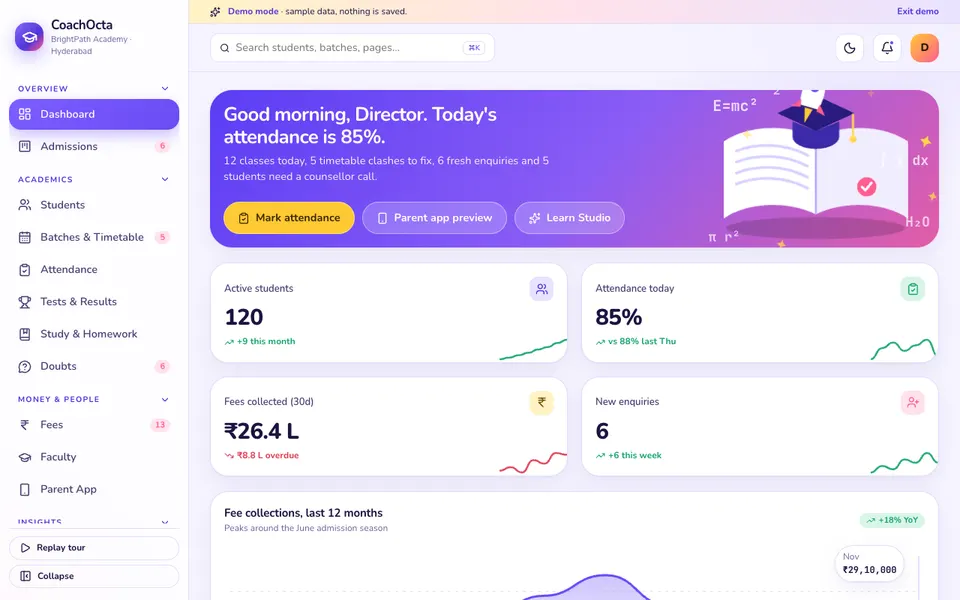
CoachOcta is built for an institute that runs batches. Its modules include a drag-and-drop admissions board with a scholarship test, an enrol flow with a fee plan, a batch timetable with conflict detection, a tap-to-toggle attendance register, tests with a rank list and topic radar, a fee ledger with instalments and receipts, faculty workload, and a phone preview of a parent app. It solves the leak between enquiry and fee: one student record follows the learner from first call to last instalment. Read the deep dive on coaching institute management software from admissions to fees, or open the CoachOcta live demo. If you are a single tutor, tuition management software for tutors is the lighter-weight guide.
K-12 schools: one timetable, many parents
SchoolOcta, for K-12 schools
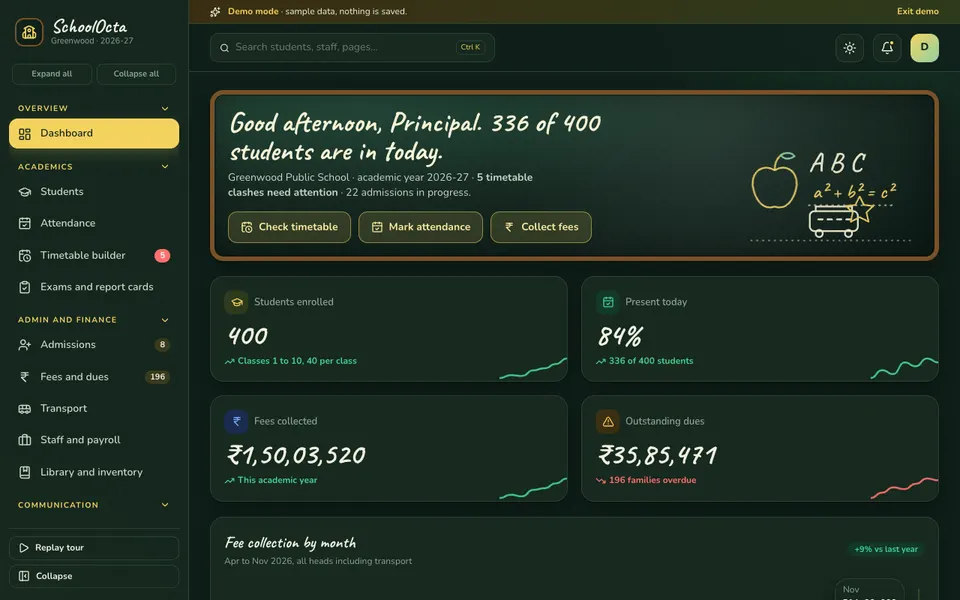
SchoolOcta centres on a timetable builder where subjects are dragged into the week grid and teacher and room clashes across all ten sample classes are flagged live, with views by class, teacher or room. Around it sit admissions that create the student record, a fees page with a defaulters list in overdue buckets, exams and report cards, transport routes with a moving bus position, notices and a parent app preview. It solves the clash: two classes sharing one teacher or one room. The deep dive is school management software, timetable clash check and fees, and the demo is the SchoolOcta live demo.
Colleges: exams, seating and placements
CampusOcta, for colleges and institutes
CampusOcta is built around a sample college of 1,800 students and six sign-in roles. Its signature screen is the exam seating planner: pick an exam date and session, let the planner seat students with branch mixing, drag a student to another seat, and let a clash check refuse a bad move. Result analytics, a shortage list with condonation approvals that feeds hall tickets, a placement drive board with CGPA and backlog eligibility checks, fees with receipts and NAAC and NBA style reports complete it. The condonation rule is a sample rule, and any real report format should be checked against the current requirements of the relevant body. The deep dive is college management software for exam seating, results and placements, and the demo is the CampusOcta live demo.
Driving schools: the roster is the product
DriveOcta, for driving schools
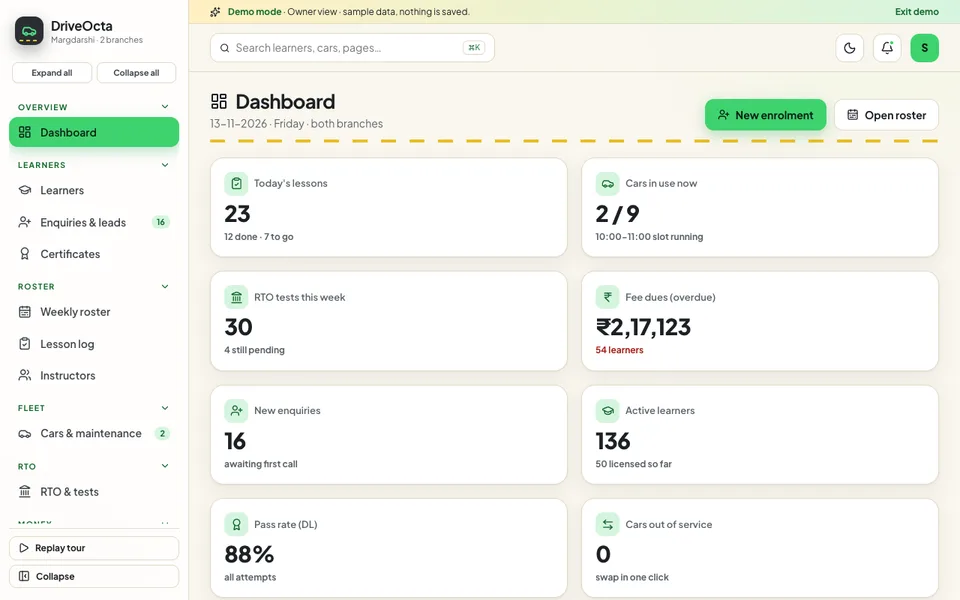
DriveOcta replaces the classroom with a car. It has a weekly roster where a lesson can be dragged to another slot, instructor or car with clashes checked, a one-click car swap when a vehicle goes to service, a lesson log with a skill checklist, learner stages, instructor leave and incentives, a cars and maintenance page, and an RTO and tests tracker with upcoming, results and application tabs. Application numbers are fictional. It solves the scramble when a car is unavailable: the lessons that depend on it move together. The deep dive is driving school software for lesson rosters and test tracking, and the demo is the DriveOcta live demo.
How do the four demos compare?
The table lists only what each demo's own pages show. A blank cell means that demo does not cover the job, which tells you where a custom build might fill a gap.
| Demo | Fees | Timetable or roster | Attendance | Parent or learner view | Results or progress |
|---|---|---|---|---|---|
| CoachOcta | Ledger, instalments, receipts, reminders | Batch week grid with conflict detection | Tap-to-toggle register | Parent app preview | Rank list, percentile, topic radar |
| SchoolOcta | Payments, receipts, defaulters list | Class, teacher and room views with live clash flags | Daily register | Parent app preview, notices | Marks, grades, report cards |
| CampusOcta | Collection and dues list | Course timetable with a clash check | Register, shortage list, condonation approvals | Marks, result analytics, placements | |
| DriveOcta | Instalments and receipts | Weekly roster with clash checks, car swap | Learner role view | Lesson log, test-ready progress, RTO tests |
The Studio pages in each demo are simulated. They run on scripted rules and sample data, so treat them as a picture of a possible feature, not a working model.
How can you try the demos in 15 minutes?
These demos use sample data, nothing you do is saved, the data resets when you refresh the page, and anything called AI is scripted and simulated. Use the same routine on each so the comparison is fair.
- Open the demo from the demo apps page and press Try Demo Account on the login screen.
- Read the dashboard for two minutes and ask whether it answers the question you ask every Monday.
- Walk one student or learner through the whole path: an enquiry to enrolment, a fee plan, and a first attendance or lesson entry.
- Break the rule it is built around: book a teacher twice, move a student to a clashing seat, send a car for service, or look at who is overdue.
- Switch to the parent or learner view if the demo has one, and judge it as a parent would, on a phone-sized screen.
- Write down what you would change and what is missing. That list is the start of a brief.
Mistakes to avoid when buying education software
- Choosing for the owner and ignoring the front desk and teachers. If marking attendance is slow, it will not be done.
- Importing messy student records. Duplicate names, missing guardian numbers and mixed date formats carry straight into the new system. Clean them first.
- Treating the timetable as a one-time task. It changes every week with leave and substitutions, so the tool must make changes easy.
- Underestimating the first week of the year. Admissions, promotions and fee collection arrive together. Ask how the tool behaves under that load.
- Believing a predicted risk is a verdict. A flag on a student should prompt a caring conversation with the family, nothing more.
- Skipping the parent view. A fee reminder that parents cannot read, in a language they do not use, will not be acted on.
What should you ask a builder before you start?
Education software holds the records of minors and of families, which raises the stakes on the questions below. Ask them in writing and keep the answers.
About access and data
- Which roles exist (owner, front desk, teacher, parent, learner), and exactly what can each one see and change?
- Who can view a child's record, and is every view or edit logged?
- Where is the data stored, who owns it, and can we export it in a standard format if we leave?
- What do we need to check under the rules that apply to us for children's information? Do not rely on the builder's assurance alone: check the current rules.
About daily use
- Can a teacher mark attendance or enter marks on a phone in under a minute?
- Does the parent view work without installing anything, and in the languages families actually read?
- Which messages are real in the first release and which are only previews? Be clear about what will really be sent.
- How are corrections handled after a fee receipt or a result has been issued?
About the first release and the year after
- What is in scope for release one, and what is listed for later?
- How will our existing registers and spreadsheets be imported?
- How does the academic year rollover work, including promotions and fresh batches?
- Hosting and domain are billed separately: what will they cost, and who manages them?
- Who do we call when something breaks during admissions week?
A builder who answers these plainly is ready to be priced. If you want the founder's view of scoping, how to build an MVP without wasting your budget is a useful companion read.
Getting a version built around your own institute
If one of these demos looks close to how you run, use it as a starting point for a conversation. They are demos, not products for sale, and the value is that you can point at a screen and say what you would change. Tell us your fee structure, your grading or roster rules and the people who will use the system. We will reply with a scoped, fixed-price proposal. Start on the contact page, browse every demo app, or see our production tools on the Zenocta apps page. For the wider reasoning behind building around your rules, read why every MSME should invest in custom software.
Try it live
Open the real thing: demos run in a new tab with sample data, apps link to their own page.
 Live demoCoachOcta live demoDrag enquiries through admissions, enrol a student with a fee plan, check timetable clashes, mark attendance and open the simulated Learn Studio.
 Live demoSchoolOcta live demoDrag subjects into a school-wide timetable and watch clashes light up, collect fees, track a bus and open the simulated Class Studio.
 Live demoCampusOcta live demoPlan an exam seating chart, drag students between benches, open result analytics and move a placement drive across stages.
- ABrowse allAll demo appsBrowse every interactive demo, each with a sample company and nothing saved.
- ZBrowse allZenocta appsProduction apps live on Google Play.
- TBrowse allTalk about a custom buildDescribe your fees, roster or timetable rules and get a scoped, fixed-price proposal.
Frequently asked questions
01What should school or coaching software handle first?
Start with the jobs that lose money or trust if wrong: the fee plan with instalments and receipts, and the timetable with clash warnings. Attendance, results and the parent view follow, because they depend on a clean student record.
02Is a spreadsheet enough for a small coaching institute?
It can be, with one branch, a few batches and one person keeping records. It stops working when two people edit fees, when you need reminders, or when teachers and rooms start to clash with no warning.
03Why does a college need a seating planner?
Exam seating is a constraint problem: students, benches, branches and invigilators must fit together without clashes. A planner shows conflicts as you drag, so you avoid printing a chart with a double-booked seat. The demo's seating is a sample, not a rule for any exam board.
04Can a driving school use school software?
Not well. A driving school schedules lessons around cars and instructors, tracks skills and official test dates, and handles vehicle maintenance. That is why a roster with a car swap and a lesson log fits better than a classroom timetable.
05Are these demos real products?
No. They are interactive demos with a sample institution. Nothing is saved, data resets on refresh, and every tool called AI is scripted and simulated. Use them to react to a realistic screen, then ask for a custom build with a scoped, fixed-price proposal.