In this guide
Three weeks before the semester exams, the exam cell is still moving names between hall lists in a spreadsheet, the attendance register is in a different file from the fee dues, and nobody can say quickly which students should not get a hall ticket. Most colleges do not suffer from a lack of data. They suffer from data that lives in six places and only meets at the worst moment. This guide explains what college management software has to do, with a close look at exam seating, results and placements.
Where does college administration break down today?
Walk through a normal semester and you can see the same pattern repeat in every department. Each office keeps its own list, and each list is correct only on the day it was made.
- Timetables are built in a spreadsheet or on a notice board. A faculty member scheduled in two rooms in the same period is discovered by the students, not by the sheet.
- Attendance is taken in class registers, totalled by hand near the end of term and then argued over when a student falls short.
- Exam seating is prepared by a few staff over several evenings. One late change to a hall means redoing the neighbours.
- Marks arrive from faculty in different formats and are re-keyed into one result sheet, which is where most result errors begin.
- Placements are tracked in a coordinator's own file, so eligibility is checked from memory.
- Fees sit with the accounts office, who cannot easily tell the exam cell which students still owe money.
A hall ticket decision needs attendance, fees and exam registration at the same time. A placement decision needs marks, backlogs and the company's criteria at the same time. When a person joins that data with a phone and a pen, mistakes become routine.
What does a college management system actually have to cover?
A useful system is a set of connected modules where a change in one place shows up in the others. The core set for a degree, diploma or professional college looks like this.
Academics: courses, timetable and faculty
Courses are the spine. Every course belongs to a department and a semester, and every course has a faculty member. A timetable built on top of that structure can run a clash check: the same faculty member, room or student group cannot appear twice in one period. Faculty workload follows naturally, because the system already knows who teaches what.
Attendance and condonation
Attendance should be recorded once, in class, and totalled automatically. The harder part is the shortage list: students below the institution's threshold, and the process for letting a student appear anyway when there is a valid reason. That process is usually called condonation. Thresholds and fees differ between universities, so a good system keeps the rule configurable and records each approval, who gave it and why.
Exams, hall tickets, marks and results
Exam registration, hall tickets, marks entry, grading and revaluation requests form one chain. Hall ticket eligibility should read from attendance and fee status instead of being re-checked by hand. Marks should be entered once, by the evaluator, and flow into results without retyping.
Students, admissions and fees
A single student view that joins attendance, marks, backlogs, fees and placement status saves time in counselling meetings. Fee collection with receipts and dues lists belongs in the same system. For the tax treatment of fees or receipts, check the current rules with your accountant.
How does exam seating work, and why is it so hard by hand?
Seating looks like a simple list until you add the rules. In most colleges the aim is to stop neighbouring students from copying, so the plan follows rules such as these.
- Neighbouring benches (left, right, front or back) should not be writing the same paper.
- Where possible, neighbours should come from different departments, which is often called branch mixing.
- Each hall has a fixed capacity and layout, and halls must not be overfilled.
- Every hall needs an invigilator, and an invigilator should not be someone who teaches a paper being written in that session.
- Students barred from the exam (because of a hall ticket decision) must not be seated.
Here is a made-up example, with invented numbers, to show how the arithmetic works. A session has three papers with 62, 58 and 60 students, so 180 students in total. Each hall has 12 rows of 8 benches, which is 96 seats. Two halls give 192 seats, so 180 students fit with 12 spare benches. Those 12 spare benches are what lets you move a student next to a different paper when a clash appears.
Tip
Always plan for a little spare capacity in every hall. A plan with zero free benches cannot absorb a late hall ticket approval, a wheelchair-accessible seat or a swapped invigilator without redoing the whole chart.
A planner that does this properly allots seats automatically, shows the clashes it found, lets staff move a student by drag and drop, and refuses a move that would create a new clash. It also prints the final chart for the notice board. By hand that takes days. In software it takes minutes, and the time saved goes into checking exceptions.
What should result analytics tell the principal?
A result sheet tells you what each student scored. Analytics tell you what the college should do next. A few measures are worth building into every term.
| Measure | What it shows | What you do with it |
|---|---|---|
| Pass percentage by department and subject | Where results are weak | Plan bridge classes or review the paper pattern |
| Toughest subjects | Subjects with the lowest pass rate | Assign extra tutorial time next term |
| Toppers and backlog lists | Both ends of the batch | Recognise toppers, support students with backlogs |
| SGPA and CGPA | Weighted performance by credits | Feed placement eligibility and scholarship lists |
Two worked examples, again with invented numbers. If 150 students appeared for a subject and 126 passed, the pass percentage is 126 divided by 150, which is 84%. For a semester grade point average on a 10-point scale (your university's scale and credit rules may differ), multiply each subject's credits by the grade point and divide the total by the total credits. With four subjects of 4, 3, 3 and 2 credits and grade points 8, 9, 7 and 10, the total is 32 plus 27 plus 21 plus 20, which is 100, and the total credits are 12. The grade point average is 100 divided by 12, about 8.33.
The most valuable analytics link back to action. If a department's backlog list can be highlighted in the seating planner, the exam cell can place those students carefully instead of discovering them on the day.
How do placements fit into the same system?
A placement drive is a pipeline: a company announces it, eligible students apply, rounds are held, offers are made. The slow part is eligibility. Companies usually set a minimum CGPA and a limit on active backlogs, and someone filters the batch for every drive. If the system already holds each student's CGPA and backlogs, eligibility becomes a filter instead of a weekend project, and the placement percentage comes from real records.
How do you roll out college software without disrupting the semester?
- Start between terms. Never switch systems in the middle of exams. Choose the break after results are published.
- Load the structure first. Departments, programmes, semesters, courses, faculty and halls. Everything else hangs off them.
- Import students and fees as of a cut-off date. Agree one date and one source of truth, then freeze the old files.
- Go live with attendance and timetable. These produce daily data that proves the system works.
- Add exams and seating before the next exam cycle. Run one mock session with real hall sizes and let the exam cell try to break it.
- Bring in marks and results. Run old and new side by side for one cycle and compare the totals.
- Finish with placements and reports. By now the data underneath is clean enough to trust.
What to ask any vendor, and the mistakes to avoid
Questions to put to every vendor
- Can the seating rules (same-paper neighbours, branch mixing, hall capacity) be changed without a developer?
- Do hall tickets read attendance and fee status automatically, with an approval record for every exception?
- Can the grading scale and credit rules match our university's, not a fixed default?
- Who can see and edit marks, and is every change logged?
- Can we export all our data in a standard format if we ever leave?
- Does it work on a phone for faculty marking attendance in the corridor?
Common mistakes
- Digitising the mess. Importing five inconsistent spreadsheets uncleaned gives you the same errors in a nicer interface.
- Hard-coding institution rules. Condonation bands, grade scales and eligibility cutoffs change, so they must stay configurable.
- Training only the office. Faculty enter attendance and marks. If they find it slow, the data stops being reliable.
- Skipping the parallel run. Results are high-stakes, so compare old and new once before you trust the new.
Spreadsheet, paper or purpose-built software?
| Approach | Works when | Breaks when |
|---|---|---|
| Paper registers and notice boards | A small institute with a few classes | Totals, shortages and hall lists must be rebuilt by hand every term |
| Spreadsheets | One person owns each sheet and the batch is small | Several offices need the same data, or a seating plan has to change late |
| Purpose-built college software | Attendance, fees, exams and placements must agree with each other | It is bought without cleaning data or training faculty first |
For a small coaching institute a spreadsheet may still be enough. The case for software grows once students, halls and rules outnumber what one person can hold in their head. For a related view from a smaller scale, see our guide to tuition management software for tutors and our notes on attendance management software.
What the CampusOcta demo shows
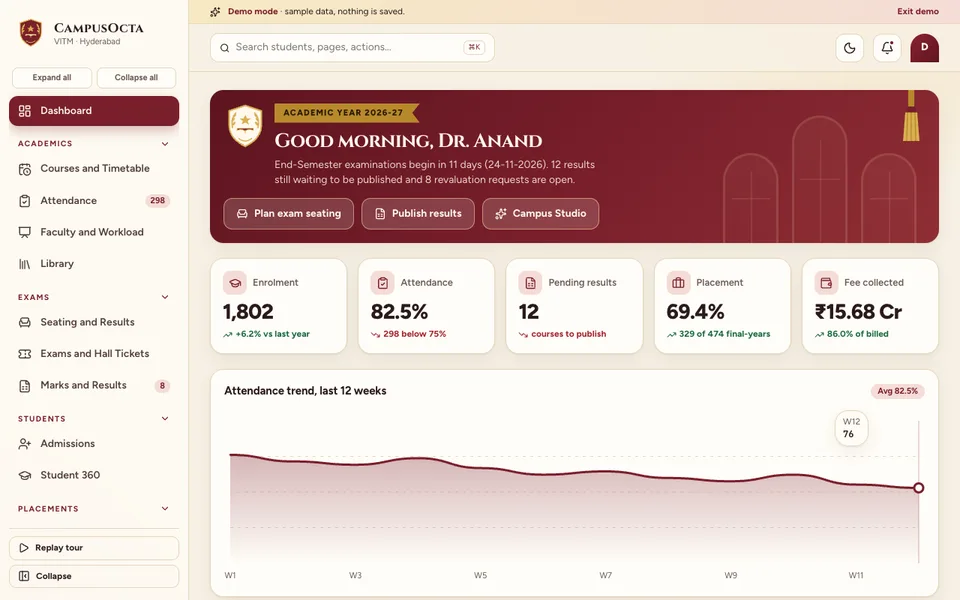
CampusOcta is an interactive demo built for degree, diploma and professional colleges. It uses a sample college, every number in it is made up, nothing you do is saved, and everything resets when you refresh the page. The seven tools in Campus Studio that look like AI are simulated and scripted, not real models. The demo exists to show what a joined-up college system can look like, so you can react to it.
The modules, as the demo lists them:
- Dashboard: enrolment, attendance, pending results, placement percentage and fees collected at a glance.
- Courses and Timetable: course and timetable management with a clash check.
- Attendance: a class register, a shortage list and condonation approvals, which feed hall tickets. The condonation rule in the demo is a sample rule, not a statement of what any university requires.
- Faculty and Workload, and Library: who teaches what, plus library records.
- Seating and Results: the signature screen. The planner takes an exam date and session, seats students automatically with branch mixing, lets you drag a student to another seat, protects you with a clash check, assigns invigilators and prints a chart. The analytics view shows pass percentage, a grade histogram, toughest subjects, toppers, backlogs and an SGPA and CGPA calculator, linked back to the planner.
- Exams and Hall Tickets, and Marks and Results: the exam chain, with revaluation requests.
- Admissions and Student 360: the intake pipeline and one view per student.
- Placements: a drive board you drag from Announced to Offers, with CGPA and backlog eligibility checks and offer letters.
- Fees: fee collection with GST receipts and a dues list.
- Reports (NAAC and NBA style) and Settings: reports laid out in the style such reviews use. Check the current requirements of the relevant body before relying on any format.
- Campus Studio: seven simulated AI tools: an at-risk predictor, a seating optimiser, a result narrator, a placement matcher, a timetable generator, a paper blueprint and a Hindi, English and Telugu student chatbot. All are scripted.
How to try it
Open the demo and choose Try Demo Account on the login screen. Start in Seating and Results, move a student to a seat that would create a clash, and watch the planner refuse the move. Then open Result analytics and follow a department back to the planner. You can also browse every other sample on the demo apps page.
How do you get a college system like this built?
A demo is a conversation starter, not a product. Every college has its own university rules, grade scales, hall layouts and approval chains, and those details decide whether people adopt the system. The useful first step is a short conversation about your halls, departments and the two or three processes that hurt most. From that we can write a scoped, fixed-price proposal. Our software development process explains how we work, and you can talk to us about a custom build whenever you are ready. Zenocta also publishes production apps, which you can see on the apps page.
Try it live
Open the real thing: demos run in a new tab with sample data, apps link to their own page.
 Live demoCampusOcta live demoPlan an exam seating chart, drag students between benches, open result analytics and move a placement drive across stages.
- ABrowse allAll demo appsBrowse every interactive industry demo with sample data.
- ZBrowse allZenocta appsProduction apps live on Google Play.
- TBrowse allTalk about a custom buildDescribe your college's processes and get a scoped, fixed-price proposal.
Frequently asked questions
01What is college management software?
It is a connected set of modules for running a college: courses and timetables, attendance, exams and hall tickets, marks and results, admissions, fees, placements and reports. The value is that each module reads from the others instead of keeping separate lists.
02How does an exam seating planner avoid copying?
It applies seating rules automatically: neighbouring benches should not be writing the same paper, students from different departments are mixed where possible, and halls are not overfilled. When staff move a student, a clash check warns before the change is saved.
03Can attendance decide who gets a hall ticket?
It can feed the decision. Attendance and fee status can be read automatically, and exceptions such as condonation can be approved and recorded with a reason. The thresholds belong to your institution and university, so check the current rules and keep them configurable.
04Is the CampusOcta demo a real product with real students?
No. It is an interactive demo with a made-up sample college. Nothing is saved, data resets on refresh, and the AI tools in Campus Studio are simulated and scripted. It exists to show what a custom college system could look like.
05How do I get a college system built for my institute?
Start with a short conversation about your halls, departments, grading scale and the processes that cause the most delay. From that, Zenocta prepares a scoped, fixed-price proposal for a custom build. Use the contact page to begin.