In this guide
On the first Monday of term, two classes arrive for science and find the same teacher scheduled in both, while the fee counter has a queue and the bus for one route is already twenty minutes late. School management software is mostly an answer to three recurring pressures: the timetable, the fee counter and the parents' questions. This guide starts with the timetable, because it is the one most schools solve with a spreadsheet and a lot of patience.
Why is a school timetable so hard to get right?
A timetable looks like a grid, but it is really a set of constraints. Each period needs a class, a subject, a teacher and a room. The same teacher cannot be in two classes at once, the science lab cannot hold two practicals at the same time, and the subject mix has to be balanced across the week.
Count the size of the problem with a made-up school: 10 classes, 6 days a week and 7 periods a day. That is 10 times 6 times 7, or 420 class periods to place. Each one needs a teacher and a room, so there are 840 assignments that must not collide with each other. Done by hand, a change to one period often breaks another somewhere else in the school, and the error is found when the bell rings.
- Single-class thinking. The coordinator fixes Class 7 and does not notice that the same teacher is now double-booked in Class 9.
- Shared rooms and labs. Labs, computer rooms and the playground are used by many classes and are rarely tracked properly.
- Last-minute changes. A teacher is on leave and the substitute plan is a phone call.
How does a timetable clash check work?
A clash check scans the whole school's timetable, not just one class, and flags any teacher or room that is booked twice in the same period.
Teacher clashes and room clashes
These are the two basic types. For a teacher clash, the software lists who is double-booked and in which classes. For a room clash, it names the room and the classes that share it. A short list you can click is far more useful than a coloured grid you must inspect cell by cell.
Three ways to look at the same week
The same data should be viewable by class, by teacher and by room. The class view is for the students' notice board. The teacher view tells a teacher where they need to be. The room view is the one the lab in-charge needs.
Fixing, not just finding
A good tool suggests a free teacher or a free room for the clashing period and lets the coordinator accept the change in one click. It also re-runs the check after every move, so a fix never creates a new clash silently.
Tip
Build the timetable from the scarce resources outward. Place labs, the computer room and shared teachers first, then fill the rest of the grid around them. Starting with the easy periods leaves the hard ones impossible.
Fee collection: structure, terms, late fees and defaulters
Fees are the second pressure. A school's fee structure is usually annual, split into terms, with some items that apply to every student and some that do not, such as transport. Here is a made-up example.
| Item | Per term (₹) | Three terms (₹) |
|---|---|---|
| Tuition | 10,000 | 30,000 |
| Transport (bus riders only) | 2,000 | 6,000 |
| Student who rides the bus | 12,000 | 36,000 |
| Student who does not | 10,000 | 30,000 |
The rule that transport is charged only to riders is exactly the kind of detail that is easy to forget on paper and easy for software to apply. Add a late fee policy, for example a fixed amount for each week after the due date, and a collection desk that can take UPI, cash or cheque and print a receipt on the spot. If the school charges a late fee of ₹50 a week, a family three weeks late owes ₹150 on top of the term fee. Set your own policy, and check the current rules that apply to your school before you charge anything beyond the fee structure.
Defaulters in buckets
Grouping overdue families by how late they are, for example up to 30 days, 31 to 60 and over 60, lets the office adjust its tone. A friendly reminder fits the first bucket. A call from the principal's office may fit the last. For a similar idea outside schools, see our guide to apartment maintenance software, which tackles recurring dues in the same way.
Admissions, attendance and exams in one student record
Admissions as a pipeline
An enquiry becomes an admission through steps: first call, school visit, documents, admitted. When admitting a child creates the student record directly, the office does not retype names, parent contacts or the class.
Attendance that feeds everything else
Each student is marked present, absent or late for the day. That record is the source for the parent's view, for the dropout-risk signals a school may want to watch, and for end-of-year reports. Our guide to attendance software explains the principles at a smaller scale.
Exams and report cards
Teachers enter marks per subject, and the software calculates percentages, grades and ranks. The grading scale itself is set by your board and school, so check the current rules rather than assuming a scale. A spread chart of grades across a class tells a principal whether a paper was too hard long before the parents do.
Transport and the parent app: what families actually ask
Parents ask the same four questions: has my child reached school, what do I owe, what did they score, and where is the bus. A parent app that answers those four reduces calls to the front office, which is a real saving in a school with hundreds of families.
Transport needs its own page. Each route has a bus, a driver, an attendant, stops and a roster of students. A live position on a map, plus a flag when a route is running late, is more reassuring than a phone call. Student records belong to children, so check the current rules on data protection for minors and decide who can see what.
A rollout plan that does not wait for the next term
- Load teachers, rooms and classes first. The clash check is only as good as these lists.
- Enter the current timetable and clear the clashes. You will usually find some you did not know about.
- Import students with parent contacts. Clean phone numbers matter for every later step.
- Set the fee structure and take the next collection in the system. Run the paper receipt book in parallel for one cycle.
- Start digital attendance in one class, then roll it out.
- Introduce the parent view last, once the data behind it is trusted.
Choosing or commissioning school software
Spreadsheet, paper or purpose-built
| Approach | Works for | Where it breaks |
|---|---|---|
| Paper registers and receipt books | A very small school | No overview, no defaulter list, slow to find a record |
| Spreadsheets | One careful administrator | Timetable clashes across classes are invisible, files get overwritten |
| Purpose-built school software | Many classes, teachers, buses and families | Needs clean data and staff training |
What to ask a vendor or your own developer
- Does the clash check cover teachers and rooms across all classes?
- Can I view the timetable by class, teacher and room?
- Can the fee structure vary by student, for example for transport?
- Are receipts, late fees and defaulter lists produced automatically?
- Who can see student data, and can parents see only their own child?
- Can I export everything?
- If something offers risk flags or comments, can a teacher edit and override it?
Mistakes to avoid
- Auto-generating a timetable and not reading it. A generated week still needs a human check for balance and fairness.
- Letting a risk score label a child. It is a prompt for a caring conversation.
- Launching the parent view before the data is clean. Wrong fee balances lose trust quickly.
What the SchoolOcta demo shows
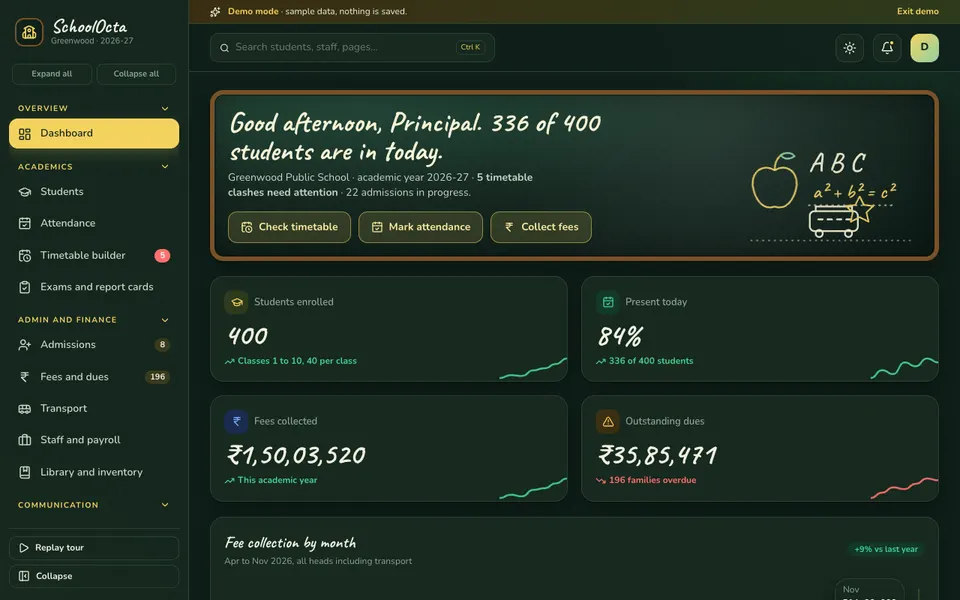
SchoolOcta is an interactive demo for a sample school called Greenwood Public School. It uses synthetic data, nothing is saved, data resets on refresh, and everything called AI is scripted and simulated.
- Dashboard. Students, attendance, fees collected and dues, updating as sample events arrive.
- Timetable builder. Drag subjects into the week grid. Teacher and room clashes across all ten classes are flagged live, with a clash report, a period palette and views by class, teacher or room.
- Students and Attendance. Student records and a daily register.
- Exams and report cards. Marks entry per class with grades, rank and a grade spread chart.
- Admissions. A drag-and-drop pipeline, where admitting an enquiry creates the student.
- Fees and dues. Payments by UPI, cash or cheque, receipts, a defaulters list with overdue buckets, and the fee structure for the year.
- Transport. Routes, stops, a moving bus position, rosters and a late flag.
- Staff and payroll, Library and inventory. The back-office pages.
- Parent app preview and Notices and broadcasts. What parents see on a phone, and how the school sends a notice.
- Reports and analytics, and Settings. The management view.
- Class Studio. Seven simulated tools: a timetable generator, dropout-risk predictor, report-card comment writer, fee nudge composer, question-paper builder, parent chatbot and route optimiser. They are deterministic demos, not live models.
How to try it
Open the SchoolOcta live demo and press Try Demo Account on the login screen. Go straight to the timetable builder, pick a teacher who is already teaching elsewhere and watch the clash appear. Then open fees and dues and look at the defaulters list. The demo apps page lists every other sample, and the apps page shows Zenocta's production apps.
Getting something like it built
No two schools share a fee structure, a bus network or a timetable pattern. Zenocta is a Hyderabad team of 11, whose most experienced members have 9+ years in the field, and we build custom business software for clients worldwide remotely. We start with your timetable, fee structure and parent communication, then send a scoped, fixed-price proposal for the modules you need. When you are ready, talk to us about a custom build.
Try it live
Open the real thing: demos run in a new tab with sample data, apps link to their own page.
 Live demoSchoolOcta live demoDrag subjects into a school-wide timetable and watch clashes light up, collect fees, track a bus and open the simulated Class Studio.
- ABrowse allAll demo appsBrowse every interactive demo, each with a sample company and nothing saved.
- ZBrowse allZenocta appsProduction apps live on Google Play.
- TBrowse allTalk about a custom buildTell us how your school runs today and get a scoped, fixed-price proposal.
Frequently asked questions
01What does school management software do?
It keeps one student record across admissions, attendance, timetable, exams and report cards, fees and dues, transport, staff and a parent view, so the office is not copying the same details into separate registers.
02How does a timetable clash check help a school?
It scans every class for a teacher or room booked twice in the same period, lists each clash, and re-runs after each change. That catches conflicts that appear when one class is edited without looking at the rest.
03How can a school handle fee defaulters fairly?
Group overdue families by days late, send a friendly reminder first and a firmer one only for older dues, record every payment with a receipt, and apply any late fee the school has formally set. Check the current rules before adding charges.
04Is SchoolOcta a real school product?
No. SchoolOcta is an interactive demo for a sample school with synthetic data. Nothing is saved, data resets on refresh, and its Class Studio tools are scripted and simulated. It shows what Zenocta can build.
05Can Zenocta build software for my school?
Yes. Zenocta builds custom business software. We start with your timetable, fee structure, transport and parent communication, then send a scoped, fixed-price proposal for the modules you need.