In this guide
A parent calls on Monday to ask why their child's fee reminder came twice, the faculty asks which batch has the free room at 5 pm, and the director wants to know how many enquiries from last week actually joined. In most coaching institutes each answer lives in a different notebook, spreadsheet or chat. Coaching institute management software is the single record that follows a student from the first enquiry to the last fee instalment.
Where does a coaching institute lose students and money?
Whether the institute prepares students for engineering and medical entrance exams, banking tests or school subjects, the leaks look alike.
- Enquiries that go cold. A phone number is written in a register, a counsellor promises a callback, and nobody checks whether it happened.
- Fee dues that depend on memory. Instalments are agreed verbally, and the accountant discovers a missed one at month end.
- Clashing batches. A faculty member is scheduled in two rooms, or a room is double-booked, and it is found out when students arrive.
- Attendance that parents hear about late. A student bunks for a week before anyone at home knows.
- Test results that stop at a marks list. The marks are entered, but nobody turns them into ranks, trends or weak topics a student can act on.
From enquiry to enrolment: the admissions funnel
Admissions is a funnel with a few clear steps, and software is useful because it shows you which step is leaking.
A pipeline for enquiries
Each enquiry is a card on a board: new, contacted, visited, test taken, joined, or lost. Moving a card forward is one drag. The counsellor sees who has not been contacted for three days, and the director sees how many cards sit in each column.
The scholarship or entrance test
Many institutes run an entrance or scholarship test, both as a marketing step and as a way to place a student in the right batch. If the result is stored against the enquiry, the counsellor can open a conversation with a real score, and the offered discount follows a rule instead of a negotiation.
Reading the funnel
Take a made-up month: 120 enquiries, 60 of whom sit the test and 30 of whom join. Half of the enquiries reached the test, half of those joined, and 30 out of 120 is a 25% joining rate. If the test-to-join step is weak, look at the offer and the follow-up call. If the enquiry-to-test step is weak, look at how fast the first callback happens and where the enquiries came from.
The enrolment step
When a student joins, one flow should create the student record, choose the batch, set the fee plan and take the first payment. If those are four separate jobs in four places, mistakes creep in.
Fee plans and instalments without arguments
Fees are where trust is won or lost. A clear fee plan states the total, the discount, the amount paid at admission and the date and amount of every later instalment. Here is a worked example with made-up numbers.
| Item | Amount (₹) |
|---|---|
| Course fee | 60,000 |
| Scholarship discount (10%) | minus 6,000 |
| Payable | 54,000 |
| Paid at admission | 14,000 |
| Balance in 4 instalments of 10,000 | 40,000 |
Check the arithmetic: 60,000 minus 6,000 is 54,000, minus 14,000 paid is 40,000, which is four instalments of 10,000. Software should keep that ledger, show the next due date, record each payment with a receipt, and prepare a reminder for any instalment past its date. Taxes on fees depend on your institute, so check the current rules before you set up receipts.
Tip
Write the instalment dates on the first receipt a parent takes home. A date the family saw at admission is much easier to enforce than a date mentioned later on the phone.
Batches, timetable and faculty without clashes
A batch is a group of students that study together on a fixed schedule: a subject, a faculty member, a room and a time. A weekly timetable is a grid of these. Conflicts come from two simple causes, one person or one room used twice at the same time.
Good software checks both as you add a class, and shows the clash immediately, before the notice goes out. Faculty management belongs next to it. Workload shows who is overloaded, substitution handles a teacher on leave, and payroll uses the classes actually taken. If you run payroll by hand, our guide on how to create payslips covers the basics, and the payroll and attendance guide goes further.
Attendance, tests and parents: keeping the loop closed
Attendance a teacher can mark in a minute
A register where each student is a tap-to-toggle row is faster than paper. If 36 of a batch of 40 are present, the day shows 90%. When absence triggers a message to the parent, the loop closes the same day. For small tutors, our article on tuition management software covers the same idea at a smaller scale. Check the current rules and get parental consent before you send bulk messages.
Tests that produce more than a marks list
Once marks are entered, software can calculate a rank list, a percentile and a spread of scores. One common percentile method counts the share of students who scored below you. If you rank 20th in a group of 200, 180 students scored lower, so 180 divided by 200 is 90%. Topic-wise results show a student which chapters pull the score down, which is what they need to act on.
Doubts and homework
Doubts raised in class or on WhatsApp are easy to lose. A board with columns for new, assigned and resolved gives each one an owner. Homework works the same way: assigned, submitted, checked.
The parent view
Parents want four things: is my child attending, how did the last test go, what is due, and what is the fee status. A parent view that shows those in one place reduces calls to the front desk.
Analytics ties these pieces together. A monthly view of fees collected against fees due, attendance by batch and average marks by subject gives the director a short list of questions to ask each week, instead of a pile of reports.
A rollout plan for the first month
- Load batches, faculty and rooms. This makes the timetable checks meaningful from day one.
- Import current students and their fee plans. Include what has been paid, so balances are right.
- Start the enquiry board. Put every new enquiry on it from today, and ignore old registers.
- Take attendance in the system. One batch first, then the rest.
- Enter the next test's marks. Review the rank list with faculty before sharing it.
- Turn on fee reminders. Start with a gentle template and review what parents say.
Choosing or commissioning the software
Paper, spreadsheet or purpose-built
| Approach | Works for | Where it breaks |
|---|---|---|
| Registers and notebooks | One tutor, a few dozen students | No overview, no reminders, results never analysed |
| Spreadsheets | One careful administrator, a few batches | No timetable clash check, easy to overwrite, nothing for parents |
| Purpose-built software | Several batches, faculty and hundreds of students | Needs clean data at the start and a habit of using it daily |
What to ask a vendor or your own developer
- Can I enrol a student and set the fee plan in one flow?
- Does the timetable warn about faculty and room clashes?
- Are instalments, receipts and reminders tracked per student?
- Can marks be entered once and produce ranks and topic-wise results?
- What do parents see, and can I control it?
- Can I export everything if I change systems?
- If it offers suggestions or predictions, can staff see the reason?
Mistakes to avoid
- Loading data half-clean. A wrong phone number means every reminder fails.
- Too many reminders. Parents who get three messages a day stop reading any of them.
- Treating predictions as facts. A dropout-risk flag is a reason to call a family, not to judge a child.
- Skipping faculty buy-in. If teachers dislike taking attendance in the system, it will not stick.
What the CoachOcta demo shows
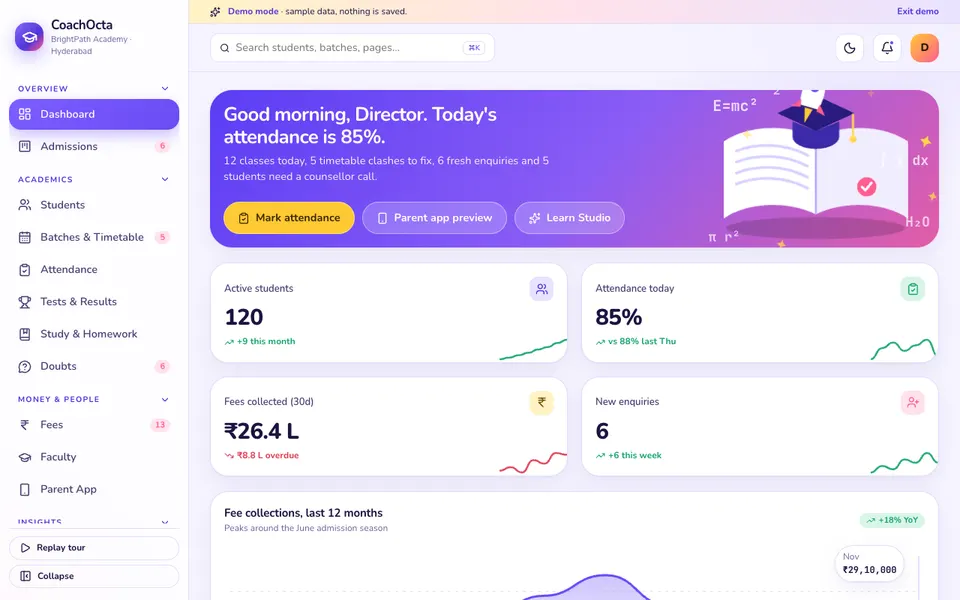
CoachOcta is an interactive demo for a sample coaching institute. It uses synthetic data, nothing is saved, data resets on refresh, and everything called AI in it is scripted and simulated.
- Dashboard. The institute at a glance.
- Admissions. A drag-and-drop enquiry pipeline with a scholarship test.
- Students. A profile drawer and an enrol flow with a fee plan and payment.
- Batches and Timetable. A week grid with conflict detection, and forms to add a class or a batch.
- Attendance. A tap-to-toggle register with an automatic parent WhatsApp message.
- Tests and Results. Create a test, enter marks, then see the rank list, percentile, histogram and topic radar.
- Study and Homework, and Doubts. A page for study and homework, plus a drag board for doubts.
- Fees. A ledger, instalments, collection, receipts and reminders.
- Faculty. Workload, payroll and substitution.
- Parent App. A phone preview of what parents see.
- Analytics, Growth and Settings. Four analytics tabs, plus a growth page and settings.
- Learn Studio. Seven scripted tools: dropout radar, test generator, weak-topic analyser, doubt solver, study planner, answer-sheet auto-grading and a parent update writer in English, Telugu and Hindi. They run on templates, and the doubt solver recognises only a handful of topics.
How to try it
Open the CoachOcta live demo and press Try Demo Account on the login screen. The demo has a guided tour that you can replay. Drag an enquiry across the admissions board, mark attendance for a batch, then open the fee ledger. The demo apps page lists every other sample, and the apps page shows Zenocta's production apps.
Getting something like it built
Every institute has its own batches, fee structures and parent expectations. Zenocta is a Hyderabad team of 11, whose most experienced members have 9+ years in the field, and we build custom software for clients worldwide remotely. We start by mapping your admissions, fee plans and timetable, then send a scoped, fixed-price proposal covering only the modules you need. When you are ready, talk to us about a custom build.
Try it live
Open the real thing: demos run in a new tab with sample data, apps link to their own page.
 Live demoCoachOcta live demoDrag enquiries through admissions, enrol a student with a fee plan, check timetable clashes, mark attendance and open the simulated Learn Studio.
- ABrowse allAll demo appsBrowse every interactive demo, each with a sample company and nothing saved.
- ZBrowse allZenocta appsProduction apps live on Google Play.
- TBrowse allTalk about a custom buildTell us how your institute runs today and get a scoped, fixed-price proposal.
Frequently asked questions
01What does coaching institute management software do?
It keeps one record for each student from enquiry to last fee instalment: admissions pipeline, enrolment, fee plans and receipts, batch timetable, attendance, tests and results, faculty workload and a parent view.
02How should a coaching institute track fee instalments?
Store a fee plan for each student with the total, discount, amount paid at admission and a date and amount for every instalment. Record each payment with a receipt, and prepare a reminder for any instalment past its date.
03How does a timetable clash check work?
When you add a class, the software checks whether the same faculty member or the same room is already booked for that time. If so, it flags the clash immediately so you can change the slot before students are told.
04Is CoachOcta a real product for institutes?
No. CoachOcta is an interactive demo with a sample institute and synthetic data. Nothing is saved, data resets on refresh, and its Learn Studio tools are scripted and simulated. It shows what Zenocta can build.
05Can Zenocta build software for my coaching institute?
Yes. Zenocta builds custom business software. We map your admissions, fee plans, batches and parent communication, then send a scoped, fixed-price proposal for the modules you need.