In this guide
At seven in the morning an instructor phones to say the car will not start, three learners are already on their way, and the only other car is a manual while one of the learners booked an automatic. The owner reshuffles the day on paper, forgets one lesson, and a learner waits at the gate. Driving school software is largely about this daily puzzle, a roster of learners, instructors and cars that keeps changing, plus the longer story of getting each learner to a licence test.
Why does a driving school roster fall apart?
A driving school has three scarce resources at every slot: an instructor, a car and a learner. All three must be free at the same time, and the car must suit the learner. Paper rosters and WhatsApp groups work until a car goes into service or an instructor takes leave.
- Double-bookings. The same car or instructor appears in two lessons at 8 am because the change was made in one place and not the other.
- Wrong vehicle. A learner who trains on an automatic is given a manual, or a two-wheeler learner gets a car.
- Cars with no maintenance calendar. Insurance, pollution check, fitness and service dates sit in different diaries and one lapses.
- Test dates in people's heads. Nobody knows which learners are ready, which have a test booked this week, and which failed and need a retest.
- Fees paid in pieces. Instalments are collected in cash and noted in a book, so dues are discovered late.
What does a good roster have to check?
A roster is a grid of time slots against instructors, with each lesson tied to a learner and a car. Before any lesson is moved or added, the software should run a few simple checks.
| Check | What goes wrong without it |
|---|---|
| Instructor already has a lesson in that slot | Two learners wait for one person |
| Car already booked in that slot | Two lessons, one vehicle |
| Learner already has a lesson in that slot | A learner is booked twice, and one lesson is wasted |
| Transmission or vehicle type does not match | A learner turns up for an automatic and gets a manual |
| Holiday, leave or car in service | The slot looks free but cannot be used |
The car swap
The most useful single feature is a car swap. When a car goes into service, the software finds every affected lesson and moves each one to a free car of the same type, and it tells you which ones it could not move. Take a made-up case: a car is out for three days, 12 lessons are affected, 9 can move to a free car and 3 need manual cover because no matching car is free. You see 9 solved and 3 to phone about, instead of 12 to chase.
Tip
On a phone or tablet, dragging a lesson across a grid is fiddly. Look for a plain Move form as well: pick the new slot, instructor and car from lists, and let the checks run before you confirm.
From enrolment to test-ready: learners and the lesson log
A clear set of stages
A learner's journey is a sequence, and your records should show where each person is. One workable set of stages is: enrolled, learner's licence applied, learner's licence passed, practising, test-ready, driving test booked, licensed. Add a "dropped" stage for people who stop. Counting learners in each stage tells you whether the bottleneck is paperwork, practice or test slots. The process for licences and tests changes, so check the current rules rather than copying a fixed procedure into your software.
Documents and plans
Each learner profile should hold the documents you collect and a note of which are missing, together with the plan chosen. Many schools sell a fixed course, such as 21 or 30 lessons, plus a custom option. The plan decides the number of lessons and the fee.
A lesson log that measures progress
After each lesson, the instructor ticks a short skill checklist: clutch control, gear change, parking, hill start and road driving, with a note. Over many lessons, those ticks add up to a progress figure. A school can decide that a learner is test-ready at, say, 80% on its own checklist. This replaces "I think she is ready" with a record the owner can read, and it stops a weak learner being sent to a test too early. An instructor's incentive can also be tied to lessons completed, which is simple to compute when the log is reliable.
Cars, maintenance and utilisation
Every car has dates that must not lapse: insurance, pollution check, fitness and the next service. A fleet page that sorts by the nearest date turns these into a to-do list. The same page can track fuel entries and breakdowns, which feeds your cost per lesson. For more on this topic, see our guides to garage management software and fleet management software.
Utilisation is the share of available slots a car actually used. Suppose a car is offered in 8 slots a day for 6 days, which is 48 slots a week, and 36 are booked. Utilisation is 36 divided by 48, or 75%. A car at 40% may be surplus. A car at 95% leaves no room for service, which makes breakdowns more likely to disrupt the roster.
Fees, instalments and test tracking
A simple example with made-up numbers: a 30-lesson plan costs ₹9,000, which is ₹300 a lesson. The learner pays ₹3,000 at enrolment and the balance in two instalments of ₹3,000. The software should show the next due date and total dues, and let the desk send a reminder in the learner's language. Receipts for school fees may carry tax, so check the current rules before you set up invoicing.
Test tracking is a calendar of learner's licence and driving licence test slots, with results, retests and the fee for each. Keep a status for each: pending, passed or failed. A failed attempt should create a retest entry and a note, not disappear. Keep a record of application numbers and the test centre. Rules on eligibility, fees and booking are set by the authorities and change, so always check the current rules and use the official channel for the actual application.
Many no-shows are preventable with reminders the evening before. Our article on reducing no-shows with a booking app explains reminders that apply just as well to driving lessons.
A rollout plan for one branch first
- List cars with type, registration and the four key dates.
- List instructors with their assigned car and working days.
- Import current learners with stage, plan and balance due.
- Move next week's roster into the software and let the checks find problems.
- Start the lesson log with the instructors who are keenest, then expand.
- Add test tracking and fee reminders once the roster is stable.
Choosing or commissioning driving school software
Paper, spreadsheet or purpose-built
| Approach | Works for | Where it breaks |
|---|---|---|
| Paper roster and registers | One instructor, a handful of learners | Every change must be rewritten, no clash checks, dues forgotten |
| Spreadsheet | A small school with a careful owner | Car and instructor clashes are invisible, no car swap, no progress record |
| Purpose-built software | Several cars, instructors and branches | Needs clean master data and instructors who log lessons |
What to ask a vendor or your own developer
- Does the roster check instructor, car and learner clashes before a move?
- Does it match the vehicle type to the learner?
- Can I send a car into service and move its lessons in one step?
- Does the lesson log track skills and a progress figure?
- Can I see test dates, results and retests per learner?
- Can instructors, front desk and learners each see only what they should?
- Can I export everything?
Mistakes to avoid
- Treating a predictor as a decision. A readiness or no-show score is a hint. The instructor and owner decide.
- Ignoring touch screens. Instructors will mostly use phones, so the Move form matters as much as the grid.
- Not logging breakdowns. Without them you cannot tell which car is costing you.
What the DriveOcta demo shows
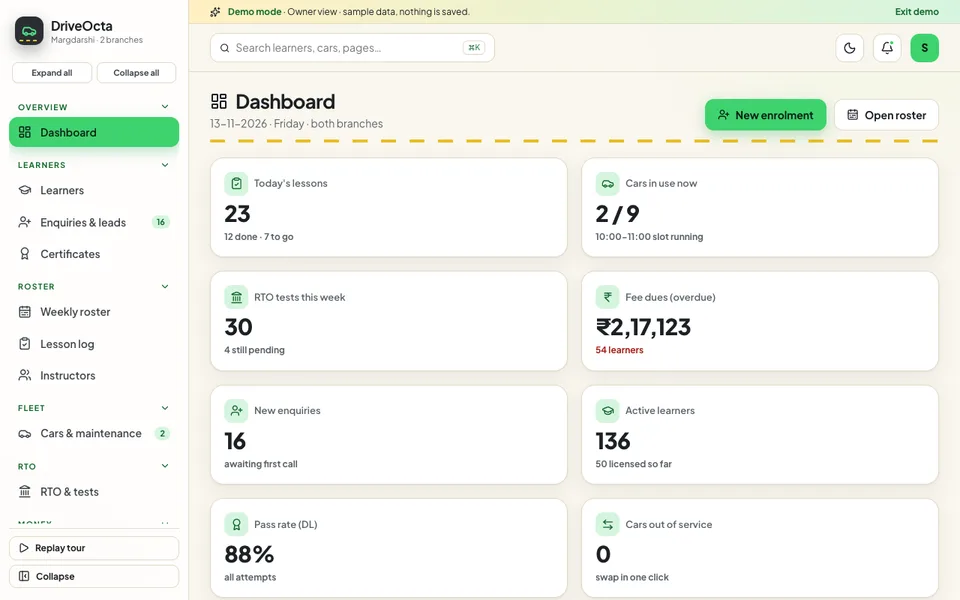
DriveOcta is an interactive demo for a sample driving school in Hyderabad with two branches. It uses synthetic data, nothing is saved, data resets on refresh, and every tool described as AI is scripted and simulated.
- Dashboard. Today's lessons, cars in use, tests this week, fee dues and new enquiries.
- Learners and Enquiries. About 220 sample learners across stages, with profiles showing documents, learner's licence status and fees, plus a leads page.
- Weekly roster. Drag a lesson to another slot, instructor or car, with clashes checked, and a Move form for touch screens. The one-click car swap sits here.
- Lesson log. A skill checklist and notes for each lesson, with progress to test-ready updating.
- Instructors. Roster, leave requests and per-lesson incentives.
- Cars and maintenance. Vehicles, fuel entries, utilisation over 30 days and breakdown logging.
- RTO and tests. Upcoming, results and applications tabs for learner and driving licence tests, with retests and fees. Application numbers are fictional.
- Fees and billing, Certificates, Reports, Team and Settings. Instalments and receipts, certificates and management views.
- Lesson Studio. Seven simulated tools: test-readiness predictor, roster optimiser, swap and maintenance planner, skill gap coach, fee reminder writer, no-show risk predictor and enquiry reply assistant.
How to try it
Open the DriveOcta live demo and press Try Demo Account on the login screen. The fixed sample date is 13 November 2026. Go to the roster, open the car swap and send a car to service to see lessons move, then switch the role from the account menu to see the learner view. The demo apps page lists every other sample, and the apps page shows Zenocta's production apps.
Getting something like it built
Every driving school has a different mix of cars, branches, plans and instructors. Zenocta is a Hyderabad team of 11, whose most experienced members have 9+ years in the field, and we build custom software for clients worldwide remotely. We begin with your roster, fleet and fee plans, then send a scoped, fixed-price proposal for the modules you need. When you are ready, talk to us about a custom build.
Try it live
Open the real thing: demos run in a new tab with sample data, apps link to their own page.
 Live demoDriveOcta live demoDrag lessons around a weekly roster with clash checks, try the one-click car swap, open the lesson log and RTO test tracker, and view the simulated Lesson Studio.
- ABrowse allAll demo appsBrowse every interactive demo, each with a sample company and nothing saved.
- ZBrowse allZenocta appsProduction apps live on Google Play.
- TBrowse allTalk about a custom buildTell us how your roster and fleet work today and get a scoped, fixed-price proposal.
Frequently asked questions
01What does driving school software do?
It runs the weekly lesson roster with clash checks, keeps learner records from enrolment to licence, logs skills after each lesson, tracks cars and their key dates, collects fees in instalments and records test slots, results and retests.
02What is a car swap in a driving school roster?
When a car goes into service, a car swap finds every lesson that car was booked for and moves each to a free car of the same type, then lists any that need manual cover. It replaces rewriting the day by hand.
03How can I tell when a learner is ready for the driving test?
Log a short skill checklist after every lesson, such as clutch control, gear change, parking, hill start and road driving, and track progress against a threshold your school sets. The instructor still makes the final call.
04Is DriveOcta a real driving school product?
No. DriveOcta is an interactive demo for a sample driving school with synthetic data. Nothing is saved, data resets on refresh, and its Lesson Studio tools are scripted and simulated. It shows what Zenocta can build.
05Can Zenocta build software for my driving school?
Yes. Zenocta builds custom business software. We start with your roster, cars, plans and test tracking, then send a scoped, fixed-price proposal for the modules you need.